Smart Buying Guide: 3D Printer In Store (2026 Edition)
Learn how to buy a 3D printer in store with hands-on demos, test prints, and practical tips from Print Setup Pro. Compare models, verify filament support, and plan for setup and warranty in 2026.


Buying a 3D printer in store gives you hands-on testing of build quality, noise, and the user interface before you commit. According to Print Setup Pro, in-store options let you compare popular entry-level models side-by-side, assess service plans, and verify filament compatibility. In 2026, stores increasingly carry beginner-friendly machines alongside prosumer options, making an in-person visit worthwhile for most buyers.
In-Store Availability and What It Means for Your Purchase
For many buyers, the most valuable part of seeing a 3D printer in a store is the tactile experience: stiffness of the frame, quality of the build plate, and how smoothly the control panel responds during a demo. Print Setup Pro notes that in 2026, major retailers and local maker shops increasingly curate in-store stations where you can inspect the chassis, watch a live print, and even perform a quick calibration. This hands-on access helps you gauge noise levels, vibration, and user interface clarity before spending several hundred dollars. If you are a home office user or DIY enthusiast, an in-store visit reduces ambiguity by letting you feel the printer’s footprint, weight, and ease of setup. In-store staff can contrast beginner-friendly models with sturdier options, making it easier to align your choice with your expected workload and skill level.
What to Look For on Your In-Store Visit: Core Spec Clusters
When you walk up to a 3D printer in store, categorize features into core spec clusters. Look for:
- Build volume and enclosure size that fit your typical projects.
- Print technology (FDM vs. resin/SLA) and the corresponding material ecosystem.
- Ease of use: setup steps, touch-screen responsiveness, and built-in calibration routines.
- Filament compatibility: supported filament diameters, hotend temperature range, and run-out detection.
- Quiet operation and stability during print jobs.
Using a structured checklist helps ensure you don’t miss critical differences that could impact long-term satisfaction. Print Setup Pro recommends starting with the models you’re considering online, then validating them in person to anchor price and performance expectations against real-world impressions.
Testing Demos and Live Prints: What to Observe
Most in-store demos aim to show the printer’s reliability on a standard test print. Observe how quickly the machine boots, loads filament, and starts printing without errors. Listen for excessive fan noise or belt chatter, which may indicate a less robust chassis. Evaluate the display or companion app’s ability to pause a print, adjust settings, or resume after a pause. If a store offers live samples, request a print with tolerances close to your typical projects (e.g., small mechanical fits, fine filaments, or detailed models). Staff can often show you how the slicer settings translate to real-world results, which helps bridge the gap between spec sheets and everyday use.
Pricing, Warranty, and On-site Support: The Fine Print
In-store prices can be competitive with online options, and sales staff may bundle accessories or extended warranties. Ask about what the price includes: basic setup, calibration, or a starter filament pack. Clarify the return window and service options if the printer develops issues within the first few weeks. In some stores, you can access on-site setup support or a quick tutorial on bed leveling and filament loading. Print Setup Pro emphasizes verifying warranty terms and whether store credits are offered for returns, which matters if you are new to 3D printing.
In-Store Setup vs Online Buying: Pros and Cons
Buying in-store lets you verify physical build, test prints, and ask live questions, which is invaluable for first-time buyers. Online purchases often have broader model selection and lower upfront costs but lack the tactile validation. A practical approach is to:
- shortlist models online, 2) visit a store to compare in person, 3) check for local after-sales support and return policies, 4) purchase the model that best balances price, performance, and support. Print Setup Pro’s guidance emphasizes this blend of hands-on verification and post-purchase confidence.
Quick Start After Purchase: Immediate Next Steps
As soon as you walk out with a printer, begin with a clean workspace, level the bed, and install the latest firmware if needed. Run a basic calibration print to verify first-layer adhesion and dimensional accuracy. Prepare a starter filament and a simple test model to establish a baseline. Keep a log of your first three prints, noting layer lines, extrusion consistency, and any artifacts. This record helps you tune slicer profiles and identify if a shop-provided setup was sufficient or if further adjustment is required.
Maintenance, Filament, and Local Supply Chains
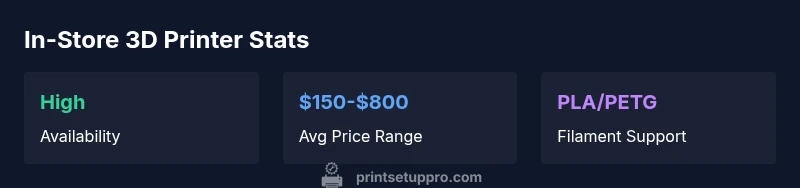
Long-term satisfaction hinges on steady filament supply and routine maintenance. In-store purchases often align with local suppliers for common filaments (PLA, PETG, ABS) and might offer starter packs that reduce upfront costs. Develop a simple maintenance routine: wipe the nozzle and bed after prints, check belt tension every few weeks, and keep firmware up to date. Print Setup Pro notes that keeping a small stock of recommended filaments on hand in a home office or studio reduces downtime and helps you iterate more quickly. For DIYers, understanding how to clean the nozzle and replace a worn nozzle or bed surface is essential for consistent results.
In-store printer types and typical price ranges along with strengths and trade-offs
| Printer Type | Typical Price | Pros | Cons |
|---|---|---|---|
| FDM Desktop | "200-400" | Affordable, easy to learn | Lower detail, slower for small features |
| FDM Mid-range | "400-800" | Better stability, larger builds | Higher cost, longer warm-up |
| SLA/Resin | "150-700" | High detail, smooth surfaces | Messy resin, ventilation concerns |
People Also Ask
Is it cheaper to buy a 3D printer in-store or online?
Prices are often similar, but in-store purchases let you validate features and get immediate assistance. Consider tax, return policies, and potential bundle offers when comparing total cost.
In-store purchases can be comparable in price to online options, and you’ll have immediate support and a hands-on test. Look at total cost, including tax and returns.
What should I test when evaluating a printer in person?
Test print a model close to your typical projects, check bed leveling ease, verify print bed adhesion, observe quietness, and assess the user interface responsiveness.
Try a sample print, check bed leveling, and test the controls to see if you’re comfortable with the setup.
Do stores offer on-site setup or warranty options?
Many stores provide basic setup and some form of warranty. Ask about extended plans, on-site support, and what the warranty covers.
Ask specifically about setup help and what the warranty includes.
How important is filament compatibility in-store?
Ensure the printer supports common filaments and has a straightforward profile library. This reduces surprises when you start printing with your preferred materials.
Make sure your usual filament types are supported and easy to load.
What if I need help after buying?
Check for local service options, store-provided tutorials, and access to online resources for troubleshooting and upgrades.
Look for local support and robust online guides after purchase.
“In-store interaction is the best way to validate a printer’s usability, noise, and reliability before committing to a purchase. Hands-on testing often reveals practical differences that specs alone can’t capture.”
Quick Summary
- Inspect in-store build quality before buying
- Compare models side-by-side rather than relying on specs alone
- Test print a model close to your use case
- Check warranty and on-site support options
- Plan for filament compatibility and future spares