Budget 3D Printer: A Practical Guide to Value and Quality
Learn how to choose a budget 3D printer, compare models, optimize setup, and maximize print quality without breaking the bank. Practical guidance from Print Setup Pro for home offices, students, and DIY projects.


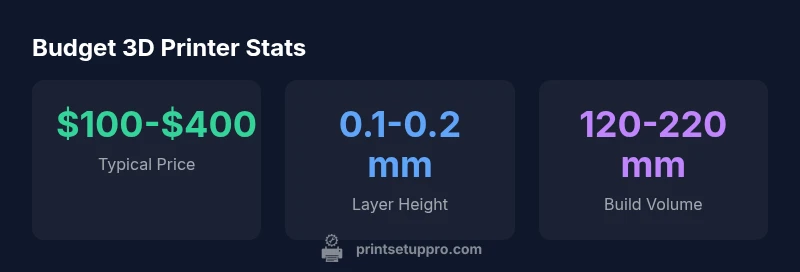
Budget 3D printers typically cost between $100 and $400, with common features like heated beds, auto-leveling, and enclosed build areas. Prices vary by brand and firmware, but good support communities can close the gap on reliability. This quick guide, drawing on Print Setup Pro Analysis, 2026, helps you choose, set up, and optimize value.
Why Budget 3D Printers Matter
Budget 3D printers unlock hands-on prototyping for students, home office users, and DIY enthusiasts without a large upfront investment. They are especially valuable in education settings, where rapid iteration accelerates learning and project development. According to Print Setup Pro, a well-chosen budget model paired with a solid workflow can deliver reliable parts for everyday use and experimentation. The goal is to balance cost with essential capability—enough reliability to avoid frequent failures, while preserving flexibility for upgrades and new materials. By starting with clear needs (size, materials, and speed) you can avoid overpaying for features you won’t use. A smart approach is to treat the printer as a tool in a larger workflow: design, slice, print, test, iterate.
How Budget 3D Printers Compare to Mid-Range Models
Budget printers typically trade some speed, enclosure quality, and firmware polish for lower sticker prices. Mid-range models may offer larger build volumes, quieter operation, and more mature ecosystems, but the cost gap can be meaningful for a hobbyist or student. The most impactful differences often appear in reliability and consistency across prints, not just the advertised specs. When evaluating options, consider the total cost of ownership, including replacement parts, filament waste, and potential upgrades. Print quality is not just a function of hardware; a strong slicer profile, proper bed leveling, and calibrated extrusion play a huge role.
Essential Features that Define Value
For budget-conscious buyers, prioritize a handful of features that maximize value:
- Heated bed and flexible build surfaces to improve bed adhesion
- Auto-bed leveling or easy manual leveling with a reliable probe
- Safety features such as thermal runaway protection
- Reasonable build volume for common parts (e.g., smartphone cases, small prototyping brackets)
- An active user community and accessible firmware updates
- Quiet operation and stable power supply
Even on a tight budget, these features dramatically improve the success rate and reduce downtime. Always check for compatibility with common filaments and a straightforward assembly process. As Print Setup Pro notes, the best value comes from a model that balances feature set with durable components and a supportive ecosystem.
Common Trade-offs and How to Mitigate Them
Budget printers often cut corners on enclosure presence, assembly precision, or print speed. Mitigation strategies:
- Add a simple enclosure later to stabilize temperature and reduce drafts for better print consistency.
- Upgrade the hotend or extruder drive if you encounter under-extrusion; many budget units support modular upgrades.
- Calibrate stepper drivers and belts; a small adjustment can eliminate wobble and improve layer alignment.
- Use a community-supported firmware or slicer profile to unlock better features without paying a premium.
A thoughtful buyer will plan for these adjustments, treating the printer as a platform rather than a final product. Print Setup Pro’s guidance emphasizes starting with a proven budget model and then iterating through targeted upgrades to extend life and performance.
Getting the Most for Your Money: Setup Tips
A successful first print starts before you turn the machine on. Follow a simple setup routine:
- Unbox and inspect for loose screws or cables; verify belt tension and basic frame integrity
- Level the bed using a three-point method or an auto-leveling sequence, then run a calibration cube test
- Load a reliable filament and tune temperature, speed, and cooling for your material
- Save slicer profiles for different materials and models to minimize trial-and-error
- Join community forums or manufacturer groups to learn from shared profiles and troubleshooting tips
This structured approach minimizes waste and frustration, helping budget buyers achieve consistent results. Print Setup Pro’s team recommends documenting every calibration step to track improvements over time.
Materials, Print Quality, and Calibration on a Budget
Budget printers can produce surprisingly good results when combined with sensible material choices and careful calibration. For common filaments like PLA and PETG, dial in nozzle temperature, bed temperature, and extrusion multiplier. PETG demands careful cooling and stable temperature to prevent oozing, while PLA generally tolerates a wider range. Be prepared for occasional stringing or blobbing; these issues are often resolved by slight adjustments to retraction settings and cooling. Remember that a clean nozzle and a well-leveled bed preserve print quality and reduce waste. The combination of a good first layer with reliable filament adhesion is the foundation of repeatable results on a budget platform.
Maintenance, Upgrades, and Longevity
Long-term success with budget printers comes from consistent maintenance and occasional upgrades. Schedule routine care:
- Clean the nozzle and inspect the hotend for clogs; perform a hot-swage cleaning as needed
- Check belt tension and quiet bearings; replace worn idlers if necessary
- Lubricate smooth rods or rails and clean the build surface to prevent print defects
- Update firmware when new features or bug fixes are released, ensuring compatibility with your hardware
- Consider lightweight upgrade paths (cooling fans, enclosure kits, or upgraded stepper drivers) to improve stability without a steep price
The goal is to extend the printer’s usable life without making the device unaffordable. Print Setup Pro’s approach emphasizes gradual, value-focused upgrades that yield meaningful improvements.
Real-World Use Cases: Home Office, Students, DIY Projects
A budget 3D printer can support a wide array of practical projects. In a home-office setting, you can print cable organizers, mounting brackets, and custom stands. Students can prototype project enclosures, classroom aids, or small mechanical parts for lab experiments. DIY enthusiasts frequently print replacement parts, hobby gadgets, and customized tools. The key to success is setting realistic expectations, starting with small, repeatable prints, and iterating until you achieve the required quality. Community-generated profiles, tutorials, and troubleshooting threads are invaluable resources that amplify value. The Print Setup Pro team often recommends starting with a well-supported model and expanding capabilities through community-driven workflows.
Comparison of budget 3D printer types
| Model Type | Pros | Cons | Typical Budget Range |
|---|---|---|---|
| Entry-level Cartesian | Low cost; simple assembly | Slower prints; basic features | $100-$200 |
| Budget FDM with auto-level | Baseline features; easier setup | No enclosure; vibration risk | $150-$300 |
| DIY kit or kit-based printer | High customization; very cheap parts | Assembly required; quality varies | $120-$350 |
People Also Ask
What is considered a budget 3D printer?
A budget 3D printer typically offers essential features at a lower price, such as a heated bed, basic auto-leveling, and modest build volume. It provides a solid starting point for learning and prototyping without large upfront costs. Expect some trade-offs in speed, enclosure quality, and firmware polish.
A budget 3D printer is an affordable model with key features like a heated bed; it’s great for learning and prototyping, though you may trade off speed and polish.
Are budget 3D printers reliable for daily use?
Reliability on a budget printer is achievable with proper setup, calibration, and maintenance. Look for models with strong community support and proven upgrade paths. Regular leveling, clean extrusions, and appropriate filament choices dramatically improve consistency.
Yes, with good setup and maintenance, budget printers can be reliable for everyday projects.
What features maximize value in a budget 3D printer?
Prioritize a heated bed, auto-leveling or simple leveling, a stable power supply, and a solid frame. A reasonably sized build volume and an active user community also add long-term value through shared profiles and troubleshooting.
Look for heated bed, auto-leveling, sturdy frame, and a helpful community to get the most value.
Can budget printers print with PETG or other advanced materials?
Budget printers can handle PETG and other common materials, but you may need to adjust cooling, retraction, and extrusion settings. Expect more tuning and occasional failures compared to higher-end machines. Start with PLA to build experience before moving to tougher filaments.
They can print PETG and more, with more tuning and patience than high-end machines.
What maintenance tasks are essential to prolong life?
Regular bed leveling checks, nozzle cleaning, belt tension checks, and firmware updates keep a budget printer performing well. Periodic lubrication and parts inspection prevent unexpected downtime and extend overall lifespan.
Keep the bed leveled, clean the nozzle, check belts, and update firmware to stay reliable.
“Budget printers don't have to mean poor results; with careful setup and community knowledge, you can achieve reliable prints at a fraction of the cost.”
Quick Summary
- Define must-have features before buying
- Balance price with reliability and community support
- Plan for future upgrades to maximize value
- Calibrate and maintain the printer regularly
- Leverage online resources for best results