How big is a 3d printer? A practical guide to sizes and volumes
Discover how big a 3d printer typically is, including build volume ranges, footprint considerations, and tips to choose the right size for your home office or classroom.


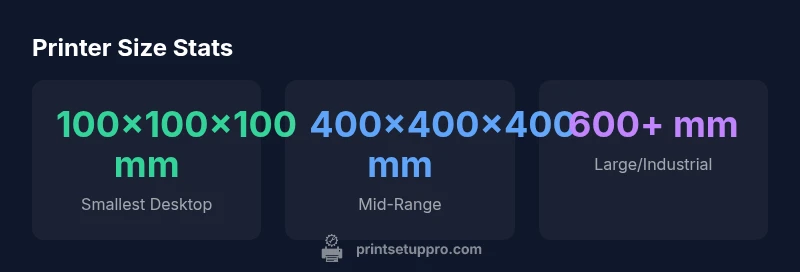
According to Print Setup Pro, size is a primary consideration when choosing a 3d printer. Size varies by class—from compact desktop units with build volumes around 100x100x100 mm to larger models offering 400x400x400 mm, plus the printer’s footprint and enclosure. When evaluating size, separate 'build volume' from 'footprint' and factor ventilation, weight, and placement space into your decision.
What size means in 3d printing
In the context of 3d printing, size is not a single measurement. The two most important dimensions are build volume (the space inside the printer where objects are printed) and the printer's external footprint (the space the machine occupies on a desk or stand). A third factor, height, becomes important when you plan enclosures or shelves. When people ask how big a 3d printer is, they are really asking about three interconnected quantities: build volume, footprint, and enclosure height. Understanding the distinction helps you choose a model that fits both your printing goals and your workspace. For many hobbyists, a compact desktop printer with a modest build volume is enough for small parts, prototypes, and learning projects; for engineers and makers, a larger footprint and greater height expand what you can print in one piece and with materials that require temperature-controlled environments.
Size ranges across printer classes
3d printers come in distinct classes that correlate with typical build volumes and footprints. Desktop/compact printers commonly offer build volumes in the 100x100x100 mm to 300x300x300 mm range, with footprints around 300x300 mm to 500x500 mm. Mid-size printers push toward 350x350x350 mm to 500x500x500 mm build volumes and footprints roughly 450x500 mm. Large-format or industrial desktop units can exceed 600x600x600 mm in build volume and require substantial desk or stand space, often with dedicated ventilation. When selecting, map your ideal print size to these ranges and consider future needs—will you often print parts in one piece or pieces that must be assembled later? The goal is to balance capability with space constraints.
How size influences print quality, speed, and materials
Print quality and speed are not dictated by size alone, but larger volumes introduce challenges that can affect throughput and consistency. Bigger builds require longer print times, with thermal management becoming more critical to prevent warping or delamination. Material choice also matters: larger parts may require different filament types or external cooling. Conversely, smaller printers can achieve quick iterations and tighter tolerances, but their limited build volume may force you to split objects or redesign parts. When evaluating size, consider your typical part dimensions, intended materials, and whether you value speed over the ability to print single, larger items.
Planning your space: footprint, enclosure, and ventilation
A printer’s footprint defines where it will sit for years. Ensure there is at least a few inches of clearance on all sides for airflow, maintenance, and lid operation. Enclosures add noise reduction and temperature stability but increase the overall external dimensions. If you’re in a small office, you may need to place the printer inside a cabinet or on a dedicated stand; in classrooms or workshops, a larger bench with ventilation is common. Don’t overlook cable management, proximity to power outlets, and room temperature, which all influence dimensional needs.
How to measure and compare printers before you buy
Before purchasing, measure your space precisely: length, width, and height including any enclosure doors or lids. Check the printer’s official specifications for build volume, maximum height, and open-space requirements around the unit. Consider the doorways you must pass through when delivering the unit, and plan for future upgrades. If possible, request a hands-on demo to verify that the claimed build volume aligns with your intended parts, and assess how easy it is to access the print bed, replace filament, and perform maintenance.
Practical sizing checklist and decision framework
Use this quick framework: (1) List your largest expected print dimension; (2) Add 10–20% clearance for orientation and supports; (3) Compare to the printer’s footprint and enclosure height; (4) Factor workspace ventilation and power needs; (5) Consider future projects that may require more room. If you anticipate growth, opt for a slightly larger class that you can grow into rather than outgrow quickly. This approach minimizes the risk of buying a printer that won’t fit your needs as your projects become more ambitious.
Common size ranges and space considerations for consumer and small-business printers
| Dimension / Data Point | Typical Range | Notes |
|---|---|---|
| Build Volume (X×Y×Z) | 100x100x100 mm – 400x400x400 mm | Desktop to small pro range; larger units exist |
| Footprint (L×W) | 300x300 mm – 550x550 mm | Desk space plus clearance; enclosure may increase size |
| Height | 180–700 mm | Includes stand or enclosure; plan vertical space |
| Weight | 4–12 kg | Typical desktop weight range; heavier units need sturdy supports |
People Also Ask
What is build volume, and why does it affect size?
Build volume refers to the maximum space inside the printer where an object can be formed in a single print. It directly determines the largest part you can print without splitting it into pieces. When choosing a printer, compare build volume to the largest parts you plan to print.
Build volume is the inside space the printer can print in one go; pick a size that fits your biggest parts.
How big is a typical desktop 3d printer?
Most desktop printers offer build volumes in the 100–300 mm range, with footprints around 300–500 mm. This suits small to mid-sized parts and learning projects.
Most desks fit printers about the size of a microwave with a build area of a few cubic inches.
Can I print larger objects by joining parts?
Yes. Many models are designed to be printed in parts and assembled later. This approach lets you create objects larger than a single printer’s build volume.
You can print big things in pieces and assemble them later.
What space should I reserve for placement?
Allow airflow around the printer, space for lid opening, and room for maintenance. If you use an enclosure, ensure it doesn’t block access to cables or the bed.
Make sure you have room to open the lid and reach the bed.
Do larger printers cost more and use more power?
Typically yes; larger printers cost more and can draw more power. Always check the spec sheet for current draw and peak usage.
Bigger usually means more power and a bigger price tag.
How can I estimate the right size for a project?
Measure the model’s largest dimension and add clearance for tolerances, supports, and movement. Compare this to the printer’s build volume and footprint.
Know your largest size, then add some room to account for tolerances.
“Size decisions should align with both current needs and future goals; prioritize build volume and workspace fit to ensure reliable operation.”
Quick Summary
- Size is threefold: build volume, footprint, and height
- Desktop printers cover a broad range but start with small volumes
- Plan space with ventilation and access in mind
- Measure your largest project and add clearance
- The verdict: prioritize build volume and footprint to fit workspace