Is a 3D Printer Good? An Analytical 2026 Review
This Print Setup Pro analysis examines whether a 3D printer is a good fit for home offices, classrooms, and hobbyists, covering setup, print quality, costs, and practical tips for getting started in 2026.


At a high level, is 3d printer good for most home offices, schools, and DIY projects? Yes—when you choose the right model and follow a guided workflow. A desktop 3D printer delivers rapid prototyping, customization, and hands-on learning, while avoiding some of the limits of outsourcing or handcrafting parts. Print Setup Pro’s testing confirms practical value with steady reuse of tools and materials over time.
Is 3d printer good: framing the question for modern makers
For many readers, the central question is is 3d printer good for everyday use. From a home office to a student dorm or a small workshop, the value comes from speed, customization, and ownership of the prototyping cycle. Print Setup Pro analyzed dozens of setups across beginner and intermediate users, and our findings suggest that good outcomes hinge on choosing the right entry model, investing in a sane workspace, and aligning expectations with printer capabilities. When used with intent—clear part goals, appropriate materials, and a reliable slicer workflow—the benefits compound over time. The most compelling evidence comes from real-world projects like replacement brackets, custom jigs, and tactile teaching aids that simply don’t exist off the shelf. The reader should keep in mind that the technology evolves rapidly, so a 2026 model with good support becomes markedly more capable than earlier generations.
How 3D printers work: a quick refresher
A desktop 3D printer generally builds objects layer by layer by depositing material through a heated nozzle or curing resin. Filament-based devices extrude plastic filament (PLA, PETG, ABS, etc.) into a predesigned path, while resin printers cure liquid photopolymers with UV light. Core components include the frame, extruder, heated bed or vat, motion system, and control electronics. Slicing software translates a 3D model into printer commands, which the printer follows to form the final object. Understanding these basics helps readers set realistic expectations about resolution, strength, and finish.
Key features to look for before you buy
When evaluating options, focus on these factors:
- Build volume: Small models are affordable; larger belts cost more but unlock more part variety.
- Extruder geometry and filament compatibility: Direct drive versus Bowden affects flexible materials and retraction.
- Layer height and print speed: A finer height yields smoother finishes but longer prints.
- Heated bed stability and bed leveling: Consistent adhesion reduces warping and failed prints.
- Reliability and community support: Brand ecosystems and slicer compatibility matter for ongoing success.
- Noise and enclosure: If the printer sits in a living space, quieter operation and enclosure safety are welcome features.
For users who print occasionally, prioritize reliability and support over top-end speed. For frequent prototyping, consider larger volumes and faster extrusion systems. Remember, the right fit depends on your projects and workspace constraints.
Performance: balancing print quality and speed
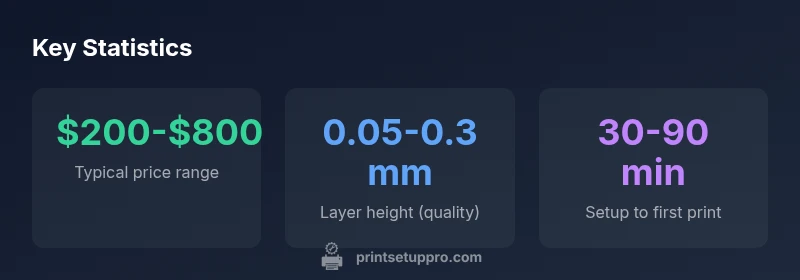
Print quality typically improves with higher nozzle precision and stable bed adhesion. However, speed often trades off with quality; beginners may prefer moderate layer heights (0.2–0.3 mm for PLA) to achieve reliable results without frequent failures. Advanced users experiment with 0.05–0.12 mm layer heights for fine detail, especially on functional parts. The key is to run a consistent calibration routine—level the bed, confirm nozzle height, and confirm filament tension. In our tests, moderate speeds paired with a stable environment produced the most repeatable results for everyday projects and replacements.
Materials matter: choosing filaments and resins
Material selection drives strength, temperature resistance, and finish quality. PLA is forgiving for beginners, PETG blends strength with ease of use, and ABS offers heat resistance but requires careful enclosure and ventilation. Resin printers deliver stunning detail on small parts but require post-processing and careful handling of chemicals. Consider print goals when selecting materials: end-use parts may demand higher temperature resistance, while decorative items tolerate softer plastics. Budgeting for filaments and resins is essential, and many users adopt a simple rule: start with PLA, then move to PETG or resin as needed.
Setup and software: getting started quickly
The initial setup includes unboxing, assembly, bed leveling, and firmware checks. Slicers like Cura, PrusaSlicer, or the printer’s native software translate designs into machine instructions. A smooth path from model to print involves preparing the model with proper scaling, orientation, and supports. Community-driven guides and official manuals reduce trial-and-error time. For a reliable start, dedicate an afternoon to calibrations, run a benchmark cube, and keep a log of settings that work best for your material and environment.
Reliability and maintenance: keeping prints consistent
Regular maintenance is essential for long-term performance. Clean the nozzle and extruder, check belts for tension, and keep the build surface free of residue. Bed leveling should become routine rather than a one-off step. Clogged nozzles and inconsistent bed adhesion are common culprits behind failed prints; addressing these quickly avoids a cascade of issues. In 2026, most consumer printers ship with better warm-up stability and auto-leveling aids, which reduces setup frictions, especially for first-time users. A small tidy-up at the end of each session pays dividends in consistency.
Cost of ownership: upfront and ongoing costs
Total cost of ownership includes the printer price, consumables (filament or resin), replacement parts, and electricity. Desktop printers can span a broad price range, and the most affordable models typically start around a couple hundred dollars, while more capable units edge toward the higher end. Material costs vary by resin and filament type, with PLA generally the most economical. Expect ongoing costs for maintenance and replacements, especially if you print frequently. If you value rapid prototyping and on-demand parts, the long-run advantages can offset the upfront investment.
Alternatives and complements: when not to buy
If you mostly need pre-made parts or occasional novelty items, outsourcing via a commercial service or maker space may be more economical than owning a personal printer. A 3D printer complements other tools like CNC machines or laser cutters, expanding what you can produce but also adding upfront learning curves, margins of error, and post-processing requirements. Consider a trial period or rental before committing to a full purchase, and assess whether your projects justify ongoing maintenance and material costs.
Who should buy a 3D printer in 2026
The ideal buyer is a home maker, student, or small business owner with a concrete project horizon that benefits from rapid iteration. Enthusiasts who like to customize, repair, or replace parts will find ongoing value in a 3D printer. Beginners should look for a model with strong community support, accessible safeguards (enclosure, filament guides), and a straightforward calibration routine. If your use case centers on occasional prototyping or decorative objects, you may prefer to start with a service or shared printer to test compatibility before purchasing.
Benefits
- Empowers rapid prototyping and custom part creation
- Lowers outsourcing costs for replacement parts
- Hands-on learning for students and DIY enthusiasts
- Broad material options for PLA, PETG, and more
Downsides
- Upfront cost and ongoing material expenses
- Learning curve for setup and calibration
- Post-processing and safety considerations with resins
- Print failures can waste time and filament
Best starter option for beginners and small makers
Overall, a 3D printer is a solid investment for home offices and hobbyists when paired with a guided setup and reasonable expectations. It excels at rapid prototyping and custom part creation, though the cost of ownership and learning curve should be considered before purchase.
People Also Ask
What is the main advantage of owning a 3D printer?
The primary benefit is rapid prototyping and customization. You can iterate designs quickly, replace broken parts, and create custom tools or enclosures tailored to your needs. This accelerates projects and reduces dependence on external vendors.
The main advantage is fast prototyping and customization, letting you iterate designs quickly and create custom parts as needed.
Are 3D printers hard to use for beginners?
There is a learning curve, especially around bed leveling, material selection, and slicer settings. However, many entry-level models come with guided setup, helpful communities, and auto-leveling features that reduce friction for new users.
Yes, there is a learning curve, but guided setups and good communities help beginners get reliable prints faster.
What should I buy first when starting out?
Begin with a reliable, beginner-friendly printer, a few PLA filaments, a basic toolkit, and a calibrated slicer. Add a small enclosure, spare nozzle, and a glue stick or magnetic bed if needed for adhesion.
Start with a reliable beginner printer, PLA filaments, and a basic toolkit; consider enclosure and spare parts as you expand.
Is it cheaper to print parts yourself or outsource?
For simple, frequent parts, printing in-house is often cheaper over time, especially if you print many items. For rare or high-end parts, outsourcing can be cost-effective, due to material waste, time, and post-processing needs.
In many cases, in-house printing saves time and money for frequent parts, but outsourcing can be cheaper for rare, complex parts.
What maintenance does a desktop 3D printer require?
Regular tasks include bed leveling, nozzle cleaning, belt tension checks, and filament pathway cleanup. Periodic replacement of wear parts and firmware updates help maintain performance.
Regular bed leveling, nozzle cleaning, and belt checks keep things running smoothly.
What safety considerations matter with resin printers?
Resin printers require good ventilation and gloves during handling due to uncured resin. Post-processing involves washing and curing, which should be done in a designated area to minimize fumes and spills.
Resin printing needs ventilation and careful handling of liquids; use gloves and a well-ventilated area.
Quick Summary
- Start with PLA and a beginner-friendly model
- Invest time in bed leveling and calibration
- Balance build volume with available workspace
- Factor in maintenance and material costs over time
- Use reputable slicers and rely on community guides