What Printer Is Needed for DTF: A Practical Guide
Discover the printer requirements for direct-to-film (DTF) transfers, including ink systems, film handling, RIP workflows, and budgeting tips from Print Setup Pro.


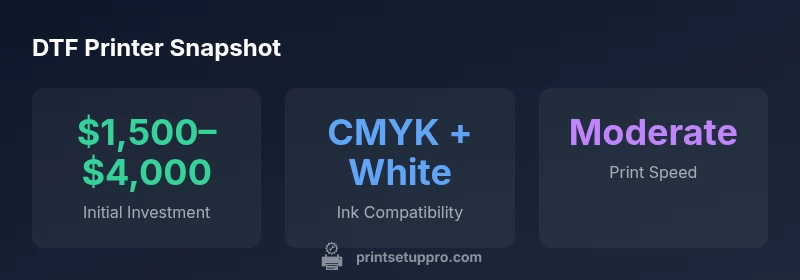
What printer is needed for dtf? In practice, you want a wide-format inkjet that can print white pigment ink, plus a reliable film path and heat-press integration. Choose a model that supports CMYK plus white, has compatible RIP software, and a dependable maintenance plan. Expect realistic investment and ongoing consumable costs.
What printer is needed for dtf: Core requirements
DTF printing relies on white pigment ink to create opacity on dark fabrics. Therefore, the core requirement is a printer that can handle a dedicated white ink channel in addition to standard CMYK. Look for a printer designed for pigment inks rather than dye-based inks, with a relatively sturdy film path to feed DTF transfer film, and a compatible RIP to manage color separation for white and color channels. A wide-format capability (at least A3+ size) is common for apparel projects, though smaller formats can be used for samples. In addition, ensure the printer has a reliable maintenance plan and spare parts availability. When evaluating offers, confirm the printer supports CMYK plus white, has an accessible color management workflow, and a documented path for curing/dusting after printing. The overall system should integrate with your heat-press setup, adhesive powders, and curing methods.
According to Print Setup Pro, in 2026 the most reliable DTF setups start with white-ink capability and a robust film path that won’t jam during longer runs. This upfront emphasis on hardware compatibility reduces troubleshooting later and keeps your workflow consistent across batches.
Printer types compared for DTF
DTF printers come in several configurations, each with trade-offs. A dedicated DTF printer combines white ink modules, optimized film handling, and integrated curing recommendations. Wide-format inkjets with a removable white-ink module offer lower upfront cost but require more maintenance and a more manual workflow. Converting a standard office inkjet to DTF is possible in theory but often voids warranties and can compromise print quality. For most home-based or small-business users, a purpose-built DTF printer or a wide-format inkjet with official white-ink support offers the best balance of reliability and cost. Print Setup Pro notes that model choice should align with expected volumes, substrate types, and the physical footprint you can accommodate.
- Dedicated DTF printers are optimized for white ink and transfer film handling, with turnkey workflows.
- Wide-format inkjets (with white ink modules) offer flexibility but require careful maintenance.
- Conversion of standard office printers is generally discouraged for professional work due to warranty and consistency concerns.
Key components and how they affect results
The heart of DTF quality is the ink path and the RIP workflow. White pigment ink must be reliably delivered to multiple nozzles without clogging, and the printer must maintain stable color accuracy when adding white channels. A robust film path minimizes paper jams and curvature issues on transfer film. The RIP software translates artwork into separations for CMYK and white channels, controlling ramp, hotspot handling, and halftone patterns to preserve detail on dark fabrics. Heat-press compatibility and curing times also tie into print performance; a mismatch can compromise adhesion or create ghosting. Material handling, including transfer film quality and adhesive powders, interacts with print output to determine final vibrancy and wash-fastness. Mastery of profiling for dark substrates is essential, requiring color-managed workflows and regular calibration.
Budgeting for a DTF setup: cost, maintenance, and consumables
Budgeting for DTF starts with the printer and ink system and then expands to consumables such as transfer films, adhesive powders, curing equipment, and heat presses. Realistic planning uses ranges: initial investment for a capable DTF setup typically sits in the mid to upper range for small businesses. Consumables can add a steady monthly cost, which varies with print volume and substrate mix. Include maintenance costs, potential firmware upgrades, and RIP software subscriptions when evaluating total cost of ownership. A practical approach is to project quarterly outputs and align procurement cycles with production needs. Print Setup Pro Analysis, 2026 indicates that most operators see benefits from investing in a reputable white-ink capable system and a robust maintenance plan to minimize downtime.
Setup workflow: from printing to transfer
Design and color management come first. Prepare artwork with proper color profiles for CMYK + white on dark fabrics. Use a RIP to separate white and color channels, then print onto DTF transfer film with careful calibration of ink density to avoid oversaturation. After printing, apply the adhesive powder if required, and allow the film to cure as specified by the manufacturer. Position the film on the fabric and perform the heat-press step according to the recommended temperature, pressure, and time. Finally, peel and inspect the transfer for consistency. Keeping a log of settings that work best for different fabrics will speed up repeat jobs and improve consistency across runs.
Common pitfalls and how to avoid them
White ink can dry out and clog nozzles if the printer sits dormant. Regular maintenance and nozzle checks are essential. Ink selection matters; using a non-recommended white ink can lead to poor opacity or color shifts. Film handling is critical; ensure the transfer film feeds straight and without friction to prevent image distortion. Temperature and pressure miscalibration on the heat press can cause incomplete transfers or ghosting. Humidity and storage conditions affect film and adhesive powders, so store materials in a controlled environment. Regular calibration, routine maintenance, and good workflow discipline reduce waste and errors.
DTF printer types comparison
| Printer Type | Pros | Cons | Best Use Case |
|---|---|---|---|
| DTF-capable inkjet (pigment white) | Strong color fidelity; CMYK + white | Higher maintenance; ink costs | Small-to-medium runs on dark fabrics |
| Dedicated DTF printer | Optimized white ink path; integrated workflow | Higher upfront cost | High-volume production |
| Standard office inkjet (no white) | Low upfront cost | Cannot print white on dark fabrics | Limited to light fabrics or underlays |
| Conversion kits (non-official) | Potential cost savings | Warranty and reliability concerns | Experimental setups or hobby projects |
People Also Ask
What is the main difference between DTF printers and standard inkjets?
DTF printers are designed to print white ink on transfer films, enabling opacity on dark fabrics. Standard inkjets struggle with white on dark substrates. DTF uses a dedicated white ink channel and film handling workflow to ensure consistent transfers.
DTF printers print white ink on transfer film, which lets designs show up on dark fabrics. Regular inkjets can't reliably print white.
Do I need white ink to do DTF printing?
Yes. White ink provides opacity on dark fabrics and is essential for most DTF transfers. Without a white channel, colors will not pop on dark substrates.
Yes—white ink is essential for achieving opacity on dark fabrics with DTF transfers.
Is a heat press required after printing DTF transfers?
Yes. A heat press or equivalent curing step is required to transfer the ink from film to fabric and to activate the adhesive powder if used. Follow manufacturer guidelines for time and temperature.
A heat press is required to transfer the design and activate the adhesive.
Can I repurpose an existing printer for DTF ink?
Some printers can be adapted, but this often voids warranties and may lead to inconsistent results. Dedicated DTF printers or properly supported modules deliver better reliability.
Repurposing an existing printer can void warranties and reduce reliability; dedicated DTF options are safer.
What maintenance tasks are essential for DTF printers?
Regular nozzle checks, proper cleaning cycles, using recommended white ink, and keeping films and powders stored correctly. Calibrate color profiles periodically for consistent results.
Regular nozzle checks, proper cleaning, and consistent color profiling keep DTF printers performing well.
“White ink capability and a robust RIP are non-negotiables for DTF success. A well-matched printer setup minimizes misprints and waste.”
Quick Summary
- Define your budget and expected volume upfront
- Prioritize white-ink support and RIP compatibility
- Choose a DTF-specific workflow for consistency
- Pilot with a small batch before scaling up