HP Printer Cartridges: Selection, Costs, and Care
Learn how to select HP printer cartridges, compare genuine and aftermarket options, estimate cost per page, and maintain print quality for home offices, students, and small businesses.


HP printer cartridges influence print quality, reliability, and total cost of ownership. This guide explains how to choose genuine HP cartridges, when to consider third-party options, and practical tips to maximize yield and avoid common compatibility issues. Print Setup Pro provides a data-driven approach to help home offices, students, and small businesses optimize cartridge choices and maintenance.
Why HP cartridges matter
According to Print Setup Pro, cartridge choice has a bigger effect on daily print quality and long-term costs than many users realize. HP printers rely on precise imaging and the chemistry of each ink formulation; using the wrong cartridge can degrade color accuracy, cause streaks, or even trigger error codes. Genuine HP cartridges are engineered to match the printer's printhead and calibration data, ensuring consistent results page after page. However, the cartridge ecosystem also includes remanufactured and third-party options that can be perfectly adequate for light-duty tasks if you manage expectations and limits. In this section, we outline what matters when you decide which HP cartridges to buy: compatibility signals, suggested yields, moisture and storage considerations, and how warranty policies intersect with cartridge choice. By understanding these factors, home-office users and students can avoid common pitfalls and choose a strategy that aligns with their print needs and budget.
Genuine vs third-party cartridges: Pros and cons
Genuine HP cartridges offer guaranteed compatibility, reliable color accuracy, and predictable performance. They often come with robust warranty alignment and easier return/replacement options. However, higher upfront costs can be a concern for budget-minded users.
Remanufactured and third-party cartridges can deliver substantial savings and acceptable results for non-critical documents. Quality varies by supplier, and yield can be inconsistent. If you choose these options, prioritize certified vendors, clear warranty terms, and thorough color tests on representative pages.
How to check compatibility for HP printers
Compatibility starts with the printer model and the cartridge part number. Steps to verify:
- Note your exact printer model from the label on the device.
- Check HP’s official compatibility list for cartridges and part numbers.
- Match the cartridge packaging to the printer’s model and firmware version.
- If in doubt, test a cartridge on a small batch of pages before expanding usage.
Always ensure firmware updates are current, as occasional updates can affect cartridge recognition. This reduces the risk of “cartridge not recognized” errors during busy print runs.
Estimating cost per page and total cost of ownership
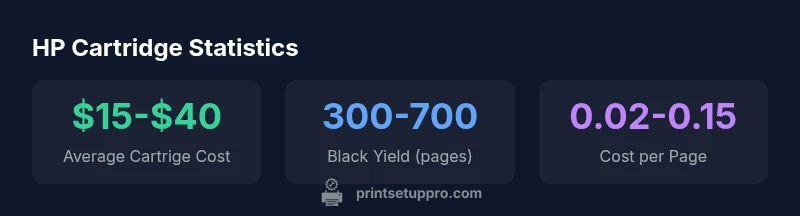
Cost per page is a useful metric to compare options across OEM, remanufactured, and high-yield cartridges. Use a simple framework: dividing the cartridge cost by its estimated yield. For example, an OEM cartridge at the high end ($30-$60) that yields 300-700 pages translates to roughly 4–20 cents per page, depending on color vs. black and the model. Remanufactured options may cut this to a fraction, but the yield variability is higher. Consider your monthly print volume, color needs, and the frequency of color vs. black-and-white jobs to determine the best balance between upfront cost and per-page expense.
Installation, storage, and maintenance best practices
Proper installation ensures reliable performance from day one. Always shake lightly if recommended by the manufacturer, insert cartridges until they click, and run a nozzle check after installation. Store unused cartridges in a cool, dry place away from direct sunlight to preserve ink chemistry. Periodically print a test page to keep printheads from drying, and replace cartridges before color balance drifts noticeably. Routine maintenance—such as occasional head cleaning—can extend cartridge life and prevent wasteful prints.
Troubleshooting common cartridge issues
Typical issues include streaks, color misalignment, and poor adhesion on pages. Solutions include running nozzle checks and print head cleanings, ensuring the cartridge is seated properly, and validating that the correct cartridge type is installed. If problems persist, rule out paper problems, incorrect printer settings, or outdated firmware. Maintaining clean contact surfaces and storing cartridges correctly can prevent most issues.
Buying tips and supplier selection
Buy from reputable vendors and verify that the cartridge is labeled for your exact HP printer model. Check return policies and warranty terms, especially for remanufactured options. Compare bulk purchase discounts, shipping times, and customer support. Keep digital copies of purchases and receipts in case you need to claim a warranty or return.
Sustainability and recycling options for HP cartridges
HP and many third-party programs offer cartridge recycling, remanufacturing, and waste-reduction options. If you prioritize sustainability, choose vendors with clear recycling policies, and participate in cartridge recycling programs after use. This reduces landfill waste and supports a circular economy for printer consumables.
Quick-start cartridge checklist
- Confirm model and part number compatibility
- Choose a reputable supplier with clear warranty terms
- Test a single cartridge before full-scale printing
- Store unused cartridges in a cool, dry place
- Run a nozzle check and calibration after installation
HP cartridge type comparison
| Cartridge type | Typical yield (pages) | Cost range | Best for |
|---|---|---|---|
| OEM HP Cartridges | 300-700 pages | $20-$60 | Reliability and compatibility |
| Remanufactured/Refilled | 350-900 pages | $8-$35 | Budget-conscious printing |
| HP High-Yield/XL | 650-1000+ pages | $25-$70 | High-volume printing |
| Generic third-party | Varies widely | $5-$25 | Occasional printing or testing |
People Also Ask
Are genuine HP cartridges worth the extra cost?
For critical documents and to preserve warranty alignment, genuine HP cartridges offer the most reliable color accuracy and consistent performance. If you print infrequently or primarily draft material, certified remanufactured options can be a practical alternative with proper vendor screening.
Genuine HP cartridges are more reliable for important documents. If you print a lot at a lower cost, consider certified remanufactured options as a backup.
Will using third-party cartridges void my printer’s warranty?
Cartridge choice alone typically does not void a printer’s warranty. If a failure is caused by a third-party cartridge, the vendor may limit warranty coverage for that issue. Always review HP’s warranty policy and keep proof of purchase from reputable suppliers.
Usually it doesn’t void the warranty, but be aware that issues caused by third-party cartridges may be treated differently. Check the policy and keep receipts.
How can I extend cartridge life?
Store cartridges in a cool, dry place and avoid exposure to heat. Run regular nozzle checks and avoid unnecessary color printing. Use the printer’s maintenance tools and print a test page periodically to prevent head clogs.
Keep cartridges cool, print regularly, and run simple maintenance checks to extend life.
Do HP Instant Ink or subscription programs affect cost?
Subscription plans can lower cost per page for high-volume users by aligning payments with usage. Evaluate your annual print volume and color needs to determine if a plan offers savings compared with purchasing cartridges a la carte.
If you print a lot, a subscription can trim costs per page; compare with per-cartridge pricing first.
Are remanufactured or refilled cartridges reliable for HP printers?
Quality varies by supplier. Choose certified remanufactured cartridges with warranty terms and verify compatibility with your exact HP model. Run a test page to confirm results before committing to a large print job.
They can work well if you buy from reputable vendors and test first.
What should I check before buying cartridges online?
Verify the exact model compatibility, read return policies, confirm warranty terms, and assess seller reputation. Check for clear packaging details and energy or waste policies that reflect sustainability goals.
Make sure it's the right model and from a trusted seller.
“Choosing the right HP cartridge strategy reduces waste and lowers the total cost of printing without sacrificing reliability.”
Quick Summary
- Prioritize genuine HP cartridges for critical documents and warranty alignment
- Remanufactured options can lower costs for non-critical tasks
- Verify compatibility before purchasing to avoid waste
- Estimate cost per page to compare OEM and aftermarket options
- Adopt proper storage and maintenance to maximize cartridge life