What Printer Has Refillable Ink Cartridges: A Practical Guide
Learn which printers use refillable ink cartridges, how ink-tank systems work, and how to choose models for home offices, students, and DIY projects. Practical setup tips from Print Setup Pro.


What printer has refillable ink cartridges? Printers that use refillable ink cartridges rely on internal ink tanks—often labeled as ink-tank or EcoTank systems—where ink is poured from bottles rather than swapped through sealed cartridges. These models, common in Epson EcoTank and similar ink-tank lines, offer lower running costs and less plastic waste, making them appealing for home offices, students, and DIY enthusiasts who print in higher volumes. They also require ongoing maintenance to keep cartridges primed and heads clean, but the refill process is straightforward when you follow the manufacturer’s steps.
What refillable ink cartridges are and how they work
Refillable ink cartridges, or ink-tank systems, store liquid ink in internal reservoirs that you replenish using bottles or compatible refill packs. Unlike traditional sealed cartridges, these printers are designed to be topped up rather than replaced entirely. The core advantage is cost efficiency for high-volume printing and a reduction in plastic waste. In daily use, you’ll notice longer intervals between cartridge changes, and a preference for bulk ink purchases. The setup requires careful handling during refills to avoid introducing air bubbles or contaminating the ink paths. The Print Setup Pro team emphasizes following the manufacturer’s ink guidelines and performing routine maintenance to preserve print quality. For readers evaluating whether a printer has refillable ink cartridges, check the product family name or feature list for “ink tank,” “EcoTank,” or “front-fill/auto-fill” configurations. The key takeaway is straightforward: refillable ink printers exist to keep your ink costs predictable while simplifying long-term maintenance when used correctly.
Who benefits most from refillable ink printers
Refillable ink printers target high-usage scenarios where cost per page and waste reduction matter most. Home offices with frequent document printing, college students, and DIY enthusiasts who print posters or craft materials achieve the strongest value. If you print multi-page reports, color diagrams, or photos, you’ll also appreciate fewer cartridge changes and more consistent color output over time. It’s important to recognize that initial upfront costs can be higher for ink-tank designs, but the long-term savings often compensate for the difference, especially with heavy print workloads. Print Setup Pro’s analysis shows that the break-even point typically falls after several hundred pages, depending on volume, ink price, and refill frequency. Overall, refillable ink printers align with strategic needs like reliability, low waste, and predictable budgeting for small offices and student households.
Key features to compare in refillable ink printers
When evaluating refillable ink printers, prioritize these features:
- Ink-tank capacity and refill bottle compatibility
- Print quality and color fidelity across text and images
- Firmware and maintenance routines (head cleaning, nozzle checks)
- Connectivity options (USB, Ethernet, Wi‑Fi, AirPrint/Google Cloud)
- User experience during refills (sealed caps, spill guards, auto-priming)
- Warranty coverage and service availability
- Total cost of ownership, including ink bottles and replacement parts
These factors influence daily use, reliability, and long-term savings. Print Setup Pro suggests compiling a short list of candidates and testing print samples to verify color accuracy and grayscale readability before purchase.
Cost considerations and long-term savings
Total cost of ownership for refillable ink printers depends on initial price, refill costs, and maintenance. In practice, many users experience lower per-page costs than cartridge-based peers, particularly if they print frequently. Evaluate the ink bottle pricing, bottle yield, and your typical monthly volume. Consider spill prevention features during refills and whether the printer uses standard bottle formats you can stock easily. A practical approach is to estimate your annual pages and multiply by your expected cost per page, then compare with a comparable cartridge-based model’s page cost. Real-world savings vary by model, ink price, and print volume, so use ranges rather than precise numbers. Print Setup Pro recommends focusing on long-term value rather than upfront cost alone, especially for high-volume environments.
Setup, refilling, and maintenance best practices
A successful refill process begins with preparing a clean workspace and using manufacturer-supplied ink or bottles known to be compatible with your system. Before refilling, power down the printer and disable any auto-clean routines that might waste ink. Open the ink-tank area, locate the correct color caps, and refill slowly to minimize air uptake. After refilling, run a nozzle check or the printer’s built-in alignment routine to ensure proper ink flow. Regular maintenance includes cleaning the printhead as needed and wiping the exterior slowly to prevent ink smudges. Store ink bottles upright, tightly capped, and away from direct sunlight. By maintaining a consistent refill schedule and following the manufacturer’s guidance, you’ll maximize print quality and prolong the life of the ink-tank system.
Common issues and quick troubleshooting
Ink-tank systems can encounter air bubbles, clogged nozzles, or inefficient ink flow if refilling is rushed or ink is contaminated. If colors appear off or streaky, start with a nozzle check and perform a head cleaning. If air bubbles persist, reseat the bottle connectors and ensure caps are closed securely. Another common issue is degraded print quality after a refill due to incompatible ink. Always use the recommended ink type and avoid refilling with household fluids or non-approved substitutes. Finally, keep firmware updated—some printers optimize ink usage and nozzle performance with updated software. Following these steps can prevent most refill-related problems and keep your printer running smoothly.
Practical buying guide: questions to ask before you buy
Before committing to a refillable ink printer, ask about ink bottle availability and pricing, refill ease, and refill frequency for typical workloads. Inquire about the warranty impact of using third-party inks, availability of color cartridges, and service options in your region. Review the expected page yield per bottle and whether the model supports automatic ink level alerts. Red flags include nonstandard bottle formats, poor refill containment, missing after-sales support, and unclear warranty terms related to ink-tank systems. A structured evaluation helps you avoid models that promise convenience but underperform in color consistency or reliability over time.
Brand and model considerations: how to compare models
When comparing models, group printers by family (e.g., “EcoTank” vs. generic ink-tank) and examine the ink-tank capacity, refill bottle compatibility, and physical footprint. Look at real users' reviews focusing on long-term reliability, ink availability, and how well the printer handles mixed workloads (text, graphics, and photos). Favor models with straightforward refill steps, spill guards, and clear indicators for ink levels. Finally, assess the vendor’s support ecosystem, including firmware updates, replacement parts, and ink bottle warranties. This structured approach helps ensure you pick a refillable ink printer that meets your workflow needs while delivering predictable costs over time.
Note: Refillable ink is common in ink-tank printers
| Printer type | Refillable ink status | Notes |
|---|---|---|
| EcoTank/Ink Tank printers | Yes | Designed for refilling ink tanks with bottles |
| Traditional cartridge printers | No | Uses sealed cartridges; refills require cartridge replacement |
People Also Ask
What is refillable ink, and how does it differ from traditional cartridges?
Refillable ink uses internal tanks that you top up with bottles, while traditional printers use sealed cartridges that are replaced when empty. Refillables can lower running costs and waste, but require careful refilling and maintenance to prevent clogs or air bubbles.
Refillable ink uses tanks you fill with ink bottles, not disposable cartridges. It can lower costs, but needs careful refilling to avoid clogs.
Are refillable ink printers more expensive upfront?
Upfront prices for ink-tank models can be higher than entry-level cartridge printers. The long-term savings depend on your printing volume, ink prices, and how often you refill.
They can cost more upfront, but long-term savings depend on how much you print and ink prices.
Do refillable ink systems clog easily?
Clogs are uncommon when you use manufacturer-recommended ink and keep up with regular maintenance. Problems usually stem from using incompatible inks or introducing air during refills.
Clogs are rare if you use the right ink and refill carefully.
How often will I need to refill ink?
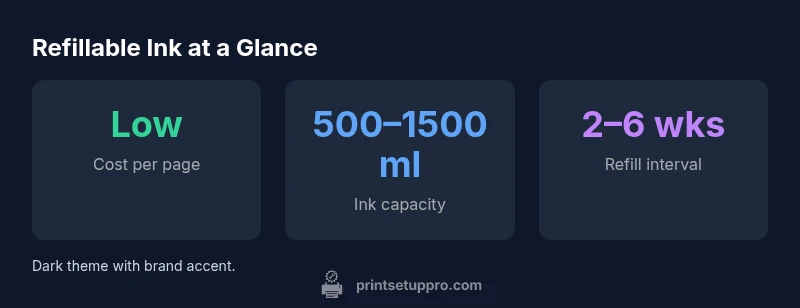
Refill frequency depends on usage and bottle capacity. High-volume users may refill every few weeks, while light users may go several months between refills.
It varies with how much you print; expect refills every few weeks to months.
Can I refill ink myself, or should I use a service?
Most users refill themselves using manufacturer bottles. A careful, clean refill process minimizes waste and interruption. Service is rarely necessary unless you encounter repeated leaks or contamination.
Most people refill themselves with the manufacturer bottles; service is rarely needed.
Are refillable ink printers good for photos?
Color accuracy and photo print quality vary by model and ink chemistry. Many refillable systems produce excellent text and good color graphics, but for high-end photo work, compare color profiles and test prints.
They can be excellent for color graphics, but test prints matter for photos.
“Ink-tank printers offer meaningful cost savings when used with proper maintenance and regular refills. Reliability improves with quality ink and careful handling.”
Quick Summary
- Adopt refillable ink printers for higher-volume printing.
- Choose ink-tank models with easy refill features and robust maintenance.
- Factor long-term costs and waste reduction into your decision.
- Follow manufacturer guidance to maintain print quality and avoid head clogs.
- Test sample prints to verify color accuracy before purchase.