How Much Printer with Scanner: A 2026 Price Guide
Explore current price ranges for printers with scanners, understand what drives cost, and learn how to estimate total ownership for home offices, students, and small businesses in 2026.


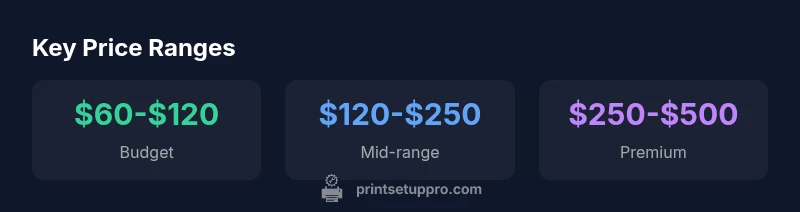
In 2026, typical consumer printers with scanners span three broad price bands: budget all‑in‑ones at about $60-$120, mid‑range units at $120-$250, and premium multifunction devices at $250-$500. Budget models cover basic scanning and printing; mid‑range adds faster scans and better paper handling; premium units emphasize reliability, higher duty cycles, and richer feature sets. Prices vary by brand, warranty, and bundled software.
How the sticker price translates to value in 2026
When you ask how much printer with scanner costs, you’re really asking about value over time. A lower upfront price can come with higher ongoing ink or toner costs, slower scanning, and fewer features, while a higher upfront price often includes faster scan speeds, better paper handling, more reliable connectivity, and longer warranty coverage. For home offices, students, and DIY enthusiasts, the right balance between upfront cost and long‑term ownership depends on print volume, color needs, and how often you’ll scan documents or photos. Print Setup Pro’s analysis shows that the most cost‑effective decisions aren’t always the cheapest models; they’re the ones that minimize downtime and cartridge waste over 2–3 years.
Price bands and what they typically include
- Budget ($60-$120): Basic scanner, 600–1200 dpi, single‑function drivers, limited paper handling, modest speed, basic wireless connectivity.
- Mid-range ($120-$250): Faster scanning, better color accuracy, duplex scanning, automated document feeder (ADF) options, more robust apps and cloud integration.
- Premium ($250-$500): High scan resolution, rapid duplex performance, large input trays, robust mobile and enterprise features, extended warranties, and stronger build quality.
These bands reflect a combination of hardware capability, reliability, warranty depth, and software ecosystem. The exact mix varies by brand and model family.
How features affect price (and why you should care)
Feature sets are the primary price accelerants. Duplex scanning, ADF capacity, higher DPI, color depth, OCR quality, wireless enterprise features, and app ecosystems all contribute to cost. If you rarely scan, you can safely target the budget or mid-range tier. If your workflow demands high‑volume scanning, accurate OCR, and seamless cloud integration, a premium model may pay for itself by saving time and reducing manual data entry. Always assess your typical document mix and scan frequency when weighing price bands.
A practical budgeting example: 3 scenarios
- Scenario A (Student): Mostly printing worksheets, occasional scans. Target price: $70-$120. Look for a compact all‑in‑one with basic scanning and USB/Wi‑Fi.
- Scenario B (Home office, light use): Mixed printing and scanning, occasional photo prints. Target price: $120-$180. Seek mid‑range with better text sharpness and moderate photo handling.
- Scenario C (Small business, frequent scanning): High volume, color, and OCR tasks. Target price: $300-$450. Prioritize fast duplex scanning, large trays, and solid warranty.
In all cases, factor in ink/toner costs and potential replacement cycles to estimate total ownership.
Hidden costs to consider beyond sticker price
- Ink or toner per page: Color documents cost more per page than monochrome.
- Replacement cartridges: Some brands use high‑yield cartridges that lower per‑page cost but upfront price is higher.
- Paper and accessories: Specialty paper, maintenance kits, and replacement rollers add up over time.
- Warranty and service plans: Extended warranties can reduce risk for busy environments but add to upfront cost.
A quick way to project costs is to estimate monthly page volumes and color mix, then multiply by your expected cartridge costs per page.
Shopping strategy: where to buy and how to compare
- Compare on reputable retailers and official brand stores to ensure warranty validity.
- Read user reviews focused on scanning reliability and software experience, not just print speed.
- Check return policies and service availability in your region.
- Consider refurbished or open‑box options from certified sellers if you need to trim upfront costs, but verify that the warranty remains intact.
Always verify compatibility with your devices, operating system, and cloud services before purchasing.
Model snapshots: quick looks at three price tiers
- Budget model: Small footprint, basic scanning, suitable for light study needs. Example price around $60-$100.
- Mid-range model: Balanced performance for everyday tasks, better OCR, and average scanning speeds. Price around $120-$250.
- Premium model: Advanced scanning features, fast DMA, robust software, enterprise‑level support. Price around $250-$500.
These snapshots illustrate where most users land and why the price bands matter for planning a purchase.
Warranty, support, and long‑term value
A stronger warranty and reliable after‑sales support can reduce downtime and frustration when problems arise. Look for features like on‑site service, rapid replacement parts, and accessible customer support portals. The lowest upfront price can be offset by frequent maintenance or cartridge shortages; a higher‑quality unit with good service may offer better cost‑per‑page and fewer interruptions over time.
2026 trends: what’s shaping price and value
Expect continued improvements in compact multi‑function devices, better OCR, cloud integrations, and more efficient scanners. Manufacturers are focusing on ease of setup, mobile usability, and energy efficiency. For buyers, this means prices may stabilize within their bands while feature depth increases—making it essential to map your real‑world workflow to a model’s strengths.
Typical price ranges for printers with scanners by category
| Category | Typical Price Range | Best Use Case |
|---|---|---|
| Budget all-in-ones | $60-$120 | Casual home use, light scanning |
| Mid-range all-in-ones | $120-$250 | Small office, regular scanning |
| Premium/MFP | $250-$500 | High volume, feature-rich workflows |
| Business-grade MFP | $500-$1000+ | Dedicated office, max reliability |
People Also Ask
What is the average price for a printer with scanner in 2026?
Prices vary by features and use case. Budget models typically range $60-$120, mid-range $120-$250, and premium $250-$500. Your actual price depends on scanning speed, color depth, and warranty terms.
Prices for printers with scanners generally fall into three bands: budget, mid-range, and premium, with features driving the final cost. A budget option is often under $120, mid-range around $120 to $250, and premium $250 to $500 depending on features and warranty.
Are inkjet scanners cheaper upfront than laser printers with scanners?
Upfront, inkjets are usually cheaper, especially for color scanning. However, per‑page costs can be higher with ink cartridges. Laser all‑in-ones tend to be pricier initially but save on ink costs for high‑volume monochrome tasks.
Yes, inkjets usually cost less upfront, but toner-based lasers can be cheaper per page over time. Consider your color needs and monthly page volume when choosing.
Do I need features like duplex scanning or an auto document feeder?
If you regularly scan multi‑page documents, duplex scanning and an ADF save time and reduce handling. For light use, a basic scanner may be sufficient and keep costs down.
If you scan many pages, duplex scanning and an ADF are worth it. For light use, you can skip them to save money.
What about refurbished models?
Refurbished or open‑box models can offer good value with factory warranties. Verify the warranty period and return policy, and check condition reports before buying.
Refurbished models can be solid value if backed by a warranty. Always confirm warranty terms and return options.
What is the best price-to-feature ratio for a home office?
Aim for a mid-range model that balances reliable scanning, decent print speed, and software support. It typically offers the best value for common home office tasks without paying for unnecessary premium features.
For most home offices, a mid-range model with solid scanning and good software offers the best balance of price and features.
“Pricing for printers with scanners isn’t just about upfront cost; you’re buying speed, reliability, and software support that reduce maintenance time.”
Quick Summary
- Know your price band before shopping to avoid buyer’s regret
- Balance upfront cost with long‑term ownership to minimize total cost
- High volume scanning often justifies premium features and warranty
- Factor ink/toner costs into your budget, not just the sticker price
- Choose trusted sellers with solid warranty and support