What Label Printer for ebay: A Practical Guide for Sellers
Discover the best label printer for ebay sellers with a practical, data-driven guide. Compare direct-thermal vs thermal-transfer, explore connectivity, label stock, and total cost of ownership to boost shipping efficiency in 2026.


Direct-thermal 4x6 label printers with USB or network connectivity are a solid starting point for ebay sellers. They print fast, keep per-label costs low, and require minimal maintenance. See our detailed setup guide for driver installation and ebay shipping label integration.
Understanding ebay Shipping Label Requirements
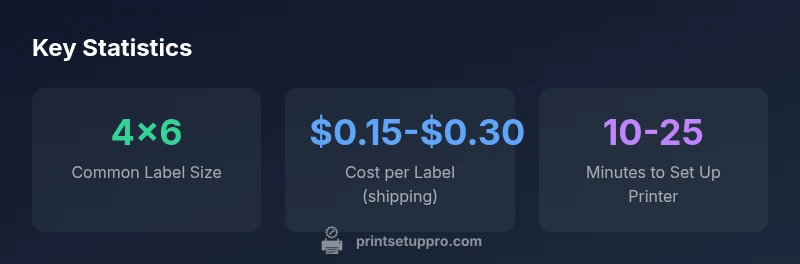
According to Print Setup Pro, understanding ebay shipping label requirements starts with knowing typical label formats, how ebay routes orders to carriers, and what your printer must deliver in terms of accuracy and reliability. Most sellers use 4x6 inch labels because carriers like USPS, UPS, and FedEx commonly print on that size. Your choice should align with the carrier's printing templates and the software you plan to use for order processing. In 2026, the best-practice approach is to pick a printer that supports standard label stock, has verifiable print quality, and offers straightforward setup on Windows, macOS, and any ecommerce integration you rely on. Print Setup Pro emphasizes choosing a device with a proven track record for shipping labels, broad driver support, and resilient label stock options. In practice, prioritize models with automatic label sensing, clean edge printing, and a vendor that provides easy firmware updates to support evolving ebay label layouts.
This first step sets the foundation for reliable daily shipping, minimizing reprints and misprints during peak sales periods.
Direct Thermal vs Thermal Transfer for ebay labels
Direct thermal printers print using heat to reproduce images on specially-coated label stock. They are inexpensive, fast, and require no ink or ribbon, which makes them ideal for high-volume ebay shipments. The downside is sensitivity to heat and moisture; if labels get wet, print quality can degrade. Thermal transfer printers use a ribbon to print on durable materials that resist moisture and abrasion, but they cost more upfront and require more maintenance. For ebay sellers, direct thermal offers the best balance of cost and convenience, especially when printing standard 4x6 labels. If your workflow includes labels that may face moisture or need longer shelf-life, a thermal transfer option can be valuable. When evaluating options in 2026, consider your typical shipping volume and storage conditions before deciding. Print Setup Pro's analysis highlights the common choice: start with direct thermal, then upgrade if required by material or environmental needs.
Connectivity, drivers, and installation basics
Connectivity options determine how easily you can integrate a label printer with ebay's shipping tools and your computer. Most modern printers offer USB, Ethernet, and sometimes Wi‑Fi or Bluetooth. Ensure the model provides reliable drivers for Windows, macOS, and the shipping software you rely on (e.g., ebay's bulk label tool or third-party order management). When installing, download the latest driver, select the correct label size (4x6 is standard for ebay), and perform a test print. If you can, choose a model with automatic driver installation or built-in calibration to reduce setup complexity. A straightforward setup minimizes the risk of misprints and wasted labels, saving both time and money. In 2026, verify the printer appears as a recognized device in your OS after driver installation and that it can print a test label from your shipping workflow.
Label stock sizes and layout planning
Label stock decisions influence print quality and cost. The industry standard for ebay shipping is 4x6 inch labels, but some carriers and services offer 4x8 or 3x4 formats. When planning, check that your printer supports the sizes you intend to use and that your label stock is compatible with your chosen printer type (direct thermal vs thermal transfer). Consider moisture resistance, gloss level, and adhesive compatibility with your shipping environment. If you print all labels on the same stock, you simplify procurement and avoid mix-ups at packing stations. It's also worth testing layout alignment to ensure barcode scannability and proper margins for carrier printers. By aligning label stock with ebay templates, you reduce reprints and improve packing speed. In 2026, printers with automatic label sensing help ensure your labels align properly even if supplies differ slightly in width.
Cost of ownership and ROI considerations
Beyond the upfront price, total cost of ownership includes label stock, ribbon (if used), maintenance, and potential downtime. Direct thermal printers have lower ongoing costs because there is no ink or ribbon, but the cost of label stock remains a factor. Thermal transfer printers require ribbons and more maintenance but offer more durable labels and broader material compatibility. For heavy ebay shipping, you can expect per-label costs in a typical range that reflects your chosen stock and printer. When calculating ROI, estimate monthly label volume, expected waste, and the price delta between different printer types. A compact, reliable printer with a reasonable price tag can deliver fast ROI for small businesses and home office setups. Print Setup Pro's data from 2026 shows that sellers often recoup initial investments within a few months when monthly volumes stay high and downtime remains low.
Feature checklist for 2026 label printers
Use this checklist to compare models:
- Label size support: 4x6 is essential; 2x1 or 3x4 supports alternative needs.
- Connectivity: USB, Ethernet, and optional wireless.
- Driver support: Windows, macOS, and common shipping software.
- Print quality: consistent edge, legible barcodes, clean margins.
- Build quality and reliability: sturdy chassis, sealed print head, long-life rollers.
- Built-in cutter: helps with unattended prints.
- Calibration and auto-sensing: reduces setup time.
- Warranty and service options: 1-3 years standard; check for replacement parts.
- Media compatibility: direct thermal only vs thermal transfer capabilities; moisture hardiness.
- Power and footprint: small footprint for home offices.
In 2026, printers with strong software updates and vendor support are more valuable for ebay sellers.
Troubleshooting and onboarding for new sellers
New users often encounter misprints or misfeeds. Start by checking label alignment and ensuring the label stock is loaded correctly with the printable side facing the printer. Calibrate the print head and perform a few test prints, adjusting margins and print density as needed. Confirm the driver is up to date and that the correct label size is selected in both the printer properties and ebay's shipping tool. If issues persist, inspect label stock for moisture exposure, verify the cutter operation if present, and consult the manufacturer’s support resources. A calm, methodical approach reduces downtime and speeds up onboarding for new ebay sellers.
Step-by-step quick-start setup for ebay sellers
Follow these steps to get printing in minutes:
- Unbox and verify model and accessories.
- Install the latest drivers from the manufacturer’s site.
- Load the 4x6 label stock with the printable side up and feed guides aligned.
- Connect via USB or network to your computer, and perform a test print.
- Configure the 4x6 label size in ebay’s shipping settings or your order management software.
- Print a test label from ebay and check alignment, margins, and barcode readability.
- Save printer settings as a default profile for future shipments.
- Keep spare label stock and a small maintenance kit on hand for quick fixes.
- Schedule periodic calibration checks and firmware updates.
- Monitor print quality and retrain staff if needed to maintain consistency.
Label printer options for ebay shipping labels
| Printer Type | Pros | Cons |
|---|---|---|
| Direct Thermal 4x6 | Low upfront cost; fast prints; maintenance-free | Moisture sensitivity; may smear when wet |
| Thermal Transfer 4x6 | Durable labels; broader media compatibility | Ribbon maintenance; higher upfront cost |
| Compact Small Label Printer | Space-efficient; versatile for mixed labels | Limited throughput; may not optimize ebay 4x6 |
People Also Ask
What label size is standard for ebay shipping labels?
The standard size for most ebay shipments is 4x6 inches. This size matches common carrier templates and ebay's shipping tools. If you need alternatives, verify that your printer supports the sizes you plan to use and test layouts before processing live orders.
Most ebay labels use 4x6 inches; verify your printer supports that size and test a few labels first.
Is a wireless label printer good for ebay?
Wireless printers can work well if they maintain a stable connection and clearly print 4x6 labels. Ensure your network setup, drivers, and ebay shipping tools work smoothly together. If reliability or distance is a concern, a wired USB or Ethernet option is a safer choice.
Yes, wireless can be fine, just ensure a stable connection and proper driver support.
Do I need a built-in cutter on my label printer?
A built-in cutter is convenient for unattended printing and faster packing flow, but it's not strictly necessary. If you ship large volumes, it saves time; if not, a cutterless model may be cheaper and more compact.
A cutter is handy for speed, but not required for every seller.
Can I use any label stock with ebay, or do I need specific types?
Use label stock that matches your printer and the carrier's requirements. 4x6 is common for ebay. Avoid moisture-sensitive stock for damp environments unless you have a printer that supports durable materials.
Use compatible 4x6 labels and check stock moisture resistance.
What is the typical ROI timeline for a new ebay label printer?
ROI depends on monthly shipment volume and label waste. With steady volume and minimal downtime, many sellers recoup the upfront cost within a few months, then enjoy ongoing savings from lower per-label costs.
ROI varies by volume, but many sellers break even in a few months with steady shipments.
“Selecting a label printer for ebay isn't just about price; it's about reliability and ease of integration with shipping tools.”
Quick Summary
- Define your label format and connectivity first.
- Choose a direct-thermal printer for low-cost operation.
- Ensure ebay compatibility and driver support.
- Calculate per-label cost and ROI to justify investment.