Notebook Paper in a Printer: Safe Use and Alternatives
Discover if notebook paper can safely pass through a printer. This guide explains risks, when to avoid it, and practical alternatives for home or office printing.


Notebook paper is usually not printer-safe. In most cases it can cause jams, smearing, and feed issues that may require service. This guide explains when you can use it for very light tasks, but the safer choice remains standard printer paper. For testing, start with unlined, plain white sheets and limit runs to a single page.
Why notebook paper is not printer-safe
Notebook paper is designed for handwriting and often features lines,Variable weight, and a coated or textured surface that isn't optimized for high-speed printer feeds. The irregularities can cause the feed rollers to grab inconsistently, leading to jams, double-feeds, or skipped pages. In laser printers, the surface may heat unevenly, increasing the risk of toner misapplication or smearing. Even if a printer handles notebook sheets once, repeated use can accelerate wear on rollers and guides. For home and small-business users, following manufacturer recommendations is the safest route to reliable prints. According to Print Setup Pro, using notebook paper for routine printing can void warranties in some models and increase service calls. That’s why most people choose standard printer paper for everyday tasks to minimize downtime and maintenance needs.
How notebook paper differs from standard printer paper
Standard printer paper is manufactured for consistent thickness, smooth surfaces, and reliable feeding through modern printers. It typically lacks coatings, lines, and irregular textures that can disrupt feed sensors. Notebook paper often includes lines, perforations, and variable weight across the sheet, which can cause the feed mechanism to misread a sheet, tear edges, or smear ink. Even within the same notebook, sheets may differ noticeably, making it hard to guarantee uniform results across batches. For most devices, the recommended media is plain white copier or printer paper with a standard weight. If you must test, start with plain, unlined sheets designed for printers and avoid using notebook paper for final outputs.
Potential damages and common issues
Jams are the most common problem when notebook paper enters a printer. The uneven thickness and layered surface can cause feeds to stall or slip, damaging rollers over time. Misfeeds can throw the printer into error states, wasting ink or toner and increasing cleaning cycles. In some cases, the lined surface can interfere with optical sensors, leading to incorrect sheet tracking. Repeated use of notebook paper may affect print quality, including skewed pages, inconsistent margins, and waviness in printed text. The safest approach is to print on media explicitly approved by the manufacturer and reserve notebook paper for handwriting or crafts—not for reliable document printing.
Safer alternatives for everyday printing tasks
Use standard printer paper designed for your device. For most home and office tasks, plain white printer/copier paper in the 20 lb (75 g/m²) range provides consistent feeding and clean results for both inkjet and laser printers. If you need to simulate drafts, consider using blank plain white sheets with no lines. For projects requiring higher strength, select a light-weight cardstock or label stock that your printer explicitly supports, and always verify compatibility in the manual. When in doubt, test with a single page before proceeding with a larger print run.
If you must test: best-practice steps
When you need to test printer behavior with notebook-like media, start by verifying the model’s official media list and weight specifications. Prepare a plain test document with minimal graphics to reduce drying time and rolling resistance. Load standard printer paper first to establish a baseline, then compare one notebook sheet under close observation. Run a single test page at a time, check alignment, and stop immediately if the sheet resists feeding or causes a jam. Remember: document safety and device warranties favor using approved media.
Handling jams and misfeeds caused by notebook paper
If notebook paper causes a jam, power off the printer, unplug, and carefully remove the sheet without tearing. Gently inspect the feed path and rollers for small fragments. Use a soft brush or compressed air to clear dust; avoid prying with metal tools that could damage sensors. After removal, reload only approved media and run a test page. If the issue persists, consult the printer’s troubleshooting guide or contact support to prevent collateral damage to the internal drive and roller assemblies.
Maintenance and prevention tips to protect your printer
Regular cleaning of the feed rollers and a dust-free printing area help prevent misfeeds. Keep the paper tray clean and dry, and store media in a cool, dry place to prevent curl or humidity-related feeding issues. Use only media that matches the printer’s specifications; update firmware and drivers to ensure optimal feed recognition. Investing a few minutes in setup and routine maintenance reduces the likelihood of jams and improves overall print quality over time. Printing with notebook paper should be avoided for routine tasks to preserve printer health.
Tools & Materials
- Printer manual or manufacturer guidelines(Check recommended paper types and weights for your model.)
- Plain white standard printer paper (unlined, 20 lb / 75 g/m²)(Use clean, smooth sheets.)
- Notebook paper (for comparison, optional)(Only to compare feed differences; not recommended for prints.)
- Test page or document(Include text with varied fonts and simple graphics to test print quality.)
- Lint-free cloth or compressed air(Use to gently remove dust from feed path.)
- Safety glasses (optional)(Only if you work with jam removal in a workshop.)
Steps
Estimated time: 15-40 minutes
- 1
Identify printer guidelines
Open the printer manual or device settings to confirm media types and weights supported by your model. This baseline helps you avoid using media that could cause jams or wear. Always prioritize manufacturer recommendations before experimenting with nonstandard media.
Tip: Refer to the exact paper weight and type recommended by the manufacturer. - 2
Prepare the test document
Create a simple test page with basic text and minimal graphics. A clean, uncluttered layout reduces drying time and minimizes feed resistance compared to busy pages.
Tip: Use a basic font like Arial or Times New Roman in a readable size. - 3
Load standard printer paper
Fill the tray with plain white paper that matches the model’s approved media. Ensure the guides are snug against the stack to prevent skewing or misfeeds.
Tip: Fan the paper slightly to prevent sticking and dust clumps. - 4
Run a small test print
Print one page first to observe feed behavior and print quality. Check for misfeeds, skew, or toner spread before continuing.
Tip: Use a plain test page to keep the setup simple and observable. - 5
Evaluate results
Assess alignment, margins, and ink or toner deposition. If results are clean, you may proceed with a limited batch; if not, stop and revert to approved media.
Tip: Compare with baseline prints on standard media. - 6
Avoid notebook paper for regular tasks
Reserve notebook paper for handwriting or non-print tasks. For every-day printing, rely on media the printer writer explicitly supports.
Tip: Document safety and warranty considerations should guide media choices. - 7
If a jam occurs, follow safe removal steps
Power off, unplug, and remove the jammed sheet gently. Inspect for residue or torn fragments and clear the path before resuming.
Tip: Never force sheets or use sharp tools that could damage sensors or rollers.
People Also Ask
Is it safe to print on notebook paper?
Generally, notebook paper is not recommended for printing due to varying thickness, lines, and textures that can cause jams or inconsistent results. Always check your device’s documentation for approved media.
Notebook paper is usually not recommended for printing. Check your printer manual for approved paper types.
What should I use instead of notebook paper?
Use standard printer or copy paper that matches your printer’s specifications. This media is designed for reliable feeding and consistent print quality.
Stick with standard printer paper for reliable prints.
Can I print on lined notebook paper?
Printing on lined notebook paper is not recommended. The lines and uneven surface can cause feed issues and misalignment.
Avoid lined notebook paper for printing. Use plain paper instead.
Will printing on notebook paper void my warranty?
Some manufacturers may not cover damage caused by non-approved media. Always verify media compatibility in the warranty terms and device documentation.
Check your warranty terms; some media choices can affect coverage.
What should I do if notebook paper jams the printer?
Power off, unplug, and carefully remove the jammed sheet. Inspect the feed path for fragments and resume with approved media.
Turn off the printer and carefully clear the jam.
Are there printers that can handle notebook paper better?
Some devices have wider tolerances or higher-grade feeds, but even then notebook paper is not ideal for regular use. Rely on media recommended by the manufacturer.
Even specialty printers should use manufacturer-approved media.
Watch Video
Quick Summary
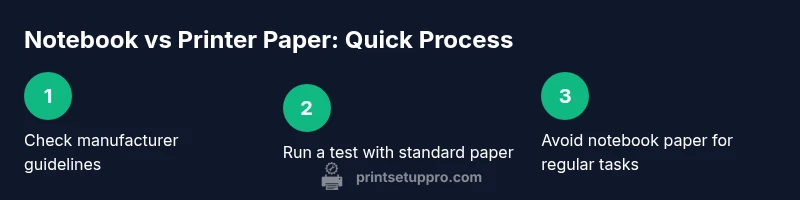
- Avoid notebook paper for routine printing
- Rely on standard printer paper and manufacturer guidelines
- Test cautiously with plain paper before larger runs
- Follow safe jam-removal procedures to prevent damage
- Maintain printer upkeep to prevent feeding issues