Do Printers Use a Lot of Electricity? A 2026 Guide
Learn how much electricity printers actually use in 2026, compare inkjet vs laser models, and pick energy-saving settings for a more efficient home office.


Do printers use a lot of electricity? The short answer is: it depends on the model and how you print. In standby, most printers pull only a few watts, but active printing—especially color and high-speed modes—can spike power use, with laser printers typically showing higher peaks due to the fuser. Overall, energy impact is manageable when you enable sleep modes and duplex printing.
Why do printers use electricity?
Do printers use a lot of electricity? The short answer is that it depends on the model and how you print. The Print Setup Pro team found that most consumer printers draw only a few watts in standby, but their power draw can jump significantly during printing, especially with color jobs or high-speed modes. Energy use also varies by printer type, with laser printers typically peaking during the fusing stage while inkjets draw energy during print head operation. For a typical home office, daily energy use hinges on print frequency, whether you duplex, and how long the device stays awake between tasks. In practice, do printers use a lot of electricity? They can, but the impact is usually manageable when you enable sleep modes and other built-in energy-saving features.
How much electricity do printers use in everyday tasks?
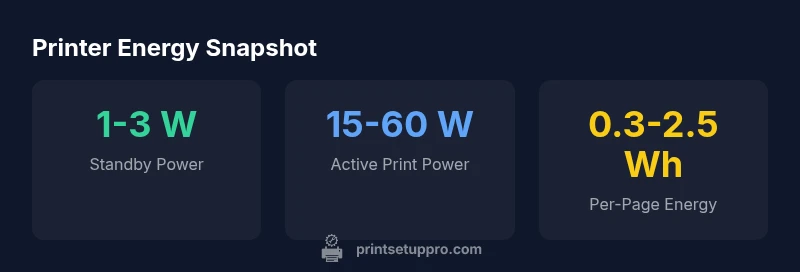
In practice, energy use depends on what you print and how you print it. Standby power is a major factor, with most modern printers drawing between 1 and 3 watts when idle. When you start a print job, power spikes occur and vary by model: inkjet printers typically run in the 15–30 watt range during active printing for text, and 30–60 watts for color output. Laser printers can draw hundreds of watts while the fuser heats up and then settle to a lower level after the page is produced. Those numbers translate to per-page energy costs that are small for simple text and higher for color graphics. The key takeaway is that the footprint is driven by page count, print frequency, and required speed.
Factors that influence energy consumption
Multiple factors shape how much electricity your printer uses. Duplex printing reduces energy by cutting the number of pages, though color duplex can still consume more energy per page than BW simplex. Sleep and auto-off features matter; devices with aggressive wake thresholds save energy when not in use. The duty cycle—how many pages a printer can print reliably each month—affects how often you need to warm up the mechanism. Printing heavy graphics or photos requires more energy due to color channels and higher print head activity. Even connectivity matters: a networked printer may stay awake longer than a direct USB print due to ongoing jobs. Finally, the device’s age and design (fuser, print head, cartridges) influence efficiency, with newer models typically offering better efficiency and smarter energy modes.
Inkjet vs Laser: which uses more energy?
Comparing inkjet and laser printers highlights trade-offs in energy use. Inkjets generally sip energy during standby and are efficient for text and simple graphics at low volumes, but color printing raises energy per page. Laser printers often use more energy during operation because the fuser must stay hot, especially for high-volume color lasers. For light to moderate printing, an inkjet with duplex and a sleep mode can be very energy-efficient. For high-volume printing, a modern color laser with efficient sleep behavior can reduce long-term energy costs, even if it peaks during bursts. In short, the answer to do printers use a lot of electricity depends on usage pattern and model.
Estimating energy costs for a home office
If you want a practical feel for energy costs, start with wattage ranges and page counts. A typical inkjet in standby uses about 1–3 watts, while a monochrome laser spends roughly 1–5 watts idle. Active printing commonly consumes 15–30 watts for inkjets and 300–600 watts for lasers. Using duplex printing reduces pages and energy per page by a meaningful margin, though savings vary with color usage and print density. For a home office producing 50 pages per day, the monthly energy difference between duplex and simplex can be meaningful, especially if most pages are text. Over a year, smarter settings and newer devices can translate into noticeable cost savings.
Practical tips to reduce energy use
To cut energy consumption without sacrificing results, start with practical settings: enable sleep or auto-off when idle, turn off the printer at the end of the day, and use duplex printing whenever appropriate. Use monochrome or grayscale for text-only jobs to reduce color energy costs, and choose draft modes when quality is not critical. Keep the device in a cool, well-ventilated area so it doesn’t work harder to reach operating temperature. Maintain and update firmware to ensure power-management features stay effective. If possible, replace older hardware with a modern, energy-efficient printer that supports automatic sleep and energy-saving defaults.
Buying an energy-efficient printer: what to look for
Energy efficiency is more than a marketing claim. Look for solid sleep modes, an explicit energy star rating, automatic shutoff after inactivity, and efficient duplex capabilities. Check the duty cycle to ensure reliability without excessive idle time. Review specs for active and standby power; lower values are better, especially if you print often. Consider your typical usage—high-volume text, graphics, or photos—and pick a model that aligns with your pattern to minimize energy per page. Finally, read independent reviews for real-world energy performance to validate claimed savings.
Myths and misconceptions about printer energy
A common myth is that all printers guzzle electricity because of the fuser. In reality, standby power is often minimal, and the biggest energy bursts come from printing tasks themselves. Another misconception is that newer printers always consume more energy than older models; in fact, modern machines frequently feature smarter sleep modes that reduce idle draw. Some users assume color printers always cost more to run; energy depends on how often color is used and whether efficient color modes are enabled. Finally, many believe inkjets are always cheaper to operate than lasers; this depends on print volume, color usage, and the specific model’s efficiency.
Choosing the right settings for energy-saving
Beyond choosing the right model, optimizing settings matters. Set duplex printing as the default, enable sleep mode shortly after inactivity, and avoid leaving the device on during long idle periods. Use draft or economy modes for non-critical prints to lower energy per page. If you print in color, select grayscale when possible to reduce color channel energy consumption. Finally, perform periodic maintenance so the printer doesn’t work harder due to clogged nozzles or misaligned heads, which wastes energy and paper.
Energy characteristics by printer type
| Printer Type | Standby Power | Active Print Power (typical) | Notes |
|---|---|---|---|
| Inkjet (mono) | 1-3 W | 15-30 W | Typically efficient for text; color prints higher energy |
| Inkjet (color) | 1-3 W | 30-60 W | Color printing increases energy usage |
| Laser (monochrome) | 1-5 W | 300-600 W | Fuser heating; high peak during print |
People Also Ask
Do printers use a lot of electricity?
Not inherently. Standby consumption is usually low, and energy per page varies by model, print mode, and color usage. The biggest savings come from enabling sleep modes, duplex printing, and avoiding unnecessary color prints.
Printers aren’t always energy hogs. Use sleep modes and duplexing to keep energy low, especially when you print a lot of text.
What factors influence energy consumption the most?
Standby power, active print power, color usage, duplex printing, and how often the printer is kept awake by a network connection all influence energy use. Newer models tend to be more efficient due to better power management.
Key factors are standby power, color printing, and whether you duplex or not.
Is it better to print in black-and-white or color for energy?
Black-and-white prints typically use far less energy per page than color prints. If you can meet your needs with BW text or grayscale, you’ll save energy on most jobs.
BW printing uses much less energy per page than color.
Does duplex printing save energy?
Yes, duplex printing can significantly reduce energy per page by halving the number of pages produced, especially for text-heavy documents. The savings vary with print mode and content.
Duplex printing cuts energy per page, especially for text-only documents.
What features should I look for when buying an energy-efficient printer?
Look for strong sleep modes, auto-off, duplex capability, low standby power, and an explicit energy star rating. Also consider real-world reviews for how models perform under typical workloads.
Seek sleep modes, auto-off, and duplex support when buying.
“Energy efficiency in modern printers comes from smart sleep modes, efficient duplexing, and models designed for real-world use. The biggest gains occur when users adopt these features consistently.”
Quick Summary
- Understand standby vs active printing power.
- Duplexing lowers energy per page significantly.
- Color printing increases energy use more than BW printing.
- Choose sleep/auto-off features to cut idle energy.
- Match printer choice to your typical workload for best savings.