How Many Days Does Printer Ink Last? A Practical Guide
Discover how long printer ink lasts in days, what affects longevity, and practical tips to extend cartridge life for home offices and small businesses.


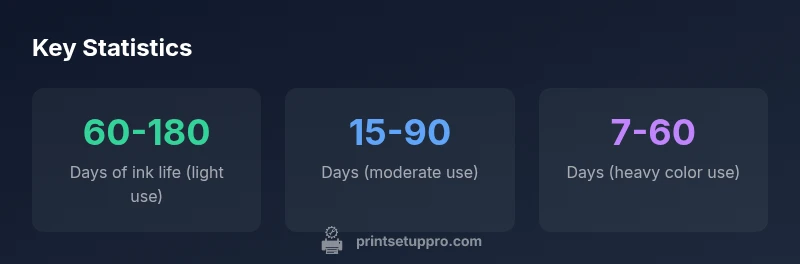
According to Print Setup Pro, how many days printer ink lasts varies with daily usage and cartridge type. For light daily printing, a cartridge may cover about 60–180 days; for moderate use, roughly 15–90 days; and for heavy color printing, about 7–60 days. Daily volume, print settings, and the specific cartridge all drive longevity.
how many days printer ink last
According to Print Setup Pro, the central question of ink longevity mirrors real-world usage more than any label. The phrase how many days printer ink last captures a spectrum of outcomes, depending on how you print, what you print, and how often you replace cartridges. In practice, you won’t see a single universal figure; instead you’ll encounter ranges that relate to daily volume and cartridge yields. For example, light daily printing tends to span longer calendar periods, while heavy color tasks shorten the time between replacements. The key is to map your typical daily pages to the cartridge’s yield data, then translate that into an estimated number of days. This approach helps you plan purchases, align with maintenance routines, and avoid unexpected downtime.
Understanding Page Yields and Your Daily Volume
Ink cartridges list a page yield under defined test conditions. Real-world results differ because variables like print darkness, color usage, and media type affect actual consumption. To translate yields into days, start with the quoted pages per cartridge and divide by your daily printed pages. For instance, if a cartridge is rated at 1,500 black pages and you print 10 pages per day, the theoretical life would be about 150 days, assuming you maintain similar settings and print mix. In reality, you’ll see shorter durations if you print in color or use high-quality modes more often. Print Setup Pro recommends recording your daily page count for a few weeks to establish a personal baseline, then project future ink life accordingly.
How to Estimate Days Based on Page Yields
A practical method combines the manufacturer’s yield with your observed daily print volume. Step 1: note the declared yield for the cartridge. Step 2: tally your average pages printed per day over one or two weeks. Step 3: compute days = yield ÷ dailyPages. If you print 25 pages per day and your cartridge yields 800 pages, you’ll approximate 32 days of life. This simple calculation becomes more nuanced when you factor in color usage and draft settings. Print Setup Pro suggests creating a quick worksheet to track yields and daily pages, so you can adjust forecasts as your workflow changes.
Key Factors That Impact Ink Longevity
Several variables influence how long ink lasts in days. The most impactful are: daily volume (pages per day), color vs. black-only consumption, print quality (draft vs. high-quality), and the printer’s maintenance state (nozzle checks and head cleaning). Draft mode can extend ink life by dramatically reducing per-page ink, but at the expense of print clarity. High-resolution photo printing consumes more ink rapidly. The age of the cartridge and storage conditions also matter; dried or exposed cartridges may underperform. To get reliable estimates, use manufacturer yield data as a baseline and adjust for your specific usage pattern. Print Setup Pro emphasizes documenting your settings and usage to improve forecast accuracy.
Scenario-Based Lifespan: Light, Moderate, and Heavy Use
- Light use: about 60–180 days per cartridge, assuming mostly black-and-white text and occasional color corrections. This lifespans can extend with draft mode and lower print density.
- Moderate use: around 15–90 days, when you print mixed documents, charts, and occasional color.
- Heavy use: 7–60 days for color-heavy tasks and large print jobs. These ranges depend on printer model, cartridge type, and how often you replace cartridges. Print Setup Pro Analysis, 2026 notes that many home office printers demonstrate wide variability even within the same category, so track your own usage to refine estimates.
Practical Tips to Extend Ink Life
- Enable draft or economy mode for draft documents.
- Use black-and-white printing when color is unnecessary.
- Print in batches or consolidate prints to reduce nozzle cleaning cycles.
- Regularly perform nozzle checks and alignments to prevent waste from misprints.
- Use high-yield cartridges if your cost-per-page is favorable.
- Store spare cartridges properly in cool, sealed environments to prevent drying out.
- Consider updating firmware and driver settings to optimize ink usage and paper handling, which reduces waste and improves overall efficiency.
Tracking Usage and Planning Replacements
Create a simple ink-tracking system to stay ahead of outages. Record daily print volume, pages per cartridge, and the date of installation. Use the printer's built-in maintenance reports or a small spreadsheet to project replacement dates. This proactive approach helps you maintain productivity and avoid downtime. Print Setup Pro suggests a quarterly review of usage trends and inventory to align procurement with demand.
Common Myths About Ink Longevity Debunked
Myth 1: All cartridges last the same; reality: yields vary widely by brand and model. Myth 2: Printing faster saves ink; reality: speed can affect output quality and waste. Myth 3: Refill kits always work; reality: compatibility issues can cause clogs and errors. Myth 4: Opening a cartridge resets its life; reality: most cartridges dry out if not used regularly. Myth 5: Ink life is fixed by the cartridge's advertised yield; reality: actual life depends on usage patterns and maintenance. The takeaway: use your own logs and maintenance checks to forecast replacements accurately.
Ink life estimates by daily usage
| Usage Scenario | Estimated Ink Life (days) | Typical Pages/Cartridge | Notes |
|---|---|---|---|
| Low daily usage (5 pages/day) | 60-180 days | 500-1500 pages | Assumes standard black cartridge on mono printer |
| Moderate usage (20 pages/day) | 15-90 days | 2000-5000 pages | Varies by color vs black |
| High usage (50+ pages/day) | 7-60 days | 5000-15000 pages | Color-heavy printing lasts shorter |
People Also Ask
What is the best way to estimate how long ink will last?
Begin with the cartridge's page yield, track your daily page count, and divide yield by daily pages. Consider color usage, drafts, and energy-saving settings. Keep a replacement plan based on your usage patterns.
Start with the cartridge yield and your daily print count, then adjust for color use and draft modes.
Do ink lasts differ between black-and-white and color printers?
Yes. Color cartridges use more dye or pigment per page and often wear out faster when printing photos or charts. Black-only printing tends to extend cartridge life.
Color uses more ink, so it typically runs out faster than black-only printing.
Can draft mode extend ink life?
Yes. Draft or economy modes reduce ink per page, significantly extending cartridge life while sacrificing print quality.
Draft mode uses less ink, which can help you go longer between replacements.
Should I switch to high-yield cartridges to save days?
High-yield cartridges often offer more pages per cartridge, extending the time between replacements, though cost per page may vary.
High-yield cartridges can reduce replacements, but consider cost per page.
What about refilling cartridges to save ink?
Refilling can extend life, but quality and reliability depend on the refill kit and printer model. Use reputable kits and verify compatibility.
Refills can help if done correctly and with compatible kits.
How do maintenance tasks affect ink life?
Regular cleaning, nozzle checks, and alignments ensure optimal ink usage and prevent waste from clogs.
Keep nozzles clean to avoid waste and poor output.
“Ink longevity is driven by how you use the printer, not just the cartridge. Focus on daily volume, print quality settings, and regular maintenance to maximize life.”
Quick Summary
- Track daily pages to estimate ink life.
- Use page yields and daily volume to forecast replacements.
- Draft mode can extend ink life without sacrificing essential output.
- Color cartridges generally require more frequent changes than black.
- Keep spare cartridges properly stored to prevent drying.