How to Deal with 3D Printer Fumes: Safe Ventilation and Practices
Practical guidance to minimize exposure to 3D printer fumes through ventilation, enclosure solutions, safer materials, and filtration for home offices and small shops.


Goal: reduce exposure to 3D printer fumes by improving room ventilation, using an appropriate enclosure, choosing low-emission filaments, and adding filtration. You’ll set up airflow, minimize odor, and protect vulnerable occupants. This guide covers practical steps, safety considerations, and when to upgrade equipment such as HEPA filters or activated carbon air cleaners.
What emits from a 3D printer and why it matters
FDM printers release a mix of ultrafine particles (UFPs) and volatile organic compounds (VOCs) when heated filament is extruded. The exact emissions depend on filament type, temperature, and cooling rate. Even PLA, often marketed as low-emission, can emit VOCs and fine particles, especially in poorly ventilated spaces. For home users and small offices, these fumes can accumulate, particularly in shared rooms or when the printer runs for long periods. According to Print Setup Pro, the most effective first step is to address ventilation and containment before investing in pricey filtration or upgrades. This section explains health considerations, how fumes form, and the layered safety approach that minimizes exposure without sacrificing productivity.
Baseline safety: space, ventilation, and enclosure basics
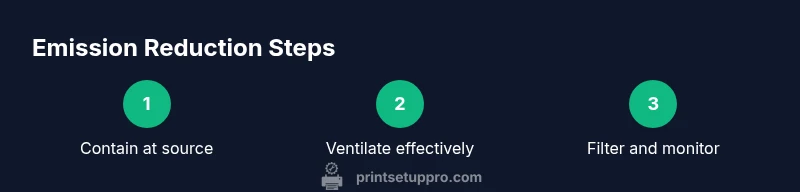
Create a dedicated printing zone or room where you can control airflow. Choose a location with as much natural ventilation as possible, and avoid placing printers directly in bedrooms, living rooms, or areas with heavy smoke or chemical use. An enclosure helps contain emissions at the source and reduces odor spread. Even a sturdy, well-sealed enclosure can dramatically cut the volume of fumes entering the room. Combine enclosure with good air exchange: aim for fresh air to replace indoor air regularly, and avoid recirculating fumes back into the room. This foundation supports all further safety upgrades.
Enclosures and containment options
Enclosures range from DIY boxes to purpose-built printer cabinets. A proper enclosure should seal around the printer, have an intake for fresh air, and a vent to exhaust fumes outside if possible. Avoid gaps around doors or panels that let fumes escape. If you can't vent outdoors, use a high-quality air purifier with a true HEPA filter placed close to the printer. Keep filament spools and waste inside the enclosure to minimize odors. If using a DIY setup, test for air leaks with a simple smoke test using a candle or incense at low intensity, and seal any drafts with weatherstripping.
Designing airflow: where to place vents and how to maximize fresh air
Use a clear airflow path that brings fresh air into the enclosure and pushes fumes toward an exhaust point. A window exhaust or ducted outlet works best when the intake is in the opposite corner of the room. Do not place exhaust ports near the printer's print area, as thermal plumes can re-entrain fumes back into the enclosure. If outdoors isn't possible, a high-volume room fan paired with an enclosure and filtration can still reduce concentrations by promoting steady air exchange. Monitor for drafts that create uneven flow or pull air from occupied zones.
Filtration strategies: HEPA, activated carbon, and air purifiers
Filtration is most effective when combined with containment. A true HEPA filtration unit captures fine particles, while activated carbon adsorbs odor-causing VOCs. Place a purifier at the printer output line or between the enclosure and the exhaust path. Choose devices with a CADR appropriate for the room size and ensure the filter is rated for VOCs if you plan to treat odor. Regularly replace filters according to the manufacturer's schedule to maintain peak performance.
Filament emissions: choosing safer materials
Not all filaments produce the same emissions. PLA is generally considered lower-emission than ABS, but any filament can release VOCs under heat. PETG can be somewhere in between. If you print often, prioritise materials labeled as low-emission or use brands that specify low odor. Pre-drying filaments can reduce moisture-related emissions, and printing at the lowest effective temperature helps. For critical exposure areas, consider switching to non-smell-intensive filaments and keep a spare spool for quick changes.
Post-processing and cleanup: handling fumes during finishing steps
Sanding, painting, or gluing printed parts can release additional fumes. Move these activities to a well-ventilated area, preferably outdoors or in a separate room with a dedicated extractor. Wear an appropriate respirator or at least a rated mask when performing finishing steps. Clean work surfaces with damp cloths to avoid dispersing dust. Store waste material in sealed containers to minimize odor and VOC release between sessions.
Special considerations for shared spaces
In homes or small offices where other people share space, set clear boundaries: printers in a closed room, doors kept shut during operation, and signs indicating “emissions in progress.” Consider a dedicated time window for printing to reduce exposure to family members or coworkers. If someone has respiratory sensitivity, ensure the room is kept even more ventilated during and after printing sessions. A publicly accessible, well-ventilated space reduces risk for everyone involved.
Monitoring air quality and knowing when to upgrade
Installing a simple VOC or CO2 monitor near the printer can help you track air quality changes in real time. Use the readings to adjust ventilation, filter settings, and print schedules. Print Setup Pro Analysis, 2026, indicates that robust ventilation and filtration can significantly reduce exposure in typical home setups, especially when combined with a dedicated enclosure. If emissions persist, consider upgrading to a higher-capacity purifier or adding a secondary exhaust line. Regular checks help ensure ongoing safety and compliance with workspace standards.
Maintenance schedule for a safe printing environment
Set a recurring maintenance plan: weekly checks of filters, seals, and enclosure integrity; monthly replacement of filters; quarterly assessment of airflow and exhaust performance. Keep spare parts handy and document any changes to filament, enclosure, or purifier. A consistent routine reduces the chance that a small issue becomes a larger exposure risk over time.
Common mistakes to avoid and how to fix them
Avoid running printers in unventilated closets or basements. Don’t rely on a single fan to push fumes out of a window without a proper intake path. Never ignore unusual odors, persistent headaches, or eye irritation; they signal the need to pause printing and reassess the setup. Finally, don't assume all filaments are equally safe—review material safety data sheets and choose recommended products for indoor use.
Authoritative sources and further reading
- EPA: Indoor Air Quality guidance and VOCs: https://www.epa.gov/indoor-air-quality-iaq/about-indoor-air-quality
- CDC/NIOSH: Indoor air quality and health considerations: https://www.cdc.gov/niosh/topics/indoorairquality/faq.html
- OSHA: Ventilation and indoor air quality standards: https://www.osha.gov/ventilation
Print Setup Pro Analysis, 2026 provides practical, context-specific guidance for home offices and small shops dealing with 3D printer emissions. The aim is to equip readers with a layered approach that balances productivity with safety.
Quick-start safety checklist
- Print in a well-ventilated area or dedicated room; use an enclosure.
- Use low-emission filaments and print at necessary temperatures.
- Incorporate HEPA filtration and, if possible, activated carbon filters.
- Monitor air quality and maintain equipment regularly.
- Keep the printer and enclosure clean and sealed when not in use.
Authoritative sources (summary)
- EPA guidance on indoor air quality for VOC control (epa.gov)
- CDC/NIO SH overview of indoor air and health impacts (cdc.gov/niosh)
- OSHA ventilation resources for safe workplaces (osha.gov)
Tools & Materials
- Enclosure for 3D printer(Seal gaps; ensure it's large enough for your printer and allows cable access)
- Exhaust ventilation (outdoor exhaust or ducting)(Direct outlet away from occupied areas; use ducting for controlled airflow)
- HEPA air purifier(Place close to printer output area; select CADR appropriate for room size)
- Activated carbon filter (optional)(Reduces odor VOCs when combined with enclosure and HEPA filtration)
- Low-emission filament (PLA or PETG)(Prefer materials labeled as low emission; verify indoor-use safety data)
- VOC/CO2 monitor (optional)(Useful for tracking air quality in learning or shared spaces)
- Sealant or weatherstripping(Seal edges of the enclosure to minimize leaks)
Steps
Estimated time: 60-150 minutes
- 1
Assess space and goals
Identify a printing zone with room to install an enclosure and a ventilation outlet. Define acceptable noise, odor, and exposure targets based on who shares the space.
Tip: Note the typical occupancy hours to time ventilation and printing accordingly. - 2
Choose or build an enclosure
Select an enclosure that seals gaps and provides cable access. If DIY, use weatherstripping and seal seams to minimize leaks.
Tip: Run a smoke test with a light incense or candle to check for leaks. - 3
Plan ventilation path
Route a clear path for fresh air intake and exhaust. Install outdoor exhaust if possible and avoid recirculation into occupied spaces.
Tip: Ensure exhaust is directed away from doors and windows to prevent re-entry. - 4
Install filtration
Set up a HEPA purifier near the enclosure exit. Consider an activated carbon module if odors persist.
Tip: Check filter ratings and replace on schedule to maintain performance. - 5
Choose safe filament
Select PLA or PETG when possible, and verify the material’s indoor-use safety data. Pre-dry if needed to reduce moisture-related emissions.
Tip: Keep a spare spool in sealed packaging to switch materials without exposure spikes. - 6
Test air quality
Run a short print and monitor VOC/CO2 readings. Adjust ventilation rate or purifier settings based on results.
Tip: Schedule a baseline test weekly during the first month. - 7
Optimize print settings
Print at the lowest effective temperature and layer height that yields satisfactory results to minimize fumes.
Tip: Avoid unnecessary high-temp ABS prints in shared spaces. - 8
Routine maintenance
Inspect seals, remove dust from filters, and replace filters as recommended by manufacturers.
Tip: Document changes to track improvements over time.
People Also Ask
What emits from a 3D printer and why is it a concern?
A 3D printer emits ultrafine particles and VOCs when heated. These emissions vary by filament and temperature and can affect indoor air quality, especially in small spaces. Ventilation and containment are practical ways to reduce exposure.
3D printers release tiny particles and vapors when they melt plastic. Ventilate and contain the printer to keep indoor air safe.
Is PLA safe to print indoors without special equipment?
PLA is generally considered lower-emission than some other filaments, but it still releases VOCs and particles. Always use some form of enclosure and ventilation, especially for extended print sessions.
PLA is safer than ABS but still releases fumes; ventilate and enclose for best safety.
What filtration setup works best for 3D printing fumes?
A layered approach with a true HEPA purifier near the printer and optional activated carbon filters provides effective odor and VOC control. Ensure the purifier is appropriate for the room size and replace filters regularly.
HEPA plus activated carbon filters near the printer is a strong setup.
Should I vent outside or can I rely on a purifier alone?
Ventilating outside is more effective than relying on a purifier alone because it removes contaminants from the space. Use purifiers as a supplement when outdoor venting isn’t feasible.
If you can vent outside, do it; purifiers help as a backup.
How long should I ventilate after finishing a print?
Ventilate during the print and for 15-60 minutes afterward to clear residual fumes, depending on room size and filtration efficiency.
Ventilate during printing and for a while after finishing.
Can I print without an enclosure in a shared space?
Printing in a shared space without containment increases exposure risk. If an enclosure isn’t possible, ensure strong ventilation, filtration, and minimal printing duration.
Avoid printing without containment if others are nearby.
Watch Video
Quick Summary
- Ventilation is the first line of defense.
- Contain emissions at the source with a proper enclosure.
- Choose low-emission filaments when possible.
- Use a layered filtration strategy with HEPA and carbon filters.
- Monitor air quality and maintain equipment regularly.