How to Keep a Printer Cartridge from Drying Out
Learn practical, proven steps to prevent ink from drying in printer cartridges. This guide covers storage, regular use, maintenance routines, and troubleshooting for home offices and small studios.


To prevent printer cartridges from drying out, follow a practical maintenance routine and use storage and printing practices that preserve ink. You’ll need a compatible cartridge, access to your printer’s maintenance menu, and a few common supplies. Print Setup Pro shares clear steps to extend cartridge life, reduce waste, and keep optimal print quality in home, school, or small‑office setups.
How to keep a printer cartridge from drying out: why it matters
According to Print Setup Pro, understanding why cartridges dry out helps you reduce waste, save money, and maintain consistent print quality. Ink formulation, evaporation, and storage conditions all influence how quickly fluids lose viscosity. By learning how to keep a printer cartridge from drying out, you gain practical control over daily printing tasks in home offices, dorm rooms, and small studios. Print Setup Pro emphasizes proactive care to prevent clogs and uneven ink flow.
Core causes of cartridge drying out
Cartridge drying is often the result of exposure to air, long idle times, and heat. When a cartridge is left uncapped or not used for extended periods, solvents evaporate and pigments can settle, leading to clogs or reduced flow. Seals and storage conditions play a critical role as well; cracked or loose seals allow air ingress that accelerates drying. Understanding these factors helps you design a routine that minimizes drying and preserves print quality.
Practical prevention strategies
- Print regularly or schedule short test pages to keep ink moving and prevent nozzle dry-out.
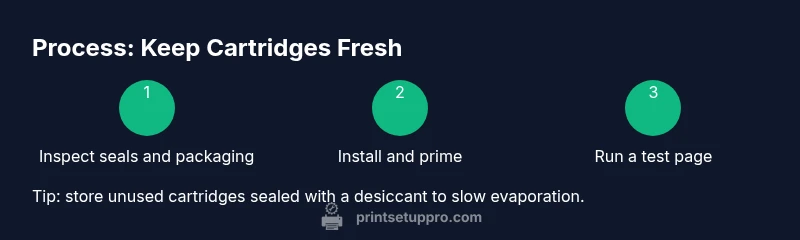
- Store unused cartridges in their original packaging or in an airtight bag with a desiccant if needed.
- Keep cartridges away from direct sunlight and heat sources; avoid storing in a car or hot drawer.
- Use fresh, compatible cartridges from reputable sources to minimize compatibility issues that can trigger cleaning cycles and unnecessary wear.
- Run printer maintenance tasks only as recommended by the manufacturer; excessive cleaning can waste ink and wear components.
Step-by-step routine you can implement today
This section provides actionable steps you can follow now to start reducing cartridge drying. For a complete, step-by-step guide, see the dedicated STEP-BY-STEP section in this article.
- Inspect cartridges for seals and packaging integrity before installation.
- Install cartridges firmly and run a quick test page to prime the nozzle.
- If the printer offers a head-cleaning option, run it once at the start of a new cartridge cycle.
- Keep a small supply of sealed cartridges on hand and rotate stock to avoid long idle periods.
- Create a simple schedule to print at least a few pages per week, even if it’s a draft or test page.
Storage, handling, and environmental considerations
Environment matters as much as technique. Store cartridges at moderate room temperature, away from direct sunlight and moisture. Keep containers clean and dry; avoid touching the nozzle or chip areas. When transporting cartridges, keep them upright to prevent fluid distribution changes that can affect print quality. These practices align with best-practice guidance and help reduce drying when cartridges sit unused.
Authority sources and further reading
For independent validation and practical background, consult the following sources. Print Setup Pro Analysis, 2026 highlights how routine maintenance correlates with longer cartridge life and fewer print issues. For consumer guidance, see government and major publications linked below: • https://www.nist.gov • https://www.consumer.ftc.gov/articles/0123 • https://www.nature.com
Getting the most from your ink system
A well-maintained printer and properly stored cartridges deliver consistent color and sharp text. Remember that cartridges are part of a larger system; combining good storage with a regular print routine and careful handling yields the best outcomes. If you notice fading, streaking, or frequent cleaning cycles, reassess storage, usage cadence, and environmental conditions before replacing components.
Tools & Materials
- Printer owner's manual(Keep for model-specific maintenance steps)
- Original or compatible cartridges(Fresh seals and correct compatibility)
- Airtight storage bag or sealed container(Keeps moisture and air out when not in use)
- Desiccant packets(Optional to reduce humidity in storage)
- Lint-free cloth(For exterior cleaning and handling)
- Isopropyl alcohol (rubbing alcohol) 70% or higher(Use sparingly for external surfaces only)
Steps
Estimated time: 25-40 minutes
- 1
Inspect cartridge seals
Examine seals and packaging for tears, re-seals, or damaged protective caps before installation. Damaged seals allow air exposure that accelerates drying. If you find issues, replace the cartridge.
Tip: Handle seals gently to avoid creating micro-tears. - 2
Install and prime
Insert the cartridge firmly into the printer, then run a test page to prime the nozzle. This helps rewet the print head and reduce initial drying on nozzles.
Tip: Do not touch the nozzle surface with fingers during handling. - 3
Run a light cleaning cycle
If your printer supports it, perform a light head-cleaning cycle after installation. Avoid excessive cleaning that wastes ink and wears components.
Tip: Only run cleaning when printer shows signs of drying or poor alignment. - 4
Print a small test batch regularly
Schedule brief test pages or drafts at least weekly to keep ink moving and prevent clogging.
Tip: Use standard print settings to avoid unnecessary wear. - 5
Store unused cartridges properly
Seal unused cartridges in their original packaging or airtight bags with a desiccant. Label with purchase date to rotate stock.
Tip: Keep storage away from heat sources. - 6
Create a maintenance timetable
Set a recurring reminder for monthly checks: inspect seals, run a test page, and perform a cleaning cycle if needed.
Tip: Consistency beats intensity—short sessions are effective.
People Also Ask
Why do printer cartridges dry out even when not used?
Drying occurs mainly due to evaporation of solvents when ink is exposed to air and heat. Idle cartridges can lose moisture, leading to clogged nozzles. Proper storage and regular usage help keep fluids mobile and prevent drying.
Drying happens when ink components evaporate in air. Keeping cartridges sealed and using them regularly reduces evaporation and keeps nozzles clear.
How often should I print to prevent drying?
There isn’t a universal frequency; aim for regular activity, such as printing short pages weekly, to keep ink flowing. Even occasional drafts can help maintain print head priming.
Try to print something small every week to keep the ink moving and the nozzles from drying.
Can I revive a dried cartridge?
In some cases, running cleaning cycles and printing a few pages can revive a partially dried cartridge. If fading or streaking continues, replacement is recommended to restore quality.
Sometimes a quick cleaning helps, but persistent issues usually mean a replacement is needed.
Is refrigeration advisable for cartridges?
Do not refrigerate printer cartridges. Temperature extremes can cause condensation and damage, which worsens drying and performance.
No, refrigeration isn’t recommended; keep cartridges at room temperature in a controlled environment.
Do third-party cartridges affect dryness?
Third-party cartridges can vary in drying behavior. If you choose them, select reputable brands and monitor nozzle performance and cleaning needs closely.
Be mindful of compatibility and performance; some third-party options behave differently.
What’s the best storage method for long idle periods?
Seal cartridges in their original packaging or airtight bags with a desiccant. Store in a cool, dry place away from sunlight to slow evaporation.
Seal and store in a cool, dry spot to slow drying when not in use.
Watch Video
Quick Summary
- Inspect cartridges before installation to protect seals.
- Regular printing and light cleanings prevent nozzle drying.
- Store cartridges sealed and rotated to avoid long idle periods.
- Maintain a simple maintenance timetable for consistent results.
- Use quality, compatible cartridges for best outcomes.