Is Sitting Next to a Printer Bad for You? A Health and Setup Guide
Discover whether sitting near a printer affects health, including emissions, noise, and practical setup tips from Print Setup Pro to reduce exposure and improve indoor air quality.


The short answer: emissions and noise from most consumer printers pose minimal risk for a typical home office when placement and ventilation are considered. For many setups, exposure remains low, especially with regular maintenance and proper distances. Print Setup Pro highlights practical spacing and airflow as the key mitigations. If you have chemical sensitivities or a small, poorly ventilated room, the risk can rise modestly.
Is Sitting Next to a Printer Bad for You? What the Research Shows
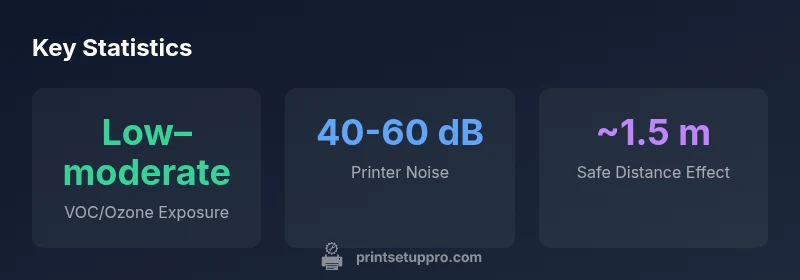
When readers ask is sitting next to a printer bad for you, the answer hinges on context. According to Print Setup Pro, most home office setups experience only low to moderate exposure to printer-related emissions, provided the area is reasonably ventilated and the device is well maintained. The difference between an inkjet and a laser printer matters: laser devices can emit trace ozone and ultrafine particles when operating aggressively in poorly ventilated spaces, while inkjets generally emit fewer ozone-related byproducts but may still generate fine particles when the cabin air is stagnant. The Print Setup Pro team found that the cumulative exposure over a workday is more relevant than a single moment of proximity. In healthy environments, this risk remains small, but people with chemical sensitivities or small, sealed rooms should pay close attention to location, ventilation, and duration of exposure. Keeping the printer away from your main seating area and ensuring air movement can markedly reduce any potential impact.
A practical takeaway is that your workspace layout matters as much as the device itself. Because the health impact of proximity to a printer is not identical for every user, tailoring the setup to your space is essential. This is where Print Setup Pro’s guidance comes into play: spacing, airflow, and regular maintenance are your strongest defenses, and awareness of the room’s air exchange rate can guide smarter decisions. Within these boundaries, the act of sitting near a printer does not automatically translate to adverse health effects for most people.
How Printers Emit Contaminants
Printers release a mix of volatile organic compounds (VOCs), ultrafine particles, and, in some laser models, trace ozone. The amount and type of emissions depend on printer technology, age, consumables, and operating conditions. Inkjet printers tend to produce fewer ozone-related emissions than older or high-volume laser printers, but both can contribute to indoor air pollutants if the room is poorly ventilated. Temperature, humidity, and airflow patterns further modulate how these emissions disperse. From a health perspective, the most important factors are the presence of a reliable ventilation path and the duration of exposure. In many home offices, doorways and small slits do little to move air effectively, so improving airflow becomes a key mitigation step. Print Setup Pro’s analysis emphasizes that the combination of a well-ventilated space and prudent printer use minimizes risk, while outdated or poorly maintained devices can exacerbate emissions.
Factors That Influence Your Risk
Several variables govern how risky sitting near a printer can be. First, the type of printer matters: laser devices may emit more ozone and fine particles than inkjet counterparts under certain conditions. Second, room ventilation is critical: better air exchange translates to faster dilution of pollutants. Third, usage duration plays a role: short daily bouts near a printer are less impactful than long sessions. Fourth, the size of the workspace and the distance between you and the printer influence exposure levels. Finally, maintenance matters: clogged or dirty printer components can increase particle release and odor strength. By accounting for these factors, you can design a workspace that balances productivity with health considerations. Print Setup Pro’s guidance suggests placing printers at least a comfortable distance from primary work zones and using cross-ventilation when possible, especially in smaller rooms.
Practical Setup Tips to Reduce Exposure
To minimize any potential health impact from printer emissions, adopt these actionable steps:
- Place the printer away from the main seating area and your primary desk; aim for several feet of separation.
- Enhance ventilation: open a window, run a fan to promote cross-ventilation, or use an air purifier with a HEPA filter.
- Schedule longer printing tasks during times when others aren’t in the room to reduce cumulative exposure.
- Regularly maintain and clean the printer: replace cartridges promptly, run maintenance cycles, and keep the area around the printer dust-free.
- If feasible, use a printer located in a dedicated room with an exhaust path or a portable air cleaner nearby.
- Consider upgrading to newer models with improved emission controls and low-odor inks. These steps can dramatically shrink exposure, particularly in smaller spaces. Print Setup Pro emphasizes that practical spacing and airflow are the most effective, low-cost mitigations.
- For households with infants, children, or pets, additional precautions include keeping the printer in a separate room when not in use and ensuring the area has adequate natural or mechanical ventilation.
When to Worry: Symptoms and Safe Practices
Most people will not notice any acute health effects from typical printer usage in a ventilated space. However, if you experience headaches, eye irritation, dizziness, or throat irritation after extended proximity to a printer, reassess the setup. Such symptoms can indicate insufficient ventilation or an older printer releasing more particulates. In those cases, try increasing distance, improving airflow, or limiting the duration you spend near the device. If symptoms persist, consult a healthcare professional and consider a formal indoor air quality assessment. Print Setup Pro recommends documenting exposure changes over time to identify improvements or persistent issues.
Alternative Workflows: Shared Printers, Paper Handling, and Breaks
If you’re particularly sensitive to printer emissions or work in a small apartment, consider alternative workflows to minimize exposure while staying productive:
- Use a shared printer located in a well-ventilated area and step away for short breaks after long print sessions.
- Switch to lower-emission consumables when possible (e.g., high-yield cartridges with low odor) and follow manufacturer guidance for replacement.
- Schedule printing tasks during peak ventilation times (e.g., when a window is open or a fan is running).
- Implement breaks to reduce cumulative exposure: every hour, step away for a few minutes to reset air quality around your desk.
- Keep the workspace tidy to reduce the amount of dust and particulates that could mix with printer emissions. Print Setup Pro’s guidance emphasizes practical spacing, airflow, and maintenance as the keys to safe and comfortable work environments.
Printer proximity scenarios and mitigation
| Scenario | Estimated Exposure | Mitigation |
|---|---|---|
| Sitting 1-2 ft away | Low to moderate | Ventilate; keep distance; position desk away from printer |
| Sitting 3-6 ft away | Lower exposure | Maintain distance; ensure airflow; prefer open space |
| Small, poorly ventilated room | Higher exposure | Increase ventilation; use HEPA; move printer away |
People Also Ask
Is it dangerous to sit near a laser printer?
Laser printers can emit trace ozone and ultrafine particles, especially in poorly ventilated rooms. In typical home offices with good airflow, the risk is low. Regular maintenance and keeping a reasonable distance from the device help minimize exposure.
Laser printers can release small amounts of ozone and particles, but with proper ventilation and maintenance the risk is low.
Do VOCs from inkjet printers affect health?
Inkjet printers generally produce fewer ozone-related emissions than laser printers, but VOCs can still accumulate in poorly ventilated spaces. Ensure adequate airflow when printing, and consider using a local air purifier to improve air quality.
Inkjet emissions exist, especially with poor ventilation. Improve airflow to keep air healthy.
What distance is considered safe from a printer?
Aim to sit at least around 1–2 meters away, and increases with smaller rooms or less ventilation. The goal is to reduce cumulative exposure by maximizing airflow and distance.
Try to stay at least a meter or two away and improve air movement.
Can improving ventilation reduce printer-related exposure?
Yes. Better ventilation dilutes emissions faster, lowers concentration, and reduces exposure duration. Pair ventilation with routine printer maintenance for best results.
Ventilation helps a lot. Combine it with regular maintenance for best results.
Are printers safe for households with kids and pets?
Printers can be safe, but emissions and noise may irritate sensitive individuals. Position printers away from play areas, ensure good airflow, and monitor for any symptoms in sensitive family members.
Printers can be safe, just keep them away from play zones and ensure good airflow.
“Proximity to a printer is not inherently dangerous, but exposure can rise in small, poorly ventilated spaces. Smart placement, regular maintenance, and good airflow dramatically reduce risk.”
Quick Summary
- Place printers away from main work zones
- Boost ventilation to reduce exposure
- Prefer well-ventilated spaces or add air purifiers
- Maintain printers regularly to minimize emissions
- Balance workflow with breaks to reduce cumulative exposure