Printer Drum vs Toner: A Practical Comparison
Explore the practical differences between printer drums and toner, including usage, cost considerations, maintenance, and compatibility tips for home offices and small businesses.


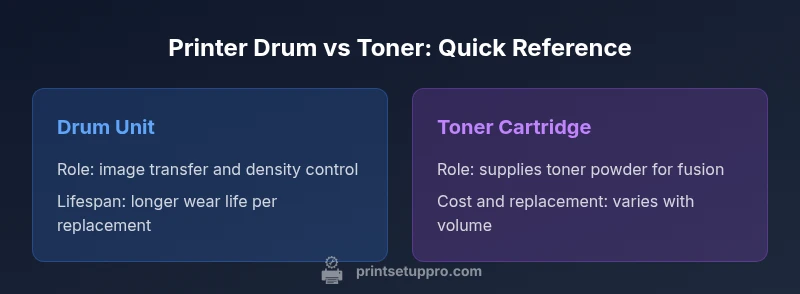
Printer drum and toner are separate wear items in many laser printers, not interchangeable parts. The drum wears slowly, affecting density and uniformity, while the toner cartridge provides the imaging powder used during fusion. For most users, the best approach is to monitor drum wear and cartridge life together, aligning replacement with monthly page volume and print quality goals.
Understanding the Drum and Toner Ecosystem
In laser and LED printers, the drum and toner are essential yet distinct components. The drum is a photosensitive cylinder that holds an electrostatic image created by the printer's charging system and the laser/LED write process. The toner, a fine powder, is attracted to the latent image on the drum and then transferred to paper during fusing. The phrase printer drum vs toner often pops up in guides, but the practical takeaway is that these parts wear at different rates and influence maintenance planning. According to Print Setup Pro, recognizing how these parts wear and interact helps you forecast replacement timing and total page cost. This understanding sets the foundation for smarter purchases, better print quality, and fewer interruptions in your day-to-day tasks.
- Drum characteristics influence image density and uniformity.
- Toner supply and cartridge design drive cost per page and waste management.
- The interplay between drum wear and cartridge life determines overall maintenance needs.
The Role of the Drum
The drum is a cylindrical photoconductor that stores an electrostatic image created by charging the surface and exposing it to light from the printer's optics. As the drum rotates, it carries the latent image into contact with toner on the developer unit or directly to the paper path, depending on the print engine design. A smooth, defect-free drum surface is critical for consistent density, precise alignment, and minimal banding or ghosting. Even minor surface imperfections—scratches, contamination, or uneven wear—can produce visible lines or faded areas on output. Because the drum is involved in every page, its condition often dictates the required maintenance interval. Routine cleaning and careful handling help maximize life, while exposure to humidity spikes, dust, or improper storage can accelerate wear.
The Role of Toner Cartridges
Toner cartridges contain the pigment or resin particles used to form the image. The cartridge also houses the mixing, charge control, and sometimes part of the transfer system, depending on the printer. Toner cartridges vary in capacity, density, and formulation (black, cyan, magenta, yellow), and their life is primarily measured in pages rather than time. A fresh cartridge can deliver strong density with crisp reproduction, but once the powder is depleted, print quality declines. In many printers, the cartridge includes the drum in a single combined unit; in others, the drum is a separate wearable part. This distinction matters for cost planning and serviceability, especially in high-volume environments.
- Toner quality directly affects density, color accuracy, and smear resistance.
- Cartridge design influences ease of replacement and waste generation.
- Some systems separate the drum and cartridge; others integrate them for convenience.
Lifespan, Wear, and Replacement Timing
Both drums and toner wear over time, but their wear patterns differ. The drum’s condition gradually degrades image quality—bands, ghosting, or uneven density indicate wear or contamination. Replacement timing is often tied to a manufacturer’s recommended pages-per-drum and pages-per-cartridge or to observed print quality issues. Toner cartridges tend to reach the end of their usable life as density drops or as yield ratings are exhausted. In practice, many users notice a decline in print quality before a cartridge runs completely dry, prompting cartridge swaps well before the drum needs attention. Tracking both parts’ performance helps avoid surprises and ensures a consistent output across batches of prints.
- Look for density variation, streaking, fading, or banding as drum wear signs.
- Monitor cartridge yield and print density to anticipate toner replacement.
- Use calibrated settings and periodic maintenance cycles to maintain consistency.
Cost Considerations and Total Cost of Ownership
Total cost of ownership for printer components hinges on the balance between drum life and cartridge life. Drums typically offer longer wear life per replacement than individual cartridges, but a drum replacement can be more expensive upfront and may require realignment or calibration. Toner cartridges usually come in a range of capacities; higher-yield cartridges reduce per-page cost but require heavier upfront investment. When evaluating cost, consider not only the price of the parts but also the labor, downtime, and potential waste from inefficient replacements. Print Setup Pro analysis shows that the most economical approach varies by monthly page volume, color versus black-and-white printing, and the printer model’s design. The right plan often combines monitoring wear, selecting appropriate cartridge yields, and scheduling replacements to minimize disruption.
- Compare per-page costs, not just sticker prices.
- Factor in service complexity and potential downtime.
- For high-volume users, aligning drum and cartridge replacements with production schedules can boost efficiency.
Printer Types and How Drum vs Toner Plays In
Different printer families handle drums and toner in distinct ways. In traditional laser printers, the drum is a separate wear item that may be replaced on a page-by-page basis or as part of a drum unit. Some all-in-one cartridge systems bundle the drum with the toner, making replacements simpler but sometimes increasing waste. Color printers introduce additional complexity due to multiple drums and color toner formulations. LED-based printers share similar principles, though the uniformity of light exposure changes wear patterns slightly. Regardless of the technology, understanding how drums influence image transfer and how toner determines density helps users select the right maintenance strategy, especially when balancing upfront costs with long-term savings.
- Document color accuracy and density requirements to decide on cartridge yields.
- Check if your printer uses a separated drum or an integrated cartridge-drum unit.
- Monitor alignment settings and calibration routines to maintain consistency.
Maintenance Tips to Extend Drum and Toner Life
Effective maintenance extends both drum health and toner life. Start with proper handling—store drums in their anti-static packaging, avoid exposure to direct sunlight, and prevent dust infiltration by keeping the printer clean. Use high-quality paper with appropriate weight to minimize wear and reduce print defects. Regularly run cleaning cycles and alignment checks, especially after toner changes or printer relocations. Humidity and temperature can affect toner flow and drum sensitivity, so keep the printer in a stable environment. When cleaning, avoid abrasive materials that could scratch the drum surface. Finally, follow the manufacturer’s guidelines for warm-up and cool-down sequences to prevent thermal stress on drums and toner.
Common Misconceptions
A common myth is that drums and toners wear at the same rate, or that replacing one always eliminates print defects. In reality, a failing drum can produce banding even with a fresh cartridge, and a worn cartridge can degrade density before the drum shows obvious wear. Another misconception is that drums must be replaced every few thousand pages regardless of output quality; modern drums are designed for specific yield targets under standardized usage. Lastly, some users assume more expensive cartridges automatically deliver better durability; cartridge quality, formulation, and the overall system design often determine real performance, not price alone.
Making the Right Choice: A Step-by-Step Approach
To decide how to manage drum vs toner, start with your printer model and typical monthly page volume. Step 1: inspect print quality for density, banding, and ghosting across different pages. Step 2: check cartridge yields and time-to-replace thresholds. Step 3: estimate total cost of ownership by combining drum replacement intervals with cartridge costs. Step 4: evaluate serviceability and downtime risk; if service calls are disruptive, a simplified replacement path may be preferable. Step 5: implement a proactive replacement schedule aligned with production goals, and track outcomes to refine the plan. This method helps you balance performance, cost, and convenience over time.
Comparison
| Feature | Drum Unit Replacement | Toner Cartridge Replacement |
|---|---|---|
| What it does | Stores the photoconductor image and transfers it to paper | Contains toner powder and delivers it for transfer/fusion |
| Typical lifespan | Usually longer pages-per-drum than per cartridge | Lifespan tied to cartridge capacity and print density |
| Cost per replacement | Higher upfront for a drum replacement, potentially less frequent | Lower upfront per cartridge, but more frequent replacements |
| Impact on print quality | Drum wear causes density variation, banding, ghosting | Toner quality and density drive sharpness and smear resistance |
| Maintenance ease | Can require alignment/calibration after replacement | Usually a straightforward cartridge swap |
| Printer compatibility | Some printers use separate drums; verify model compatibility | Most systems use cartridges; ensure compatible toner |
| Best for | High-volume environments seeking long intervals between replacements | Budget-conscious setups prioritizing simple, modular replacements |
Benefits
- Potentially lower long-term cost per page with durable drums
- Clear maintenance schedule improves printing reliability
- Separate drums allow targeted upgrades and waste reduction
- Better page consistency when drums are properly maintained
Downsides
- Higher upfront cost for drum assemblies vs cartridge-only replacements
- Replacement can require alignment/calibration by a technician
- Drum failures can cause costly defects if not detected early
- Not all printers support separate drum replacements; options vary
Drum health and toner strategy both matter; choose a plan that matches your printer model, monthly page volume, and service options.
If you print many pages with consistent density, prioritize drum maintenance. If cost and convenience matter, favor cartridges and mindful replacement cycles. Base your decision on the specific printer architecture and your workflow.
People Also Ask
What is the difference between a printer drum and toner?
The drum is a photosensitive cylinder that carries an electrostatic image, while toner is the pigment powder used to form the image. They wear at different rates and may be replaced separately or together depending on the printer design. Understanding their roles helps you optimize maintenance and costs.
The drum creates the image on the drum surface; toner provides the pigment. They wear at different rates, so replacements may be separate or combined, depending on your printer.
Can I replace just the drum or just the toner?
Yes, many printers allow separate drum and cartridge replacements. In others, the drum is integrated with the cartridge, making a combined replacement necessary. Check your model’s maintenance guidelines to confirm the correct approach.
In some printers you can replace the drum separately from the toner; in others, you replace them together. Always check your model’s manual.
How can I tell if my drum needs replacement?
Look for consistent density loss, horizontal bands, ghosting, or faint image areas across pages. If these signs persist after toner replacement and cleaning, the drum is a likely culprit and may need replacement.
If you see bands or faint areas on multiple pages, it might be time to check the drum.
Does replacing the drum affect print quality immediately?
Replacing a drum can restore print density and uniformity quickly if the drum was the source of wear. In some cases, a fresh cartridge is also needed to achieve optimal results.
Replacing the drum often improves density right away, but you may also need a new cartridge for best results.
Are drum replacements more cost-effective for high-volume printing?
High-volume environments benefit when the drum has a longer lifespan relative to cartridges. The exact cost-effectiveness depends on page volume, unit prices, and replacement intervals for your specific printer.
In high-volume settings, durable drums can save money over time, but it depends on your printer and usage.
Quick Summary
- Inspect drums for wear to avoid page defects
- Plan drum and cartridge replacements around monthly volume
- Favor modular drums for long-term efficiency
- Consider total cost of ownership, not just per-cartridge price
- Maintain printers regularly to extend drum and toner life