Best Way to Print Text Messages for Court
Discover the best way to print text messages for court with a practical, step-by-step guide that preserves authenticity, timestamps, and metadata for reliable evidence.


To use the best way to print text messages for court, start by preserving the original messages in a non-destructive format and export to PDF or print-ready formats. Then, choose a method that maintains timestamps and sender data (e.g., exporting conversation threads or using screenshots with metadata). Finally, print with clear legibility and keep a chain-of-custody record.
Why authenticity and chain of custody matter for court
For court submissions, the exact wording, timestamps, sender IDs, and the sequence of messages create context that judges rely on. The best practices emphasize preserving the original form, ensuring you can demonstrate that prints are faithful duplicates, and providing a clear, auditable trail from the source device to the courtroom exhibit. Print Setup Pro's guidance highlights that consistency and non-destructiveness are essential to avoid disputes about the evidence's integrity. By treating text messages as evidence, you also reduce the risk of later claims that a print was altered or misrepresented. In this guide, we focus on practical, repeatable steps you can implement today to maximize reliability and minimize challenges in court.
Methods to capture text messages for printing
There are several ways to capture text messages for printing, each with pros and cons. Exported conversation threads from the messaging app often preserve timestamps and sender IDs, which are critical for credibility. Some apps allow you to export as a PDF or text file; others provide a non-editable HTML or JSON export that courts may prefer. Screenshots can be quick, but they risk losing metadata unless you capture the whole thread and include a timestamped cover page. If you work with a lawyer, consider using a certified export tool or a forensic-grade method to ensure integrity. The goal is to produce a print that can be independently verified and reproducible by others.
Printing formats: PDF, export, and screenshots
Print formats affect readability, integrity, and acceptance by the court. PDF exports are generally preferred because they preserve layout, fonts, and pagination across devices. Native exports can be useful when they include full metadata, but ensure you do not rely on editable copies. Screenshots should be avoided as the primary evidence due to potential cropping and metadata loss, unless accompanied by a metadata sheet. When possible, attach the export alongside a printed copy and keep both digital and physical records in sync. The essential principle is to maintain a faithful, unaltered record of the conversation.
Metadata, timestamps, and sender IDs
A credible print must show when messages were sent, who sent them, and in what order they appeared. Timestamps should reflect the device’s locale, not just the app’s server time. Metadata can include device identifiers, conversation IDs, and export method. Courts may request a metadata appendix explaining how the export was performed and how the print was generated. Document every step in a simple log, so a third party can reproduce the process and verify the results if needed.
Step-by-step workflow from device to print
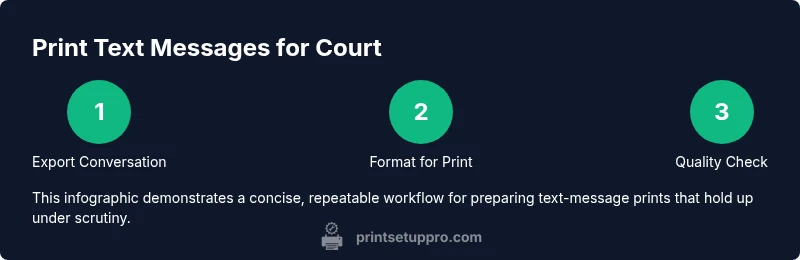
This section outlines a repeatable workflow that you can adopt for any text-message print, including the best way to print text messages for court. Begin with exporting the conversation from the source device, then format the content for print, then generate a print-ready PDF, and finally perform quality checks. Keep the originals untouched, and create secure backups of every export file. This workflow ensures you have both the physical copy and a verifiable digital trail.
Quality control, proof, and backups
Quality control is about legibility, accuracy, and completeness. Check font sizes, line breaks, and page numbers so the print matches the on-screen thread. Compare the export file with the printed pages to confirm no content is missing or altered. Create backups in at least two secure locations, and label each copy with date, time, and method used. Maintain an evidence log that records who accessed the files and when.
Common mistakes to avoid
Avoid relying on screenshots as the sole method of proof; always attach metadata sheets. Do not redact or edit messages in a way that changes meaning. Never alter timestamps or sequence without a documented reason. Don’t skip the court’s required formats or retention rules. Finally, test print on the actual paper size and printer model you plan to use for submission to catch layout issues early.
Quick-start checklist before submission
- Verify you have the original export and a print-ready copy
- Confirm timestamps, sender IDs, and thread order are intact
- Ensure the print is legible with standard fonts and proper margins
- Include a metadata appendix and custody log
- Keep both digital and physical copies secured and organized
Tools & Materials
- Smartphone with messages to be printed(Keep device accessible; do not delete messages)
- Computer or laptop(For exporting and preparing print-ready files)
- Printer and paper (standard letter/A4)(Ensure ink/toner is sufficient; keep sample page)
- Cable or stable Wi-Fi connection(For transferring files from device to computer or cloud)
- External storage (USB drive) or cloud storage(Backups of export files)
- PDF reader or word processor(Review and format export files)
- Labeling supplies (labels, file folders)(For organizing evidence copies)
- Legal counsel contact or court rules document(Use if guidelines require counsel input)
Steps
Estimated time: 60-120 minutes
- 1
Export the conversation from the source device
Open the messaging app, select the full conversation, and export as a non-editable file (PDF or export format) that preserves timestamps and sender IDs. Do not edit content.
Tip: Verify the exported file shows the full thread with original timestamps. - 2
Choose a print-ready format
If multiple formats are available, choose PDF with embedded metadata or a locked export. Ensure the layout is stable across devices.
Tip: If the export includes a metadata file, attach it. - 3
Create a proof copy with a cover page
Print a cover page showing title, date, case, and method; include a brief statement about the export process.
Tip: Use a consistent header across all pages. - 4
Print the main text message pages
Print the content in order, with page numbers and ample margins; adjust font size to readability.
Tip: Test print a sample page before full run. - 5
Annotate and summarize context
Add a short appendix describing how to interpret the messages and any abbreviations.
Tip: Avoid altering content; annotations should not change meaning. - 6
Document the chain of custody
Create a custody log listing file names, export times, who prepared the print, and where copies are stored.
Tip: Use a simple template you can reuse. - 7
Secure originals and backups
Store the original device exports and the physical copy in separate secure locations.
Tip: Consider tamper-evident folders or sealable containers. - 8
Review and submit to court
Do a final cross-check against court rules, attach metadata and custody documentation, and submit.
Tip: Ask counsel to review the submission for compliance.
People Also Ask
What is the best export format for court printing?
PDF with full metadata is generally preferred, but follow local court rules for your jurisdiction.
PDF with metadata is usually best, but check your local court rules.
Is it acceptable to redact messages for privacy?
Redaction should not alter meaning; consult counsel and follow court guidelines.
Redact carefully without changing what was said; consult counsel.
Can I use screenshots as evidence?
Screenshots should not be the sole evidence; attach export and metadata to support authenticity.
Screenshots alone aren’t ideal; pair them with metadata and export.
How should I store printed messages?
Keep secure, labeled copies; backups in two secure locations and a custody log.
Store in secure places with clear labeling and backups.
Do I need a witness to the print?
Not always; verify with the court or counsel regarding certification or witness needs.
Check your court’s rules; sometimes a witness or certification is required.
What if the text messages are on a device I no longer own?
Obtain proper authorization and document the transfer; use copies that maintain integrity.
If you don’t own the device, get permission and document the transfer.
Watch Video
Quick Summary
- Preserve originals before printing.
- Export with full metadata and ensure timestamps align.
- Use a PDF print format for consistency.
- Document chain of custody and access controls.
- Verify legibility and pagination before submission.