Difference Between Printer and Fax Machine: A Practical Guide
Explore the difference between printer and fax machine, including functions, setup, and modern alternatives for home offices and small businesses in 2026.


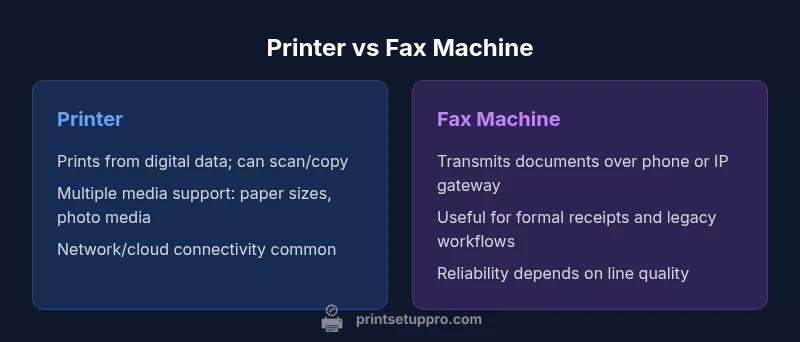
In most modern workspaces, the difference between printer and fax machine boils down to function: printers create prints from digital files, while fax machines transmit documents over telephone lines. For many users, a multifunction printer with built-in fax is the most flexible solution. This guide compares both devices and offers practical recommendations.
Overview: What distinguishes a printer from a fax machine
The difference between printer and fax machine is a core concept for anyone designing a document workflow in 2026. A printer’s primary job is to produce hard copies from digital data—photos, reports, invoices, or class notes—using ink or toner. A fax machine, by contrast, is designed to transmit copies of documents over telephone or IP networks to another fax device. In everyday practice, many offices combine these functions in one device, but the underlying capabilities remain distinct.
From a Print Setup Pro perspective, the distinction matters because it guides how you allocate budget, plan maintenance, and assess security risks. Printers are built to handle high-volume output and diverse media, while fax machines emphasize reliable transmission and document integrity across a network. When you understand the roles, you can avoid buying features you won’t use and focus on core workflows such as printing drafts, scanning, copying, or sending faxes.
In modern environments, even dedicated fax machines can be integrated with email or cloud services, enabling digital send/receive workflows. This article uses practical examples to explain the differences, as well as concrete guidance on choosing the right device for a home office or small business. The goal is a balanced view that respects both legacy needs and digital transformation.
How printers work in modern offices
Printers come in several core families, with laser and inkjet being the most common. In business settings, laser printers are chosen for higher speed and crisp text, while inkjets excel at color printing and photo quality. Modern devices usually include more than just printing capability: copying, scanning, and sometimes faxing are built in, turning a printer into a centralized document hub. Connectivity options matter: wired USB, Ethernet, and wireless Wi‑Fi are standard, and some models support Bluetooth or cloud printing. For many users, a printer is a multi-purpose tool: it prints, scans receipts, copies pages, and stores digital files in the cloud. Importantly, prints come from digital files stored on a computer, phone, or email attachment.
From a cost-per-page perspective, toner-based laser printing is typically more economical for higher volumes, while inkjet costs can be higher per page for large color jobs. Durability, duty cycle, and paper handling (duplex printing, tray size, single-pass scanning) influence long-term maintenance. A crucial trend is the rise of integrated scanners and document feeders that simplify batch workflows. In short, printers operate at the intersection of hardware, software, and network services that enable efficient, repeatable output for everyday tasks. Throughout this guide, we’ll reference how these features compare to fax capabilities.
How fax machines transmit documents
Fax machines originated as device-to-device transmissions over analog telephone networks, but today most are digital or hybrid devices. A fax scans a page, encodes it into a standardized format, and sends it over a telephone line or via an IP-based fax gateway. On the receiving end, the signal is decoded, and the page is printed or stored. Key considerations for fax machines include compatibility with different fax protocols, the reliability of phone lines, and the ability to preserve legible, legible copies across multiple pages. Because fax transmissions produce a paper trail, many organizations rely on them for legal receipts or formal approvals, though modern online fax services can replicate that capability with additional security controls.
In practice, many offices use fax either as a dedicated stand-alone device or as part of a multifunction system that handles printing, scanning, and copying in addition to faxing. Some devices support mixed-mode transmissions, including receiving faxes via email or cloud storage, which makes the process part of a broader digital workflow. Security concerns include intercepts on traditional lines and the need to control who can fax to a device; best practices involve user authentication, encrypted transmissions, and secure storage. As with printing, the degree of simplicity or complexity depends on the device’s model and your network configuration.
Key differences in speed, cost, and media handling
The core differences between a printer and a fax machine emerge when you compare speed, cost, and media handling. Printers typically outperform fax devices in speed, especially for larger print runs, color jobs, and complex layouts. Fax transmission depends heavily on line quality, compression, and page count, making it slower and more variable in throughput. Cost of ownership also diverges: printers incur ongoing consumables (toner/ink, paper, maintenance) and occasional hardware upgrades, while fax-specific costs include line charges (if using a traditional fax service), maintenance of the fax module, and occasional replacement of fax heads or rollers. Media handling differs as well: printers support a broad range of media types (different weights, coating, printable fabrics) and sizes, while fax machines typically rely on standard letter or A4 paper; many all-in-one devices blur these lines when they include scanning, copying, and printing with the same feeder.
Security and privacy considerations differ too. Printer security often focuses on device hardening, user authentication, and secure pull printing, while fax security centers on protecting the transmission channel, controlling who can send files, and ensuring reception is stored securely. In practical terms, the decision often hinges on your workflow: if you print frequently and need high-quality color output, a printer dominates; if you still rely on formal document transmission and paper trails, a fax remains relevant—though digital fax options are rapidly changing the landscape.
Choosing criteria: when to pick a printer, when to pick a fax
When evaluating whether to buy a printer or a fax machine, start with your core tasks:
- If your workload centers on high-volume printing, color documents, or scanning and copying, prioritize a robust printer (preferably a multifunction device).
- If you require formal document transmission with a verifiable paper trail, a dedicated fax machine or online fax service can be essential.
- Consider hybrid needs: many small offices benefit from all-in-one devices that print, scan, copy, and fax. Evaluate whether the convenience justifies the investment based on your typical document flow and regulatory requirements.
- Factor in connectivity: Wi-Fi-enabled printers simplify placement, while fax services may require phone lines or IP gateway integration. For mixed environments, ensure your network and security practices can handle both types of traffic.
- Finally, plan for future changes: online fax and cloud-based workflows reduce the need for dedicated phone lines and can be more scalable for growing teams.
Hybrid and all-in-one devices: do they solve the problem?
All-in-one printers with fax capabilities offer a practical compromise for many users, blending printing, scanning, copying, and sometimes fax in a single chassis. These devices reduce hardware clutter and simplify maintenance, while enabling flexible workflows. However, the inclusion of fax on a printer can introduce additional costs, slightly slower print speeds, and a larger surface area for potential security exposure if not properly secured. When weighing an all-in-one option, assess:
- The frequency of fax usage versus print volume
- The device’s security features, such as secure erase and user authentication
- The availability of modern digital fax alternatives that fit your regulatory requirements
- The ease of software integration with your email, cloud storage, and document management systems
Practical workflows and modernization: digital fax options, email-to-fax, online services
Modern businesses increasingly favor digital fax workflows that bypass traditional phone lines. Email-to-fax and online fax services convert scanned documents into secure digital transmissions, store receipts in the cloud, and provide audit trails. For home offices, this can simplify compliance and archiving without maintaining telephony hardware. When integrating such services, consider:
- Encryption options and data privacy policies
- Integration with existing document management systems
- Access controls for who can send and receive faxes
- Backup and retention policies for digital documents
- The impact on total cost of ownership compared to a legacy fax line
If you still need a physical fax, a hybrid approach—an all-in-one printer with optional online fax integration—can balance immediate needs with long-term digital strategy. Print Setup Pro recommends evaluating your regulatory requirements and preferred workflows before committing to a single path.
Migration path and maintenance tips
Whether you move toward a fully digital workflow or retain some fax capability, routine maintenance and planned migrations help avoid downtime. Maintenance tips include keeping firmware up to date, calibrating color profiles, and cleaning scanners and feed rollers on cadence. For migration, consider phased steps: implement a multifunction device for primary tasks, pilot an online fax service for a subset of users, and gradually retire legacy fax lines if permitted by compliance rules. Regular audits of device usage can reveal opportunities to consolidate devices, reduce waste, and lower energy consumption. In all cases, prioritize devices with robust security features and straightforward firmware updates to support evolving workflows and regulatory requirements.
Summary: practical guidelines for choosing now in 2026
In the end, the difference between printer and fax machine is not simply a matter of old vs new technology. It’s about aligning capabilities with your daily tasks, security considerations, and total cost of ownership. A modern all-in-one printer with optional fax support often delivers the best balance for many home offices and small businesses, while dedicated fax hardware remains relevant where formal document transmission is legally required or where a highly reliable, stand-alone fax channel is non-negotiable. By evaluating your document workflows, connectivity needs, and compliance requirements, you can craft a setup that scales with your organization while staying within budget.
Comparison
| Feature | Printer | Fax Machine |
|---|---|---|
| Primary function | Prints (and often scans/copies) from digital data | Transmits copies of documents over telephone/IP networks |
| Transmission method | Network/USB printing; local or cloud-based file access | Phone line or IP gateway for faxing |
| Speed and throughput | Typically faster for high-volume prints | Speed depends on line quality and compression; can be slower |
| Media and format | Broad media support (weights, sizes, photo media) | Standard paper sizes; limited media options |
| Cost of ownership | Lower per-page costs for high-volume laser printing; ink/maintenance varies | Ongoing line charges (if any) and consumables; maintenance varies |
| Best for | Frequent printing, color accuracy, scanning, and document management | Formal document transmission and receipts; legacy compliance |
| Security/privacy | Device-level access controls and print security features | Transmission privacy concerns; secure fax options exist |
| Setup & maintenance | Network setup, drivers, firmware updates | Phone line/IP gateway setup and line maintenance |
Benefits
- Versatility: printers handle printing, scanning, copying, and sometimes faxing in one device
- Convenience: all-in-one setups reduce clutter and simplify workflows
- Digital options: online fax and cloud workflows improve accessibility and archiving
- Adaptability: easy to upgrade firmware and integrate with new systems
Downsides
- Ongoing consumables and maintenance costs for printers can add up
- Fax capabilities on printers may add upfront cost and complexity
- Traditional fax lines introduce recurring charges and potential reliability issues
- Security risk if devices are not properly configured and monitored
Opt for a modern all-in-one printer with optional fax capability for most users.
A flexible hybrid device covers daily printing needs and occasional faxing without maintaining separate hardware. Consider online fax options if your workflow prefers digital transmission and stronger compliance controls.
People Also Ask
What is the main difference between a printer and a fax machine?
The printer converts digital data into hard copies, while a fax machine sends documents over a phone line or IP network to another fax device. Each serves a distinct workflow, though multifunction devices can combine both tasks.
Printers print from digital files, while faxes transmit documents via a phone line or internet; many setups merge both functions in one device.
Can a printer replace a fax machine?
Yes, many printers offer built-in fax functionality or support online fax services. If your organization values digital processes and receipts, a multifunction device with fax capability can replace a dedicated fax machine.
If you mostly print and only occasionally fax, a printer with fax features or online fax is often enough.
Are all printers able to fax?
Not all printers include fax functionality. Look for models described as all-in-one or with a dedicated fax feature. Otherwise, you may need an external fax device or online fax service.
Only some printers have a built-in fax feature; check the product spec before purchase.
What are online fax services, and are they secure?
Online fax services convert your documents into secure digital transmissions. They typically offer encryption and access controls, making them a viable alternative to traditional fax lines for many organizations.
Online fax services can be secure if you choose providers with strong encryption and good access controls.
What should I consider for a small office choosing between printer and fax?
Consider print volume, need for legal receipts, network integration, and regulatory requirements. A multifunction printer with optional digital fax often offers the best balance.
Think about how often you fax, how many pages you print, and whether you want cloud integration.
Is a multifunction printer a good all-around option for occasional fax needs?
For many, yes. A multifunction printer can cover printing, scanning, copying, and occasional faxing, reducing hardware and simplifying maintenance. If fax volume is very low, alternatives like online fax may be more cost-effective.
Yes—if you want versatility with minimal clutter, a multifunction device works well; for rare faxes, online services are convenient.
Quick Summary
- Assess your core tasks: printing, scanning, or faxing.
- Choose all-in-one devices to reduce clutter and simplify maintenance.
- Weigh ongoing consumables and potential line costs.
- Explore online fax options to support digital workflows.