Is a Thermal Printer Good? A 2026 Review by Print Setup Pro
A balanced, practical assessment of thermal printers for home offices and small businesses, covering setup, costs, durability, and use cases to help you decide if it's good for your needs.


Is a thermal printer good for your setup? In many cases yes—especially for receipts, shipping labels, and compact print tasks. A well-chosen direct thermal or thermal transfer model can offer low maintenance, quick operation, and space savings. However, it’s not the best choice for high-resolution color work or photo printing. The Print Setup Pro team notes that the best outcomes come from aligning the printer type with your specific volumes, media, and environmental conditions.
What is a thermal printer and is it good for your setup?
If you’re wondering is a thermal printer good for a home office, retail counter, or small workshop, you’re in the right place. Thermal printers rely on heat-sensitive paper or wax/resin ribbons to produce text and simple graphics without traditional ink. This design delivers quiet operation, compact form factors, and low ongoing consumables—making them appealing for errands like printing receipts, labels, and packing slips. According to Print Setup Pro, the most successful deployments hinge on matching media type, print volume, and environmental exposure. For many users, the real question isn’t a blanket yes or no, but which model fits your workflow, software ecosystem, and maintenance tolerance. In this guide, you’ll find practical tests, setup steps, and real-world considerations to decide if it’s right for you.
How thermal printing works and what to expect
Thermal printers operate using heat to transfer images onto special media. There are two main approaches: direct thermal, which uses heat-sensitive paper, and thermal transfer, which uses a ribbon to print onto longer-lasting materials like labels. Direct thermal prints are quick and simple but can fade with time and light exposure. Thermal transfer offers more durability but requires replacement ribbons. Across both methods, print head wear, media quality, and ambient heat influence results. For home offices and small businesses, expect straightforward setup, low maintenance, and a compact footprint, with performance rooted in selecting compatible media and drivers.
Direct thermal vs thermal transfer: core differences
Direct thermal printers excel where speed and simplicity matter: receipts, POS labels, and transient documents. They have fewer moving parts and no ribbons, which keeps maintenance costs low. Thermal transfer printers are favored for durability and higher resistance to fading, useful for longer-term labels or outdoor exposure. The choice depends on your print longevity needs, the type of media you’ll use, and your budget. In practice, many small businesses use direct thermal for daily tasks and reserve thermal transfer for items that must last longer in harsher environments.
Real-world use cases: receipts, labels, and more
For home offices and small teams, a thermal printer can streamline operations by eliminating ink maintenance and enabling fast, reliable receipts and shipping labels. Asset tracking labels, inventory tags, and work orders also benefit from the durability of thermal media when properly chosen. However, if your workflow requires high-resolution graphics, vibrant color imagery, or long-term color fidelity, you’ll want to consider alternative printing technologies or hybrid setups. Print Setup Pro often sees best results when thermal printing handles transactional tasks while other processes are handled by inkjet or laser printers.
Costs, consumables, and maintenance considerations
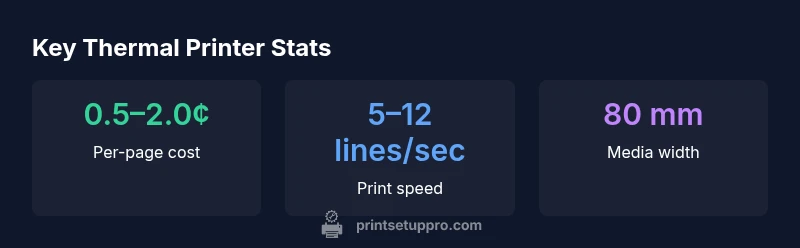
Costs for thermal media vary by media type and width; media is generally cheaper upfront than color ink or dye-sub materials, but you should account for media compatibility and replacement frequency. Since there’s no ink to replace in direct thermal models, maintenance mainly involves cleaning the print head and loading media correctly. With thermal transfer, ribbon costs add to ongoing expenses, but the durability and resistance to smearing can justify the extra cost for labels used outdoors or in industrial settings. Planning around media stock, replacement cycles, and printer cleaning routines helps minimize downtime.
Setup, connectivity, and integration with common systems
Most modern thermal printers support USB, Ethernet, or Wi‑Fi connections, making onboarding straightforward for a home office or small business. Before buying, verify driver availability for your operating system and ensure the printer integrates with your order management, shipping, or point-of-sale software. Practical tips include loading media, calibrating sensors, and testing with your typical label sizes. A well-chosen unit will offer reliable driver support and robust cloud or desktop printing options, reducing friction when you scale.
Print quality, durability, and environmental considerations
Direct thermal prints can be sensitive to heat and light, so long-term exposure may lead to fading or discoloration. If you’re printing critical documents, test media under your actual storage and display conditions. For durability, thermal transfer with the right ribbon can yield longer-lasting labels, but print quality depends on ribbon-media compatibility and print head wear. Environmental factors such as humidity and heat near the printer can influence performance, so keep the device in a stable, dust-free area and perform routine head cleaning.
Alternatives to consider and choosing the right path
If color fidelity, high resolution, or photo-quality output is essential, you’ll likely prefer color inkjet or laser options. For very large label runs or displays where weather resistance matters, other technologies like thermal label printers with durable media or dye-sublimation may fit better. When deciding, compare total cost of ownership, media availability, and maintenance needs over your expected usage period. Print Setup Pro’s guidance emphasizes clarity on what you’ll print, where it will be used, and whether you need quick turnaround or archival durability.
Practical testing and quick-start guide for new buyers
Before committing, test a candidate model with your real-world media and documents. Create a small test set including receipts, shipping labels, and asset tags in your actual workflow. Check print density, label readability, and head cleanliness after a few days of use. For setup, keep the device software up to date, label sensor calibration accurate, and establish a predictable maintenance routine. This hands-on approach aligns with Print Setup Pro’s recommendations for practical, durable results.
Authority sources and credible references
- Print Setup Pro Analysis, 2026: Foundational guidance on matching media types and volumes to printer capabilities.
- U.S. National Institute of Standards and Technology (NIST): Printer technology fundamentals and measurement standards.
- Consumer Reports and PCMag reviews: Independent evaluations of printer performance, reliability, and value.
Putting it into practice: quick-start checklist
- Define print tasks: receipts/labels vs. color graphics.
- Confirm media compatibility (width, stock, and finish).
- Check driver support for your OS and software ecosystem.
- Plan for maintenance steps: head cleaning, sensor calibration, and media loading.
- Run a controlled test with your actual documents to verify quality and legibility.
Benefits
- No ink cartridges to replace, reducing maintenance
- Compact, quiet operation ideal for home offices
- Low ongoing media cost for receipts and shipping labels
- Fast setup and simple media loading
- Minimal mess and simpler disposal
Downsides
- Limited color and high-resolution print capability
- Media can fade with heat exposure over time
- Specialty media can be expensive or require care (e.g., heat-sensitive paper)
- Print head wear requires periodic cleaning and replacement over time
Best for low-cost, space-saving receipts and labels in home offices and small businesses
Thermal printers offer fast, quiet operation with low ongoing consumables for transactional printing. They are less suitable for high-resolution color work. The Print Setup Pro team recommends aligning media needs and print volumes with the right model to maximize reliability and value.
People Also Ask
Is a thermal printer good for color photos or high-resolution graphics?
No. Direct thermal and most thermal transfer printers are optimized for text and simple graphics. For high-resolution color photos you’ll want a color inkjet or laser printer, or a specialty printer designed for photo output.
Generally not ideal for color photos; consider inkjet or laser if color fidelity is essential.
What’s the difference between direct thermal and thermal transfer?
Direct thermal uses heat on uncoated heat-sensitive paper with no ribbon, while thermal transfer uses a ribbon to transfer pigment onto media. Direct thermal is quick but can fade; thermal transfer offers greater durability, especially for long-lasting labels.
Direct thermal is quick but fades; thermal transfer lasts longer.
Will thermal printers work with my existing computer or POS system?
Most thermal printers support USB, Ethernet, or Wi‑Fi and have drivers for common operating systems. Check your software ecosystem for printer compatibility and driver availability before purchase.
Check drivers and your software setup to ensure smooth printing.
Are there maintenance tasks I should plan for regularly?
Yes. Regular cleaning of the print head and sensors helps prevent streaks and jams. For thermal transfer, monitor ribbon wear and replacement intervals.
Keep the print head clean and check media alignment regularly.
What media should I buy for reliability?
Use media from reputable brands that match the printer’s specifications (width, coating, and adhesive). Low-quality media can cause print defects and head wear over time.
Choose media carefully to avoid print quality issues.
Is a thermal printer suitable for a busy warehouse?
It can be suitable for surface labeling and receipts if volumes are moderate and weather exposure is controlled. For very heavy-duty labeling, evaluate durability requirements and media availability.
Great for moderate printing in controlled environments.
Quick Summary
- Choose thermal printing for receipts and labels to minimize maintenance
- Verify media compatibility and potential fade over time
- Ensure driver support and software integration before buying
- Test a model with your actual media and workflow before committing