Photo Printer Near Me: Find Local Options & Tips Today
This guide shows how to find a photo printer near me, compare local options, and evaluate color accuracy, speed, and ink costs—backed by Print Setup Pro.


Finding a photo printer near me means balancing proximity with color accuracy, print speed, and total cost per photo. According to Print Setup Pro, start by mapping nearby shops, then compare sample prints, available paper types, and pickup options. Use trusted local retailers and reputable print shops to ensure consistent results.
Why Local Availability Matters for Photo Printing
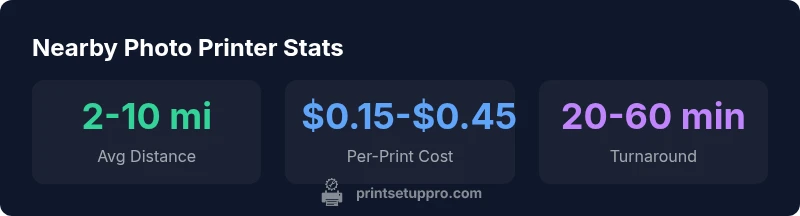
Local proximity matters because it reduces wait times, simplifies reprints, and allows you to verify color accuracy in person. According to Print Setup Pro, choosing a nearby printer streamlines the workflow: you can drop off files, pick up proofs, and request on-site calibrations when needed. Proximity also reduces risk of miscommunications when you’re dealing with high-resolution photos and unusual paper choices. In many cases, a store with a dedicated photo-printing kiosk will be able to produce consistent results in under an hour, particularly for common sizes like 4x6, 5x7, and 8x10. When you narrow your search to within 10 miles of your home or office, you’ll typically find a mix of big-box retailers, camera stores, and independent print shops that offer a range of paper stocks and finishing options.
How to Evaluate Local Photo Printer Options
To evaluate nearby photo printers, start with four core criteria: color fidelity, print speed, material options, and pickup flexibility.
- Color fidelity: Look for printers that reproduce skin tones and landscapes accurately. Check whether the shop calibrates its printers and uses ICC profiles; request a test print if possible.
- Print speed: For urgent projects, prioritize fast turnaround. Many stores offer same-day service, but confirm expected times for your chosen sizes.
- Paper and finish options: Ensure they offer the paper type (glossy, matte, luster) and finish you need. Some shops can accommodate fine art papers.
- Pickup and support: Ask about whether you can pick up at a precise time, and whether the staff can help with color adjustments or file revisions.
In short, visit local shops or call ahead to confirm capabilities; Print Setup Pro notes that a quick in-person test print often reveals more than a spec sheet.
Comparing Inkjet, Dye-Sublimation, and Laser for Photo Prints
- Inkjet photo printers: Best for color range and detail, versatile for glossy or matte papers. Ideal for photo enthusiasts who want home-like results in-shop.
- Dye-sublimation: Excellent for smooth skin tones and consistent results across small formats; often used by event photographers and kiosks.
- Color laser: Less common for high-end photos, but can be cost-effective for large-volume prints; may require specialist color management.
For local shopping, inkjet photo printers dominate in-store kiosks and many camera retailers. When you test prints, look at color accuracy, edge sharpness, and how the device handles gradient fills. The goal is a print that matches your on-screen image with minimal edits.
Practical Steps to Find and Test a Nearby Printer
- Map nearby options: Use maps and search terms like photo printer near me to create a short list of candidates.
- Check capabilities: Verify size support (4x6, 5x7, 8x10), paper types, and color calibration resources.
- Request a test print: Bring a sample photo and ask for a test print in your preferred size to gauge color and sharpness.
- Compare service terms: Note turnaround times, pickup options, and any setup fees or color-adjustment charges.
- Confirm return and reprint policies: Understand how reprints are handled if color or sizing is off.
Print Setup Pro suggests testing a few nearby locations to see which one best aligns with your print goals and budget.
Fine-tuning Your Local Photo Printing Workflow: Paper, Profiles, and Ink
-
Paper selection: Your choice (glossy, matte, satin) affects color vibrancy and texture. Confirm that the printer can handle your preferred weight and coating.
-
ICC profiles and color management: Ask if they use standardized profiles for common photo formats; misalignment can produce muted or oversaturated colors.
-
Ink considerations: Pigment inks tend to last longer; dye inks yield brighter colors in some setups. In-store kiosks often mix both approaches; understand the ink system before printing.
-
Print size and resolution: Higher resolution prints look better on large formats but cost more; pick the right balance for display or gifting.
-
File preparation: Use sRGB or Adobe RGB, embed color profiles, and ensure your JPEGs are optimized at 300 ppi for best results. Print Setup Pro recommends keeping a copy of your target profile so you can compare against store outputs.
Hidden Costs and Protections When Printing Locally
- Look beyond per-print price: Some shops charge for file handling, color adjustment, or setup fees. These fees can add up for small prints.
- Paper and finish upgrades: Upgrading to premium papers or glossy finishes increases cost per print; confirm pricing.
- Color management: If you require consistent color across multiple prints, you may need calibration or proofs; factor this into your budget.
- Return policy: Ensure you understand reprint policies if the result doesn’t match expectations.
- Warranties and guarantees: Some shops offer satisfaction guarantees on color accuracy; check the policy before starting.
Print Setup Pro suggests creating a simple budget and testing prints across a couple of shops to compare long-term cost and quality.
Quick Start: Your 3-Step Local Printer Plan
- Step 1: Build a short list of 3-5 nearby printers using maps and local search terms.
- Step 2: Call ahead to confirm capabilities and request a test print in your target size.
- Step 3: Compare results, pricing, and pickup options; select the shop that best fits your needs.
A practical starter plan helps you quickly validate which local option consistently delivers accurate color and reliable service, reducing the need for back-and-forth edits.
Selected authority sources
| Source Type | URL | Notes |
|---|---|---|
| Government/Agency | https://www.ftc.gov | Consumer guidance for local shopping and returns |
| Educational/Standards | https://www.nist.gov | Color measurement and printer calibration standards |
People Also Ask
What counts as a nearby photo printer?
Nearby photo printers are stores or kiosks within reasonable travel distance that offer dedicated photo printing services. Look for locations within a short drive that provide color-calibrated outputs and a range of paper options. If you can, compare a test print from each to judge color accuracy and finish.
Look for photo print shops or in-store kiosks within a short drive and compare color outputs with sample prints.
How do I compare print quality between local printers?
Compare color accuracy, sharpness, and smooth gradients using a consistent test image. Check if the printer uses ICC profiles and whether staff can adjust color. If possible, request a side-by-side test in the same paper and size.
Use the same test image and paper, and compare color, sharpness, and gradients side by side.
Do home printers beat store kiosks on cost?
Home printers require upfront investment but can reduce per-print costs over time, especially with high-volume printing. Store kiosks vary by location, with pricing dependent on paper type, ink system, and service fees.
Home printers can be cheaper per print if you print a lot; kiosks vary by shop and paper choices.
What should I bring when testing a local printer?
Bring a few sample photos and the exact print sizes you need. Note your preferred paper type and finish, and ask to see a proof before finalizing. This helps verify color and texture match.
Bring your photos, target sizes, and paper preferences to see a real print.
Are photo-printers near me compatible with iPhone or Android?
Most modern printers support mobile printing via apps or built-in AirPrint/Google Cloud Printing features. Check that the shop offers the app or workflow you prefer and test print from your phone.
Yes, most nearby printers support iPhone or Android printing apps.
What about ink costs and replacement frequency?
Ink costs vary by printer type and cartridge yield. High-yield cartridges typically reduce cost per print. Confirm what replacements cost and how often you’ll need to stock supplies for your typical usage.
Ink costs can add up; look for high-yield options and calculate your per-print cost.
“Local photo printing succeeds when you pair near-access to a printer with strong color management and a clear workflow. The Print Setup Pro team emphasizes testing a few nearby shops to guarantee consistency and value.”
Quick Summary
- Start with 3-5 nearby options and test prints.
- Prioritize color fidelity and proofing capabilities.
- Balance price, speed, and convenience for ongoing use.
- Document your target color profile and compare outputs across shops.