Best Printer for Sale 2026: Top Picks and Buying Guide
Discover the best printer for sale in 2026 with practical buying tips, budget ranges, and setup guidance for home offices, students, and small businesses.


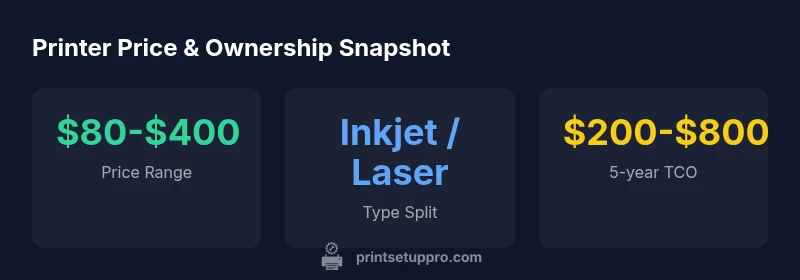
While prices vary, the best printer for sale in 2026 balances upfront cost with long‑term costs. For most home offices or students, an affordable inkjet or compact monochrome laser is ideal, typically priced between $80 and $400. Look for automatic duplex, reliable wireless connectivity, and affordable, widely available cartridges. A good model also offers solid support from reputable brands.
Market overview and buying context
The landscape for a printer for sale in 2026 is broad, spanning entry-level inkjets to compact monochrome laser devices, and even versatile all‑in‑ones for home offices. The right choice depends on your typical tasks, space, and long‑term running costs, not just the upfront price. According to Print Setup Pro, buyers should emphasize total cost of ownership—ink or toner costs, maintenance, and spare‑part availability—alongside feature needs. When evaluating listings, compare page yields, compatible cartridge availability, and warranty terms. Shopping channels vary: online marketplaces, refurbished inventories, and brick‑and‑mortar retailers each offer advantages. Regardless of venue, verify the model number, confirm ink/toner compatibility, and check return policies. A practical plan is to list must‑have features (wireless printing, duplexing, device compatibility) and nice‑to‑have features (mobile scanning, cloud printing, and automation). The Print Setup Pro team notes that a well‑chosen printer for sale today should deliver reliable daily performance, predictable support, and fit within your budget while meeting quality expectations.
Key features to evaluate before buying
When shopping for a printer for sale, prioritize features that reduce long‑term costs and improve workflow. Look for:
- Print speed in pages per minute (ppm) and color accuracy for photos or graphics.
- Color vs monochrome needs: color inkjets excel at photos, monochrome lasers excel at fast text.
- Duplex printing to cut paper use and costs.
- Scanning and copying quality, OCR compatibility, and whether the device handles legal or letter sizes reliably.
- Connectivity: Wi‑Fi, Ethernet, USB, and compatibility with mobile apps or cloud printing services.
- Paper handling: input tray capacity, feed reliability, and media versatility (card stock, envelopes).
- Cartridge yield and cost per page, with preference for high‑yield or remanufactured options when warranted.
- Energy efficiency and warranty terms.
- Driver support and ease of firmware updates. A good approach is to map these features to your daily tasks and then compare models accordingly.
Budget guides and total cost of ownership
Pricing for printers sold today ranges widely, but you can anchor your decision with a few practical estimates. New entry‑level models typically fall in the $80–$400 range, while mid‑range devices may stretch toward $400–$600. Beyond the sticker price, ink or toner costs dominate ongoing expenses. For a rough five‑year view, plan for total ownership costs roughly in the $200–$800 window, depending on usage and cartridge choices. High‑yield cartridges and seller promotions can tilt this range favorably, but don’t overlook maintenance and potential repair costs. When budgeting, include possible replacement parts, ongoing paper costs, and any subscription printing services if relevant. Print Setup Pro’s methodology emphasizes comparing per‑page costs across your expected print volume and factoring in any color printing needs for budgets and reliability.
Inkjet vs Laser: which is best for different use cases
Inkjet printers deliver superb color reproduction and photo quality, making them ideal for home projects, school reports with color, and creative tasks. If you print graphics or photos weekly, an inkjet is often worth the higher ink costs for color excellence. Laser printers, including monochrome and color variants, prioritize speed and lower per‑page costs for text documents, making them a strong choice for busy home offices and small businesses with heavy document workflows. For mixed workloads, a compact color laser or an all‑in‑one with solid color capability can offer a practical compromise. Consider your primary tasks, required color fidelity, and whether you’ll print mostly text or photos when weighing inkjet against laser.
Verifying printer for sale listings and avoiding scams
To avoid buying a dud, verify the model number, confirm compatibility with your devices, and check the seller’s return policy and warranty terms. Ask for close‑up photos of the control panel, ink/toner cartridges installed, and the printer’s physical condition. If possible, request a test print or seller video showing print quality and functionality (scan, copy, wireless setup). Compare the listing against official product specs on the manufacturer site and ensure the firmware can be updated. Review recent user reviews for reliability patterns and check the seller’s ratings. A cautious checklist will help you spot discrepancies and green‑light trustworthy listings.
Setup and basic troubleshooting after purchase
Once you bring a printer for sale home, start with the basics: unbox and inspect components, install official drivers from the manufacturer, and connect to your network. Run alignment and calibration tests, load the recommended paper type, and ensure you can print from multiple devices. Keep firmware up to date and enable automatic updates if available. If you encounter prints with banding or color shifts, run a nozzle check and clean the print head as directed by the manual. For ongoing reliability, schedule regular maintenance, like simple head cleanings and cartridge replacements, and keep a log of print yields and issues to detect trends early.
Practical best practices for choosing a printer for sale
- Start with a prioritized feature list based on your typical tasks.
- Compare total cost of ownership, not just upfront price.
- Favor models with widely available cartridges and easy supply chains.
- Check for robust wireless and mobile printing support.
- Consider refurbished options with warranties for budget efficiency.
- Read user reviews regarding reliability and customer service.
- Confirm warranty terms and return policies before purchasing.
Comparison of common printer types
| Printer Type | Pros | Cons |
|---|---|---|
| Inkjet | Excellent color and photo quality | Higher ink costs per page |
| Monochrome laser | Fast text, lower per-page cost | Higher upfront price |
| All‑in‑one (MFP) | Scans and copies built-in | Can be bulkier and pricier |
People Also Ask
What is the most important factor when buying a printer for sale?
The most important factor is total cost of ownership, including ink or toner costs, maintenance, and reliability. Consider whether the ongoing costs align with your expected print volume and color needs. A model with low upfront price but high ink costs can cost more over time.
Prioritize long‑term costs and reliability to avoid surprises.
Are refurbished printers a good value?
Refurbished printers can be a good value if they come with a warranty and have been tested by a reputable seller. Verify that high‑yield cartridges are available and that the unit includes basic accessories. Always check return policies and the seller’s rating.
Refurbished units can save money if backed by a solid warranty.
How can I estimate cartridge costs over 5 years?
Estimate cartridge costs by calculating cost per page and multiplying by your expected annual pages, then multiply by five. Include color pages if you print in color frequently. High‑yield cartridges can dramatically reduce per‑page costs.
Compute cost per page and multiply by expected volume.
Should I choose color inkjet or monochrome laser for a home office?
Color inkjets excel at photos and color graphics, making them ideal for creative work. Monochrome lasers are faster for heavy text printing and typically have lower running costs. For mixed needs, a compact color laser or a dependable inkjet with reasonable ink costs can be a good compromise.
Inkjet for color; laser for quick, cheap text printing.
Do printers bought online come with warranties?
Most printers purchased online come with at least a manufacturer warranty or seller guarantee. Always verify the warranty length, what it covers, and whether it transfers if you switch sellers. If buying refurbished, ensure an explicit warranty is included.
Check the warranty and return policy before buying online.
What about compatibility with mobile devices?
Many printers support mobile printing apps and cloud services. Check compatibility with your devices (iOS, Android, Windows, macOS) and confirm that the setup process supports your preferred workflow.
Make sure the printer works well with your phones and tablets.
“A printer is only as valuable as its ongoing costs. Balance upfront price with ink costs and reliability to minimize surprises.”
Quick Summary
- Define your use-case before shopping
- Compare total cost of ownership, not just sticker price
- Prioritize cartridge availability and costs
- Check connectivity and mobile printing support
- Consider refurbished models for budget-conscious buyers