HP vs Brother Printers: A Practical Comparison Guide
An objective side-by-side comparison of HP and Brother printers for home offices, students, and small businesses. Explore print quality, cost of ownership, reliability, and best-use scenarios.


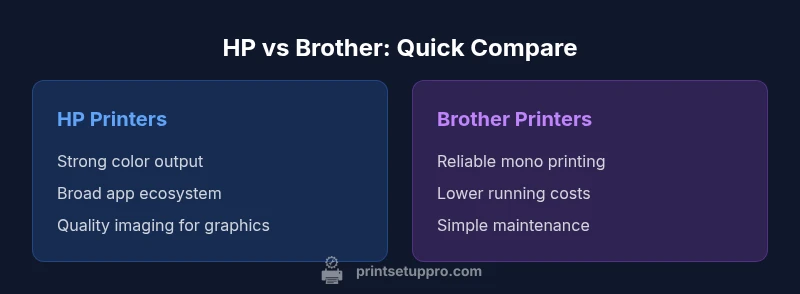
When weighing printer hp vs brother, prioritize your primary task: color imaging and photo quality tend to favor HP, while mono text printing and long-running office workloads often lean toward Brother. For most home offices and small businesses, Brother offers strong reliability at a lower ongoing cost, but HP remains competitive in color accuracy and ecosystem durability. This quick verdict helps you decide which brand to start with based on your typical print mix.
Overview of HP vs Brother: What the comparison covers
Choosing between printer hp vs brother involves evaluating color vs monochrome strengths, total cost of ownership, consumables availability, and ecosystem support. The Print Setup Pro team found that HP generally delivers stronger color reproduction and richer imaging for photos and marketing materials, while Brother emphasizes robust monochrome performance, lower upfront costs, and enterprise-friendly reliability. This section sets the stage for a practical, use-case driven discussion rather than a model-by-model comparison. Expect guidance that helps homeowners, students, and small businesses map their print tasks to the right brand without getting lost in model minutiae.
Core differences that shape everyday printing
HP printers often leverage broader color management features, vibrant color output, and strong driver ecosystems (including native support for popular mobile printing standards). Brother printers tend to emphasize dependable mono output, straightforward setup, and lower per-page costs in many monochrome-heavy workflows. The two brands also differ in consumable pricing and refill options, which significantly affect long-term cost. When you look at the big picture, the decision boils down to your ratio of color to monochrome pages, required network features, and how much you value ecosystem software.
Use-case fit: Home office vs. students vs. small business
For a home office with mixed tasks, HP’s color-capable models can provide premium images for presentations and reports, while Brother’s monochrome options can keep document printing affordable and reliable. Students often benefit from affordable color printing occasionally, but commonly rely on clean text in reports; a balanced approach might involve a color-capable HP entry model for graphics and a cost-efficient Brother mono for daily papers. Print Setup Pro suggests evaluating your typical monthly page count and color demand to determine which brand aligns with your workload.
Print quality and color vs. text emphasis
Color accuracy and photo print quality are among the most noticeable differences. HP’s color science and broader media support frequently yield crisper color transitions and better gradient handling, which is important for marketing PDFs or photos. Brother models excel in high-quality text and sharp monochrome output, with dependable grayscale rendering. If your workflow includes both charts/graphics and dense text, consider how often you’ll print in color versus black-and-white and plan accordingly. The balance usually favors HP for color-heavy tasks and Brother for pure text work.
Total cost of ownership: upfront price, consumables, and longevity
Consumables are a major lever in total cost. HP color consumables can be more expensive per page, especially for vibrant outputs, while Brother monochrome toners are typically cost-efficient for high-volume text printing. Many users underestimate drum life, replacement cycles, and warranty terms, which can swing the long-run cost much more than the sticker price. Print Setup Pro recommends projecting annual page volumes and color mix to estimate true costs, rather than relying on upfront price alone.
Connectivity, mobile printing, and software ecosystems
Both brands offer strong wireless capabilities, cloud printing options, and apps for mobile devices. HP often showcases a wider range of native ecosystem features, including seamless compatibility with popular mobile platforms. Brother provides robust network printing, reliable Wi-Fi, and easy-to-use interfaces aimed at office environments. If you rely on AirPrint, Mopria, or Google Cloud Print-style workflows, you’ll find both brands capable, but HP may have the edge in broader consumer device compatibility.
Security, firmware updates, and manageability
Printer security matters more than ever in small offices. Both HP and Brother release firmware updates that address vulnerabilities and enhance printer manageability. HP generally emphasizes proactive security features in newer models, including secure print and encrypted data paths. Brother also prioritizes security with various enterprise-grade options on select models. When selecting, check firmware update frequency, supported secure printing methods, and whether your IT policy requires centralized management features.
Maintenance, reliability, and consumable availability
Reliability hinges on build quality, drum/toner longevity, and ease of maintenance. Brother monochrome units are often celebrated for straightforward maintenance and predictable performance under heavy workloads. HP color printers favor color durability, but maintenance cycles can be more involved if color printing is a constant requirement. Proven reliability comes from consistent parts supply, local service options, and active firmware support. Plan for routine checks and a predictable replacement cycle aligned with your monthly print volume.
Environmental impact and sustainability considerations
Both brands participate in sustainability efforts, from recyclable consumables to energy-efficient designs. If green printing is a priority, compare energy usage per page and recycling programs offered by your region. While color printing generally consumes more energy and materials, choosing an efficient model with remanufactured or recycled consumables can reduce environmental impact. Print Setup Pro suggests favoring models with lower energy profiles and accessible recycling programs to support long-term sustainability goals.
Practical buying guide: how to decide between HP and Brother
Start with a clear use-case plan: what percentage of pages will be color vs monochrome? Do you need advanced mobile printing or secure print features? How important is color fidelity for your needs? Answering these questions helps determine which brand aligns with your priorities. If color-rich outputs and imaging are central, HP is a strong candidate; if cost-per-page and office reliability loom large, Brother often wins. Always compare similar classes, consult vendor warranties, and read recent independent reviews to validate claims.
Common myths and how to debunk them
A common myth is that HP always costs more to run due to color printing. In reality, cost-per-page varies by model and usage mix, and Brother’s monochrome lines can be extremely economical in high-volume environments. Another misconception is that security features are only relevant for enterprises; in fact, home offices with sensitive data benefit from secure print options too. The key is to compare apples-to-apples models and consider your actual printing habits.
Comparison
| Feature | HP printers | Brother printers |
|---|---|---|
| Print Speed | Varies by model, generally solid in color output | Strong mono text speed, consistent performance |
| Color Quality | Typically superior color accuracy and imaging | Good color support but emphasis on text/mono |
| Total Cost of Ownership | Higher color consumable costs can affect TCO | Lower per-page cost for many mono models |
| Consumables Availability | Broad color ink/toner ecosystems, varied media support | Common, widely available monochrome toners |
| Connectivity & Apps | Wide app ecosystem, strong mobile printing features | Reliable wireless options and simple setup |
| Security & Management | Advanced security features in newer models | Solid security options with mature firmware updates |
| Maintenance & Reliability | Strong imaging durability, media handling varies by model | Known for dependable monochrome performance |
| Best For | Color graphics, marketing materials, mixed tasks | High-volume mono printing, cost-focused offices |
Benefits
- Balanced performance for mixed home/office tasks
- Wide availability of consumables and service options
- Strong mobile printing and cloud connectivity
- Reliable options for cost-conscious monochrome printing
Downsides
- HP color printers can incur higher color running costs
- Brother mono-focused models may lack strong color output
- Firmware updates can intermittently affect older devices
HP shines in color and imaging, while Brother leads in reliability and cost for mono printing
If color accuracy and imaging are priorities, HP is often the better pick. If ongoing mono printing at lower cost is critical, Brother tends to deliver superior value. Your choice should match your primary print tasks and budget strategy.
People Also Ask
Which is cheaper to run for mono text printing: HP or Brother?
For pure mono text printing, Brother often offers lower running costs due to efficient monochrome toners. However, costs vary by model and usage. Compare pages-per-tont and cartridge prices for models in your shortlist.
For mono text, Brother often wins on running costs, but check your model's pages-per-toner and cartridge prices.
Do HP and Brother printers support AirPrint and Mopria?
Yes. Both brands generally support major mobile printing standards like AirPrint and Mopria, though exact features depend on the model. Verify compatibility with your devices before purchasing.
Both HP and Brother support AirPrint and Mopria on most newer models; check your specific model.
Is color output better on HP than on Brother?
In many cases, HP provides stronger color reproduction and imaging capabilities, especially for photos and marketing graphics. Brother often provides solid color performance but focuses more on reliability and cost.
HP typically has stronger color output, while Brother focuses on reliable, cost-effective printing.
Are these brands easy to set up for beginners?
Both brands offer user-friendly setup experiences with guided installers and mobile app support. If you’re new to printers, consider models with clear on-device guides and robust online support.
Both HP and Brother are beginner-friendly with solid setup guides and apps.
Do HP and Brother offer strong security features?
Yes, many models provide secure print, encrypted connections, and regular firmware updates. Review the security features listed for specific models to ensure alignment with your privacy needs.
Most modern models from HP and Brother include secure printing options and firmware updates.
Is customer support comparable between the brands?
Both brands offer standard warranty support and online resources. Response quality can vary by region and model, so check local reviews and support options before buying.
Support is solid from both brands, but regional differences can matter.
Quick Summary
- Define your color vs mono mix before buying
- Compare total costs, not just upfront price
- Prioritize mobile and network features if needed
- Match model class to workload for best results