Printer vs Thermal Printer: Choosing the Right Tool for Your Setup
A detailed, objective comparison of printer vs thermal printer to help home offices and small businesses choose the right device for documents, receipts, and labels.


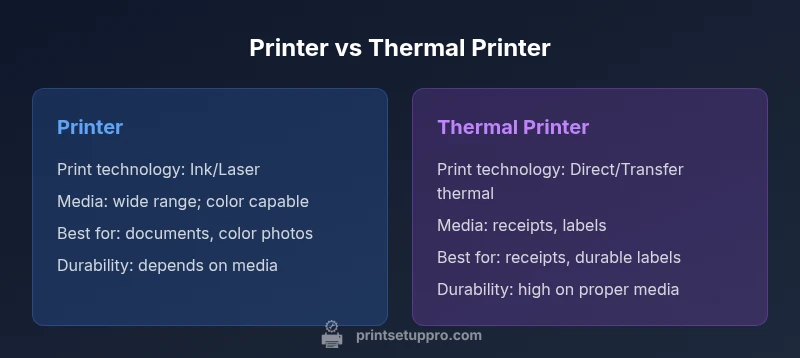
Between a standard printer and a thermal printer, the first excels at versatile document and photo printing, while the latter shines for receipts, labels, and durable barcodes. If you mostly print reports, emails, and color images, a traditional printer is the better fit. For retail, shipping, or inventory tasks, a thermal printer usually provides faster, cheaper per-item output. This quick read helps you decide which path aligns with your daily tasks.
What is a printer vs thermal printer? Core technology explained
If you’re evaluating a traditional office printer against a thermal printer, it’s essential to understand the underlying technology. A printer (typically inkjet or laser) deposits ink or toner on paper to create an image or text. A thermal printer, by contrast, uses heat to transfer ink from a ribbon (thermal transfer) or to activate a dye on heat-sensitive paper (direct thermal). This fundamental difference drives print quality, media compatibility, maintenance needs, and running costs. When you hear the phrase printer vs thermal printer, think about the work you actually do: general documents, color photos, and drafts versus receipts, tickets, or shelf labels. Print Setup Pro’s analysis shows that media costs and durability often determine the total cost of ownership more than the upfront price. In this guide, we’ll unpack the technology and translate it into practical guidance for setup, maintenance, and budgeting. By the end, you’ll know which device best fits your workflows and budget, from home offices to small businesses.
Media compatibility and print quality: what each type excels at
Media compatibility strongly influences the value you get from either option. A traditional printer supports a wide range of paper types, weights, and finishes, delivering high-quality color images and sharp text suitable for reports, presentations, and marketing materials. Thermal printers are more specialized: direct thermal is ideal for receipts and simple labels on heat-sensitive paper, while thermal transfer can handle durable barcode labels and long-lasting shelf tags using ribbons and a variety of media including synthetics. Print quality on thermal prints tends to be monochrome and highly legible, which is perfect for transactional documents but not for color photography. Durability varies: thermal transfer prints on appropriate media resist smudging and moisture, while direct thermal prints can fade with prolonged heat or sunlight. Choosing the right media depends on your environment and the item’s exposure to light, heat, and abrasion. For most home offices, a color-capable printer covers more use cases; for warehouses and retail, a thermal solution can dramatically improve label and receipt reliability.
Cost of ownership: upfront price, consumables, maintenance
Total cost of ownership (TCO) matters more than sticker price. Printers commonly incur higher per-page costs due to ink or toner, especially for color printing, while maintenance costs hinge on sensor cleaning, printhead life, and occasional part replacements. Thermal printers typically have lower per-page costs for receipts and labels, especially when printing large volumes, but media costs (thermal paper or transfer ribbons) can add up. Direct thermal paper is inexpensive per unit, yet it may require replacement more often if exposure to heat and sunlight is a factor. Thermal transfer requires ribbons that add a recurring cost but can dramatically extend the life of the print on durable media. In practical terms, expect higher initial investment for a feature-rich printer and lower ongoing costs for a dedicated thermal labeling or receipt solution. Print Setup Pro recommends modeling your monthly page volume and the mix of color vs monochrome tasks to determine the true break-even point.
Use-case scenarios: receipts, labels, photos, documents
Different tasks demand different technology. For household document printing—school reports, resumes, color photos—a traditional printer offers flexibility, quality, and ease of use. If your day-to-day includes printing receipts, shipping labels, or inventory tags, a thermal printer is typically the better choice due to speed, reliability, and cost-per-item. Hybrid setups are common in small offices: one reliable color printer for documents and marketing materials, plus a dedicated thermal printer for receipts and labels. Understanding your primary workflow helps you determine the right balance between device type, media choices, and consumable strategies. Print Setup Pro notes that many teams underestimate the value of dedicated thermals for high-throughput labeling tasks and the time saved on maintenance when pairing with a general-purpose printer.
Setup considerations: drivers, connectivity, maintenance routines
Setup plays a big role in how well a device performs over its lifetime. Traditional printers require robust driver support for color management and paper handling, plus network sharing and maintenance routines for printheads and nozzles. Thermal printers typically demand fewer moving parts and simpler maintenance for direct thermal units, but thermal transfer systems rely on ribbon handling and printhead care. Connectivity options—USB, Ethernet, Wi-Fi, and Bluetooth—affect how seamlessly devices integrate with PCs, tablets, and POS systems. Regular cleaning of nozzles or printheads, proper alignment checks, and media handling practices will reduce jams and extend print life. For mixed environments, ensure you have a clear plan for media stock, compatible drivers, and a straightforward interchangeable workflow.
Practical buying guide: how to choose for home office vs small business
A methodical approach helps you avoid buyer’s remorse. Start with the primary use case: color documents and photo printing point to a versatile printer; routine receipts and labels point to a thermal solution. Evaluate volume: high-volume label printing benefits most from thermal transfer with ribbons, while occasional label needs may be met by direct thermal. Consider space and noise: some printers are compact and quiet, whereas industrial thermals may be bulkier and louder. Compare total cost of ownership over a 3–5 year window, including media, maintenance, and potential consumables. Finally, check compatibility with your existing devices and software; ensure drivers are actively supported and that the media you plan to use is readily available.
Common myths and pitfalls to avoid
A frequent myth is that thermal printers can replace a color photo printer; the reality is that thermal devices are specialized for auxiliary tasks like receipts and labels and generally not suitable for high-quality color photos. Another pitfall is assuming lower upfront cost means lower long-term costs—media and ribbons can offset initial savings. Some buyers believe all thermal media is equally durable; direct thermal prints fade with exposure to heat or UV light, while thermal transfer on durable media lasts much longer if stored properly. Finally, don’t overlook the importance of driver support and software compatibility; a device can underperform if its ecosystem isn’t well supported by your operating system.
How to optimize for reliability and longevity
Reliability comes from a holistic approach: select the device for the job, use appropriate media, and keep devices clean. For printers, schedule regular printhead and nozzle maintenance, use high-quality consumables, and keep firmware up to date. For thermal printers, protect media from heat and sunlight, replace ribbons before they run out, and perform routine printhead inspections. Create a simple maintenance calendar and stock essential supplies (media and ribbons) to avoid downtime. Finally, educate users on correct media loading and print settings to minimize jams and waste. With careful planning, both types can deliver years of dependable service.
Quick reference: which is best for you? Practical criteria
- Need versatile document printing with color? Choose a printer.
- Primary task is receipts or durable labels? Choose a thermal printer.
- High-volume labeling with varied media? A thermal transfer setup is ideal.
- Tight upfront budget but long-term media costs matter? Run the numbers and pick the path with the lower break-even point.
Comparison
| Feature | Printer | Thermal printer |
|---|---|---|
| Print technology | Inkjet or laser (varies by model) | Direct thermal or thermal transfer |
| Media types | Paper, coated stocks, photos (depending on model) | Direct thermal paper or labels; wax/resin ribbons for transfer |
| Upfront cost | Moderate to high for color-capable printers | Low to moderate for basic units; higher for transfer setups |
| Per-page cost | Ink/toner costs vary by color and volume | Direct thermal is inexpensive per item; transfer media adds cost but improves durability |
| Durability of print | Good for documents; color printing can fade over time | Very durable on appropriate media; resistance improves with transfer ribbons |
| Best for | General documents, color photos, marketing materials | Receipts, shipping labels, inventory labels, shelf tags |
| Typical use-case | Home/office and small business document printing | Retail, logistics, and industrial labeling environments |
| Media availability | Wide range of paper types and finishes | Specialized media; availability depends on transfer ribbon and media type |
Benefits
- Versatile for a wide range of documents and photos (printer)
- Excellent color reproduction for marketing materials (printer)
- Low running costs for receipts/labels (thermal printer)
- Simple maintenance for some direct thermal units
- Strong durability with thermal transfer for labels
Downsides
- Ink/toner can be costly over time (printer)
- Direct thermal media can fade with heat/light exposure (thermal printer)
- Color photos are challenging to sustain with most thermal options (thermal printer)
- Thermal transfer requires ribbons and media planning
Thermal printers excel for receipts/labels; standard printers excel for documents and color photos
Choose thermal when your core output is durable labels or receipts. Choose a traditional printer for versatile document printing and color accuracy.
People Also Ask
What is the main difference between a printer and a thermal printer?
A printer (often inkjet or laser) deposits ink or toner on ordinary paper to create documents and photos, while a thermal printer uses heat to seal ink from a ribbon or reacts with heat-sensitive paper. This leads to different media needs, print durability, and per-page costs. Your decision should hinge on the primary tasks you perform and the desired media lifespan.
A printer uses ink or toner for color and detail on regular paper, while a thermal printer prints with heat on special media. Choose based on whether you need versatile documents or durable receipts and labels.
Are thermal printers good for color prints?
Direct thermal printing is typically monochrome and not suitable for high-quality color photographs. Thermal transfer can reproduce simple color graphics on certain media but remains limited compared to a color inkjet or laser printer. For vivid color documents or photos, a traditional printer is the better option.
Thermal printers usually aren’t the choice for color photos; they’re best for receipts and labels, with limited color options when transfer ribbons are used.
What media can I use with a thermal printer?
Direct thermal printers use heat-sensitive paper or labels, while thermal transfer printers use ribbons to print on a broader range of media, including synthetic labels. Availability depends on media type and printer model. Always verify media compatibility before purchase.
Direct thermal uses heat-sensitive paper; thermal transfer uses ribbons and can work on many label materials.
Which has lower long-term running costs?
Direct thermal printing often has lower per-item costs for receipts and basic labels, but durability may be limited. Inkjet or laser printers incur ongoing ink or toner costs, which can be high for color printing. Evaluate your volume and media needs to determine which path minimizes long-term expenses.
Direct thermal can be cheaper per label, but durability and media costs matter. Compare your monthly print volume for a true cost picture.
Can I convert a traditional printer to handle labels and receipts?
Converting a standard printer to optimally handle labels and receipts is often impractical due to media handling differences, printhead wear, and driver support. If you need reliable labeling, investing in a dedicated thermal printer or a printer with compatible label printing modes is usually a better choice.
It’s typically better to use a dedicated thermal printer for receipts and labels rather than trying to adapt a standard printer.
Do I need special software to manage a thermal printer?
Most thermal printers use standard printer drivers and labeling software. You’ll want to ensure your POS or labeling software supports the printer model and media type you choose. Routine firmware updates help maintain reliability.
Yes, ensure your software supports the printer and media, and keep firmware updated.
Quick Summary
- Define your primary use-case to guide the purchase
- Model total cost of ownership, not just upfront price
- Thermal printers are best for receipts/labels and throughput
- Inkjet/laser printers offer broader media support and color fidelity
- Plan for media availability and maintenance in your setup