Risograph Printing: A Practical Guide for Home and Small Shops
Explore risograph printing step-by-step—from setup and color separation to finishing. Learn how to plan color runs, choose paper, and troubleshoot for vibrant, textured prints ideal for zines, posters, and small runs.


Risograph printing is a fast, texture-rich method for creating vibrant, limited-color prints with a distinct handmade feel. It shines for zines, posters, and small runs when you plan color separations and paper choices in advance. Use test prints to dial in ink density and alignment before committing to the final run.
What Risograph Printing Is and How It Works
Risograph printing, commonly called risograph, sits between digital printing and traditional screen methods. It uses a master (stencil) wrapped around a drum; as paper moves through, ink transfers from the master onto the sheet in bold, slightly granular layers. Each color requires a separate master, so multi-color runs become deliberate passes rather than a single exposure. The result is a vibrant, chalky texture with a unique depth that’s hard to replicate with standard inkjet printers. According to Print Setup Pro, risograph printing offers a compelling blend of speed and economy for limited-color runs. The Print Setup Pro team found that careful color planning and paper selection lead to consistent color across batches and a distinctive tactile finish. This makes risograph printing a strong choice for zines, posters, art prints, and educational handouts where personality and speed matter.
Why it Matters for Creative Projects
For home studios and small presses, risograph printing provides a cost-effective alternative to more traditional offset methods when you want a handmade vibe without sacrificing throughput. Its appeal comes from two core traits: the texture created by the ink and the repetition cadence that makes each sheet feel slightly different, which many designers find visually engaging. If your project relies on strong color blocks, bold type, or limited palettes, risograph printing can deliver remarkable results with fewer resources than a full-color lithographic run.
When to Choose Risograph Over Other Methods
Choose risograph printing when your goals include rapid turnarounds, high-contrast color blocks, and a tactile finish that stands out in a crowd. It’s fantastic for limited-color posters, zines, event programs, and school handouts. It isn’t the best option for photo-realistic imagery or ultra-high-resolution work where fine detail and smooth gradients are essential. If your design depends on spectral color accuracy or a glossy finish, other methods may be more suitable. For most small-run art projects, the texture and punch of risograph prints offer a memorable, affordable solution.
The Lifecycle of a Typical Risograph Project
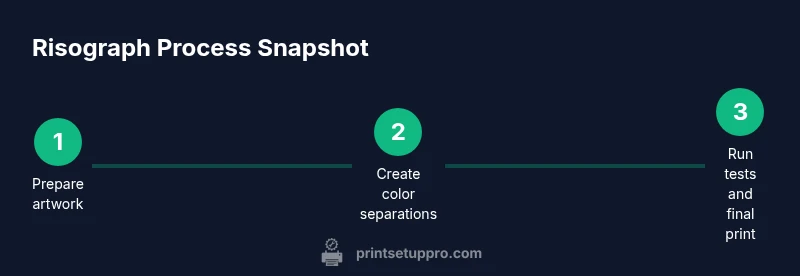
A typical risograph project moves through planning, color separations, master creation, a test run, adjustments, and a final print run. Expect to manage each color as a separate pass. Clear labeling and consistent paper stock help maintain color alignment across the run, while careful storage of masters protects print continuity for future editions. Print Setup Pro emphasizes treating risograph projects as a collaborative, iterative process—small adjustments between passes can dramatically improve the final result.
Tools & Materials
- Risograph printer or access to a Risograph facility(Ensure you have a working machine or reliable access to the service; verify available color drums)
- Color inks (soy-based inks)(Stock a few core colors; avoid mixing brands to prevent misfeed)
- Master sheets (stencil masters)(Label by color and project; handle with clean, dry hands)
- Paper stock (uncoated, weights 90–160 gsm)(Test various stocks for ink absorption and texture; avoid glossy finishes)
- Cutting mat, hobby blade, and ruler(For trimming final runs and tidy edges)
- Gloves and lint-free cloths(Protect hands during ink handling and cleaning)
- Cleaning supplies (isopropyl alcohol, microfiber cloths)(Used to wipe rollers and drums between color runs)
Steps
Estimated time: Total time: 2-3 hours per color run; plan for 4-8 hours for larger multi-color projects
- 1
Prepare artwork and color plan
Review the project brief, define the color palette, and plan color separations. Decide which colors will run in which order and create clear labels for each master. Save separations in a clean, Repeatable workflow to avoid mislabeling during production.
Tip: Label each color separation with color name, order, and date to prevent confusion on press. - 2
Create color separations
Convert your design into separate color layers suitable for risograph masters. Use vector shapes for solid blocks and high-contrast typography to maximize ink transfer and legibility. Export or prepare masters consistent with your printer’s workflow.
Tip: Keep key details away from the edge of the master to avoid edge bleed. - 3
Prep masters and cut paper
Mount each color master onto the drum and fan the paper to ensure even feeding. Check paper stock compatibility with your ink choice and confirm alignment marks line up with the layout grid.
Tip: Run a dry test feed without ink to verify feed alignment first. - 4
Load paper and set guides
Place stock into the feed tray, adjust guides for precise alignment, and secure the stack. Use a single-sheet pilot run to validate tension and feed consistency before a full run.
Tip: Avoid overloading the tray; a light, even stack feeds more reliably. - 5
Run a test print
Print a sample sheet for each color layer to check density, alignment, and color balance. Note any ghosting or misregistration and adjust as needed before the final run.
Tip: Keep a dedicated test sheet log with density readings and alignment notes. - 6
Adjust ink density and registration
If colors look too pale or too dense, tweak ink flow and master tension. Re-test with a single sheet before committing to the full batch. Re-register if edge misalignment appears across the page.
Tip: Small, incremental adjustments produce more stable results than large changes. - 7
Run final color passes
Proceed color by color, maintaining consistent feed, storage, and handling. Periodically check for curl, misfeeds, or density drift, and halt if issues escalate.
Tip: Schedule short breaks between passes to prevent overheating of the machine. - 8
Inspect, trim, and finalize
Review final prints for color consistency and edge quality. Trim as needed and package carefully to preserve the texture and finish. Document any deviations for future editions.
Tip: Store finished prints flat or in a protective sleeve to avoid creases.
People Also Ask
Is risograph printing suitable for photographs?
Risograph prints excel with strong color blocks and stylized images. Photos can be represented with dithering, but expect grain and limited tonal range. For pristine photo realism, other methods may be preferable.
Risograph is great for bold colors and texture, but not ideal for flawless photo realism.
How many colors can I print with risograph?
Most risograph workflows use multiple color passes; each color requires its own master. Plan for the color count in advance, and expect some registration variation between passes.
Typically a few colors; more passes add complexity and potential misalignment.
What papers work best with risograph?
Uncoated papers with moderate weight (around 90–160 gsm) give the best ink absorption and texture. Very smooth or glossy stocks can cause uneven ink transfer and paper jams.
Uncoated papers are usually best for crisp, textured results.
How do I prevent color misregistration?
Use clear color registration marks, feed paper consistently, and run a thorough test print for each color. Re-check alignment between passes and adjust the master tension as needed.
Keep feeding steady and check alignment between colors.
Are risograph inks expensive?
Costs vary by color and volume. For limited runs, per-page costs are generally favorable, making risograph an economical option for small editions.
Ink costs are reasonable for small runs, but vary by color and quantity.
How should I clean and maintain a Risograph?
Regularly clean the ink drums and rollers, wipe down surfaces, and store masters properly. Follow the manufacturer’s maintenance schedule to extend press life.
Keep the machine clean and follow routine maintenance.
Watch Video
Quick Summary
- Plan color separations before printing
- Choose paper that matches ink absorption for best texture
- Run thorough tests to dial in density and alignment
- Label and store masters properly for consistency
- Finish with careful trimming and protective packaging