Screen Printing T-Shirts: A Complete Beginner's Guide
Learn to screen print T-shirts from start to finish with a beginner-friendly setup. This guide covers artwork prep, screen coating, exposure, printing, curing, and basic maintenance for home studios.


By following a beginner-friendly screen printing setup, you can produce clean, durable prints on T-shirts. This guide covers selecting materials, setting up a basic screen printing station, preparing artwork, applying emulsion, exposing and burning the screen, washing, and curing the ink. You'll learn safety steps, troubleshooting tips, and budget-friendly options for home studios.
What is screen printing for T-shirts?
Screen printing is a versatile method that uses a stenciled mesh screen to apply ink onto fabric, producing bold colors and durable prints. For a screen printer t shirt project, you’ll pair a designed image with a frame, ink, and a controlled printing surface to transfer the ink through the open portions of the screen. The advantage of screen printing is its ability to layer colors, build texture, and reproduce consistent results across many copies. In this guide, Print Setup Pro shares practical steps for beginners, including equipment selection, workspace setup, and essential safety practices. If you’re new to this technique, think of screen printing as a marriage of art and craft where the screen acts like a stencil and the squeegee pushes ink through the design onto the garment. You’ll learn to separate colors, calibrate pressure, and manage timing so that a simple design becomes a professional-looking T-shirt. By the end of this section, you’ll see how screen printing fits into home studios and small workshops, and you’ll understand how to plan an efficient workflow for your own projects. According to Print Setup Pro, starting with a simple, budget-friendly screen printing setup can empower hobbyists to produce professional-looking T-shirts at home.
Designing for screen printing
Designing for screen printing starts with clear, print-ready artwork. Vector files (.ai or .eps) tend to scale cleanly, while raster images should be high-resolution and properly color-separated. For a multi-color T-shirt design, you’ll need to separate each color into its own screen. This is where planning matters: count how many screens you’ll need, estimate ink coverage, and choose a mesh count that matches your ink viscosity and fabric weight. When choosing colors, consider how they will sit on light and dark shirts; white or light ink on dark fabrics can require a separate white underbase. Print Setup Pro recommends starting with a simple, two-color design to learn registration, then gradually add colors. This approach helps you control alignment and reduces waste. For inspiration, study real-world print layouts and keep a color legend handy so you don’t mix up colors during the run. As you scale up, you can introduce halftones or gradient fills, but always test print first.
Preparing the screen and emulsion
A screen printing setup hinges on a reliable screen and well-coated emulsion. Start with a sturdy aluminum or wooden frame and a mesh count suitable for your ink and fabric. Coat the screen with emulsion in a dim, dust-free area using a smooth, even stroke; avoid drips or heavy patches. Allow the emulsion to dry completely in a dark, clean space. Once dry, you’ll place your positive artwork on the screen and expose it to light with an exposure unit or a strong light source. The goal is to harden the emulsion that is not covered by the design while leaving the design area receptive. After exposure, rinse the screen gently with water to reveal the stencil. If any areas wash out too easily, recoat and re-expose. For beginners, this stage is sensitive; keep notes of exposure times and rinse temperatures to replicate consistent results arc-wise. Remember to protect eyes and skin from inks and solvents during handling.
Exposing and burning the screen
Exposure is the process that permanently sets your design into the emulsion. Place the transparent film with your artwork on the screen and expose it for the recommended time based on your emulsion and lighting setup. If the image looks faint after rinsing, re-expose for a bit longer or adjust your lighting. After exposure, wash the screen under a gentle spray to reveal the stencil. The goal is crisp lines and solid fills with minimal edge chatter. Regularly check for pinholes or thin areas and touch up with a small brush if needed. As a rule, do not rush this step. A well-burned screen will pay off in repeatability and fewer misprints. Practicing with test fabrics helps you dial in exposure and ink levels before committing to a full run.
The printing process and workflow
With your screen ready, set up the printing station and garments. Align the shirt on the platen and position the screen using a registered jig or tape guides. Apply a small amount of ink at one edge of the screen, then use the squeegee to pull ink across the image with a smooth, even stroke. The first pass defines the ink depth; a second pass can add opacity if needed. Maintain consistent pressure and speed to achieve uniform results across all shirts. Clean the edge of the frame during each pass to prevent smudging and ensure sharp edges. Remember to use a test run on scrap fabric to confirm alignment, ink viscosity, and curing readiness. Your workflow is a loop: coat screen, coat garment, print, cure, and inspect. As you gain experience, you’ll optimize ink types, platen temperatures, and squeegee hardness for different fabrics.
Curing, washing, and maintenance
Curing is the final critical step to fix the ink so it lasts through washes. Use a heat source appropriate for your ink type, typically a heat gun, toaster oven, or heat press, to reach the recommended temperature for the specified dwell time. Test a sample garment after cooling to ensure the ink adheres well. After printing, wash screens promptly to prevent ink buildup; reclaim screens by removing residual ink and re-coating with emulsion if reprinting. Routine maintenance includes cleaning the squeegee blades, drying screens completely, and storing them in a clean, upright position to avoid warping. Regular practice with scrap garments helps you refine your technique and reduce waste, while maintaining your equipment extends its life. Print Setup Pro emphasizes consistent cleaning and proper ventilation when working with inks and solvents.
Troubleshooting and ongoing improvements
Even experienced screen printers encounter common issues. Misregistration can occur if your frame shifts during printing; recheck your alignment blocks and ensure your shirts aren’t shifting. Uneven ink deposits usually point to inconsistent squeegee pressure, improper blade angle, or a clogged screen; clean or recoat as needed and test again. If ink dries on the screen between runs, it reduces flow; consider thinning ink slightly or adjusting exposure. Keeping a dedicated space, organized tools, and a color swatch library helps you track improvements and reproduce results. For long-term success, maintain a stencil library with preferred color separations and keep a log of the best mesh counts and ink brands for different fabrics.
Tools & Materials
- Screen printing frame with mesh(Choose a frame size matching your shirt platen (typically A3 or larger) and a mesh count suitable for plastisol or water-based inks.)
- Screens (pre-stretched or DIY)(Ensure even tension and clean edges.)
- Emulsion and emulsion remover(Select a dual-cure or fast-dry emulsion compatible with your ink.)
- Exposure unit or strong light source(Must be able to evenly expose the screen without overheating.)
- Squeegee (various hardness)(Have a couple of sizes for different screen areas.)
- Ink (plastisol or water-based)(Choose color family and base depending on fabric and desired feel.)
- Palette or mixing tray(For color mixing and creating underbase.)
- Heat source for curing(Heat gun or heat press; verify ink-specific curing temperature.)
- Garments to print on(Start with 100% cotton T-shirts for best results.)
- Masking tape and frisket film(Helpful for masking areas during color separations.)
- Gloves, masks, ventilation(Protect yourself from solvents and fumes.)
Steps
Estimated time: 3-5 hours
- 1
Prepare artwork and color plan
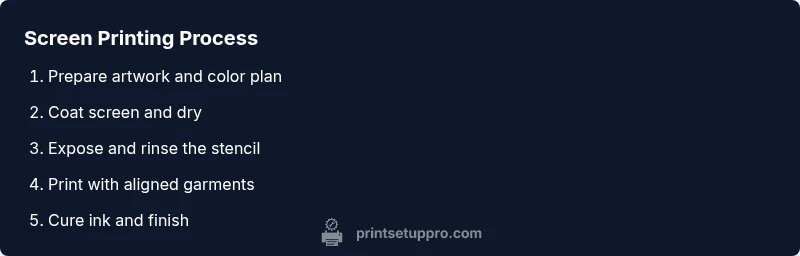
Finalize the design, decide on colors, and separate the design into print layers. Confirm file formats are vector or high-resolution raster with clean edges.
Tip: Create a color legend to track layers and ensure proper registration. - 2
Gather materials and set up workspace
Arrange inks, screens, squeegees, a clean workspace, and a testing area. Layer protection (dust-free) helps avoid specks in prints.
Tip: Label colors and screens to minimize misprints during runs. - 3
Coat screen with emulsion
In a dark or dim area, apply a thin, even coat of emulsion to the screen. Let it dry completely in an environment free of dust.
Tip: Apply two thin coats for durability; avoid heavy layers that crack. - 4
Expose and burn the image
Place the artwork on the screen and expose as directed by your emulsion. Rinse gently to reveal the stencil and inspect for pinholes.
Tip: Keep a detailed log of exposure times for future consistency. - 5
Rinse and reclaim
Rinse the unexposed emulsion away and examine the stencil. If the image isn’t sharp, adjust exposure time or screen tension.
Tip: Use cooler water to preserve fine details. - 6
Prepare garments and align prints
Position shirts with alignment marks or a jig, and verify the design placement on multiple test garments.
Tip: Always test on scrap garments before official runs. - 7
Print the first run and adjust
Coat the screen with ink, pull a test print, and adjust ink consistency and squeegee pressure as needed.
Tip: Use a light pass first to avoid excess ink on crowded areas. - 8
Cure and finish
Cure the ink with proper heat to fix it. Allow to cool and test wash; perform maintenance thereafter.
Tip: Document curing time and temperature for repeatability.
People Also Ask
What is screen printing for T-shirts?
Screen printing uses a mesh stencil and ink to transfer designs onto fabric. It’s cost-effective for small runs and produces durable, vibrant prints. It’s ideal for simple or multi-color designs when you have time to set up each color layer.
Screen printing uses a mesh stencil and ink to transfer designs onto fabric. It’s great for small runs and durable, vibrant prints.
What equipment do I need to start at home?
You’ll need a printing frame with mesh, emulsion, an exposure setup, screens, squeegees, plastisol or water-based inks, a heat source for curing, and blank T-shirts. Start with a basic kit and upgrade as you gain experience.
You’ll need a frame with mesh, emulsion, exposure setup, screens, squeegees, inks, a heat source, and blank shirts.
What ink should I use for fabric?
Choose plastisol for strong color and easy curing or water-based ink for softer feel. Consider your fabric type and washing durability when selecting inks.
Choose plastisol for bold color and easy curing, or water-based ink for a softer feel; pick based on fabric and wash durability.
How long does emulsion take to dry?
Emulsion dries quickly in a dust-free area. Allow adequate air circulation and keep it away from direct sunlight to prevent premature hardening.
Emulsion dries fast in a clean area; avoid direct sun and ensure good air flow.
Can I print on dark fabrics with white ink?
Yes. You typically use a white underbase on dark fabrics to ensure colors look bright on top of it. This requires an additional screen or layer.
Yes, use a white underbase on dark fabrics to ensure colors pop; it usually needs an extra layer.
How do I reclaim a screen?
Remove ink with solvents, apply reclaim solution to break down emulsion, and thoroughly rinse. Re-stretch or store for future use after drying.
To reclaim, remove ink with solvent, apply reclaim solution, rinse, and dry before storing.
Is screen printing cost-effective for small runs?
Screen printing can be cost-effective for small runs when you optimize materials and workflow. Initial setup is a larger investment, but per-shirt costs drop as volume increases.
It can be cost-effective for small runs if you optimize your workflow; initial setup is the main cost, but per-shirt cost drops with volume.
Watch Video
Quick Summary
- Plan color separations before coating screens.
- Use appropriate mesh count for ink and fabric.
- Cure thoroughly to ensure durability.
- Test prints on scrap garments first.
- Store screens clean and dry for longevity.