What Printers Can Be Used for Sublimation: A Practical Guide
Discover which printers are suitable for sublimation, including dedicated dye-sub models and inkjet conversions, with practical setup tips for home offices and small businesses.


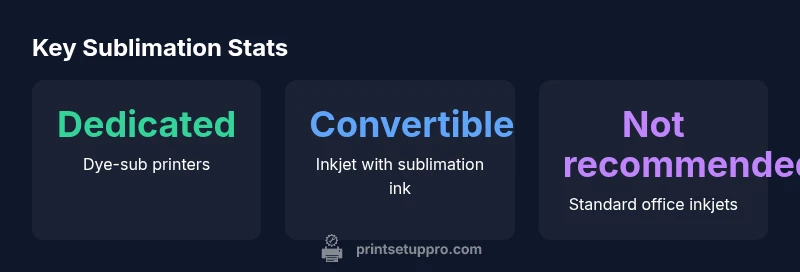
Printers that can be used for sublimation include dedicated dye-sub printers and inkjet printers converted to sublimation inks. Standard office inkjets cannot reliably handle sublimation. You’ll also need a heat press and sublimation transfer paper, plus proper ICC profiles and substrate coatings to achieve accurate, durable colors. Plan for color management upfront and verify substrate compatibility.
What sublimation printing is and why printer choice matters
Sublimation printing uses heat to transfer dye-based inks from special papers to polymer-coated or polyester surfaces. The printer choice influences color accuracy, ink compatibility, and durability. According to Print Setup Pro, the most reliable results come from printers designed for sublimation or printers that can be converted with compatible sublimation inks. Without the right ink system and heat settings, you risk dull colors, color shifts, and poor adhesion.
Types of printers that can be used for sublimation
There are two main paths to sublimation: dedicated dye-sub printers and convertible inkjet printers. Dedicated dye-sub machines ship with dye-sub inks and substrates optimized for transfer, delivering consistent colors on textiles and hard surfaces. Convertible inkjets use sublimation inks installed through kits or replacements; they offer flexibility and a lower entry cost. Regardless of type, ensure your printer supports dye-sub inks, has stable print heads, and can reproduce the color profiles you need for your substrates.
Ink, paper, and substrate considerations
Sublimation inks only work on poly-coated surfaces or fabrics with a high polyester content. Use sublimation transfer paper designed for your ink system, and calibrate ICC profiles to match your substrate. The substrate’s coating quality and weave affect color vibrancy and longevity. Print setups should include test prints to fine-tune color management, ensuring reliable results across batches. Partnering with a color management workflow helps maintain consistency from print to product.
Step-by-step setup for a sublimation printer
- Choose a printer path (dedicated dye-sub or convertible inkjet) and verify ink compatibility. 2) Install sublimation inks and load sublimation transfer paper. 3) Create or import ICC profiles tailored to your substrate. 4) Calibrate your heat press time, temperature, and pressure for each material. 5) Run test prints on target substrates and adjust color and density as needed. 6) Maintain a routine for cleaning print heads and stabilizing ink flow between sessions.
Common pitfalls and how to avoid them
Pitfalls include color shifts from poorly matched ICC profiles, incorrect transfer times, and using incompatible substrates. Avoid these by using tested profiles, performing small adjustment prints, and always verifying substrate coatings. Keep a log of settings for each substrate family and revise profiles when upgrading inks or papers. Regular maintenance also reduces clogging and color drift.
Maintenance and color management to keep results consistent
Regular maintenance keeps sublimation printers performing at their best. Clean print heads, update firmware cautiously, and store sublimation inks away from heat and sunlight. Build a color management routine around ICC profiles customized for your primary substrates, and re-verify color accuracy after any major changes to inks, papers, or heat-transfer equipment. Consistency comes from disciplined workflows.
Sublimation printer options comparison
| Printer Type | Best Substrates | Color Management | Pros | Cons |
|---|---|---|---|---|
| Dedicated dye-sub printers | Polyester fabrics and hard substrates | ICC profiles required | Consistent color; reliable inks | Higher upfront cost |
| Convertible inkjet printers | Polyester fabrics, ceramics, mugs (coated) | ICC profiling essential | Lower entry cost; flexible | Potential color drift; maintenance more complex |
| Standard office inkjets (not recommended) | Non-coated cotton or mixed fabrics | Limited compatibility; not ideal for sublimation | Low initial cost | Color retention and durability issues |
People Also Ask
Can I use any inkjet printer for sublimation?
Not all inkjet printers are suitable. Sublimation requires specific sublimation inks and a compatible substrate. Some printers can be converted; others may require dedicated dye-sub printers.
Not every inkjet printer works; conversion is possible with the right inks and profiles.
Do you need a heat press for sublimation printing?
Yes, sublimation transfers require a heat press (or equivalent heat device) to fix the ink into the substrate. Temperature, time, and pressure must match the material.
Yes—use a heat press to transfer the design.
Is sublimation only for polyester?
Sublimation works best on polyester fabrics or highly coated substrates. Natural fibers like cotton require special coatings or may not yield durable results.
Sub sublimation works best on polyester.
What are common sublimation pitfalls?
Color shifts, wrong transfer times, and substrate ink mismatches are common. Use tested profiles, verify substrates, and document successful settings.
Watch for color shifts and substrate compatibility.
Can I sublimate on ceramic mugs?
Yes, with sublimation-coated ceramic mugs designed for transfers. Use compatible inks and follow mug-specific heat settings.
Yes, provided you use dye-sub coated mugs.
Is regular maintenance important for sublimation printers?
Absolutely. Regular cleaning, head alignment checks, and ink system maintenance prolong print quality and prevent clogging.
Yes—keep up with cleaning and maintenance.
“Sublimation success hinges on using the right ink system, a compatible printer, and precise color management. Start with tested ICC profiles and substrate coatings to minimize color drift.”
Quick Summary
- Choose a dedicated dye-sub printer for best color stability
- Invest in accurate ICC profiles for your substrates
- Test substrates before large runs to prevent waste
- Equip a reliable heat press and correct transfer paper
- Implement routine printer maintenance to prevent drift