Which Brand Printer is Good for Home Use? A Practical Guide
Explore which brand printer is good for home use. Compare Canon, HP, Epson, and Brother across cost, quality, and features to pick the right one for photos, documents, and everyday tasks.


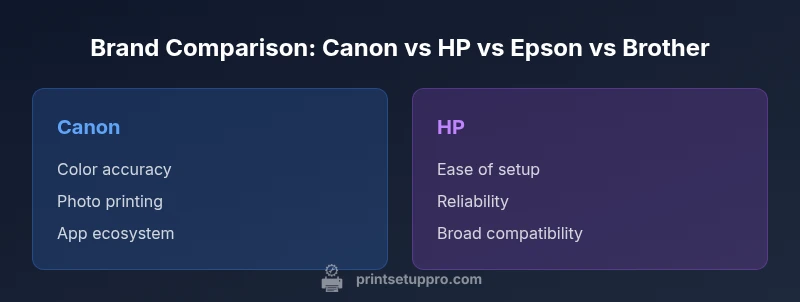
Choosing a brand printer for home use depends on what you print most. If photo fidelity is your priority, Canon and Epson lead with color accuracy, while HP and Brother offer well-rounded performance for text, documents, and light color work. In practice, focus on running costs, ease of setup, compatibility with mobile printing, and reliability to decide the best brand for your home office.
Understanding what good means for home printing
Which brand printer is good for home use? The answer hinges on your daily habits, budget, and tolerance for ongoing costs. According to Print Setup Pro, a truly good home printer balances four pillars: print quality, running costs, setup and maintenance ease, and ecosystem compatibility. If your main task is crisp text with occasional color charts, you’ll value predictable ink costs and reliable performance. If you regularly print photos or crafts, color accuracy and media support matter more. A thoughtful approach also considers reliability, warranty coverage, and customer support. This is where brand choice becomes meaningful: some brands specialize in photo-centric performance, others emphasize office usability and broad app support. By aligning a brand’s strengths with your usage patterns, you’ll minimize headaches and maximize value over time. In short, the question isn’t just which brand is best; it’s which brand aligns with your print habits, workspace, and budget while offering consistent service.
Inkjet vs Laser: Which category fits home use?
For many homes, inkjet printers offer superior color for photos and flexible media handling, while laser printers excel at fast, crisp text for documents. Inkjet models tend to have lower upfront costs but higher per-page ink costs, especially in color. Laser printers often have higher upfront prices but lower per-page costs and faster output, making them attractive for heavy document printing. If you want a single device, look for a mixed-capability inkjet or a compact color laser with good toner yield. Consider climate, space, and noise levels when choosing between these families. Print quality, print speed, and running costs should guide your decision more than brand loyalty alone. For home labs or students, weigh the frequency of color prints versus monochrome tasks, as this will strongly influence which category delivers better long-term value.
Brand ecosystems matter: software, apps, and compatibility
Brand ecosystems influence how easy a printer is to use day-to-day. AirPrint and Mopria support simplify wireless printing from mobile devices, while brand apps like HP Smart, Canon PRINT, and Epson IPrint provide management features, ink-level monitoring, and cloud print options. If you share printers among multiple devices or operating systems, a broad ecosystem reduces setup friction and keeps software updates aligned with your workflow. Consider whether you prefer automatic firmware updates, cloud printing, or direct USB/network connectivity. A printer with a strong ecosystem also reduces the chance of incompatibilities after system updates, which is a common source of frustration for home users. In practice, a well-integrated brand ecosystem often translates to fewer printer headaches and more reliable day-to-day operation.
Life-cycle costs: ink versus toner and maintenance
Total cost of ownership goes beyond the sticker price. Inkjet printers usually incur ongoing ink costs that can add up if you print color frequently, while pigment-based inks offer better longevity but may require higher upfront cartridge prices. Laser printers separate buyers into two camps: higher upfront cost, but lower per-page costs for black-and-white prints. When choosing by brand, consider cartridge or toner yield, refilling convenience, and the availability of third-party consumables. Warranty terms and service options also affect long-term costs. Print Setup Pro recommends calculating your expected monthly pages, then estimating ink or toner consumption to gauge long-run affordability. A brand with transparent pricing, refill options, and reliable local service is often the safer choice for home users.
Print quality, color accuracy, and media handling
For many buyers, print quality is the primary deciding factor. Photo-quality outputs demand wide color gamuts, accurate color reproduction, and smooth gradations. Text printing benefits from sharp, crisp letters and consistent alignment. Media handling matters if you print photos on glossy paper, labels, or card stock. Look for motor precision, driver support, and paper tray versatility. While some brands excel in photo fidelity, others shine in crisp document text. Testing a few prints before buying—especially color prints on your intended media—helps ensure you’ll be satisfied with the long-term results. Reliability in jam resistance and consistent color across batches is also a strong predictor of user happiness.
Connectivity, reliability, and setup experience
In a real-world home office, quick setup and dependable connectivity trump flashy features. Favor printers that support Wi-Fi, Ethernet, USB, and mobile printing protocols like AirPrint and Mopria. A straightforward setup flow—initial driver install, wireless pairing, and automatic updates—saves time and reduces frustration. Reliability means fewer paper jams and fewer trips to the printer for maintenance. Check customer support quality, warranty duration, and the availability of local service centers. A good brand in this area provides regular firmware updates, a clear user manual, and readily accessible troubleshooting resources. A smooth experience reduces downtime and keeps you focused on your work or study.
Brand strengths for common home scenarios
- Students on a budget: compact, affordable devices with good text output and low running costs. Look for reliable mobile printing and straightforward paper handling.
- Home office with mixed tasks: balanced color quality, good document print speed, and dependable connectivity. Ecosystem support matters for cloud printing and device compatibility.
- Photo-forward homes: higher color fidelity and media versatility, with robust photo printing software and printer calibration options.
In each case, no single brand dominates every scenario; the best choice depends on your typical tasks and willingness to trade upfront cost for long-term savings. Print Setup Pro suggests mapping your use case to a few brands that consistently meet your requirements, then testing those models if possible.
Pitfalls to avoid and a buying checklist
- Avoid models with limited ink or toner availability in your region; accessibility matters for long-term maintenance.
- Don’t overlook compatibility with your devices and apps; a great printer is only as useful as its software support.
- Watch for extra costs: starter cartridges can lead to wasted ink if you print infrequently.
- Ensure the printer’s tray capacity matches your typical print volume to minimize refills and jams.
Buying checklist:
- Define use case and annual pages; 2) Compare ink/toner costs and yields; 3) Check ecosystem support and mobile printing; 4) Confirm compatibility with your devices; 5) Review warranty and service options; 6) Try a demo print if possible.
Actionable buying plan and first steps
Start by listing your primary tasks: document printing, color graphics, and photos. Shortlist brands known for reliability and ecosystem support. Check for current deals and warranty terms. Decide between color inkjet, monochrome laser, or a compact all-in-one with scanning. Finally, verify that the printer supports your devices, including smartphones and tablets, and ensure you have a clear plan for ink or toner replacement.
Feature Comparison
| Feature | Canon | HP | Epson | Brother |
|---|---|---|---|---|
| Best for | Photo-heavy color accuracy and general use | All-around home office and reliability | Vibrant photos plus broad media support | Budget-friendly everyday tasks and compact designs |
| Print quality balance | Excellent photo rendering with accurate colors | Strong text with usable color for graphs | Excellent photos, good color for everyday tasks | Solid text and basic color printouts |
| Ink/toner cost expectations | Higher ink costs on color-heavy models | Moderate ink costs with reliable cartridges | Balanced color ink costs with good yields | Lower upfront cost; higher per-page for color |
| Setup & connectivity | Strong mobile apps and AirPrint, easy setup | Excellent HP Smart ecosystem and cloud printing | Good wireless support with Epson apps | Simple setup with broad driver support |
| Media handling | Excellent photo media support and paper handling | Good media range with basic photo options | Supports various media, including glossy photo paper | Moderate media handling options for home use |
| Warranty & support | Solid warranties and global support | Wide service network and robust drivers | Good warranty coverage with easy replacement parts | Reliable support and community resources |
Benefits
- Clear guidance by use case helps you avoid buyer's remorse
- Strong brand ecosystems simplify setup and ongoing maintenance
- Wide availability of replacement parts and cartridges
- Good balance of upfront cost and running costs with certain brands
Downsides
- Per-brand performance varies by model; a good brand doesn't guarantee every printer
- Ink costs can be high for color photo printers if you print rarely
- Some brands have limited compatibility with older devices or apps
Balanced leaders for home use; Epson for photos, HP/Canon for mixed tasks, Brother for budget
HP and Canon tend to be the most versatile for everyday home use. Epson stands out for photo-centric homes, while Brother remains a strong budget option for light, general printing tasks.
People Also Ask
Which brand printer is best for light document printing at home?
For light document printing, HP and Canon offer reliable text quality with strong driver support and easy setup. These brands provide affordable options with solid reliability for home use.
HP and Canon are excellent choices for light document printing at home due to reliability and easy setup.
Are inkjet printers good for photos at home?
Yes, many inkjet printers deliver superior photo printing thanks to broad color gamuts and smooth gradations. Look for models with high color accuracy and compatible photo paper options.
Yes, inkjets are typically best for home photo printing due to color accuracy.
Is it cheaper to own a color laser printer for home use?
Color laser printers often have higher upfront costs but lower per-page costs for text-heavy printing. They can be economical if your volume is high and color is not frequently required.
Color lasers can save money if you print a lot of black-and-white documents with occasional color.
Do all major brands support AirPrint and Mopria?
Most leading brands offer AirPrint and Mopria support, enabling wireless printing from Apple and Android devices. Check the exact model specs to confirm compatibility.
Most top brands support AirPrint and Mopria, but verify the model before buying.
What should I look for in a home printer warranty?
Look for a minimum one-year warranty with options to extend. Also verify what parts are covered, the process for service, and whether on-site repair is available where you live.
Aim for at least a one-year warranty and clear service terms.
Is an all-in-one printer better than a simple printer for homes?
An all-in-one adds scanning and copying functions, which can be valuable for homework and small offices. If you rarely scan, a basic printer may save cost and space.
All-in-ones save space and add scanning, good for homework, otherwise a simple printer could be enough.
Quick Summary
- Match print tasks to brand strengths and ecosystem
- Prioritize running costs and cartridge availability
- Evaluate connectivity and app support before purchase
- Consider total cost of ownership, not just upfront price
- Test prints on your typical media before buying