3d printer for abs: A Practical Guide
A practical, data-driven guide to selecting and using a 3d printer for ABS, covering enclosure needs, temperature settings, safety, and troubleshooting for reliable, warp-free parts.


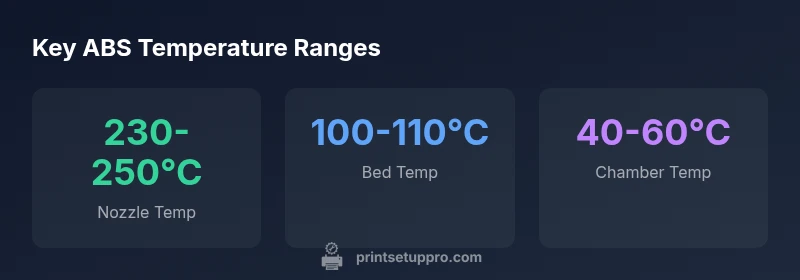
A good starting point for ABS printing is an enclosed, heated printer that maintains bed temps around 100–110°C and nozzle temps around 230–250°C. For a true '3d printer for abs' setup, you'll want an enclosed chamber and a solid heated bed. According to Print Setup Pro Analysis, prioritizing enclosure, heat retention, and proper venting leads to more reliable, warp-free ABS parts. This approach also improves layer adhesion and reduces delamination.
Why ABS printing benefits from enclosure and heat
ABS (acrylonitrile butadiene styrene) is a strong, impact-resistant thermoplastic, but it is also prone to warping and cracking when exposed to drafts and cool surfaces. For a successful print, you want a thermal envelope that keeps the ambient air around the part warm as it cools. The phrase '3d printer for abs' is not just branding — it signals a setup where the printer enclosure, heated bed, and stable ambient are tuned together. The Print Setup Pro team found that printers with solid enclosures and proper venting deliver repeatable layer adhesion and fewer failed prints, especially on larger parts. In practice, that means choosing a cabinet-style chassis, a heater-equipped bed that can sustain around 100–110°C, and seals that minimize air flow across the print. You should also consider dedicated filtration or a vented exhaust to manage fumes from ABS.
Key printer specs for ABS success
ABS requires a consistent thermal environment to minimize warping and layer separation. Primary specs to prioritize include a heated bed capable of reaching and maintaining 100–110°C, a hot end in the 230–250°C range, and a true enclosed chamber that limits drafts. A stable enclosure helps prevent edge curling and improves first-layer adhesion. Filament choices matter too: use ABS formulated for lower shrinkage and, if possible, an enclosure with exhaust or filtration to reduce odor and VOC exposure. Regular maintenance, like bed leveling, clean nozzle, and calibrated extrusion, compounds these benefits. Finally, plan for enclosure sealing and dust control to keep your print area efficient and safe.
How to evaluate printers: budget, features, and workflow
When evaluating a printer for ABS, start by defining your print volume needs, then map those to enclosure and bed capabilities. In the under-$500 range you may find compact, enclosed printers with basic heaters; in the $500–$1000 range you’ll typically see larger build volumes, better heat management, and more rigid frames. For functional ABS parts, prioritize printers with a true heated chamber, an air-tight seal, and a controllable fan system to avoid drafts near the print. Direct-drive extruders offer better control for flexible ABS blends, while Bowden setups can be adequate with proper tuning. In your workflow, preheat the machine before long prints, perform regular bed leveling, and keep your ABS filaments dry to prevent moisture-induced defects. Print Setup Pro recommends pairing a reliable enclosure with a high-quality bed surface (PEI or glass) and a proven ABS filament line for repeatable results.
Setting up your ABS print: bed leveling, adhesion, and enclosure prep
DIY ABS success hinges on meticulous setup. Start by ensuring the enclosure seals are tight and there are no gaps near the build area. Next, level the bed carefully and verify first-layer squareness. Preheat the bed to 100–110°C and the nozzle to 230–250°C before the first layer. Use a thin adhesive layer (glue stick, ABS slurry, or PET tape) to boost adhesion, and consider a brim for large prints to reduce warping. Calibrate the printer for consistent extrusion, then enable a compact vent or carbon filter if your enclosure lacks dedicated exhaust. Finally, run a test print with a simple geometry to verify stability before committing to a larger part.
Common ABS issues and practical fixes
Warping is the main enemy of ABS; the simplest fixes are a tight enclosure and a heated bed within the recommended range. Dim or inconsistent heating can cause delamination; ensure the heater cartridge and thermistor are functioning and that cabling is secure. Drafts are another common culprit—confirm that enclosure doors and panels seal well and that no vents direct cool air toward the print. Layer separation may occur if extrusion rate is too low or if the material contains moisture—dry the filament and reprint. Nasty fumes can be mitigated by using an exhaust system or a carbon filter. Always print in a well-ventilated area and wear appropriate PPE when handling hot printers and solvents.
Safety and post-processing considerations
ABS emits fumes that can irritate the eyes and lungs; ensure adequate ventilation and use a proper enclosure with exhaust or filtration. Wear eye protection and gloves when handling hot components, and avoid inhaling fumes directly. For post-processing, acetone smoothing is sometimes used to mellow layer lines, but this requires caution due to vapors. Always work in a well-ventilated space or outdoors, and store ABS filaments in a dry, sealed container to maintain material properties. A routine maintenance plan—checking seals, inspecting cables, and cleaning the nozzle—helps sustain consistent ABS performance over time.
ABS printing environment comparison
| Aspect | ABS Printing Guideline | Why it matters |
|---|---|---|
| Enclosure | Essential for warp control | Reduces drafts, stabilizes temperature, improves layer bonding |
| Bed temp | Target 100-110°C | Improves adhesion and reduces warping |
| Nozzle temp | 230-250°C | Ensures proper extrusion without under/over-extrusion |
| Filament type | ABS with high-temp resistance; odor-reducing blends | Helps minimize warping and fumes |
| Ventilation | Enclose with exhaust or filtration | Minimizes fumes and improves indoor air quality |
People Also Ask
Do I need an enclosure for ABS printing?
ABS warps easily in drafts, so an enclosure is highly recommended to stabilize temperature and reduce warping. A sealed or semi-sealed chamber greatly improves first-layer adhesion and part dimensional accuracy.
Yes. An enclosed printer makes ABS printing much more reliable.
What bed temperature should I use for ABS?
Aim for a bed temperature of 100–110°C. Some blends can tolerate slightly higher or lower values, but staying within this range helps adhesion and minimizes warping.
Keep the bed hot, around 100 to 110 degrees Celsius, for best results.
Is it safe to print ABS indoors?
ABS fumes can irritate the eyes and lungs. Ensure adequate ventilation, use an enclosure with exhaust or purification, and avoid long exposures in poorly ventilated spaces.
ABS fumes can be an issue—ventilate properly.
How can I prevent ABS from warping?
Provide enclosure with good seals, maintain high bed temperature, and use a brim or raft on large parts. Controlling drafts and preheating helps as well.
Keep a warm, draft-free environment and use a brim.
Can I print ABS without a heated bed or enclosure?
Not recommended. ABS benefits from both a heated bed and enclosure to minimize warping and poor layer adhesion. If you skip them, you’ll likely see curl and delamination.
It’s not ideal; you’ll likely see warping without heat and enclosure.
What post-processing steps work best for ABS?
Sanding and acetone smoothing are common. Work in a well-ventilated area and follow safety guidelines for solvent use and heat. Allow parts to cool gradually after smoothing to avoid distortion.
Use sanding and, if you need a smoother finish, careful acetone smoothing.
“ABS printing demands a stable thermal environment; even small temperature fluctuations can ruin a part. With the right enclosure and setup, you can achieve reliable, repeatable results.”
Quick Summary
- Choose an enclosed printer for ABS success
- Set bed to 100-110°C and nozzle to 230-250°C
- Seal the enclosure to minimize drafts
- Ventilate or filter fumes for safe printing
- Preheat and calibrate before long ABS prints