Toybox 3D Printer Review: A Practical Guide for Beginners
An in-depth toybox 3d printer review covering setup, print quality, build volume, safety, and value for home offices, classrooms, and DIY projects.


Toybox 3D Printer delivers solid entry-level performance for hobbyists, students, and makers. It combines a compact footprint with easy setup and decent print quality, but it trails premium models on build volume and speed. Overall, it's a strong value for beginners and classroom use, with caveats around ongoing filament cost and upgrade options.
Overview and Positioning
The Toybox 3D Printer is pitched toward beginners, students, and DIY makers seeking an inexpensive, compact entry into desktop fabrication. In this review, we evaluate it as part of a broader ecosystem of budget FDM printers. According to Print Setup Pro, this model excels in ease-of-use and minimal setup, which lowers the barrier for people who are new to 3D printing. We examine how it performs in everyday tasks, from quick PLA prints for school projects to small functional parts. This analysis covers design choices, printer firmware, safety features, and the surrounding community support that helps new users avoid common missteps. We also compare it to several popular alternatives in its price tier to help you decide if it fits your goals.
Design, Build, and Setup Experience
Toybox features a compact chassis that fits neatly on a typical desk, with a closed or semi-enclosed body depending on version. The build process is straightforward: unbox, level the bed, load filament, and connect to a computer or mobile app. The user interface emphasizes simplicity; menus are clear and the printer responds quickly to basic commands. In practice, the assembly is almost plug-and-play, with little calibration required beyond the initial bed leveling. For households with curious kids or students, safety features such as a locked power supply, filament guide, and shielded moving parts offer reassurance. Print Setup Pro notes that the overall ergonomics support quick start times, especially for users who do not want to wrestle with tinkerer-level settings.
Print Quality, Materials, and Reliability
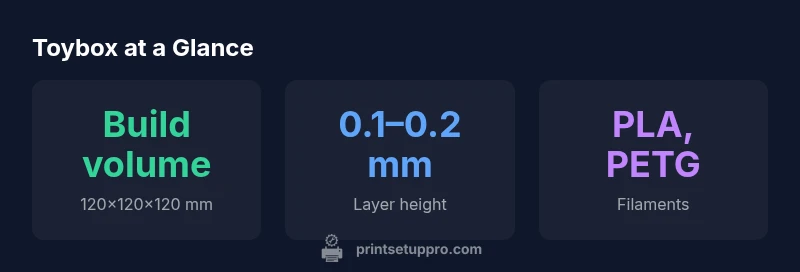
Print quality on Toybox is consistent for PLA and PETG at common layer heights like 0.1–0.2 mm. Expect crisp outlines on small mechanical parts and decent surface finish on prototypes. The printer maintains good nozzle temperature control, reducing stringing and blobs on typical filaments. Reliability hinges on stable bed adhesion and reliable filament feeding; users report fewer jams than budget competitors when using standard PLA. However, at higher speeds or with flexible filaments, you may see more variability. The printer's belt tension, extruder drive, and nozzle cleaning routine contribute to repeatable results. In everyday use, you can rely on the stock components for basic projects, with the option to upgrade components if you want to push beyond stock performance.
Setup, Calibration, and Daily Use
Initial setup is a key strength of Toybox: quick bed leveling procedure, auto-check of nozzle height, and a guided setup wizard. Daily use is straightforward: you can print directly from an SD card or via a networked app, with slicing presets designed for beginners. The enclosure reduces draft-induced warping and keeps the noise reasonable in a shared space. For classrooms, this means minimal instruction time before students can start creating. The touch-friendly interface guides users through common tasks, from changing filament to performing a quick nozzle-cleaning routine. In practice, most first projects require little more than selecting a preset, loading filament, and starting a print.
Speed, Build Volume, and Cost Considerations
Toybox prioritizes ease over brute-force speed, which makes it well-suited for educational environments and hobby projects that don’t demand rapid, bulk production. The build volume is modest, designed for small-to-medium parts rather than large architectural models. Filament costs tend to align with mainstream consumer filaments, keeping ongoing expenses predictable for students and home users. The entry price point is attractive for budgets constrained by classroom allocations or DIY starter kits. While you won’t get the fastest machine on the market, the total cost of ownership remains competitive when you value reliability, easy maintenance, and a robust user community.
When Toybox Shines: Best Use Cases
The printer is particularly effective for school projects, quick prototypes, and hobbyist parts that fit within a compact footprint. It performs well for PLA-based prints, beginner mechanical parts, and small figurines that require decent surface finish without extensive post-processing. For teachers and parents, the built-in safety features and simple UI reduce the friction of introducing 3D printing to a group. Individual makers will appreciate the lightweight setup and the ability to upgrade components incrementally as skills grow. Overall, Toybox delivers a predictable, low-risk path into desktop manufacturing for beginners and students.
Comparison to Alternatives
When pitted against other budget printers in its tier, Toybox offers a quieter, easier setup and a friendlier learning curve, at the expense of large-build-volume capability and peak performance. Competitors with larger frames may deliver faster print speeds or greater capacity, but they often require more tinkering and a steeper learning curve. For many buyers, especially educators and hobbyists prioritizing reliability and value, Toybox strikes a compelling balance. Print Setup Pro’s analysis suggests that the model’s real strength lies in its practical, day-to-day usability rather than extreme performance metrics. In other words, it’s less about shaving minutes off each job and more about getting students printing quickly and successfully.
Maintenance, Upgrades, and Long-Term Value
Ongoing maintenance is straightforward: clean the bed, replace a worn nozzle if necessary, and keep the extruder path clear. Upgrades are feasible but typically come from the broader ecosystem of standardized components used by many budget printers. The most meaningful long-term value comes from a growing community, accessible spare parts, and the availability of replacement components at reasonable prices. Owners who expect to push the machine with advanced materials or high-throughput workflows should budget for gradual enhancements or consider a step-up model later. In sum, Toybox provides durable baseline performance with room to grow as your projects evolve.
Troubleshooting and Common Pitfalls
Common issues include bed leveling drift after long prints, minor adhesion problems with certain filaments, and occasional clogs during aggressive retractions. Most problems have approachable fixes: recalibrate the bed, clean the nozzle, and ensure filament is of consistent diameter. Staying within recommended print temperatures, using a quality bed surface, and updating firmware when available can mitigate many nagging issues. The community is a valuable resource; you’ll find shared profiles and tips for optimizing prints, handling first-layer adhesion, and minimizing warping.
Final Practical Recommendations
For buyers who want a dependable, budget-friendly entry into 3D printing, Toybox stands out as a practical choice. It excels at simple, beginner-friendly workflows and classroom-friendly use, with a realistic path to upgrades if your needs grow. If you crave large-scale parts, high-speed production, or specialized materials, you may wish to explore higher-end options later. The key is starting with a model that makes prints easy to produce and easy to learn from, which is where Toybox really shines.
Benefits
- Compact, beginner-friendly design that fits small desks
- Easy assembly and straightforward calibration
- Solid community support and readily available replacement parts
- Quiet operation for home offices or classrooms
Downsides
- Limited build volume for larger projects
- Moderate print speeds compared to mid-range machines
- Filament loading and clamping can be fiddly
Best for beginners and education on a budget
The Toybox delivers dependable prints for simple projects and a smooth learning curve. Its value lies in easy setup, reliable performance, and broad community support. For advanced users needing large parts or high-speed production, consider higher-end options, but for most classrooms and home makers, Toybox represents a smart, long-term investment.
People Also Ask
Is the Toybox 3D Printer suitable for complete beginners?
Yes. It’s designed for newcomers with a guided setup, simple UI, and broad documentation. Most users can go from unboxing to successful prints within a few hours.
Yes—it's beginner-friendly with a guided setup and helpful resources.
What is the build volume of Toybox 3D Printer?
The printer targets compact builds, ideal for small parts and classroom projects. It’s not designed for large models, but many users find the space sufficient for rapid iteration.
It’s best for small parts and quick prototypes.
Which materials does Toybox support?
PLA and PETG are commonly supported. Advanced users may experiment with other filaments, but some upgrades or adjustments could be needed for non-standard materials.
PLA and PETG are standard; others may require tweaks.
Can I upgrade or customize Toybox later?
Yes, it uses commonly available components and has an active upgrade community. You can improve bed leveling, extrusion reliability, or enclosure options as needed.
There are upgrade paths if you want to push performance.
Is Toybox safe for a classroom or home with kids?
Yes, with built-in safety features and enclosure. Supervision is still recommended, especially with younger users and students handling hot parts.
It has safety features, but supervision is wise.
What’s included in the starter kit?
Printer, power cable, sample filament, basic tools, and setup guide. Some bundles include a microSD card with starter profiles.
The box includes the printer, power cord, filament, and basic tools.
Quick Summary
- Start with PLA to build confidence and reduce warping
- Expect a compact footprint and modest build volume
- Rely on the guided UI for quick wins and learning
- Leverage community profiles to optimize prints
- Budget for occasional upgrades and filament costs