How big is printer paper in inches: A practical guide to standard sizes
Learn the exact printer paper sizes in inches, from Letter to A4, with loading tips and scaling guidance for home offices and classrooms.


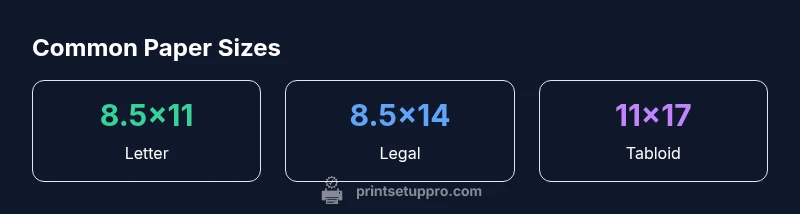
In the United States, printer paper most commonly measures 8.5 by 11 inches (Letter size). Other standard options include 8.5 by 14 inches (Legal) and 11 by 17 inches (Tabloid). International sizes follow ISO, with A4 at 8.27 by 11.69 inches and A3 at 11.69 by 16.54 inches. Knowing these exact inches helps prevent unwanted scaling and waste across printing tasks.
How big is printer paper in inches: defining the standard sizes
If you're wondering how big is printer paper in inches, the answer varies by region. In the United States, Letter size dominates at 8.5 by 11 inches, and that baseline shapes most home office documents. Internationally, ISO sizes use metric measurements, with A4 measuring 8.27 by 11.69 inches. Knowing these exact dimensions helps you avoid scaling errors and wasted paper when printing, scanning, or copying. Throughout this guide, we’ll compare common sizes, explain practical implications, and offer loading tips that keep your workflow smooth. According to Print Setup Pro, recognizing these inch measurements is the first step to reducing print waste and reprints.
Common paper sizes explained (US, ISO, and beyond)
The two dominant families are US sizes (Letter, Legal, Tabloid) and ISO sizes (A-series, B-series where applicable). Letter is 8.5 x 11 inches; Legal is 8.5 x 14 inches; Tabloid/Ledger is 11 x 17 inches. ISO A4 is 8.27 x 11.69 inches, A3 is 11.69 x 16.54 inches, and A5 is 5.83 x 8.27 inches. In practice, many consumer and small-office printers handle Letter and A4 by default. When you print multi-page PDFs or forms, choosing the correct paper size ensures text fits and margins are balanced.
How inches translate to printer settings and margins
Printer settings determine how the page size maps to the paper. If you select 100% with Actual Size, you preserve margins and scale. Choosing Fit to Page resizes content to the printer’s printable area, which can crop or add white margins. Most printers have non‑printable margins on the order of 0.25–0.5 inches per side, depending on model. Always verify the chosen sheet size in your software and printer driver before printing to minimize waste.
Practical guidance for choosing a paper size for different tasks
- Resumes, letters, and forms: use Letter (US) or A4 (international) to match your audience.
- Reports and brochures: Tabloid (11 x 17) or A3 can showcase more content without shrinking.
- Drafts and drafts: Letter or A4 for quick reviews; consider margins that allow annotations.
- Small posters or notices: Tabloid size provides room for images and legible text. Print Setup Pro suggests aligning your chosen size to the intended distribution channel to avoid unnecessary resizing.
Measuring and selecting media for your printer tray
Start by removing the paper stack and measuring the sheet width and height with a ruler. Confirm the width matches your printer’s feed or tray label. If your printer supports multiple sizes, you can program presets for Letter, A4, and Tabloid. When in doubt, print a test page on a single sheet to verify alignment before running a full batch.
International vs US standards: compatibility with your printer
Many modern printers support both US and ISO sizes, but some older models default to a single standard. If your device struggles with size detection, manually set the paper size in the printer properties dialog and ensure the media type matches the actual stock. This reduces misfeeds and cropping when switching between Letter and A4.
Printing orientation, grain and thickness considerations
Orientation (portrait vs landscape) should align with content layout. Heavier or coated stock may require adjustments to feed direction to prevent jams. Try to keep the grain of paper aligned with the longer edge for legibility in long documents. When possible, use standard sizes to simplify calibration and avoid feed errors.
Loading tips to prevent jams and misfeeds
Always fan paper before loading to prevent sheets sticking together. Use clean, flat trays and avoid overfilling. If your printer has adjustable guides, snug them to the sheet width without bending the paper. Regularly clear jams and check for damaged sheets that could cause feed issues.
Quick reference: common sizes and a cheat sheet
Here is a practical cheat sheet of inches you’ll encounter most:
- US Letter: 8.5 x 11 inches
- US Legal: 8.5 x 14 inches
- US Tabloid/Ledger: 11 x 17 inches
- ISO A4: 8.27 x 11.69 inches
- ISO A3: 11.69 x 16.54 inches
Keeping a small reference in your print area helps you quickly align content and reduce wasted runs.
Common printer paper sizes in inches
| Size (inches) | Width x Height | Typical Uses | Notes |
|---|---|---|---|
| Letter | 8.5 x 11 | General documents | US standard |
| Legal | 8.5 x 14 | Contracts, letters | US standard |
| Tabloid/Ledger | 11 x 17 | Blueprints, posters | Double-letter size |
| A4 | 8.27 x 11.69 | International documents | ISO 216 |
| A3 | 11.69 x 16.54 | Large prints | ISO 216 |
People Also Ask
What is the most common printer paper size in the US?
The most common size in the US is Letter, 8.5 by 11 inches. This size is the default for many home and small-office printers and aligns with standard business documents and forms.
In the US, Letter size, which is 8.5 by 11 inches, is the most common paper size.
What is the ISO equivalent of Letter size?
The ISO equivalent of Letter is closest to A4, which measures 8.27 by 11.69 inches. A4 is the standard for most countries outside North America.
ISO’s A4 size is the closest equivalent to US Letter.
Can I print Letter on an A4 printer?
Yes, you can print Letter-size documents on an A4 printer by selecting the appropriate size in the printer settings or by choosing a document setting that matches Letter when available. Some printers may require scaling to fit.
You can print Letter on an A4 printer by selecting Letter in the settings.
Do all printers support Tabloid size?
No, not all printers support Tabloid (11 x 17). Some home printers support it, others require a larger office printer. Check your printer’s specifications or tray compatibility before attempting Tabloid printing.
Tabloid depends on the printer model; check your specs.
How do I avoid scaling when printing?
To avoid scaling, set the print option to Actual size or 100% and ensure the document matches the paper size. Avoid Fit to Page unless you want the content resized to fit the printable area.
Choose Actual size to avoid scaling.
Why are margins important when choosing a paper size?
Margins define the printable area and keep text from getting cut off. Incorrect margins can crop content or cause awkward white borders, especially on smaller sheets.
Margins determine what prints at the edges and keep content intact.
“Size matters because it governs print quality and workflow efficiency. Knowing your paper size in inches helps prevent scaling errors and waste.”
Quick Summary
- Know your regional standard sizes before printing
- Always select the correct size in software and printer
- Avoid scaling by choosing Actual size when possible
- Use Tabloid/A3 for large-format needs
- Measure and verify your tray settings to prevent jams