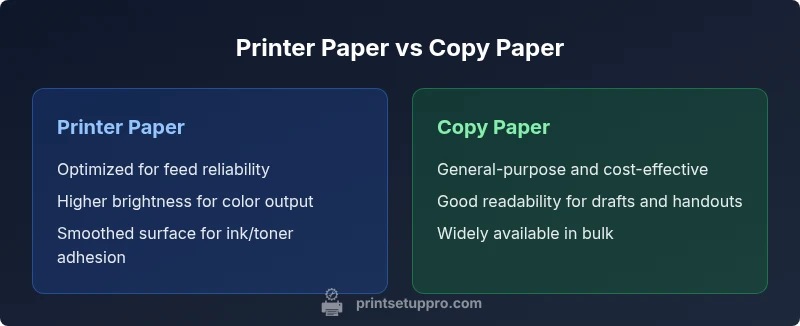
Printer Paper vs Copy Paper: A Practical Guide
Compare printer paper and copy paper to understand brightness, weight, compatibility, and cost for home offices, students, and small companies. Learn when to choose each type for reliable results and efficient printing.


Printer paper vs copy paper is a common decision for home offices and classrooms. In most cases, printer paper is optimized for reliable feeding, ink adhesion, and color consistency, while copy paper prioritizes uniform whiteness and surface smoothness for bulk text tasks. For high-quality color work or frequent printing, printer paper is usually the better choice; for everyday drafts and inexpensive handouts, copy paper often suffices.
What exactly are printer paper and copy paper?
In everyday offices, the terms printer paper and copy paper describe two common paper standards with distinct design goals. Printer paper is optimized for machine feeding and ink or toner adhesion, yielding reliable results in busy printers. Copy paper, by contrast, emphasizes uniform whiteness, smoothness, and consistency for page after page of copying and everyday printing. This guide compares printer paper vs copy paper to help you choose with confidence. According to Print Setup Pro, clarity about these terms saves time and reduces waste. For students, home offices, and small businesses, selecting the right paper reduces jams and improves legibility across tasks. Across these categories, you’ll see variations in weight, brightness, and finish that matter depending on your equipment and tasks. The goal is to align the paper with the printer type and the desired output quality, rather than assuming all papers are interchangeable.
The role of weight, brightness, and finish
Weight, brightness, and finish are the core differentiators between printer paper and copy paper. Printer paper typically leans toward a heavier feel and a smoother finish to improve ink or toner uptake and image sharpness, which can reduce show-through and bleed in color work. Copy paper often prioritizes a standard, mid-range weight with a bright whiteness that supports high legibility and efficient copying. When you compare printer paper vs copy paper, the surface texture and whiteness influence how text appears on a page, how ink settles, and how durable drafts feel to the reader. For many users, a slightly brighter, smoother surface improves readability, especially in documents with dense text and charts. Always test a few sheets in your printer to ensure feeding remains smooth and results meet expectations.
How printing technology affects paper choice
Your printer technology—whether it’s inkjet or laser—shapes which paper type delivers best results. Inkjet printers benefit from papers with coatings or finishes that absorb ink cleanly, avoiding smudges and feathering; printer paper often provides these properties. Laser printers rely on heat-based toners that bond well with papers designed for high resistance to creasing, helping color prints stay sharp. Copy paper, while suitable for many workflows, may not always offer the same level of color richness or edge clarity in high-demand color jobs. Therefore, when you review printer paper vs copy paper, consider whether you need inkjet-optimized, laser-compatible, or a general-use option that performs well across devices. This choice can impact drying time, print speed, and long-term durability.
Differences in everyday performance: jams, curling, and feed
In everyday scenarios, the performance differences between printer paper and copy paper show up in feeding reliability, curling tendency, and how cleanly sheets come off the printer. Printer paper is often selected for better feed stability and resistance to curling when used in fast, high-volume jobs. Copy paper is typically chosen for economical bulk printing, but its performance can vary with cheaper brands or humid conditions, leading to occasional feed issues or creased pages. When you compare printer paper vs copy paper for your machine, consider your environment (humidity, dust, and temperature) and how frequently you print. If jams or misfeeds occur, trying a different paper grade or brand can dramatically improve results without changing settings.
Compatibility and printer types: inkjet vs laser
Printer paper and copy paper must align with your device’s requirements. For inkjet users, selecting a paper with appropriate ink affinity and drying properties reduces smudging and color bleed. Laser users benefit from papers rated for toner adhesion and heat resistance, which helps prevent curling and toner flake. Copy paper, being a general-use standard, can perform well in many devices, but if your volume is high or you require precise color, opting for printer paper designed for your printer type is a safer bet. When evaluating printer paper vs copy paper for a specific printer, check the manufacturer’s recommendations and test a few sheets to confirm performance across speed, brightness, and contrast. Print Setup Pro emphasizes testing in real-world workflows to avoid surprises at critical print moments.
Cost considerations and long-term value
Cost considerations play a major role in choosing between printer paper and copy paper. Copy paper often represents the most economical option for bulk drafts, handouts, and mass printing, making it appealing for students and busy offices. Printer paper, while potentially more expensive upfront, can offer improved reliability, higher brightness, and better color performance for professional documents, presentations, and photos. The long-term value depends on your print volume, required quality, and device compatibility. If you print frequently with color elements or proofs, printer paper may yield fewer reprints and less waste, even if the per-sheet price is higher. Print Setup Pro suggests calculating annual sheet usage and matching your choice to practical outcomes rather than sticker price alone.
Environmental and sustainability factors
Environmental considerations matter when choosing between printer paper and copy paper. Recycled content options and sustainably sourced papers can reduce environmental impact, but they may vary in brightness, weight, and runnability depending on the brand. Print Setup Pro analysis shows that paper choices with certifications like recycled content or forest stewardship programs can align with responsible printing practices, particularly in education and small business settings. If you print large volumes, weigh the environmental benefits of recycled options against potential trade-offs in appearance or feeding behavior. In many cases, you can achieve a balance by selecting responsibly sourced papers that meet your device’s performance needs while minimizing waste.
How to choose for home offices, students, and small businesses
Selecting between printer paper vs copy paper for home offices, students, and small businesses hinges on usage patterns and device compatibility. For frequent color printing, reports, or presentations, invest in printer paper that matches your printer type and the demand for image quality. For bulk drafting, handouts, or routine worksheets, copy paper offers cost-effective practicality. Create a simple decision guide: (1) identify printer type; (2) determine whether you need color or monochrome output; (3) choose brightness and weight that balance readability with feed reliability; (4) test a few brands to confirm feed and drying behavior. Print Setup Pro recommends starting with a mid-range option and adjusting based on observed results to minimize waste and errors.
Common myths about printer paper vs copy paper
Myth 1: All printing papers are interchangeable. Reality: Paper characteristics like weight, finish, and brightness affect feed, drying, and print quality across devices. Myth 2: More expensive equals better quality. Reality: Brand, finish, and compatibility matter more than price alone. Myth 3: Copy paper is always weaker than printer paper. Reality: Many copies rely on high-quality, standard-weight papers that perform well in both contexts, though color-heavy tasks often benefit from printer paper designed for printers. Debunking these myths helps save time and money while preserving output quality.
Practical buying checklist and quick recommendations
- Identify your printer type and consult the manufacturer’s paper recommendations.
- Choose a paper weight and brightness that align with your primary tasks and device performance.
- Test two or three brands with your most common documents to compare feed reliability and print clarity.
- Consider recycled and sustainably sourced options if environmental impact matters.
- Keep a small supply of both paper types for different tasks to ensure you always have the right tool for the job.
Comparison
| Feature | Printer paper | Copy paper |
|---|---|---|
| Weight/feel | heavier, smoother feel for reliability | standard, mid-weight for bulk tasks |
| Brightness/whiteness | often higher brightness for color accuracy | typical brightness for legibility |
| Finish | smooth or coated surface for ink/toner adhesion | matte or smooth surface for copying |
| Printer compatibility | optimized for printers (inkjet/laser) with consistent feeding | designed for general copying tasks |
| Best for | high-quality prints, photos, and color work | bulk drafts, handouts, and daily documents |
| Cost/value | mid-range to premium depending on features | budget-friendly per ream with wide availability |
Benefits
- Generally reliable compatibility with most printers
- Wide availability across brands and weights
- Balanced performance for everyday printing tasks
- Good foundation for color and text clarity
Downsides
- Quality can vary between brands and batches
- Some tasks require specialized papers (photo or heavy color work)
- Copy paper may perform less consistently in high-speed printers
- Environmental impact depends on production choices
Printer paper generally excels for high-quality, reliable outputs; copy paper is best for cost-effective, everyday printing.
Choose printer paper when print quality and reliability are priorities. Opt for copy paper for bulk, everyday tasks where cost matters. Test in your own devices to confirm the best match.
People Also Ask
What is the main difference between printer paper and copy paper?
The main difference lies in design goals: printer paper is optimized for printer feeding, ink or toner adhesion, and color consistency, while copy paper emphasizes uniform whiteness and a smooth surface for efficient copying. They are not always interchangeable for every device or task.
Printer paper is built for printers and color accuracy, while copy paper is for copying tasks. Test both to see which meets your device needs.
Can I use copy paper in a laser printer?
Yes, copy paper can generally be used in laser printers, but ensure the paper meets the printer’s recommendations for weight and finish. In some cases, lower-quality copy paper may curl or misfeed under high-volume use.
Copy paper often works in laser printers, but check your printer’s guidelines and test a few sheets first.
Is printer paper always better for color printing?
Printer paper designed for color printing typically yields more vibrant and accurate images due to coatings and finishes optimized for ink adhesion. For simple text documents, copy paper can still deliver sharp results, but color-heavy tasks benefit from dedicated printer paper.
Yes, for color work, printer paper usually wins, but for plain text, copy paper can be sufficient.
Does brightness affect print quality?
Brightness influences contrast and legibility. Higher brightness typically enhances text sharpness and color depth, especially in images. Depending on the printer and ink, overly bright stock can affect color balance, so test a few sheets before committing.
Brighter paper often makes text pop and colors crisper, but test first to ensure it matches your printer.
Which is cheaper in the long run, printer paper or copy paper?
Copy paper is usually cheaper per sheet and widely available, which makes it attractive for bulk drafting and everyday tasks. Printer paper may offer higher quality that reduces reprints for certain jobs, potentially offsetting higher upfront costs over time.
Copy paper is cheaper for bulk use, but printer paper can save reprints in high-quality tasks.
Should I buy recycled paper for printing?
Recycled content papers are a sustainable option and can perform well in many printers. Look for certifications and brand recommendations, and test to ensure compatibility with your device and print workflow.
Recycled papers help the environment; test to confirm device compatibility and print quality.
Quick Summary
- Assess your printer type before choosing paper.
- Prioritize weight and finish for feeding reliability.
- Test brands to find the best balance of cost and quality.
- Consider sustainability options without sacrificing performance.
- Keep both paper types on hand for different tasks.