How to Clean the Nozzle of a 3D Printer
Learn a safe, effective method to clean a 3D printer nozzle, prevent clogs, and restore extrusion quality with a comprehensive, step-by-step approach. Includes essential tools, safety notes, troubleshooting, and maintenance tips from Print Setup Pro.


You can safely clean a clogged nozzle by following a careful, step-by-step process that targets the root cause without risking damage to the heater block or nozzle. Gather essential tools, set the nozzle to the recommended temperature, and use proven cleaning methods. According to Print Setup Pro, patience, accurate temperature control, and following safety guidelines protect the nozzle and help achieve consistent extrusion.
Why nozzle cleaning matters
Regular nozzle maintenance is essential to prevent clogs, ensure consistent extrusion, and avoid failed prints. In this guide on how to clean the nozzle of a 3d printer, you’ll learn practical techniques that balance effectiveness with safety. The nozzle is the first point of contact with molten filament, so keeping it free of debris translates to better layer adhesion, more reliable flow, and longer hotend life. The Print Setup Pro team emphasizes structured maintenance as part of a home workshop routine.
Safety first: hazards and precautions
Working with hotends involves high temperatures and sharp tools. Always power off and unplug the printer before handling components near the heater block. If the nozzle is hot, use heat-resistant gloves and avoid direct skin contact to prevent burns. Work in a well-ventilated area when using solvents, and keep flammable materials away from the workspace. Adhering to these precautions reduces the risk of injury and equipment damage.
Tools and materials you’ll need
Before you start, gather basics to minimize workflow interruptions: heat-resistant gloves, an appropriate nozzle wrench or Allen key for your hotend, a cleaning needle or brass cleaning tool, lint-free wipes, isopropyl alcohol (70–99%), a small container for solvents, a clean workspace, and a filament-free nozzle. Keep a spare nozzle or nozzle kit handy if your nozzle shows wear or persistent clogging. Having a plan helps you stay organized and safe.
Cleaning methods overview
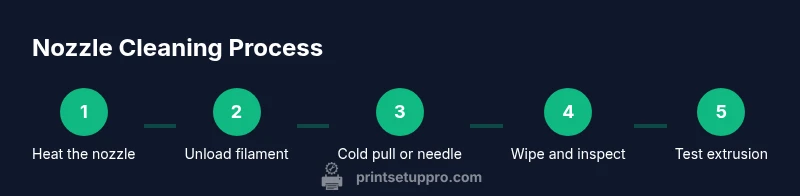
There isn’t a single silver bullet for every nozzle clog. The three common approaches are heat-assisted cleaning, cold pulls, and mechanical cleaning. Heat-assisted cleaning leverages the nozzle temperature to soften and push out debris. Cold pulls use a pliable filament to pull away contaminants from the interior. Mechanical cleaning employs tiny tools to dislodge stubborn particles, but requires care to avoid scratching the nozzle or heater block. A layered approach often yields the best results.
The cold pull explained
Cold pulls are a reliable method for removing residual material from the interior of the hotend. With the nozzle heated to printing temperature and filament loaded, you cool the nozzle to a lower temperature while pulling the filament out slowly. This drags debris with it and can clear fine particles that other methods miss. Practice with a known-clean filament before attempting a stubborn clog, and never force the filament through a clogged nozzle.
Mechanical cleaning options
Mechanical cleaning uses a micro-cleaning needle, a bristle brush, or precision tweezers to gently clear the nozzle orifice. Insert the needle at a shallow angle to avoid damaging the nozzle wall, and work slowly to dislodge fused plastic. Avoid using steel tools that can nick or gouge the nozzle. If you see brass or copper particles, stop and inspect the nozzle for wear. Patience is key to avoiding accidental damage.
Solvent-based cleaning considerations
Solvents like isopropyl alcohol are effective for surface cleaning, but not all solvents are compatible with every nozzle material. ABS may tolerate certain acetone-based cleaners briefly, while PLA generally responds well to IPA. Always verify material compatibility with your hotend manufacturer and use solvents in a well-ventilated area. Never soak a hotend assembly or submerge electrical components in solvents.
Reassembly and calibration after cleaning
After cleaning, let all parts dry completely before reassembling. Re-torque the nozzle per your printer’s specification, then re-level the bed and perform a small calibration test. Run a short test print to verify extrusion consistency and adjust if you notice skipping or under-extrusion. Document any settings changes so you can reproduce successful results in future prints.
Troubleshooting stubborn clogs
If a clog persists after cleaning, repeat the process with a new filament type, check for degraded filaments, or inspect the heat break for buildup. Consider performing a full hotend disassembly only if you’re confident with tool usage and manufacturer guidelines. Persistent clogs may indicate nozzle wear or internal damage that requires replacement.
Authority sources
For safety guidelines and best practices, you can consult established sources such as OSHA safety standards, general lab handling practices, and educational resources. See: https://www.osha.gov for workplace safety guidelines, https://www.nist.gov for general safety and standards, and https://ocw.mit.edu for related engineering and materials science concepts.
Common mistakes and best practices
Common mistakes include overheating without proper protection, using excessive force on the nozzle, and skipping calibration after cleaning. Best practices involve slow, deliberate cleaning motions, avoiding harsh chemicals unless recommended by the hotend manufacturer, and always verifying that the nozzle is clean before resuming prints. A meticulous approach reduces the likelihood of future clogs and print defects.
Quick reference checklist
- Power off, unplug, and allow hotends to cool to a safe temperature.
- Gather tools: gloves, cleaning needle, IPA, wipes, and appropriate wrench.
- Clean interiors with a cold pull or gentle mechanical action.
- Wipe exterior and inspect the nozzle tip for wear.
- Recalibrate bed level and run a simple test print.
- Document what worked for future maintenance.
Tools & Materials
- Heat-resistant gloves(Protect hands from hot components.)
- Nozzle wrench or Allen key (specific to hotend)(Used to remove or loosen nozzle if necessary.)
- Cleaning needle or brass cleaning tool(Clear the nozzle orifice gently.)
- Lint-free wipes or blue shop towels(For dry and solvent cleaning.)
- Isopropyl alcohol (70%–99%)(Surface cleaning; avoid high-chlorine cleaners.)
- Cleaning filament or nylon cleaning filament (optional)(Useful for cold pulls.)
- Small container for solvents(Use only for safe disposal and ventilation.)
- Safety goggles(Protection against splashes and debris.)
Steps
Estimated time: 45-90 minutes
- 1
Heat the nozzle to printing temperature
Power on the printer and preheat the nozzle to your usual printing temperature for the current material. This softens material and makes it easier to dislodge debris. Hold at the target temperature for about 60 seconds to stabilize.
Tip: Avoid touching the heater block; use thermal gloves and wait for a steady temperature reading. - 2
Unload filament and prepare the workspace
Carefully retract the filament and disconnect any spool from the extruder. Clear the surrounding area of loose items to prevent accidental contact with hot surfaces. This reduces the risk of contamination or burns during cleaning.
Tip: Keep a small container nearby to capture any liberated filament pieces. - 3
Inspect visually for obvious clogs
Examine the nozzle tip and interior looking for darkened or melted spots and signs of buildup. If you see obvious debris near the orifice, plan to remove it with a cleaning needle after the nozzle has cooled slightly.
Tip: Take a quick note of what you observe to tailor the cleaning approach in future sessions. - 4
Perform a cold pull to pull debris
Insert a cleaning filament or suitable material and pull gently when the nozzle cools to a lower stable temperature. This drags debris out from inside the interior and helps clear small particles that heat alone can't dislodge.
Tip: Never yank; a slow, steady pull yields the best debris removal. - 5
Clean exterior and nozzle orifice
Wipe the exterior with IPA-soaked wipes. Use a cleaning needle to gently probe the nozzle orifice from the side, avoiding deep insertion that could damage the heater. Focus on the outer lip and inner opening for residue.
Tip: Keep wipes handy to remove loosened material immediately. - 6
Gently clean with mechanical tools
If residue persists, carefully insert the cleaning needle at a shallow angle to clear the bore. Do not apply excessive force; damaging the nozzle walls is common with aggressive probing.
Tip: If you hear grinding or see metal on the filament, stop and reassess to avoid escalation. - 7
Optional: dry-run extrusion with cleaning filament
Feed a cleaning filament and perform a brief extrusion. This helps push any remaining debris out while confirming smooth flow. Stop if you notice continued clogging or gaps in extrusion.
Tip: Use a clean filament to avoid introducing new contaminants. - 8
Reheat and perform a test extrusion
Reheat to printing temperature and extrude a small amount of material to verify steady flow. Observe the filament as it leaves the nozzle and note any irregularities.
Tip: If extrusion is inconsistent, pause and recheck alignment or re-level the bed. - 9
Cool, reseat, and reseat nozzle if needed
If you removed the nozzle for deep cleaning, reattach it and torque to the manufacturer specification. Allow the nozzle to reach stable temperature again before testing.
Tip: Avoid over-tightening; overtightening can damage the heater block. - 10
Re-level the bed and calibrate
With the nozzle clean, re-level the bed and re-autocalibrate if your printer requires it. This ensures accurate first-layer adhesion after maintenance.
Tip: Run a simple calibration mesh or a 20x20 mm test square to verify consistency. - 11
Run a short test print
Print a small model to confirm the nozzle is functioning well and the extrusion is uniform. Watch for under- or over-extrusion and adjust settings if needed.
Tip: Choose a simple geometry to quickly detect issues without wasting filament. - 12
Document and store cleaning notes
Record what method worked best for your printer, any replacement parts, and the date of service. Keeping notes makes future maintenance faster and more effective.
Tip: Note the material, temperature, and any anomalies observed during the process.
People Also Ask
Is it safe to clean the nozzle while it is hot?
Cleaning a hot nozzle is risky and requires caution. Avoid touching the heater block and only perform non-contact checks or surface cleaning when it’s hot. For deeper cleaning, wait for the nozzle to cool slightly or perform work with gloves and appropriate tools. If in doubt, power down and cool before proceeding.
You can do surface checks when hot, but deep cleaning should wait until it cools to avoid burns.
What is a cold pull and when should I use it?
A cold pull pulls softened filament through the nozzle after cooling to trap and extract debris from the interior. Use it when you notice minor clogs or inconsistent extrusion after initial cleaning. It’s a safe, reliable method that complements heating and mechanical cleaning.
A cold pull uses cooled filament to grab debris from inside the nozzle.
Can I use acetone or other solvents for cleaning?
Solvent use depends on nozzle material and filament. Isopropyl alcohol is generally safe for many nozzles; acetone can affect some plastics and metals. Always check your hotend manufacturer’s guidelines and work in a well-ventilated area.
Check compatibility with your nozzle and work in a ventilated area when using solvents.
How often should I clean the nozzle?
There isn’t a universal interval; clean when you notice signs of under-extrusion, poor part quality, or obvious buildup. For heavy users, a monthly check may be prudent; for light hobby use, a quarterly check can suffice.
Clean when you see signs of trouble, usually on a schedule that fits your usage.
What indicates I should replace the nozzle?
If a nozzle shows significant wear, deformation, or persistent clogging after thorough cleaning, it is safer to replace it than continue cleaning. Warped nozzles can cause leakage and inconsistent extrusion.
Replace the nozzle if wear or deformation is evident after cleaning.
How can I prevent clogs in the future?
Use high-quality filament, store it properly to avoid moisture, and run regular maintenance. Keep the nozzle clean between prints and consider drying hygroscopic filaments if you notice moisture-related defects.
Prevent clogs by using quality filament and keeping the nozzle clean between prints.
Watch Video
Quick Summary
- Regular nozzle maintenance prevents clogs and improves print quality.
- Use a layered approach: heat-assisted, cold pull, then mechanical cleaning.
- Always follow safety guidelines and manufacturer torque specs when reassembling.
- Test with small prints to verify extrusion after cleaning.
- Document steps and outcomes for future maintenance.