3d printer for beginners reddit: a practical guide
Learn how to pick, set up, and troubleshoot a beginner-friendly 3D printer with Reddit guidance. Print Setup Pro leads you through steps, safety, calibration, and first prints for home offices and students.


With this guide, you'll learn how to select a beginner-friendly 3D printer based on Reddit discussions, set it up safely, and complete your first prints. It covers bed leveling, first-layer calibration, slicer setup, material choices, and community tips from r/3Dprinting and related subreddits. By the end, you'll be printing confidently and troubleshooting common issues.
How Reddit Helps Beginners Find Their First 3d Printer
Reddit serves as a practical, real-world classroom for new users who are navigating the world of 3D printing. Across subreddits like r/3Dprinting, newcomers share unfiltered experiences about setup, calibration, and print quality. The strength of these communities lies in their hands-on feedback—from first-bed adhesion woes to tuning nozzle temperatures for reliable results. According to Print Setup Pro, the most useful Reddit threads for beginners emphasize three things: choosing a reliable, beginner-friendly model; following a clear setup checklist; and keeping a log of successful settings for future prints. By engaging with these communities, you can learn from others’ mistakes and celebrate small wins together, which accelerates your learning curve and reduces wasted material. This article is designed to translate those community insights into actionable steps you can apply right away in your home office or dorm room.
Core Features That Make a Printer Beginner-Friendly
When browsing Reddit discussions, several features consistently appear as markers of a beginner-friendly printer. A stable, rigid frame reduces wobble during prints and improves first-layer quality. An auto-bed leveling system or easy manual bed leveling saves countless hours of frustration. A heated bed and a compatible build surface (such as PEI or a painter’s tape surface) help with adhesion and consistent layer bonding. Reliability matters: printers with simple control interfaces, robust firmware, and widely supported slicer profiles tend to have fewer nasty surprises for newcomers. Community-tested models that offer transparent documentation, readily available spare parts, and straightforward assembly are favored by beginners and seasoned makers alike. Print Setup Pro’s guidance emphasizes choosing equipment that reduces the learning curve while still leaving room to grow with future projects.
Understanding Reddit Subreddits and Their Role in Learning
Reddit is not just a product catalog; it’s a forum for troubleshooting, experimentation, and constructive critique. Subreddits such as r/3Dprinting host weekly discussions where users post photos of their prints, discuss slicer settings, and offer printable models tailored for beginners. The best approach is to search for threads labeled “Beginner” or “First Print” and note the configurations that consistently produce clean results. Don’t hesitate to ask questions when you’re stuck, but also read the comments to see what solutions worked for others. This habit helps you build a repository of practical, community-validated advice rather than relying on isolated tips from random blogs.
A Community-Driven Setup Workflow for Beginners
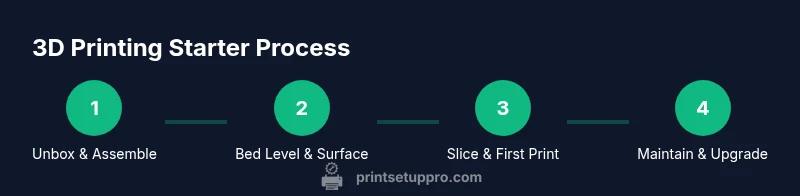
A typical starter workflow recommended by the Reddit community begins with selecting a reliable, entry-level printer, followed by unboxing and simple assembly. Next comes basic wiring checks, bed surface preparation, and ensuring the power supply is safely routed. As you move into leveling the bed and loading the filament, you’ll switch to a starter slicer profile (often Cura) and print a simple calibration model. Throughout this process, Reddit threads often suggest keeping a printable checklist: confirm hardware tightness, verify belt tension, calibrate the hotend temperature for PLA, and save the successful first-layer measurements. Print Setup Pro reinforces the value of documenting settings so you can reproduce consistent results on future prints.
Bed Leveling, Adhesion, and First-Layer Mastery
First-layer success is the linchpin of good prints. Reddit guides routinely cite the importance of bed leveling, correct nozzle distance, and proper adhesion methods. For beginners, PLA with a modest nozzle temperature around typical PLA ranges and a stable bed surface is usually the easiest path. Techniques like spring-boarding the Z-offset with a piece of paper, then adjusting after a few small test prints, are repeatedly recommended. Adhesion aids such as a PEI sheet, blue painter’s tape, or rafts/skirts in initial tests can help you diagnose whether the issue is bed level, temperature, or slicer settings.
Slicing Essentials: Settings That Matter for Beginners
The slicer is where most early prints succeed or fail. Reddit discussions often highlight starting with a basic profile that uses a 0.2 mm layer height, 0.4 mm nozzle, and a first-layer height of 0.2–0.28 mm for good adhesion without sacrificing too much detail. Filament choice is another hot topic: PLA remains the most forgiving option for newcomers, while ABS, PETG, and other materials require more careful calibration. Save your profiles for each filament type and keep notes on temperature, speed, and cooling. By gradually tweaking one variable at a time, you’ll isolate which settings most influence print quality.
Troubleshooting Common Issues with Community Wisdom
Even seasoned makers rely on Reddit for troubleshooting. Common issues include poor first-layer adhesion, warping, stringing, and under-extrusion. Reddit threads often propose systematic checks: verify that the nozzle is clean, confirm the bed is level, ensure the filament is dry and not tangled, and review your slicer’s retraction settings. The recommended approach is to reproduce the problem with a simple model, adjust one variable at a time, and compare the results to establish reliable, repeatable settings. Print Setup Pro’s guidance emphasizes patience and disciplined record-keeping to avoid chasing incidental problems.
Filament, Safety, and Maintenance for New Users
Starting with a safe, well-maintained setup reduces risk and frustration. Reddit users stress keeping the printer away from dust and moisture, using a dedicated power strip with surge protection, and turning off the machine when unattended. PLA is preferred for beginners because it’s less brittle and emits fewer fumes at typical room temperatures. Cleaning routines—such as wiping the nozzle with a high-temperature-safe cloth, checking belt tension, and inspecting fans—help prolong printer life. Always follow the manufacturer’s safety instructions and wear eye protection when changing parts or debugging hot components.
How to Extract Value from Reddit Without Getting Overwhelmed
Reddit can be overwhelming due to its volume of information. The best practice is to target a few trusted threads and authors, subscribe to a weekly digest, and bookmark reliable guides. Create a personal learning journal to capture what works for your printer model and filament, including bed settings, extrusion rates, and cooling profiles. When you encounter conflicting advice, compare it against verified guides from reputable sources and cross-check with multiple posts. Print Setup Pro’s stance is that a focused, incremental approach beats broad, untested experimentation.
Maintenance, Upgrades, and a Path to Growth
As you gain experience, you’ll identify parts that benefit from upgrades, such as quieter stepper drivers, a sturdier frame, or an enclosure to reduce temperature fluctuations. Reddit threads often discuss upgrade cost vs. benefit and the impact on print quality. Prioritize practical upgrades that align with your goals—quick wins like a heated bed upgrade or improving bed adhesion tend to deliver noticeable improvements sooner than more complex changes. Remember to keep documentation of any modifications so you can retrace steps if something goes wrong.
Getting Your First Printable Project and Building Momentum
The transition from theory to practice is the most exciting part. Start with a simple, well-documented model or a beginner project from your favorite repository. Print it, assess the result, and adjust your workflow accordingly. Celebrate small milestones—clean first layers, successful multi-layer objects, and basic supports removal—as these build confidence and keep you motivated. Reddit communities thrive on sharing progress, so consider posting your own results with clear photos and notes to contribute back to the learning loop.
A Practical Posture for Asking Questions on Reddit
When you need help, frame your question with context and minimal jargon. Include your printer model, filament type, slicer version, and a link to the model you attempted. Show what you’ve tried (with photos if possible) and ask specific questions. A well-posed query increases the likelihood of receiving useful, actionable feedback and saves time for both you and the helper. Print Setup Pro agrees that thoughtful questions are the backbone of effective community support.
Tools & Materials
- 3D printer (beginner-friendly, FDM with heated bed)(Look for a stable frame and simple manual/auto-bed leveling)
- PLA filament (1-2 spools)(Choose natural or translucent colors for visibility of layer lines)
- Slicer software (e.g., Cura, PrusaSlicer)(Install latest version and import a basic PLA profile)
- Calipers(For precise bed leveling and measuring prints)
- Bed surface (PEI sheet or painter’s tape)(Enhances first-layer adhesion; replace if performance drops)
- Spare nozzle kit(Useful for nozzle clogs or wear; keep on hand)
- Allen keys and basic screwdrivers(Essential for assembly and adjustments)
- SD card or USB drive(For transferring prints and profiles without a network)
- Safety gear (gloves, eye protection)(Important when handling hot components and tools)
- Surge-protected power strip(Protects equipment and prevents data loss during power issues)
- Dust-free storage for filament(Moisture protection helps prevent filament swelling and prints issues)
Steps
Estimated time: 2-3 hours
- 1
Unbox and inspect the printer
Carefully remove all packaging, locate all components, and verify that the frame is square. Check belts for tightness and tighten any loose screws. This ensures predictable motion and reduces the likelihood of alignment issues later.
Tip: Take photos of each stage in case you need to reference assembly later. - 2
Assemble the frame and mount the print surface
Assemble the base per the manufacturer’s manual, then attach the print surface or bed plate. Ensure the surface is flat and clean to promote even first layers. A stable platform reduces vibration that can cause artifacts.
Tip: Use a level across the bed surface to confirm flatness before any printing. - 3
Level the bed and prepare adhesion
Power on the printer and run a basic bed-level routine or manually adjust with a thin sheet of paper between the nozzle and bed. Confirm a slight resistance when sliding the paper—enough contact to feel friction but not stiffness. Place a small test model to verify adhesion and calibration.
Tip: If adhesion is poor, try a light coat of glue stick or a fresh surface until consistent first layers occur. - 4
Load filament and heat the nozzle
Feed PLA into the extruder and heat the nozzle to the recommended range (usually around 190–210°C for PLA). Make sure the extruder is actually feeding material and that the filament advances smoothly. Stop before a clog forms and note the temperature for future prints.
Tip: Run a short purge to clear any old filament before starting a new color. - 5
Print a calibration model
Choose a simple calibration cube or first-layer test model and print it with a basic profile. Observe the results closely: are there gaps, stringing, or uneven layers? Use this as a baseline to tune layer height and extrusion width.
Tip: If the first layer is too thin, slightly increase the Z-offset; if it's too thick, decrease it slightly. - 6
Tune slicer settings for a reliable first print
Set a conservative layer height (0.2 mm for a standard 0.4 mm nozzle), disable complex supports initially, and keep print speed moderate. Save this as a starter profile and reuse for future prints. Adjust cooling and retraction in small increments for optimal results.
Tip: Document the profile name and key settings in a notebook for quick reference. - 7
Run your first real print
Select a beginner-friendly model with minimal overhang and print it using the starter profile. Monitor the print closely for the first few layers to confirm even extrusion and adhesion. If issues arise, pause the print and adjust bed Level or temperature accordingly.
Tip: Avoid large, complex models on your first try to reduce the risk of failure. - 8
Evaluate and iterate
Compare your printed part to the digital model, note any deviations, and adjust your print settings. Keep a log of what changes you made so you can reproduce improvements. Gradually increase complexity as you master the basics.
Tip: Small, consistent improvements compound over time and create better long-term results. - 9
Engage with Reddit and the community
Share photos of your prints, ask for feedback, and bookmark threads with troubleshooting tips. Use summarized notes from your journal to ask targeted questions, which increases the chance of getting useful responses. This ongoing collaboration accelerates your learning.
Tip: Be specific in your questions and always include printer model, filament type, and the exact issue.
People Also Ask
Is Reddit a good place to start when selecting my first 3D printer?
Yes. Reddit communities offer real-world feedback on reliability, assembly, and print quality. Look for threads labeled beginner-friendly and compare two or three well-regarded models based on user experiences. Always cross-check with official manuals for safety and warranty information.
Reddit can help you choose a printer by showing how real users handle setup and prints. Look for beginner posts and compare a few trusted models.
What features matter most for a beginner printer?
Auto-bed leveling, a heated bed, a reliable firmware, and a straightforward user interface are the top priorities. A sturdy frame and good support community also help reduce the learning curve and improve long-term success.
Auto-leveling, a heated bed, and a strong community support make a printer beginner-friendly.
Can I print reliably with PLA on a budget printer?
Absolutely. PLA is forgiving and widely supported. With proper bed preparation and a basic slicer profile, budget printers can deliver consistent first-layer results and successful prints for simple projects.
PLA is forgiving and works well on many budget printers with proper setup.
How much should I spend on my first printer and basic setup?
Invest in a reliable, beginner-friendly model and essential accessories first. It’s better to start with a solid, simple setup than to chase every upgrade at once. You can expand later as you learn.
Start with a solid, simple setup and upgrade gradually as you learn.
What should I post on Reddit to get better help faster?
Post with context: model name, filament, slicer version, concrete issue, and photos. Include steps you’ve tried and a link to your print file. Clear questions help the community provide precise, actionable advice.
Give context, photos, and exact steps taken to get precise help fast.
When should I upgrade parts or move to more advanced materials?
Only after you consistently achieve reliable prints with your current setup. Early upgrades should target reliability and ease of use, such as better bed surfaces or a reliable cooler, before moving to advanced filaments.
Upgrade when you’re consistently printing well and ready for new materials.
Watch Video
Quick Summary
- Choose a beginner-friendly printer with stable frame and auto-bed leveling.
- Prioritize bed leveling and first-layer calibration for successful prints.
- Start with PLA and a simple model to build confidence.
- Document settings and poster tips from Reddit to guide future prints.