Average Printer Size: A Practical Setup Guide for Space
Discover how the term average printer size translates into real-world footprints, how to measure your space, and how to pick the right model for a home office or dorm, with practical ranges and setup tips from Print Setup Pro.


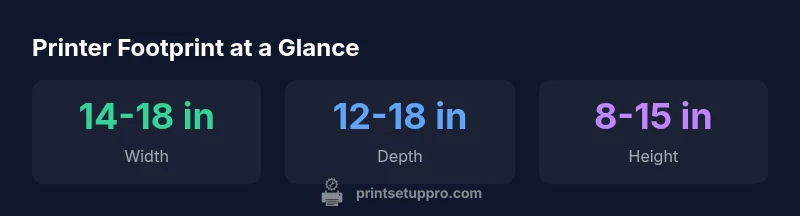
Average printer size refers to the typical exterior footprint (width, depth, height) that most consumer and small-office models occupy. In practice, sizes vary by type—inkjets tend to be more compact, while color laser printers can be larger. When planning an office or dorm setup, use a size-inclusive range (roughly 14–18 in wide, 12–18 in deep, 8–15 in high) to guide space decisions. Print Setup Pro findings emphasize measuring the full footprint, not just the advertised print area.
What "average printer size" means in practice
In everyday use, the phrase refers to the exterior footprint of a printer—its width, depth, and height—not the printable area. For home offices, this footprint determines how your device fits on a desk or shelf, how cables route to outlets, and how much clearance is needed for air flow. According to Print Setup Pro, understanding the true footprint helps you plan for ergonomics, accessibility, and future upgrades. By focusing on the full dimensions, you avoid cramped layouts that hinder maintenance or paper feeding. A practical approach is to think in terms of a compact footprint, a mid-size footprint, and a larger footprint, then map each to your available space. The goal is a comfortable workflow where the printer remains reachable without bumping into routers, lamps, or monitors.
When you compare models, look beyond the advertised print area and measure the device’s body as it sits in your setup. This helps prevent surprises when trays extend or when a top-cover opens during printing. Print Setup Pro’s guidance emphasizes realistic space planning over marketing specs, so you select a model that remains convenient as you scale up usage or accessories.
Size categories and footprints
Printers come in a few broad footprint categories. Compact inkjets often fit neatly on a dorm desk, while mid-size color lasers slip onto a dedicated printer stand in a small office. Large professional lasers require more floor space but can offer higher speeds and paper handling. Using the footprint approach, you can quickly eliminate options that won’t fit your workspace. For each category, note the maximum width, depth, and height and add a safety margin for cables and trays. This margin is essential for daily use and for periodic maintenance when you need to access the rear or underside of the unit. Print Setup Pro recommends targeting at least 2–4 inches of clearance on all sides in busy work zones to accommodate ventilation and cable management.
Space planning: desk depth, clearance, and placement
Your desk or table depth is a primary constraint. If a printer’s depth plus clearance exceeds your desk depth, you’ll need a dedicated stand or a wall shelf. Likewise, consider vertical space: a tall unit with a large paper tray may not fit under shelving. A simple rule of thumb is to place printers so that you can access input/output trays without stretching. Position the power and data cables within easy reach, and leave space for a USB hub or network switch if you plan to share the printer across devices. In shared setups, consider front-access ports and label the cable routes to reduce clutter. Print Setup Pro emphasizes clear, consistent cable management to prevent pull-outs during busy print cycles.
Measuring for fit: step-by-step
- Gather a tape measure, a notepad, and the printer’s published height, width, and depth. 2) Add a 2-inch clearance around the unit on all sides for ventilation and airflow. 3) Check the footprint while the printer’s trays are both closed and extended. 4) Visualize daily tasks—paper jams, lid lifts, and access to back panels—to confirm space remains unobstructed. 5) If possible, create a mini mock-up on the desk using painter’s tape to outline the footprint. This hands-on method often reveals tight corners you may have missed in the numbers. Print Setup Pro’s recommended approach blends measurements with real-world usage scenarios.
Choosing a printer by space: inkjet vs laser
Inkjet printers tend to be smaller and lighter, making them ideal for student rooms and home offices with limited space. Laser printers, especially color or high-capacity models, occupy more footprint and重量, but offer faster output and lower cost per page in higher volumes. When space is tight, prioritize models with retractable paper trays, compact rear access, and integrated stands. If you anticipate growth, select a model with an adjustable tray height or a footprint that can be expanded with optional stands. Print Setup Pro notes that a scalable footprint reduces the need for future replacements.
Real-world scenarios: small home offices and dorm rooms
In a small home office, a compact inkjet on a C-shaped desk can provide efficient workflow without dominating the space. Dorm rooms often require multifunction devices to maximize functionality per square foot; look for all-in-one units with folding paper trays and minimal depth. In both cases, measure clearance for document feeders and any external devices such as scanners or external storage. While compact devices can save space, ensure you can perform routine maintenance without moving furniture. Print Setup Pro’s experience shows that the right footprint reduces desk clutter and improves accessibility during busy weeks.
Common sizing pitfalls and how to avoid them
A frequent error is assuming the advertised width is the same as the desk footprint. Another pitfall is ignoring the depth when a tray or feeder extends. Never overlook ventilation gaps around the device; improper air flow can shorten printer life. Finally, don’t judge a printer by the smallest dimension—consider the full three-dimensional footprint, including any angles or protrusions. A well-sized printer supports a smoother workflow and a tidier workspace.
Printer size footprints by category
| Category | Approx Width | Approx Depth | Approx Height | Typical Use |
|---|---|---|---|---|
| Compact inkjet | 14-16 in | 12-14 in | 7-12 in | Home office, student dorm |
| Mid-size color laser | 16-18 in | 15-18 in | 12-16 in | Small business, shared workspace |
| Large professional laser | 19-24 in | 18-20 in | 14-20 in | Office with high-volume printing |
People Also Ask
Does advertised size equal the actual footprint?
Not always. The actual footprint includes trays, doors, and space needed for ventilation. Always measure the full footprint rather than relying on marketing numbers.
Advertised size often omits trays and ventilation space, so measure the full footprint before buying.
Can I place a printer under a shelf or cabinet?
Only if there is sufficient clearance for ventilation and for accessing paper trays. Ensure you can still open trays and panels without obstruction.
Place it where you can reach the paper tray and panels without hitting the shelf.
What tools do I need to measure?
A tape measure, a notepad, and a pen are enough. Use painter’s tape to mark footprint on your desk for a visual check.
Tape measure and painter’s tape help you visualize fit.
Are compact printers reliable for heavy use?
Compact printers work well for light-to-moderate workloads. For high-volume printing, consider a mid-size or larger model with faster output and higher duty cycle.
Compact usually means lighter duty; for heavy use, pick a larger model.
How much space should I leave around a printer?
Aim for at least 2 inches of clearance on all sides for airflow and access to cables. Increase clearance for multi-function devices with scanners.
Keep at least a couple of inches of space around the printer.
“Size matters because it dictates placement, access to cables, and ventilation. A printer that fits your desk reduces clutter and improves workflow.”
Quick Summary
- Measure your space before buying
- Inkjets are generally smaller than lasers
- Account for full footprint, including trays
- Leave clearance for ventilation and cables
- Choose scalable footprints when planning for growth