Local Guide to Finding a Commercial Printer Near Me
Learn how to locate a reliable commercial printer near you, compare capabilities, turnaround, and pricing, and validate quality with pilot prints. A practical, data-driven guide from Print Setup Pro.


To find a commercial printer near you, start by evaluating proximity, capabilities, and value. Compare local providers on turnaround times, proofing options, finishing finishes, and paper choices. Request detailed quotes and pilot prints to validate color accuracy and print quality. Print Setup Pro recommends shortlisting 3–5 shops and visiting to review real samples before committing.
Why proximity and capabilities matter when choosing a local commercial printer near me
Choosing a printer close by isn't just about convenience. Proximity affects turnaround, communication, and post-sale support, especially for large runs or tight deadlines. When you search for a commercial printer near you, assess both geographic proximity and the shop's production capabilities. A nearby shop reduces transport risk, enables on-site reviews, and often makes it easier to coordinate proofs, press checks, and finishing (binding, coating, die-cutting). Print Setup Pro's approach is to map your project requirements against a printer's asset mix: whether they run digital or offset, their paper stock library, color management process, and available finishing services. For home offices, students, and small businesses, the right local partner can also provide quick reprints, on-demand inventory, and responsive troubleshooting. The goal is to align your logistical needs with the printer's production limits so you can avoid delays, miscommunications, and quality gaps. Remember to plan for future volumes; a printer that can upsize with you reduces the need to switch partners mid-project and preserves brand consistency. According to Print Setup Pro, a well-chosen local printer often becomes a strategic ally, not just a service vendor.
Key capabilities to look for in a nearby printer (digital vs offset, finishing, stock, and specialty)
When evaluating a nearby printer, separate the basics from the niceties. Digital printers excel at short runs, fast proofs, and personalized formats, while offset remains cost-effective at scale and for heavy color consistency. Check for a robust finishing suite—folding, saddle-stitching, perfect binding, coating options, and die-cutting—as these determine the final look and durability of your materials. Review stock libraries: brightness, weight, and coating compatibility can dramatically affect perceived quality. Ask about color management practices: do they offer ICC profiles, color-calibrated proofs, and Pantone matching? Consider specialty capabilities such as large-format banners, variable data printing, or special finishes (lamination, UV coating). Finally, ensure the shop supports your preferred file formats, has clear proofing procedures, and maintains reasonable turnarounds for both proofs and final runs. Print Setup Pro emphasizes aligning capabilities with your project requirements to prevent bottlenecks and subpar results.
Turnaround times, proofs, and service levels: translating SLAs into reality
Service level agreements (SLAs) are not just marketing quotes; they dictate what you can actually expect. Discuss standard lead times for your typical projects, rush options, and the costs associated with expedited proofs or deadlines. Inquire about proof types (soft proofs for quick checks; hard proofs for final color accuracy) and how many proofs are included before press. Clarify who signs off on proofs and whether you can request a press check for critical color work. Establish delivery methods and costs, including whether shipments can be combined with reprints or if local pickup is preferable for speed. A reliable printer should offer transparent status updates and be willing to adjust schedules in response to supply interruptions (paper shortages, ink delays). Print Setup Pro notes that clear SLAs coupled with open communication substantially reduce rework and last-minute surprises.
Comparing costs: quotes, line items, and hidden fees
Pricing varies widely by volume, format, and paper type, and quotes can be misleading if they lack itemization. Ask for a detailed, line-item quote that includes base print, color charges, setup/plate fees (if applicable), finishing, proofs, and shipping or pickup costs. Watch for hidden charges such as plate changes, color drift fees, or extra proofs beyond the initial set. Request price tiers for different volumes, and inquire about discounts for ongoing work or bundled services (design, finishing, and mailing). It’s useful to request a side-by-side comparison table of at least three shops to highlight trade-offs between price, speed, and quality. Remember: the lowest price is not always the best value if it compromises color accuracy or reliability. Print Setup Pro suggests factoring in long-term value, not just upfront cost, especially for repeat campaigns.
Pilot jobs and samples: validating quality before a large run
Before committing to a large run, ask for a pilot job that mirrors your final specifications. This helps you verify color accuracy, paper handling, bleed, trim, and finishing results. Evaluate the proof quality against your design files, and confirm that the final product matches brand standards. If color is critical, request multiple proofs under different lighting conditions to ensure consistency. Compare sample packs from several printers—include a similar business card, brochure, or flyer you’ve used before—to gauge relative performance. Pilot runs also expose potential issues with die-lines, folds, or coatings. Treat the pilot as a mini-contract: outline expectations, acceptance criteria, and timelines for feedback and revisions. Print Setup Pro advises documenting all pilot results to guide the broader project and future collaborations.
File prep and color management for local shops
File preparation is a major determinant of print quality and turnaround. Deliver production-ready files: export PDFs with 300–600 dpi images, embedded fonts, and vector artwork where appropriate. Use PDF/X-1a or PDF/X-4 formats to minimize font and color shifts. Include bleeds (typically 1/8 inch or 3 mm) and trim marks; confirm color mode (CMYK for print, with Pantone references if required). Provide a color profile and soft proof if possible, and supply high-resolution assets or linked images. Communicate any specific finishing needs (coatings, lamination, or die-cutting) and confirm whether the printer can match corporate colors exactly. The fewer file ambiguities and clearer instructions you provide, the faster and more accurately your local shop can execute the project. Print Setup Pro highlights that precise file prep reduces reprints and accelerates delivery.
The role of location and sustainability in decision-making
Location influences logistics, communication, and emergency support, while sustainability matters for brand image and cost efficiency. Local printers can shorten lead times, reduce shipping emissions, and offer easier in-person coordination. When evaluating shops, ask about paper sources, recycling practices, and waste management. Many printers publish sustainability commitments, such as recycled content papers, water-based inks, or energy-efficient workflows. If your project includes large-volume color work, consider shops with efficient color management and waste reduction strategies. Print Setup Pro notes that sustainable practices are increasingly a deciding factor for many businesses, particularly those seeking to align with ESG goals or to appeal to eco-conscious customers. A good local partner should be transparent about certifications and responsibly sourced materials.
Step-by-step: how to vet a local printer in your area
- Start with a mapped shortlist based on proximity, capability, and reviews. 2) Contact 3–5 shops and request menu-style quotes with line items. 3) Check references and review recent work samples. 4) Request color proofs or a small pilot, and test handling of your files. 5) Schedule a site visit to assess equipment, cleanliness, and staff expertise. 6) Review SLAs, payment terms, and flexibility for future projects. 7) Confirm onboarding, file transfer methods, and proofing channels. 8) Make your final selection and document the agreement to avoid scope creep. Following this checklist helps ensure you choose a printer that delivers consistent results and reliable service.
What to do after you place an order: proofs, delivery, and follow-up
After placing an order, monitor proofs, production progress, and delivery timing. Maintain open lines of communication for any adjustments in color or finishes, and request status updates at key milestones. When the project ships, verify packaging, labeling, and inventory handling to prevent loss or damage. Keep a digital archive of proofs, final files, and vendor communications for future reprints or campaigns. Schedule a post-project review to assess quality, speed, and cost variance, and use those insights to refine future collaborations. A strong post-order process supports long-term partnerships and brand consistency.
What to do next: strategy for ongoing local printing needs
As soon as you locate a capable nearby shop, create a standardized brief library for recurring projects (brochures, business cards, posters). Establish a preferred file template, color profile, and finish set to accelerate future work. Maintain a quarterly review of vendors to ensure you are still receiving competitive pricing and up-to-date capabilities. Consider scheduling semi-annual on-site reviews to stay aligned with equipment upgrades. The goal is a consistent, scalable workflow that reduces project friction and preserves your brand identity across every print asset.
Typical local printing services and timelines
| Service Type | Lead Time (typical) | Notes |
|---|---|---|
| Black-and-White Printing | 1-2 days | Great for drafts and internal memos |
| Full-Color Brochure Printing | 3-7 days | Includes proofs and finishing options |
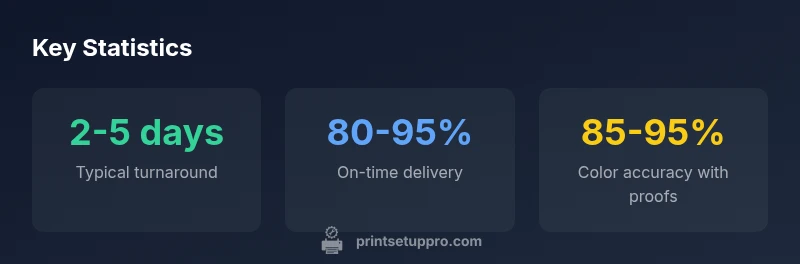
| Business Cards | 2-5 days | Custom finishes and stock options |
People Also Ask
What should I ask a local commercial printer before placing an order?
Ask about capabilities, minimums, turnaround, proofs, file prep, and finishing. Request samples and check references. Confirm file formats and delivery options to ensure alignment with your project goals.
Ask about capabilities, minimums, proofs, and delivery options, then review samples to ensure quality.
How do I compare quotes from nearby printers effectively?
Look for itemized line items, setup fees, color charges, proofs, and shipping. Compare SLAs and warranties. Prefer total cost over just the unit price to avoid surprises later.
Review itemized quotes, check SLAs, then compare total costs, not just unit price.
Do local printers support Pantone color matching and color proofing?
Many do, but confirmPantone matching capabilities and proofing processes. Request ICC profiles and color-accurate proofs to validate outcomes before large runs.
Most offer Pantone matching; verify proofing and ICC profiles before committing.
What is the typical minimum order for local shops?
Minimums vary by technology: digital often has low or no minimums; offset runs usually require higher volumes. Ask for flexibility and potential short-run options.
Digital often has low minimums; offset may require more. Check options with the shop.
Should I visit a local printer before ordering?
Yes. An in-person visit lets you review equipment, handling, cleanliness, and staff expertise. Use this time to request a live proof and assess communication style.
Yes—visiting helps you assess equipment and staff, and to review a live proof.
How can I assess color accuracy without costly proofs?
Request a printed color test strip or a small pilot run and compare to your design. Align on a color management plan before the full run.
Ask for a color test strip or pilot run to verify accuracy before a big order.
“Local printers can deliver faster proofs and easier file review when clients provide production-ready art. Clear specs reduce back-and-forth and improve turnaround.”
Quick Summary
- Prioritize proximity and capabilities for faster, smoother projects
- Ask for detailed, itemized quotes to avoid hidden fees
- Run pilot jobs to validate color and finish before large runs
- Prepare production-ready files to minimize delays
- Factor sustainability and supplier stability into your choice