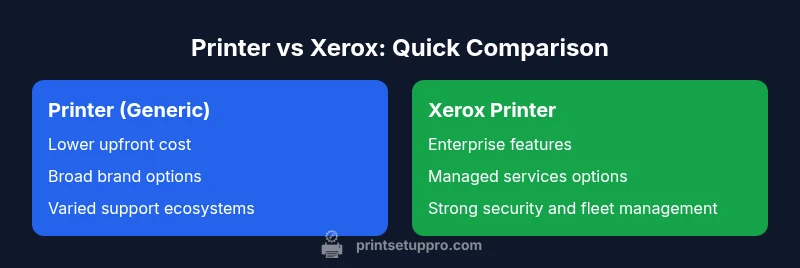
Difference Between Printer and Xerox: A Practical Guide
Learn the difference between printer devices and the Xerox brand, with buying guidance, total cost of ownership, and practical tips for home offices and small businesses.


At its core, the difference between printer and Xerox is brand and product scope. Xerox is a long-standing brand that offers printers and multifunction devices for business needs, while a printer is a device category that any manufacturer can produce. For buyers, this distinction matters: you’re choosing a device type and a brand, not a single feature set. According to Print Setup Pro, recognizing this helps prevent shopping confusion.
Defining the difference: printer vs Xerox
A common question is whether a Xerox device is just a printer. The short answer is that Xerox is a brand, while a printer is a device category. A printer refers to any hardware that produces physical prints, and it can come from countless manufacturers, each with their own feature sets, drivers, and ecosystems. Xerox, by contrast, is a specific company that designs and markets its own line of printers, multifunction devices, and managed printing services. Understanding this helps you evaluate models by the same criteria, rather than conflating a brand name with capability. When comparing, ask: does this model belong to a generic printer family, or is it a Xerox-branded device with enterprise-level services?
In practical terms, a consumer looking for a simple color printer may not care whether the brand is Xerox or another maker, so long as print quality, cost per page, and warranty align with needs. For business buyers, the decision often hinges on vendor support, service level agreements, and integration with existing IT infrastructure. This distinction between device type and brand is foundational for smart purchasing decisions.
This section lays the groundwork by separating the abstract idea of a “printer” from the concrete identity of a brand like Xerox. It also sets up the later discussion on total cost of ownership, feature requirements, and long-term value. The distinction matters because it ultimately guides selection criteria and total cost expectations over the life of the device.
Historical context and brand positioning
Xerox has deep roots in copying technology and office equipment. Over decades, the company expanded into printers, multifunction devices, and enterprise services. Brand positioning matters: Xerox is associated with reliability, enterprise-grade features, managed print services, and global support networks. For home users, this brand emphasis may not be the top priority, but for mid-sized and large offices, Xerox’s ecosystem can influence procurement decisions. The broader market includes many brands offering similar class devices, so the brand name alone should not decide value. Buyers should examine model specifications, service options, and compatibility with their IT environment to determine true fit.
From a strategic standpoint, Xerox devices often aim to deliver security features, centralized management, and long-term maintenance plans. Competing brands may emphasize affordability, compact design, or faster color output. The crucial takeaway is that brand identity shapes expectations around service, updates, and workforce compatibility, but it should be weighed against technical requirements and cost over time.
In this section, we explored how branding influences perception and procurement. The takeaway is not to privilege one brand but to evaluate the complete package: hardware quality, software, support, and total cost of ownership. Your evaluation should balance immediate price against ongoing costs and IT compatibility.
Core product categories: consumer vs business printers
When deciding between a generic printer and a Xerox device, the most practical lens is product category. Consumer printers typically cover a wide spectrum of needs: occasional color printing, photos, school documents, and small home offices. They tend to emphasize low upfront cost, straightforward setups, and broad compatibility with consumer software. On the other hand, Xerox devices—especially their business-class line—tend to target higher duty cycles, more robust security features, and integrated management tools. These devices often support advanced scan-to-email, centralized authentication, and networked deployment in larger teams. For home offices, a consumer-grade printer is usually sufficient, provided it meets print quality, ink/toner cost, and reliability criteria. For offices with multiple users, higher-duty devices with enterprise features may justify the higher upfront cost through lower per-page costs, reduced downtime, and easier IT administration.
In practice, you’ll see a wide range in both categories. The key is to map your expected volume, required security, and integration needs to a model profile. If your workload is predictable and modest, a consumer printer from any reputable brand can deliver solid results. If you require centralized management, strong security controls, and scalable support, you’ll likely gravitate toward business-class or enterprise-grade devices, including Xerox models.
To make an informed choice, compare the expected monthly page volume, the cost of consumables, and the availability of compatible drivers across your devices. The end result should be a device that balances performance with total cost of ownership. In all cases, ensure that the chosen device will fit your network architecture and software environment for a smoother rollout.
Cost of ownership: upfront price, toners, maintenance
Cost of ownership is a pivotal differentiator in this space. Consumer-grade printers usually come with a lower upfront price, but ink or toner costs can accumulate quickly, especially with color printing or high-volume needs. The true cost per page often matters more than sticker price, because replacement consumables and maintenance can eclipse initial purchase costs over time. Xerox devices, particularly in the enterprise segment, typically command higher upfront prices but may offer lower per-page costs through efficient toners and robust duty cycles. They also often come with extended service contracts and lifecycle management options. A comprehensive evaluation should compare not only the purchase price but also consumables, maintenance plans, cartridge yields, and potential penalties for downtime. For home offices, a balance between upfront affordability and ongoing consumable costs is usually the best path. For small to mid-sized businesses, factoring in support agreements, fleet management, and refill availability becomes essential.
To avoid sticker shock, set a realistic monthly print budget, estimate annual page volumes, and calculate cost per page for the models you’re considering. This approach reveals the true economic value of a device over its expected lifespan and helps you avoid overpaying for features you won’t use. Remember that many manufacturers offer tiered maintenance and ink/toner programs; evaluating these options can yield meaningful long-term savings.
Performance and quality factors: print speed, color accuracy
Performance is another axis of differentiation. Consumer printers vary widely in print speeds, often measured in pages per minute (ppm), with color output typically slower than monochrome. In a home setting, speed is rarely a bottleneck unless you’re printing large documents or graphics-heavy material. Xerox business devices usually emphasize higher duty cycles, better color consistency, and more stable output across extended print runs. Security and network optimization features can also impact perceived speed in a corporate environment, where print jobs traverse multiple devices and routes.
Color accuracy matters for photos, marketing materials, and presentations. Consumer devices generally deliver acceptable color fidelity for everyday use, but professional workflows may demand color management tools and calibrated monitors. Xerox models often include enterprise-grade color control features, management software, and consistent color output across a fleet of devices. If you need precise color rendition for professional materials, ensure you choose a model with color profiles, calibration options, and reliable media handling support. In all cases, test print samples to verify that your chosen device meets your expectations for sharpness, contrast, and grayscale fidelity.
As you compare, consider the impact of page size flexibility, media handling (weight, coating, and photo paper compatibility), and the availability of duplex printing. These factors can significantly affect throughput and output quality in real-world use.
Compatibility, drivers, and ecosystem
A common pain point in printer selection is driver compatibility and ecosystem support. Generic printers from various brands rely on well-supported drivers across Windows, macOS, and Linux, along with mobile printing options like AirPrint or Mopria. Xerox devices are generally compatible with industry-standard printing protocols and offer enterprise-friendly software suites for device management, security, and user authentication. The ecosystem extends to mobile apps for print-from-mobile and cloud printing services. When evaluating, verify driver availability for your operating system version, check for firmware updates, and assess whether the vendor provides centralized management tools if you’re deploying multiple devices.
Beyond drivers, examine the ecosystem around consumables and replacement parts. Availability of genuine cartridges, third-party alternatives, and recycling programs affects long-term convenience and cost. A device with broad cross-brand compatibility and a robust support network reduces risk and simplifies future upgrades. Finally, ensure that the device supports your preferred cloud and mobile printing workflows so that work remains seamless across devices and locations.
Common misconceptions and pitfalls
A frequent pitfall is assuming brand alone guarantees quality or value. A Xerox device may deliver excellent enterprise features, but the same performance could be achieved with a consumer-grade printer from another brand if the workload is light. Conversely, selecting a high-end enterprise model when you only need basic prints can waste money and complicate maintenance. Another misconception is equating high speed with better results; print quality and media handling are equally important, especially for documents with graphics or photos. Always test with your typical media and print tasks.
Additionally, many buyers overlook total cost of ownership. Ink costs, cartridge yields, and maintenance plans often determine long-term affordability more than the upfront price. Finally, compatibility with existing IT policies and security requirements should guide selection in business contexts; a device that integrates poorly with your network or security framework can create more headaches than it solves.
Practical buying scenarios: when to choose printer vs Xerox
For a home office or a student setup with moderate printing needs, a consumer-grade printer (from any reputable brand, including Xerox) is typically the best fit. It balances upfront cost, ease of use, and rapid availability of consumables. For small businesses that require centralized management, fleet security, and predictable long-term costs, Xerox business-class devices and associated services may provide stronger value. In mixed environments, a phased approach can work: start with a reliable consumer model for day-to-day tasks, then add enterprise-grade devices as your volume grows or as you need more robust security and workflow features. The key is to align the device with your actual use case rather than defaulting to a brand stereotype.
Finally, consider the provider’s support footprint and training resources. A vendor with a strong service network can reduce downtime and improve user adoption. Whether you choose a printer from a mass-market brand or a Xerox enterprise device, the goal is to minimize friction and maximize uptime while keeping costs predictable.
Future-proofing and support considerations
Technology and software ecosystems evolve, so future-proofing matters. Look for devices with modular upgrade paths, easy firmware updates, and compatibility with current and upcoming operating systems. Security features are increasingly important in business environments; choose devices with secure print, user authentication, and the ability to revoke access if devices are lost or stolen. Evaluate warranty terms, service levels, and options for extended coverage to avoid surprise repair costs. Finally, consider the environmental impact and end-of-life recycling programs—many manufacturers offer cartridge recycling and device take-back schemes, which can align with sustainability goals and potentially reduce operating costs over time.
Comparison
| Feature | Printer (generic brand) | Xerox Printer |
|---|---|---|
| Brand focus | Broad consumer/SMB appeal | Enterprise-grade features and services |
| Target use cases | Home offices, students, DIY projects | Mid-to-large businesses, managed print services |
| Cost of ownership | Lower upfront price in consumer models | Typically higher upfront price but robust lifecycle |
| Connectivity & ecosystem | USB/Wi-Fi, broad app support | Advanced security, fleet management, enterprise integrations |
| Support options | Retail and warranty options for consumer models | Dedicated enterprise support and service contracts |
| Common model examples | Popular consumer models from multiple brands | Xerox VersaLink/AltaLink for enterprise |
Benefits
- Clear differentiation between a device type and a brand
- Broader buying options in the generic printer category
- Potential for lower upfront costs with consumer models
- Access to large driver ecosystems and third-party supplies
- Flexible support options across brands
Downsides
- Brand-name myths can mislead value judgments
- Enterprise-level Xerox devices may have higher total ownership costs
- Quality and reliability depend more on model than brand
- Finding compatible supplies can be tricky if you misjudge the ecosystem
Choose based on use case and total cost of ownership rather than brand alone.
For home offices, start with a reliable consumer printer that fits your print volume and ink costs. For teams and businesses needing centralized management and security, Xerox devices may offer better long-term value through service plans and fleet features.
People Also Ask
What is the practical difference between a printer and Xerox brand devices?
A printer is a generic device capable of producing prints, made by many brands. Xerox is a specific company that sells printers and multifunction devices, often with enterprise-level software and support. The practical difference lies in destination: device category versus the brand and its service ecosystem.
A printer is a type of device produced by many brands, while Xerox is one brand that makes those devices with its own services. Think of it as device type versus brand and support package.
Is Xerox only a copier brand?
Xerox originated as a copier company, but it now offers a range of printers and multifunction devices. While its strengths include enterprise features and managed print services, many other brands also provide capable printers for home and small business use.
Xerox started with copiers but now includes printers as well, especially for business use. Other brands offer similar capabilities for home offices.
Can I use Xerox supplies in a generic printer?
Printer consumables are generally model-specific. You should not mix cartridges or toners across brands or incompatible models. Always use the consumables recommended by the device manufacturer to avoid damage or warranty issues.
No, don't mix Xerox supplies with non-Xerox printers. Use the specific cartridges or toners your device requires.
Are home printers more affordable than Xerox enterprise devices?
Yes, home printers typically cost less upfront and are designed for lower duty cycles. Enterprise Xerox devices usually cost more upfront but may offer lower cost per page and stronger security features over time, depending on use case and service contracts.
Home printers usually cost less upfront, while enterprise Xerox devices can be more expensive but may save money over time with higher duty cycles and security.
How do I choose between a basic printer and an MFP with Xerox features?
Consider whether you need scanning, copying, or fax in addition to printing. If you rarely need those functions, a basic printer may suffice. If you demand integrated workflows, duplex scanning, secure authentication, and centralized management, an MFP from Xerox or another enterprise-focused brand is a better fit.
If you need copying or scanning along with printing, go for an MFP. If you only print occasionally, a basic printer might be enough.
What else should I consider besides brand name when buying?
Look at total cost of ownership, print volume, media handling, security features, driver support, and warranty options. Also consider integration with your IT environment, expected downtime, and availability of local support or service contracts.
Think about costs, workload, security, drivers, and support—not just the brand name.
Quick Summary
- Assess your actual print volume before choosing a brand
- Compare total cost of ownership, not just upfront price
- Verify driver support and IT ecosystem compatibility
- Choose consumer models for home use; reserve enterprise devices for business needs