Do You Need a Subscription for HP Printer? A Practical Guide
Discover whether HP printers require a subscription, explore optional services like HP Instant Ink, and learn cost-effective strategies for home offices.


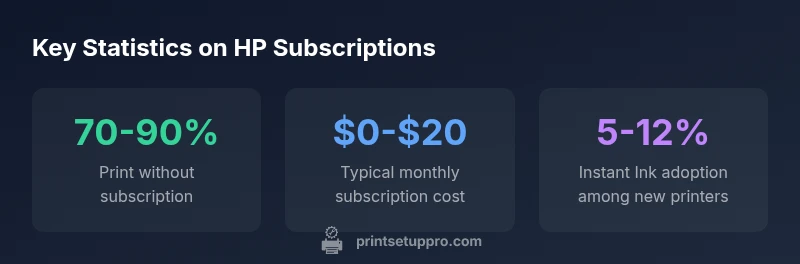
Do you need a subscription for HP printers? No—the core printing functions work without a paid plan. You install HP drivers, connect via USB or Wi‑Fi, and print normally without subscribing. Optional services like HP Instant Ink (ink replenishment) or extended cloud features exist, but they are optional add-ons and not required to print.
Do I Really Need a Subscription to Print with HP?
For most home office users, a paid subscription is not required to print, scan, or copy with an HP printer. The core functionality relies on drivers and standard connectivity (USB or Wi‑Fi). HP offers optional services like HP Instant Ink and HP+ features, which are designed to simplify ink management or provide enhanced cloud features, but you can still print without subscribing. When deciding, weigh your typical monthly pages, color usage, and budget to determine if an ink-delivery plan makes financial sense. Print Setup Pro recommends starting with a basic, non-subscription approach and only adding a service if you expect to gain measurable value.
Real-world takeaway
- Most users print successfully without any subscription.
- Subscriptions are optional add-ons, not printer prerequisites.
How HP Printing Works Without a Subscription
HP printers are designed to work out of the box with standard drivers and common connection methods. Install the official HP printer drivers from HP’s support site, connect the printer to your network or computer, and you’re ready to print. Cloud features and mobile apps (like HP Smart) expand capabilities, but they are not required for basic tasks. If you stay offline or print mainly documents, a subscription is unlikely to be beneficial. For those who want simplified ink management or monthly pricing, optional ink-delivery plans are available through HP and third-party programs, but they are not mandatory.
Practical note
- Ensure you regularly update firmware to keep features stable and secure.
- Review printer settings to optimize ink usage and print quality.
When Subscriptions Make Sense: A Cost-Benefit View
Subscriptions tend to appeal to heavy color printing or high-volume households where ink costs accumulate quickly. If you print photos, marketing materials, or color graphics weekly, an ink-delivery plan can flatten expenses and reduce the risk of running out mid-project. For light users, pay-as-you-go cartridge purchases usually outperform subscription plans. Always compare the per-page cost of cartridges versus the monthly subscription to determine which path is more economical for your actual usage.
Quick framework to decide
- Estimate monthly page count and color proportion.
- Calculate cost per page for cartridges vs. subscription tier.
- Consider convenience vs. potential wastage from unused cartridges.
- Include potential hardware credits or loyalty benefits in the calculation.
Cloud Printing, Apps, and Privacy
Cloud-related features can streamline printing from mobile devices and remote locations, but they introduce privacy and security considerations. HP Smart and similar apps offer scan-to-email, cloud storage, and remote printing. These features are optional and can be disabled if you prefer a purely local setup. If you do enable cloud features, review permissions, access controls, and data handling policies. Subscribing to ink services often pairs with cloud features, but you can decouple these choices entirely.
Best practices
- Use strong, unique passwords for HP accounts.
- Enable device encryption and firmware updates.
- Periodically review connected apps and printers in your network.
- Disable cloud features unless you truly need them.
A Practical Evaluation Checklist
Use this quick checklist to decide whether to subscribe:
- Estimate monthly color pages. If color is rare, subscription is less attractive.
- Compare per-page ink costs under cartridge-only purchasing and a subscription plan.
- Consider the convenience of automatic cartridge delivery versus DIY stocking.
- Check eligibility and terms for HP+ and Instant Ink in your region.
- Assess internet reliance and privacy implications of cloud features.
- Test printing with and without cloud features enabled to observe differences.
A structured evaluation helps you avoid buying a service you won’t use.
Practical Alternatives to Subscriptions: Ink Management and Budgeting
If you’re price-sensitive, you don’t need to subscribe to manage ink costs effectively. Stock up on high-yield cartridges when on sale, use draft or grayscale modes for draft documents, and set print preferences to optimize ink use. Regular maintenance, such as cleaning printheads and updating drivers, can prolong cartridge life and improve print quality. Consider a hybrid approach: start with non-subscription printing, then trial a monthly ink plan only if usage justifies it.
Quick tips
- Enable two-sided printing to save paper and ink.
- Use monochrome mode for text-heavy documents.
- Align print heads periodically to maximize cartridge efficiency.
Comparison of options with and without subscriptions
| Option | Subscription Required | Typical Cost | Notes |
|---|---|---|---|
| Basic Printing (USB/Wi‑Fi) | No | 0 | Driver-based printing, offline-friendly |
| HP Instant Ink | Optional | $0-$20 | Ink replenishment service; cost varies by pages |
| HP+ Cloud Features | Optional | 0 | Requires HP+ account for some features |
| Scanning/Copying | No | 0 | Included with most printers; no subscription needed |
People Also Ask
Do I need a subscription to print with an HP printer?
No. Basic printing works without a subscription. Optional services are available, but not required.
No, you can print without a subscription. Optional features are available if you want them.
What is HP Instant Ink and do I have to use it?
HP Instant Ink is an ink-delivery service that ships cartridges automatically. It’s optional and can help save money for heavy printing.
Instant Ink is optional and you can print without it.
When should I consider subscribing to ink delivery?
If you print heavily or rely on color graphics, an ink-subscription can help manage costs; compare monthly pages with cartridge costs first.
If you print a lot, consider it; otherwise, pay-as-you-go may be cheaper.
Are there hidden costs with subscriptions?
Subscriptions can include shipping fees, data charges, or cancellation terms—always read the plan details before signing up.
Check the terms before signing up for any ink plan.
Can I use cloud features without subscribing?
Some cloud features require an account or optional services, but basic printing remains subscription-free.
Yes, basic printing is free; cloud features may require an account.
“The HP ecosystem supports printing without a subscription, but optional ink-delivery plans can reduce overall costs for high-volume users.”
Quick Summary
- Print without a subscription for basic tasks
- Optional ink plans exist but are not mandatory
- Evaluate your monthly volume before subscribing
- Cloud features add convenience but are optional
- Keep firmware and drivers up to date for best results