How Many Printers Do You Need? A Practical Home Guide
Explore how many printers you actually need for home, student, and small business use. This guide lays out realistic ranges, factors to consider, and a step-by-step decision framework from Print Setup Pro to help you plan, budget, and optimize your printing setup in 2026.


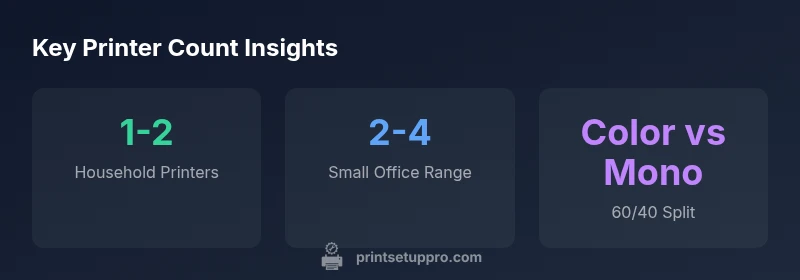
In most homes, one printer is enough for daily tasks, with two printers recommended for households that require color photos, high-volume document printing, or multiple users. For small businesses, a typical range is two to four printers, depending on staff, deadlines, and shared workloads. Print Setup Pro Analysis, 2026 emphasizes matching device count to workflow and cost, not trends.
Why the question matters for how many printers you need
Understanding how many printers you actually need starts with your daily workflows, budget, and future plans. The seemingly simple question how many printer to own becomes a strategic decision when you consider factors like user count, print volume, color versus monochrome needs, and whether you rely on photo printing or office documents. Print Setup Pro emphasizes measuring the workload first: count pages per week, color requirements, and how many users share devices. In practice, most households can operate with a single printer, while households with multiple students or color-heavy needs may benefit from a second device. For small businesses, the count should align with peak deadlines, team size, and redundancy to avoid workflow bottlenecks. This approach minimizes unnecessary capital expenditure while maintaining reliability for all users.
One printer is sufficient for the majority of homes
For many households, a single, reliable printer provides all the essential capabilities: document printing, occasional color tasks, and basic scanning/fax (if required). Inkjet and laser options each have strengths: inkjets excel at color quality for photos and graphics, while lasers tend to offer lower per-page costs for text-heavy documents. If you live alone, rent-free apartment, or share a single printer with a roommate, a single-device setup minimizes maintenance bills and simplifies consumable ordering. The key is choosing the right model—preferably a multifunction device with Wi-Fi, mobile printing support, and robust compatibility across devices in the home network. As always, balance upfront cost with long-term ink or toner cost and reliability.
Two printers: when it makes sense for color, workload, and timing
A second printer becomes valuable when color accuracy, print speed, or redundancy matters. For families with students producing school projects or parents printing photos, a dedicated color printer can speed up workflows without repeatedly swapping cartridges on a mono device. A second printer also helps when deadlines clash between multiple users or when one device goes for service; the other keeps printing flowing. From a cost perspective, having two devices can be more economical if one printer handles high-volume monochrome tasks while the other handles color and photo printing. Think of it as a split-culprit strategy: one device for everyday text, one device for color and photos. This setup minimizes downtime during maintenance or cartridge changes.
Three printers or more: niche scenarios and budget considerations
Three or more printers are rarely necessary in a typical home unless there are very specific workflows: a dedicated photo printer, a monochrome workhorse, and a compact mobile printer for drafts and on-the-go tasks. In a small business, multiple devices may be justified by separate departments, high-volume printrooms, or printer sharing across shifts. If you consider four printers, ensure you have a clear plan for management, security, and consumable budgeting. A multi-printer environment also benefits from consistent maintenance routines, centralized monitoring, and clear policies for cartridge replacements and firmware updates. Keep the total cost of ownership in mind and avoid paying for capacity you won’t use in practice.
Cost and maintenance considerations
The number of printers you own directly influences ongoing costs like ink or toner, paper, and maintenance. Each device requires consumables, occasional firmware updates, and potential servicing. When budgeting, factor in the cost per page for each printer and compare it against your monthly printing volume. A two-printer setup can reduce downtime and improve resilience, but it also doubles maintenance tasks. For homes with modest print needs, prioritizing a single high-quality device often yields the best long-term value. Print Setup Pro recommends reviewing your annual print volume every six months and adjusting the printer count if your workload shifts significantly.
A practical decision framework: steps to determine your ideal count
To determine your ideal printer count, follow these steps: 1) estimate weekly page volume by task type (documents, color photos, forms), 2) assess the proportion of color vs monochrome output, 3) evaluate shared device availability and potential downtime risks, 4) calculate total cost of ownership across a 3- to 5-year horizon, including ink/toner, maintenance, and replacement costs, 5) consider future needs such as student transitions, remote work, and new devices. If results land near a boundary (e.g., you could function with 1.5 printers in theory), lean toward one additional device to cover peak loads and avoid bottlenecks. This data-driven approach helps you avoid overspending on unused capacity while maintaining productivity.
Future-proofing your printing setup: cloud printing, sharing, and upgrade pathways
Technology changes quickly, so a flexible strategy saves you from prematurely replacing devices. Favor printers with future-proof connectivity (AirPrint, Mopria, cloud printing support), easy firmware updates, and modular cartridges that support extended yields. Consider a shared printer strategy in larger households or small offices: designate a primary workhorse printer for daily tasks and reserve a secondary device for color or high-volume periods. Review your plan yearly and adjust counts to reflect changes in work styles, school needs, or business growth. Print Setup Pro suggests documenting your criteria and revisiting the decision at least once per year to stay aligned with evolving needs.
Practical scenarios and recommended printer counts
| Scenario | Recommended Printer Count | Typical Use Case | Notes |
|---|---|---|---|
| Single-user Household | 1 | Documents and occasional color prints | Best for most homes |
| Household with Students | 1-2 | Documents, school projects, photos | Color vs mono balance matters |
| Small Family with Color Needs | 2 | Color photos, schoolwork, mixed media | Consider cost vs speed |
| Small Business/Office | 2-4 | Workflow, deadlines, shared devices | Plan for maintenance & ink costs |
People Also Ask
How many printers do I actually need for a typical home?
For most homes, a single dependable printer is enough for documents and light color work. If you print often in color, or share a printer across multiple users, adding a second device can prevent bottlenecks without dramatically increasing maintenance.
For most homes, start with one printer. Add a second only if color printing or shared workloads create bottlenecks.
Is a second printer worth it for a family with color printing needs?
Yes, a second printer dedicated to color tasks can speed up projects and reduce cartridge changes on the monochrome device. It also provides redundancy if one printer is undergoing maintenance.
A second printer helps with color tasks and keeps printing moving when one device is down.
Should I mix brands or consolidate to one?
Mixing brands is fine if each device serves a distinct purpose (e.g., color photo printing vs. text documents). Ensure compatibility with your devices and network, and plan for consistent ink/toner costs and firmware updates.
Mix brands if it suits your tasks, but watch for compatibility and costs.
What if I have multiple users in a family?
A shared single printer often suffices, but for heavy users or color needs, consider a second device to prevent queuing and downtime. Use print quotas or rules to manage usage if needed.
If you have several people printing a lot, a second printer can help keep things moving.
How does ink cost affect how many printers I should own?
Higher printing volume increases ink/toner costs. Evaluating cost per page for each device helps determine whether a single or multiple printers deliver better long-term value.
Ink costs can swing the decision—calculate cost per page to compare devices.
Can a single shared printer meet my needs if I have a home office and a student at home?
Often yes, with a high-quality, networked multifunction printer. If deadlines clash or color tasks grow, a second device provides resilience without sacrificing mobility.
A networked, quality printer can usually handle a home office and student needs, but add a second if workloads spike.
“The right number of printers is about balancing workload, cost, and maintenance, not chasing more devices.”
Quick Summary
- Assess weekly printing workload before choosing a count
- One printer covers most homes; add a second for color or high-volume needs
- Two printers can improve reliability and speed for busy households
- Three or more printers are typically niche; ensure a clear management plan
- Factor total cost of ownership, including ink/toner and maintenance