HP 8710 Ink: Compatibility, Costs, and Setup Tips
Print Setup Pro analyzes HP 8710 ink compatibility, cost ranges, and practical setup tips for home offices and small businesses. Learn how to choose genuine vs compatible cartridges and avoid common pitfalls to maximize print quality and device longevity.


According to Print Setup Pro, HP 8710 ink quality hinges on using genuine or fully verified cartridges designed for the OfficeJet Pro 8710. This quick answer summarizes compatibility basics, typical cost ranges for original vs. high-quality alternatives, and practical setup guidance to minimize clogs, print head wear, and wasted paper, helping home offices and small businesses print with confidence.
Understanding HP 8710 Ink Compatibility
HP 8710 ink compatibility centers on matching cartridges to the printer’s model family. The OfficeJet Pro 8710 accepts cartridges that are specifically labeled for that series or clearly documented as compatible by reputable brands. In practice, the cartridge’s physical fit, chip communication, and ink formulation all matter. Always verify compatibility on the packaging and in the printer’s menu before installation. Print Setup Pro notes that sticking to labeled compatibility reduces misfeeds, color drift, and alignment failures, which are common causes of wasted paper and reprints. To minimize risk, consider purchasing from authorized retailers and avoid unlisted inks that lack official compatibility statements.
Cartridge Categories for the HP 8710
Cartridges fall into a few broad categories for the HP 8710: Original HP cartridges, third-party compatible cartridges, remanufactured options, and refillable systems. Original HP cartridges offer guaranteed compatibility and consistent color, but at a higher upfront cost. Third-party compatibles can reduce ongoing costs but require careful selection to ensure reliable performance. Remanufactured cartridges provide a middle ground, often with lower prices but variable longevity. Refills work for certain models, though they may involve additional steps during installation. In all cases, confirm compatibility with model designations such as OfficeJet Pro 8710 and consult reliable brand listings. Print Setup Pro emphasizes evaluating warranty implications and post-purchase support when choosing non-original inks.
Original HP vs. Third-Party Inks: Pros, Cons, and Risks
Choosing between original HP inks and third-party options involves trade-offs. Original HP inks typically deliver consistent page yields, predictable color accuracy, and full warranty coverage, but at higher per-cartridge costs. Verified third-party inks can lower upfront costs and reduce per-page expenses if the supplier provides explicit compatibility for the 8710. The downside is potential variability in print quality, color matching, and the risk of clogged print heads or printer errors if the ink is not well formulated for the model. Print Setup Pro recommends balancing cost with reliability, and always verifying that third-party products clearly list compatibility for the HP OfficeJet Pro 8710. Additionally, consider the supplier’s return policy and customer support quality.
How to Identify Compatible Cartridges (Model Flags, Compatibility Lists)
Look for packaging that explicitly states compatibility with HP OfficeJet Pro 8710 or with the same cartridge family marketed for that model. Use HP’s official support pages or trusted retailers’ compatibility guides. Check the cartridge chip and ensure it communicates correctly with the printer’s firmware. If a cartridge claims generic compatibility without model-specific validation, proceed with caution. Printer drivers and firmware updates can sometimes affect cartridge recognition, so keep both up to date. Print Setup Pro recommends keeping a small stock of confirmed cartridges to avoid mid-cycle swap complications.
Cost Considerations and Total Ownership
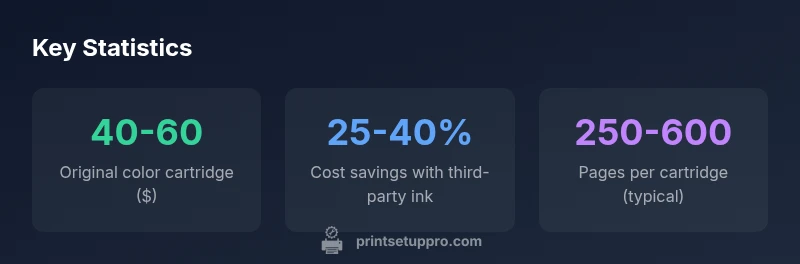
Total ownership costs include purchase price, page yield, and potential maintenance. Original HP inks often carry higher upfront costs but offer consistent yields and fewer service interruptions. Third-party inks can save money per cartridge, yet you may incur extra costs if misfeeds or cleaning cycles are frequent. When comparing options, compute cost per page and project longevity rather than solely focusing on cartridge price. Print Setup Pro encourages buyers to factor-in waste from failed prints and the environmental impact of disposal when assessing total ownership.
Installation, Storage, and Maintenance Best Practices
Store ink cartridges in a cool, dry place away from direct sunlight to preserve shelf life. Before installing, gently rock the cartridge to distribute ink evenly and remove protective seals carefully to prevent air gaps. Run a printer head cleaning cycle if you notice color gaps or streaks after installation. Regular firmware updates can improve cartridge recognition and print quality. Finally, maintain routine cleaning schedules and alignments to maximize cartridge efficiency and extend print head life, especially when using non-original inks.
Troubleshooting Ink Issues and Common Symptoms
If you encounter streaks, color drift, or missing colors, first check ink levels and perform a cleaning cycle. Verify that the paper type selected in printer settings matches the media loaded, as incorrect settings can affect ink absorption and color balance. If problems persist, re-seat cartridges, run another cleaning, and run a calibration. Consider testing with both original and third-party cartridges to isolate whether the issue is ink quality or hardware.
Environmental Impact and Recycling
Many printers support cartridge recycling programs that reduce landfill waste and encourage sustainable disposal. Check the brand’s recycling options and local e-waste programs. By choosing compliant recycling channels, you help minimize environmental impact while keeping your HP 8710 ink ecosystem efficient. Print Setup Pro highlights that responsible disposal aligns with a broader commitment to sustainable office practices.
Quick Shopping Checklist for HP 8710 Ink
- Confirm the cartridge is explicitly listed as compatible with HP OfficeJet Pro 8710.
- Compare price-per-page between original and third-party inks.
- Check return policy and customer support quality.
- Store cartridges properly and perform routine maintenance after installation.
- Recycle spent cartridges through official programs.
HP 8710 ink cartridge options and price ranges
| Cartridge Type | Typical Price Range | Notes |
|---|---|---|
| Original HP color cartridge | $40-$60 | Official HP cartridge; guaranteed compatibility |
| Original HP black cartridge | $25-$50 | HP black cartridge options; ensure correct color designation |
| Third-Party compatible cartridges | $15-$40 | Verify explicit compatibility with 8710; warranty considerations |
People Also Ask
What cartridges are compatible with the HP OfficeJet Pro 8710?
Cartridges labeled for HP OfficeJet Pro 8710 compatibility are safe choices. Prefer genuine HP inks or third-party options explicitly listed as compatible with this model. Always cross-check the packaging and your printer’s compatibility guide before installation.
Use only cartridges listed as compatible with the 8710, preferably HP originals or clearly labeled third-party options.
Are third-party inks safe for the HP 8710?
Third-party inks can work if the manufacturer explicitly lists compatibility for the 8710. Otherwise, you may face color mismatches, print quality issues, or potential warranty implications.
Third-party inks can be safe when clearly listed as compatible; verify with reputable brands.
Do I need to prime new cartridges in the HP 8710?
Some cartridges require priming as part of installation. Always follow the cartridge’s insert instructions and printer prompts to ensure proper ink flow.
If the cartridge instructions say to prime, do it before you print.
What should I do if I see streaks or color gaps after installing ink?
Run a printer cleaning cycle, check alignment, and verify media settings. If problems persist, reseat cartridges and test with an alternative cartridge if available.
Run a cleaning, recheck alignment, and try a different cartridge to isolate ink issues.
How can I recycle HP 8710 ink cartridges?
Use the manufacturer’s recycling program or local e-waste services. Recycling helps reduce environmental impact and supports sustainable printer use.
Recycle through the brand’s program or local e-waste facility.
Will using compatible ink affect my warranty?
Using non-original inks can affect warranty coverage if the cartridge is not listed as compatible by HP or the printer manufacturer. Always verify compatibility and consult warranty terms.
Check compatibility listings to protect warranty coverage.
“Ink quality for the HP 8710 hinges on cartridge compatibility and proper maintenance; choosing verified cartridges simplifies troubleshooting and preserves print reliability over time.”
Quick Summary
- Use genuine HP cartridges or clearly listed compatibles for HP OfficeJet Pro 8710.
- Calculate total cost of ownership, not just per-cartridge price.
- Store and handle cartridges properly to maximize lifespan and print quality.
- Avoid unlisted inks to protect warranty and troubleshooting ease.
- Follow manufacturer steps for installation and priming to prevent clogs.