Laser Printer That Prints 11x17: Setup, Costs, and Troubleshooting
Learn how to choose and configure a laser printer that prints 11x17, with practical setup tips, cost awareness, and troubleshooting for home offices today.


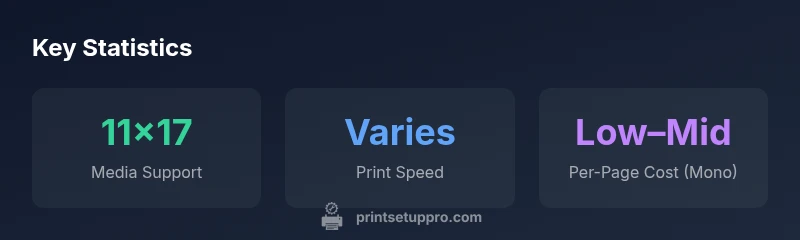
To print 11x17 on a laser printer, choose a model with wide media support, verify driver settings, and evaluate the total cost of ownership. For most home offices, a reliable laser that handles 11x17 sheets without frequent reloading offers the best balance of speed, print quality, and ongoing costs. Ensure you have compatible drivers, an appropriate tray or manual feed option, and a reasonable per-page cost for monochrome vs color tasks.
Understanding the landscape of the laser printer that prints 11x17
When you search for a laser printer that prints 11x17, you’re looking for a device that can handle tabloid-sized media with consistent quality and reliable paper feeding. This size is popular for architectural drawings, posters, large spreadsheets, and marketing proofs. The key drivers of success are media handling, driver support, and total cost of ownership (TCO). Print Setup Pro emphasizes that the best choice balances media flexibility with dependable operation, especially in homes and small offices where workflows are not uniform. By focusing on tray capacity, feed reliability, and driver compatibility, you ensure the printer serves you well for both current tasks and future expansion. According to Print Setup Pro, the right model should gracefully handle 11x17 sheets without frequent reloading or jams, while maintaining predictable print quality. In many cases, this means choosing a printer with a dedicated 11x17 tray or a robust manual-feed pathway and verifying driver settings for large formats. In short, plan around media handling first, then consider speed, color capability, and cost per page.
Paper and Tray Compatibility for 11x17
Media handling is the single most important factor when evaluating a laser printer that prints 11x17. Many models offer a dedicated 11x17 tray, but some rely on a manual feed or a secondary tray extension. Always confirm that the target size is supported by the tray and by the driver before purchasing. Look for a printer that can feed large sheets from a primary tray and has a reliable bypass path for occasional oversize stock. When loading, fan the paper to prevent multi-sheet feed, and ensure the stock is within the printer’s recommended weight range. If you routinely print mixed sizes, a device with a flexible feeding system and intuitive tray reconfiguration will save time and prevent jams. Print Setup Pro’s guidance stresses validating feed paths under real-world workloads, so you’re not surprised by a blocked sheet during a critical print job.
Speed, Quality, and Efficiency: What to Expect at 11x17
Printing at 11x17 typically shifts the balance between speed and quality. In monochrome tasks, many laser printers strike a favorable compromise, delivering crisp text and solid graphics while maintaining reasonable output speeds. Color printing on 11x17 often consumes more toner and processing power, which can reduce throughput compared with standard letter-sized jobs. Resolution and color accuracy still matter, especially for professional proofs and client-ready posters, so choose a printer that matches your required quality level. Energy efficiency and sleep modes also influence long-term costs. Print setups that keep the printer in a ready state without frequent warm-ups tend to reduce downtime, which is crucial for project-driven work streams.
Setup Essentials: Drivers, Windows, Mac, and Tray Configuration
Getting 11x17 right starts with the right driver package and a clear setup path. On Windows, install the latest driver, then go to Printers & Scanners to set the default paper size to 11x17 and create a custom page size as needed. On macOS, add the printer in System Preferences, then select 11x17 in the Print Dialog, ensuring the correct media type and source. If a dedicated 11x17 tray exists, configure it as the default feeding source; otherwise, use the bypass tray for occasional oversize stock. It’s important to check both the driver settings and the physical tray configuration, because misalignment between software and hardware is a common source of feed problems. Print Setup Pro recommends validating a test print after setup to confirm the job uses the intended stock and margins.
Costs and Total Cost of Ownership for 11x17 Laser Printing
Total cost of ownership for 11x17 laser printing includes toner or cartridge costs, maintenance, and potential upgrades to trays or firmware. Monochrome output is typically cheaper per page than color due to simpler toners and fewer color cartridges. Model selection should factor in toner yield, cartridge price, and the availability of high-yield options. Maintenance intervals, such as cleaning rollers and replacing pickup components, can influence uptime and reliability for large-format work. Print Setup Pro notes that evaluating the long-term costs requires projecting monthly page volumes and distinguishing between frequent black-and-white drafts and occasional color proofs. When possible, compare total costs over a typical project cycle to avoid sticker shock at the end of the month.
Troubleshooting Common 11x17 Printing Issues
Even the best devices encounter issues with 11x17 media. Common problems include misfeeds due to oversize stock, paper jams from non-standard weights, and color alignment drift in proof files. Start by verifying media type and size in the driver, reseating the toner, and inspecting rollers for wear. Firmware updates can fix calibration and feed problems; ensure your device is running the latest version. If jams persist, try a dedicated 11x17 tray or alternate weight stock within the printer’s supported range. For professional or frequent large-format work, keeping spare rollers and manuals on hand reduces downtime. Print Setup Pro also suggests maintaining a regular cleaning schedule to prevent static build-up that can attract misfeeds in larger sheets.
Choosing the Right Model: Features to Prioritize
When selecting a laser printer that prints 11x17, prioritize media handling, driver support, and reliability over flashy features. Look for a robust feed path, a dependable bypass tray, and clear margin controls suitable for tabloid formats. Consider models with high-yield monochrome or color options if you anticipate long print runs. Networking capabilities, mobile printing, and compatibility with your operating system can save time and improve workflow efficiency. Finally, check for warranty coverage and availability of parts like rollers and fuser components, which impact maintenance costs and downtime.
11x17 printing capability table
| Feature | 11x17 Capability | Notes |
|---|---|---|
| Paper size support | Supports 11x17 on many models | Verify with vendor specs and driver settings |
| Tray feeding | Dedicated 11x17 tray common in business-class lasers | Check for overflow options and feed path |
| Economy per-page | Monochrome often cheaper than color | Costs vary by toner yield and color vs mono |
People Also Ask
Can a home office laser printer print 11x17 sheets?
Yes, many laser printers support 11x17 (tabloid) sizes, but you must confirm tray support and driver readiness. Review the model’s specifications and test with your typical stock before committing.
Yes, many laser printers can print 11x17; check the tray support and driver settings, then run a test print.
Do I need a special tray to print 11x17?
Some models include a dedicated 11x17 tray or a robust manual feed option; others require loading larger media in the primary tray. Verify tray compatibility before purchase and ensure you can feed without jams.
Some printers have an 11x17 tray or a strong manual feed. Check tray compatibility before buying.
Is 11x17 printing slower on color lasers?
Color 11x17 printing typically takes longer than monochrome due to additional toner usage and color processing. If speed is a priority, plan for color jobs during off-peak times or limit color usage when possible.
Color 11x17 printing is usually slower due to extra toner and processing.
What should I consider for the total cost of ownership?
Toner yield, cartridge price, maintenance, and warranty coverage all influence cost. Monochrome tends to be cheaper per page for typical office tasks; compare high-yield options to reduce replacements.
Toner yield and maintenance affect cost; monochrome often cheaper per page.
How do I set up Windows or Mac for 11x17?
Install the latest driver, then set the default paper size to 11x17 in printer properties. On Mac, add the printer and select 11x17 in the Print dialog, ensuring the proper tray is chosen.
Install the driver and pick 11x17 in printer settings.
What are common 11x17 printing issues and fixes?
Jams, misfeeds, and color misalignment are common. Resolve by cleaning rollers, updating firmware, selecting the correct media type, and verifying the feeding path. Keep spare rollers handy for quick maintenance.
Jams and misfeeds happen; clean, update firmware, and use the right media type.
“Reliable media handling and consistent driver support matter more than feature lists when you need 11x17 capability in a home office.”
Quick Summary
- Verify 11x17 support before purchase
- Prioritize wide media handling and compatible drivers
- Estimate per-page costs based on color vs monochrome
- Budget for maintenance and upgrades
- Test print with real workloads to confirm reliability