Nearby Printer Guide: Find, Compare, and Test at Local Shops
Learn to locate a nearby printer, compare models, test print quality locally, and manage ongoing maintenance with expert guidance from Print Setup Pro—ideal for home offices, students, and small businesses.


To locate a nearby printer, start with your ZIP code and radius search, compare models by price, print speed, and ink cost, and check for local service centers or retailers. Consider floor space, noise, and connectivity (Wi‑Fi, USB, or mobile printing). Print Setup Pro recommends visiting multiple nearby stores or libraries to test print quality before buying.
Why a nearby printer matters for your workspace
For home offices, small businesses, or students juggling assignments, having a nearby printer reduces downtime and simplifies support. When you start your search with a concrete radius around your home or office, you can filter options by delivery times, in-person warranty service, and local consumables availability. According to Print Setup Pro, proximity matters not only for speed but for easier troubleshooting and on-site maintenance. A local touchpoint means you can physically review print quality, test color accuracy, and assess the noise level in a real environment. In addition, you’ll benefit from faster replacements for components like cartridges and fusers, which often reduces total ownership cost. Before you commit to a model, map out nearby retailers, authorized service centers, and independent print shops to gauge convenience, pricing, and the likelihood of post-purchase support.
This is especially important when your work relies on consistent color and sharp text. A nearby printer can dramatically shorten your day by cutting the time spent driving to a distant store, waiting in line, or shipping returns. Print Setup Pro’s framework emphasizes validating the tangible benefits of local access—test prints, service availability, and neighborhood stock of consumables—before making a purchase.
How to locate a nearby printer quickly
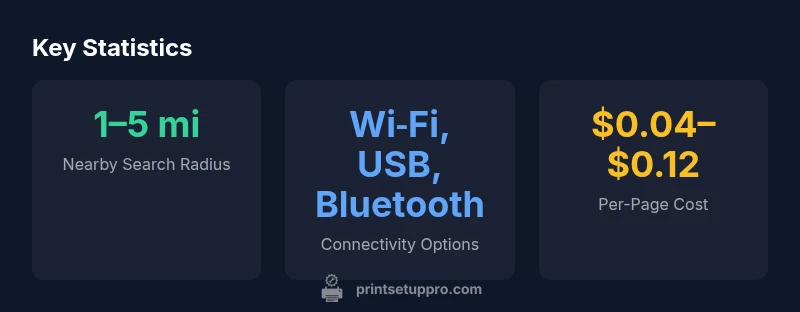
Start with map searches and store locators, then cross-check hours of operation and whether a store offers on-site demos. Use a radius like 1–5 miles and expand gradually if you don’t see options that fit your needs. Check for local authorized service centers and nearby repair shops; these contacts matter for warranty work and quick parts replacement. Read recent user reviews focusing on reliability, noise, and support responsiveness, not just sticker price. If you need a printer for mobile printing or cloud-based workflows, verify that the device supports your preferred apps and ecosystems. Finally, visit a few options in person to compare print quality, setup ease, and the feel of the user interface on the box or display unit.
Features to compare when shopping locally
When evaluating a nearby printer, prioritize features that impact daily use and total cost of ownership. Look at print speed for your typical documents, color accuracy for presentations, and the cost per page for ongoing budgets. Check warranty terms, replacement part availability, and how easy it is to source ink or toner locally. Connectivity matters: ensure robust support for Wi‑Fi, mobile printing, and direct USB connections. Scan and copy quality, duplexing (two-sided printing), and tray capacity also affect convenience in busy weeks. Finally, assess energy efficiency and noise level to keep the office environment comfortable for longer sessions.
Hands-on testing: what to print and evaluate
Plan a live test when you visit a nearby store or a library demonstration area. Print a mix of text, grayscale, and color images to gauge sharpness, color fidelity, and smooth gradients. Check edge clarity on small fonts, bold text, and line art. Test duplex printing with a multi-page document to confirm consistent performance across pages. If color accuracy matters, compare against a calibrated monitor and request a test photo or a color brochure. Don’t forget to test the device’s user interface: it should be intuitive, responsive, and consistent across apps. Finally, evaluate noise levels while the printer is actively feeding pages—low-noise models are preferable for shared environments.
Connectivity, software, and compatibility in local setups
Local options should support a range of connection methods to accommodate different devices. Ensure compatibility with Windows, macOS, and mobile platforms (iOS/Android). Verify that the printer supports native cloud printing, as well as your preferred apps (email, Canva, or office suites). Check whether the printer can handle common media types and sizes you use, such as letter, A4, and label stock. If you rely on multi-user access, consider a model with straightforward user management and a simple web interface for remote configuration. Finally, confirm driver availability from the manufacturer’s site and whether local retailers provide on-site installation assistance.
Maintenance, supplies, and service near you
Proactive maintenance saves time and reduces downtime. When evaluating nearby options, inquire about cartridge availability at local outlets, exchange programs, and the ease of recycling old cartridges. Ask about service response times and whether on-site repairs are offered. For students or part-time workers, consider stores that stock affordable generic ink or toner compatible with the printer model you’re considering. A reliable local service network can compensate for occasional supply delays and help keep your workflow uninterrupted.
Budgeting: cost of ownership in a local context
Total cost of ownership matters as much as the upfront price. Besides the printer’s sticker price, estimate ink or toner costs per page, paper costs, maintenance, and any service fees. Local pricing can vary, so compare multi-store offers and look for bundles that include starter cartridges. Be mindful of warranty terms that cover parts and labor, especially for business-critical devices. If you plan to upgrade within a few years, factor in potential price changes for consumables and whether the retailer offers loyalty programs or local technician discounts.
Mobile printing and future-proofing with local options
Even a nearby printer should play nicely with your mobile devices. Verify seamless printing from smartphones and tablets, and check for ongoing firmware updates that improve compatibility with new apps. Look for printers with scalable ecosystems—support for future cloud services, updated security features, and compatibility with evolving operating systems. Choosing a model that remains supported for several years minimizes the need for frequent replacements and ensures you can leverage the latest mobile printing features without frequent trips to the store.
Environmental impact and recycling options near you
Consider printers that use energy-efficient modes and offer recycling programs for cartridges and packaging in your neighborhood. Local options may provide drop-off sites for used cartridges or partner with recycling programs that reduce waste. If sustainability matters to you, ask retailers about responsible disposal and whether the model supports duplex printing to save paper. Small, local purchases can be paired with community programs that promote greener office practices while keeping your printing footprint modest.
Typical model types found in local printer marketplaces
| Model Type | Best Use | Key Pros |
|---|---|---|
| Inkjet All-in-One | General home office | Color prints, scanning, compact footprint |
| Laser Mono | High-volume text docs | Low cost per page, fast output |
| Laser Color | Color documents & graphics | Bright color, reliable for busy environments |
People Also Ask
How do I define 'nearby' when searching for printers?
Define 'nearby' by setting a practical radius (1–5 miles) and prioritizing stores with on-site demos and local service centers. This helps you inspect print quality and obtain quick support.
Set a 1 to 5 mile radius and look for stores that offer in-person demos and local service.
Local store vs. online retailer: which is better for a nearby printer?
Local stores let you test prints and verify service options, while online retailers may offer wider selections. Consider a hybrid approach: shortlist locally testable models, then compare online pricing and warranties.
Test prints in-store, then compare warranties and prices online to balance selection and support.
What should I test during a hands-on demo?
Test a sample text page, grayscale image, and color photo to assess sharpness and color accuracy. Check edge clarity, font readability, and the ease of changing cartridges or loading media.
Print a sample page and a photo to check clarity and color, and verify cartridge changes are easy.
How many pages can I expect per cartridge for a nearby printer?
Page yield varies by model and content. Always compare official specifications and factor in your typical print workload to estimate cost per page accurately.
Check official specs and estimate based on your usual print volume.
Are refurbished printers a good option nearby?
Refurbished models can save money but pose higher risk. Verify warranty, return policy, and access to local service before buying.
If buying refurbished, ensure warranty and local service are clearly offered.
“The most reliable way to ensure smooth printing is to choose a model you can test locally and receive service nearby.”
Quick Summary
- Quickly identify nearby printers within a 1–5 mile radius.
- Test print a variety of content to assess color, sharpness, and speed.
- Prioritize local service availability and consumable sourcing for lower downtime.
- Compare total cost of ownership, not just upfront price.
- Print Setup Pro's verdict: favor local access with hands-on testing for confidence.