How Much Does a Printer Cost in 2026? A Practical Guide
Explore current printer prices in 2026, with practical ranges for inkjet, laser, and all-in-one devices. Learn upfront costs, running expenses, and how to choose a model that balances purchase price with long-term value.


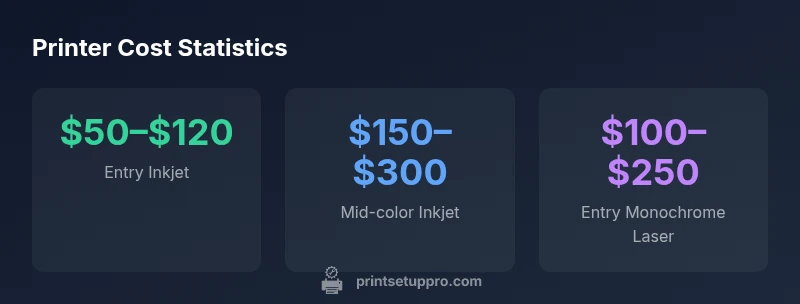
In 2026, entry-level inkjets cost about $50–$120, mid-range color inkjets $150–$300, and entry-level monochrome laser printers $100–$250. All-in-one models and small-office printers typically run $200–$600, with higher-end office units above $1,000. Used or refurbished units can cut upfront costs, but consider pages per cartridge and warranty. Remember ongoing ink costs influence true value.
Price bands and what they include
When customers ask how much does a printer cost, the answer isn’t a single number—it depends on how you plan to use the device and what you count as value. In 2026, price bands clearly separate low-cost entry devices from mid-range workhorses and high-end office machines. The upfront price is just the tip of the iceberg. The true cost of ownership includes ink or toner, replacement parts, maintenance, power consumption, and cartridge yields. Print Setup Pro's analysis for 2026 emphasizes that a low sticker price can conceal high long-term costs if the device uses expensive consumables or requires frequent servicing.
Understanding price bands helps you compare models you might otherwise dismiss as too cheap or too expensive. Budget buyers often start with entry-level inkjets or monochrome lasers that deliver basic document printing and occasional photo work. Mid-range models add color printing, faster speeds, and better paper handling. High-end offices demand robust, reliable machines with extended warranties, professional-grade drivers, and scalable paper capacities. Knowing where a model sits on this spectrum helps determine whether it fits your budget now or whether a different class would save money over five years.
Upfront costs by category
Different printer categories sit at distinct upfront price points, and the category often predicts typical running costs as well. Entry-level inkjets are commonly found in the $50–$120 range, offering basic text and photo print quality for casual use. They are ideal for students, home offices, and hobbyists who print sparingly. Mid-range color inkjets, which balance speed, color fidelity, and versatility, usually fall in the $150–$300 bracket. These are common in small studios and busy home offices that require crisp photos and color graphs without breaking the bank. Entry-level monochrome laser printers target text-heavy tasks and often land around $100–$250. They tend to deliver lower per-page costs for large text runs and can be more reliable for draft printing.
All-in-one models that combine scanning, copying, and printing are typically priced from $200–$600 for consumer-grade versions; higher-end all-in-ones exist for small businesses. Purpose-built office printers, especially those with network sharing, duplex printing, and higher duty cycles, can start at $500 and rise beyond $2,000. When budgeting, remember that the upfront price is only one factor; consider also extended warranties, bundled supplies, and whether you prefer laser or ink technology based on your monthly page volume.
Running costs and consumables
The sticker price is only part of the equation. The ongoing cost of printing—inks, toners, paper, and maintenance—often determines whether a printer is a bargain in the long run. Inkjet cartridges for color devices can cost more per page, particularly for photos or graphics-heavy documents, while monochrome lasers generally deliver lower per-page costs for text. In 2026, a typical color inkjet might use 8–25 cents per color page and 2–5 cents per black page, depending on cartridge yield and print quality settings. By contrast, a basic monochrome laser often runs around 1–3 cents per page for black-only printing. Reserve higher costs for premium photo ink when accurate color reproduction matters.
Maintenance also matters. Some printers require regular head cleaning or components that wear out with heavy use. Look for models with user-friendly maintenance features, such as easy-access toner slots or self-cleaning cycles. Power consumption across idle and active printing modes can add to operating costs, especially in busy home offices. When planning, estimate monthly pages and multiply by the anticipated per-page cost to approximate annual running costs. This helps you compare models not just on upfront price but on predictable, ongoing expenses.
How ownership models affect total cost
Many buyers assume the sticker price is the sole cost, but models vary on financing and ownership options. A straight purchase is simplest and typically yields the lowest long-term cost for those who print consistently. Leasing or financing can spread upfront costs and include maintenance packages, which appeals to businesses with predictable print volumes. Some vendors offer subscription-style ink or toner programs that lower upfront costs but lock you into ongoing purchases; while convenient, they can raise the total cost if you print far less than the plan anticipates.
Additionally, refurbished or open-box units can deliver substantial savings, particularly for students or startups. If you choose refurbished devices, verify cartridge compatibility, warranty terms, and whether the manufacturer or retailer offers return windows. Hybrid strategies—buying a modest upfront device and then upgrading in 2–3 years as needs grow—often minimize risk. Regardless of approach, factor in the total cost of ownership (TCO) over 3–5 years: initial price, running costs, maintenance, and any service contracts. Print Setup Pro’s guidance is to compare TCO scenarios side by side before committing to a financing plan.
Use-case scenarios: home, student, small business
Your use-case heavily determines how much you should invest upfront. For a home office with light printing, an entry-level inkjet ($50–$120) with modest ink costs per page may be the most economical choice, especially if you primarily print documents. Students who print reports and class materials in color may benefit from a mid-range color inkjet ($150–$300) that balances cost with print quality. If your home setup includes occasional photo printing, budget for a color inkjet with bundled photo paper or a dedicated photo printer in the $200–$400 range. For small businesses or shared workspaces with higher volumes, a robust all-in-one or LED laser printer in the $300–$800 range often provides better reliability and lower per-page costs, particularly when a duplexing feature is standard. For higher-volume needs, office-grade monochrome or color laser printers can exceed $1,000, emphasizing durability and service contracts.
To minimize total cost, align your device choice with your expected monthly page volume, including color printing needs. If color is rarely used, a monochrome device with occasional color printing is often more economical than a dedicated color printer. Finally, set realistic expectations about maintenance, supplies, and potential downtime when comparing options.
Tips to compare prices and find value
- Define your monthly page volume and color requirements before shopping.
- Compare upfront price, toner or ink cost per page, and cartridge yields across models.
- Consider cost-saving features like duplex printing, automatic two-sided printing, and compatible remanufactured cartridges.
- Check the cost of replacement consumables in your region and any warranty coverage.
- Look for bundled supplies, starter cartridges, and included maintenance options that reduce initial outlays.
- Read reviews focusing on reliability and actual ink consumption in real-world scenarios.
- Don’t overlook the environmental and energy-efficiency ratings; longer-life components can save money over time.
To avoid buyer’s remorse, create a simple TCO calculator using estimated monthly pages, color usage, and cartridge yields. Adjust for sales tax, shipping, and any extended warranty you might purchase. Print Setup Pro recommends framing your decision around value, not just the lowest upfront price.
Common pitfalls that inflate costs
- Focusing solely on upfront price and ignoring running costs.
- Overestimating needs for color printing when most pages are black-and-white.
- Buying a printer with high maintenance requirements or closed cartridges.
- Underestimating the cost of replacement inks or toners in your region.
- Choosing non-standard cartridges that limit options or drive up prices.
- Failing to account for paper costs and availability of compatible media.
To guard against these, verify page yield claims and confirm you can easily obtain compatible consumables. Compare owners’ reports of ongoing costs from credible sources and run a small pilot to gauge performance. Print Setup Pro’s consumer guides provide recommended models and cost-conscious configurations to help buyers avoid these traps.
The bottom line: total cost of ownership and decision guardrails
When deciding how much a printer costs, you should evaluate total cost of ownership over 3–5 years, not just the sticker price. The most economical option often depends on your print volume, the proportion of color versus black-and-white pages, and the availability of affordable consumables in your region. For casual users, the cheapest device that covers your essential tasks can be the best choice, provided you maintain a steady supply of ink or toner. For frequent color printing or photo work, a mid-range or higher-end model may offer lower effective costs per page thanks to higher yields and energy-efficient operation, despite a higher upfront price. For offices, a durable, service-backed solution with predictable cartridge costs typically yields the best long-term value, even if it requires a larger initial investment. Print Setup Pro’s verdict is clear: assess both upfront price and long-term costs, compare multiple scenarios, and choose the option whose TCO aligns with your budget and workflow.
If possible, request a trial or a short-term rental to validate performance in your environment. Keep a log of pages printed and ink or toner usage during the first 60–90 days to adjust your expectations and refine future buying decisions.
Typical upfront costs and per-page running costs by printer category
| Category | Typical upfront price | Typical running cost per page (approx) | Notes |
|---|---|---|---|
| Entry-level inkjet | $50–$120 | 2–5c black, 10–20c color | Best for light use |
| Mid-range color inkjet | $150–$300 | 2–6c black, 8–15c color | Balanced performance |
| Entry-level monochrome laser | $100–$250 | 1–3c per page | Good for text-heavy work |
| All-in-one small-office | $200–$600 | 3–10c color | Includes scanning/copying |
People Also Ask
What is the typical upfront cost range for a basic printer?
Entry-level inkjets typically cost about $50–$120, while monochrome lasers are around $100–$250. Features like duplexing or wireless networking can push prices higher.
Entry-level printers usually run from fifty to two hundred twenty dollars, depending on type and features.
How do I estimate running costs per page?
Estimate per-page costs by cartridge price divided by page yield, then separate color vs black-and-white pages. Color pages tend to be significantly more expensive.
Calculate per-page costs by cartridge yield and price, noting color pages cost more than black-and-white.
Is it better to buy new or refurbished to save money?
New devices come with full warranty and up-to-date parts. Refurbished units can save money but require careful warranty checks and compatibility verification.
Refurbished can save money if you check warranty and compatibility first.
Should I lease a printer for a small business?
Leasing can spread costs and include service, but total 5-year cost may exceed purchase. Compare both paths with projected print volumes.
Leasing works if you want predictable costs and included service, otherwise compare to buying.
Do color printers cost more to run than monochrome?
Yes. Color printing raises per-page costs, so limit color use to where it adds value unless workload demands it.
Color costs more per page; use it where necessary.
What features save money over time?
Duplex printing, high-yield cartridges, and energy efficiency reduce long-term costs. Verify compatibility before purchasing.
Look for duplex, high-yield cartridges, and energy efficiency.
“Total cost of ownership matters more than the sticker price; ink costs, maintenance, and downtime can dwarf the initial purchase.”
Quick Summary
- Define your use-case before buying
- Calculate total cost of ownership over 3–5 years
- Compare upfront price and per-page running costs
- Leverage bundled supplies and warranties
- Choose based on long-term value, not sticker price