Is there a way to print without a printer? Practical alternatives
Explore practical, affordable ways to print without owning a printer—public libraries, online services, print shops, and mobile options explained by Print Setup Pro.


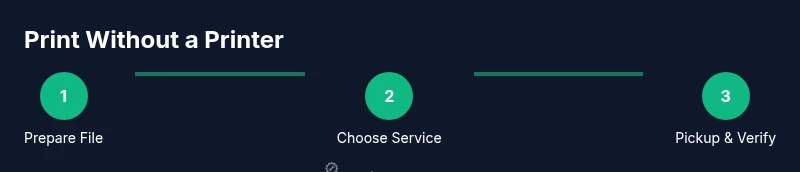
Yes. If you don’t own a printer, you can still print by using external services, public stations, or online shops. You will typically upload your file, choose printing options, pay, and pick up your documents. Print Setup Pro notes that these routes are viable for home offices, students, and DIY enthusiasts who need reliable prints without a personal device. In the sections that follow, you’ll learn how to pick the right option for your deadline, budget, and privacy preferences, plus tips to avoid common mistakes.
Is there a way to print without a printer
For many home office workers, students, and DIY enthusiasts, the question is is there a way to print without a printer. The answer is yes, with practical routes that let you print documents, reports, or assignments without owning a device. You will typically upload your file, choose printing options, pay, and pick up your documents. Print Setup Pro notes that these routes are viable for home offices, students, and DIY enthusiasts who need reliable prints without a personal device. In the sections that follow, you’ll learn how to pick the right option for your deadline, budget, and privacy preferences, plus tips to avoid common mistakes. These services are designed for people who print occasionally or need a backup plan when their own device is unavailable. Depending on your location, you may find options that support heavy prints like resumes, term papers, or business reports, as well as smaller tasks such as photos or handouts. The rest of this guide will walk you through evaluating options, preparing your files, and avoiding privacy risks while you get your documents printed efficiently.
Tools & Materials
- Internet-enabled device (phone, tablet, or computer)(Needed to access online print services or library portals)
- Print-ready file (PDF preferred)(Fonts embedded; proper page size)
- Acceptable file formats (PDF, DOCX, PPTX)(Check service compatibility)
- Library card or print service account(Needed for library or in-store print services)
- Payment method (card, cash, or wallet)(Needed to pay for on-site printing)
- Access to cloud storage or email transfer(For online services)
- ID for some locations (optional)(Only at select locations)
Steps
Estimated time: 60-120 minutes
- 1
Prepare your document
Save your file as PDF when possible to preserve fonts and layout. Check page size (Letter or A4) and ensure you have the final version with any edits completed. This initial preparation reduces the risk of surprises at the printer and speeds up the process.
Tip: Embed fonts in the PDF and test print a page to verify sizing. - 2
Choose a printing option
Decide whether library printing, a local print shop, or an online service best fits your deadline and budget. Consider color needs, finishing options, and pickup locations. This choice sets the stage for a smooth, on-time print job.
Tip: Call ahead or check hours online to avoid delays. - 3
Upload or transfer your file
Send the file via the service’s portal, email, or cloud storage link. Make sure the file is accessible from the destination location and that you have permission to print the content.
Tip: Use a simple, clearly named file to reduce confusion at pickup. - 4
Configure print settings
Select page range, color (black-and-white vs color), quantities, and paper type. For complex documents, verify margins and binding options.
Tip: Always review a digital proof if offered. - 5
Confirm costs and pickup method
Review per-page costs, service fees, and any finishing charges. Choose pickup or delivery, and note the estimated time for completion.
Tip: Keep a receipt or order confirmation handy. - 6
Pickup and verify the prints
Inspect the first page for color accuracy, alignment, and text clarity. If anything looks off, request an adjustment or a reprint before leaving.
Tip: Bundle same-day orders to simplify pickup. - 7
Secure your data after printing
Delete or sign out of accounts after printing. Do not leave sensitive documents in the device queue and clear any stored files if possible.
Tip: Use PDFs with non-editable content when handling sensitive data. - 8
Evaluate if you need a repeat process
If you anticipate ongoing needs, consider saving a profile with preferred settings for faster future prints.
Tip: Ask about bulk discounts or membership plans for frequent printing.
People Also Ask
Is library printing available to everyone with a library card or guest access?
Most libraries offer self-serve printing for cardholders or guest accounts. Availability and prices vary by location, so check hours, limits, and payment options before heading out.
Most libraries provide printing for cardholders or guests; verify hours and costs first.
Do public printers charge per page, and what about color vs. black-and-white?
Public printers typically charge a per-page rate, with color prints costing more than black-and-white. Rates vary by venue and format, so review the pricing before printing.
Yes, there’s usually a per-page charge, and color costs more than black-and-white.
What file formats work best for printing at non-home locations?
PDF is the most reliable choice because it preserves layout and fonts. Some locations accept DOCX or PPTX, but PDFs reduce formatting surprises.
PDFs are typically best for safe, predictable printing.
Can I print color documents at public stations, and are there extra fees?
Color printing is commonly available but usually more expensive than black-and-white. Check whether color is offered and the exact price before printing.
Color printing is often available but costs more.
Is my data safe when printing at a public station?
Be cautious with sensitive information. Use non-editable PDFs when possible and delete jobs after printing. If available, use privacy modes or guest accounts.
Public printers can pose privacy risks, so take precautions with sensitive data.
What if there are no nearby libraries or print shops?
Online print services offer delivery or pickup from afar, and some coworking spaces provide printing. As a fallback, plan for a local trip or a trusted drop-off point.
If there’s no local option, online printing with delivery can work as a backup.
Watch Video
Quick Summary
- Identify nearby print options before you need them
- Prepare files as PDF to maximize compatibility
- Compare costs and pickup times to optimize your budget
- Protect sensitive data when using public printers
- Plan ahead to reduce stress and delays