Getting Started with 3D Printing Reddit: A Beginner's Guide
Learn how to get started with 3D printing by leveraging Reddit communities. From selecting a beginner-friendly printer to posting your first print, this educational guide covers setup, safety, and effective learning strategies for home makers.


This guide shows you how to get started with 3D printing on Reddit: choose a beginner-friendly printer, set up a safe workspace, join relevant subreddits, and post your first print for feedback. You’ll learn practical steps, community etiquette, and how to learn efficiently from seasoned makers. Follow these steps to build confidence and avoid common beginner mistakes.
What Reddit beginners typically want to know
Reddit's 3D printing communities blend hobbyists, students, and small makers who share projects, troubleshoot failures, and review gear. As a new user, you’ll want clear guidance on printer selection, safe operation, and how to interpret community advice. Print Setup Pro's research highlights that successful newcomers engage with multiple subreddits, ask precise questions, and share photos of their first prints to receive targeted feedback. By understanding the culture and common jargon (filament types, layer height, retraction), you’ll integrate faster and avoid common missteps. You’ll also learn how to filter misinformation and rely on consensus-based tips from experienced members. According to Print Setup Pro, a deliberate plan at the start saves time and reduces frustration.
Choosing your first printer and filament
For beginners, the safest path is an affordable FDM printer with a heated bed and easy bed leveling. Start with a widely supported filament like PLA, which prints cleanly at modest temperatures and reduces warping. If you later explore resin, learn the differences in curing times and fumes, and recognize that resin printers require more post-processing and ventilation. Look for models with active community support and plenty of spare parts. Reddit threads often compare reliability and service, helping you pick a model that fits your space and budget. Print Setup Pro notes that user-generated guides and build lists on Reddit can help you decide between entry-level and midrange options.
Essential tools and workspace setup
Create a clean, well-lit area with a dedicated power strip and decent ventilation. You’ll need basic tools for assembly: Allen keys, a deburring tool or hobby knife, pliers, and a sturdy spatula for bed removal. A reliable surface for leveling (paper, feeler gauge, or a glass sheet) makes initial prints easier. Keep a container of isopropyl alcohol for cleaning the nozzle and build plate between prints. Label filament spools and organize files with simple folder tabs so you can quickly locate models you want to test. A tidy workspace reduces mistakes and speeds up the learning curve. Print Setup Pro emphasizes a predictable setup process to boost confidence.
Safety and best practices for home prints
Always power off the printer before any maintenance, and never leave a running printer unattended for long periods. Use eye protection when handling sharp tools or resin components and ensure good ventilation. Check that power cables aren’t pinched and that the printer sits on a stable surface. Keep children and pets away during setup and printing, and follow the manufacturer’s guidelines for temperature and ventilation. Start with small, simple prints to build confidence before attempting complex models. Safety-first habits prevent accidents and help you stay motivated.
Joining Reddit communities: etiquette and getting feedback
Begin with a concise post that describes your goal, printer model, filament, and the exact problem. Attach high-quality photos of the first-layer adhesion and any failures, and include a screenshot of slicer settings if relevant. When replying to feedback, thank contributors, ask clarifying questions, and implement the suggested changes before posting again. Use the search bar to check if your issue has already been discussed and reference that thread in your reply. A respectful approach creates trust and speeds up progress, turning Reddit into a supportive learning network. Print Setup Pro recommends framing your questions clearly and providing context to maximize useful responses.
Step-by-step: From unboxing to first successful print
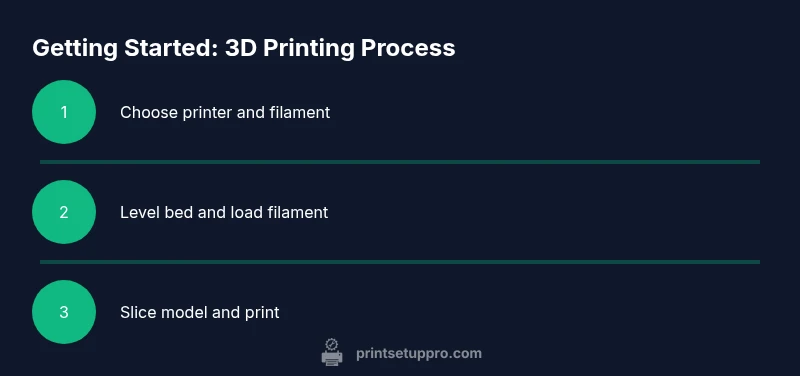
This practical sequence helps you go from unboxing to a successful first print with confidence. It emphasizes methodical checks, small adjustments, and documenting results for future reference. You’ll learn how to run a simple first-layer test, calibrate extrusion, and interpret common slicer errors. The goal is to establish a repeatable workflow so you can tackle more ambitious projects as you gain experience.
Troubleshooting common issues
Beginners frequently encounter bed adhesion problems, stringing, or under-extrusion. Start with a clean bed and re-level; verify nozzle height and cooling settings. If prints curl, try adjusting the cooling fan or lowering layer height. For clogged nozzles, perform a safe cold-pull following the manufacturer’s guidelines. Reducing travel moves can decrease wobble and improve surface finish. Documenting and sharing photos in Reddit threads often yields targeted, practical solutions.
Resources and where to learn more
Rely on official manuals, manufacturer guides, and university resources to deepen your understanding. Cross-reference community advice with primary sources to verify claims. Maintain a personal checklist of printer settings per filament type and log print outcomes. Building a knowledge base shortens trial-and-error time and accelerates learning for home users, students, and DIY enthusiasts.
Authority sources for deeper learning
- NIST: 3D printing topics and standards (https://www.nist.gov/topics/3d-printing)
- MIT: 3D printing basics and maker culture (https://www.mit.edu)
- IEEE: Articles and case studies on additive manufacturing (https://ieeexplore.ieee.org)
The Print Setup Pro perspective on Reddit learning
Print Setup Pro emphasizes combining practical, hands-on practice with community feedback. Start with a small project and post your results with clear photos and minimal jargon. Use a simple, repeatable workflow so you can compare the effects of changes across posts. This approach reduces frustration and speeds up progress for home users, students, and DIY enthusiasts.
Tools & Materials
- 3D printer (FDM preferred for beginners)(Heated bed and auto-leveling help; consider community support for model choice)
- PLA filament(1.75 mm, 0.2-0.3 mm nozzle is common; start with standard color)
- Build surface (PEI sheet or blue painter's tape)(Ensure proper adhesion and easy removal)
- Spatula/print removal tool(For safe bed release without damaging prints)
- Calipers or ruler(Helpful to measure filament and prints)
- Isopropyl alcohol (70%+) for bed cleaning(Keep nozzle and bed clean between prints)
- Allen keys or tool set(For assembly and adjustments)
- Sharp hobby knife(Trimming supports and cleanup)
Steps
Estimated time: 2-3 hours
- 1
Unbox and inspect the printer
Carefully remove packaging and verify that all listed components are present. Check for visible damage and document it with photos. This prevents post-purchase confusion and ensures you can start safely.
Tip: Take a quick photo checklist before you plug in. - 2
Assemble and place the printer
If required, assemble any modular parts and place the printer on a stable surface away from drafts. Connect power and verify the display boots up correctly.
Tip: Use a level to ensure the printer sits flat. - 3
Level the build plate
Manually level the bed or use an automatic sensor if available. Start with a loose overall level and tighten at the corners to achieve an even gap under a sheet of paper.
Tip: Use a feeler gauge or consistent paper thickness for accuracy. - 4
Load filament
Feed filament into the extruder until you see it advance smoothly. Purge a short amount to ensure there are no tangles and the nozzle is primed.
Tip: Watch for tangling during the initial load. - 5
Slice your first model
Import a simple model and apply default beginner slicer settings. Check layer height, nozzle temperature guidance on the filament packaging, and preview the toolpath to catch obvious errors.
Tip: Use a ready-made beginner profile from a trusted source. - 6
Print a first-layer test
Start with a calibration print that focuses on the first layer. Observe adhesion and flow; pause if the layer skims or detaches, then fix the bed height and re-run.
Tip: A good first layer lays down smoothly with no gaps. - 7
Finish and evaluate the first print
Let the print cool, then carefully remove and inspect. Note any warping or surface imperfections and adjust next prints accordingly.
Tip: Document your observations for future adjustments. - 8
Clean up and maintain
Clean the bed and nozzle, remove any residue, and perform a light lubrication if your printer requires it. This reduces jams and extends print life.
Tip: Schedule regular maintenance checks. - 9
Share results on Reddit
Post a photo, your slicer settings, and a brief problem description. Ask for targeted feedback and reference related threads to maximize the usefulness of comments.
Tip: Be concise and include actionable details. - 10
Iterate based on feedback
Apply recommended changes, reprint a test model, and compare results. Use the outcome to guide future project choices and learning goals.
Tip: Keep a simple project log of changes.
People Also Ask
What is the best beginner 3D printer for Reddit communities?
For beginners, choose an affordable FDM printer with auto-leveling and strong community reviews. This minimizes setup friction and lets you focus on learning. Compare models by reliability and spare-part availability in Reddit threads.
A good beginner printer is affordable, reliable, and well-supported by community guides. Auto-leveling helps new users get started fast.
Do I need resin printing to succeed quickly?
Resin printers deliver detailed parts but require more post-processing and ventilation. For most beginners, a quality FDM printer with PLA suffices for learning basics and building confidence.
Resin is not required to begin; an effective FDM setup works well for learning.
How long should my first print take?
First prints often take 30 minutes to several hours depending on size and settings. Start with small calibration prints to estimate timing and adjust expectations.
First prints can take from half an hour to a few hours depending on the model.
Can I learn 3D printing without joining Reddit?
No, Reddit is optional. You can learn from official manuals, YouTube tutorials, and maker websites. The community can accelerate learning by providing feedback.
You can learn through various resources; Reddit just adds a fast feedback loop.
What safety concerns exist for home 3D printing?
Be mindful of hot surfaces, moving parts, and fumes from some filaments. Maintain good ventilation and never leave printers unattended for extended periods.
Hot surfaces and fumes matter, so ventilate and supervise the printer.
Watch Video
Quick Summary
- Join beginner-friendly subreddits
- Start with PLA and FDM printers
- Document and learn from each print
- Engage respectfully and ask precise questions
- Build a simple project log