Resin printer vs 3d printer: Practical comparison
Print Setup Pro breaks down resin printer vs 3d printer, comparing detail, cost, materials, safety, and workflow to help home offices, students, and makers choose the best technology for their projects.


According to Print Setup Pro, resin printers vs 3D printers each excel in different scenarios. If you need ultra-fine detail and smooth surfaces for miniatures or intricate parts, resin wins. For larger parts, lower material costs, and easier maintenance, a filament (FDM) printer is the practical choice. The best option depends on project size, finish, and production speed.
What is resin printing vs filament printing?
In the resin printer vs 3d printer landscape, two distinct approaches dominate home and small-shop workflows. Resin printers use photopolymer resins that are cured by light to form solid layers, delivering exceptional definition and very smooth surfaces on small parts. Filament printers, typically FDM/FFF, heat plastic filament and extrude it in precise paths to build objects layer by layer. This foundational split shapes every other decision: print quality, material behavior, post-processing, and workspace setup. Print Setup Pro has guided countless users through this decision, emphasizing how detail, speed, and total cost of ownership vary between the technologies. If your projects include tiny gears, figurines, dental-like features, or highly detailed prototypes, the resin path often shines. If you’re making larger enclosures, mechanical housings, or functional prototypes where robustness and cost per part matter, filament printing is usually more practical.
resin printer vs 3d printer: nuance in capabilities
When weighing these two paths, think about the core outcomes you need. Resin systems deliver high-precision geometry, fine feature definition, and extremely smooth surface finishes, but they demand a proper post-processing workflow and a controlled environment. Filament systems offer faster build times for big objects, more forgiving handling of typical workshop dust, and generally lower upfront costs. The decision should factor in how much post-processing time you’re willing to invest, the size of the parts you print, and your tolerance for ongoing material costs. Print Setup Pro has observed that most hobbyists and makers end up choosing resin for small, detailed parts and FDM for larger projects or when budget constraints are a primary consideration.
Understanding the user profile
Your choice also tracks with who you are as a creator. Students and DIY enthusiasts who work on small, intricate parts may find resin printers extremely productive, especially for model making, jewelry prototypes, or rapid micro-assemblies. Home office users and small business owners often prioritize cost per part and scalability, where FDM printers deliver a better balance of size, cost, and speed. Print Setup Pro stresses that aligning your goals with the technology’s strengths increases satisfaction and reduces the friction of learning curves. In short, there isn’t a single winner: it’s a question of fit for your specific projects, space, and budget constraints.
Comparison
| Feature | Resin Printer | 3D Printer (FDM) |
|---|---|---|
| Print technology | SLA/LCD/DLP-based photopolymer curing | Thermoplastic extrusion (heated nozzle) |
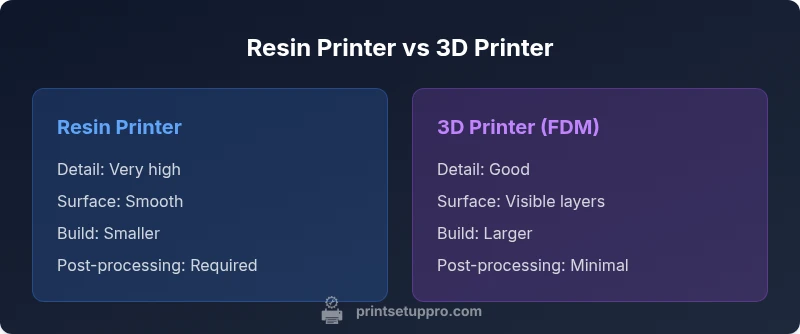
| Detail & surface finish | Exceptional micro-details; very smooth surfaces | Good detail with visible layer lines; smoother with high-quality filaments |
| Build volume | Typically smaller per machine; high precision at small scales | Typically larger build areas; scalable for bigger parts |
| Material costs per part | Higher per-part cost; resin and consumables add up | Lower per-part cost for larger builds; filament is generally cheaper per volume |
| Post-processing | Washing, curing, and careful handling of resin | Minimal post-processing beyond basic support removal and possible sanding |
| Safety & ventilation | Ventilation and protective measures needed due to resin fumes | Ventilation advised but typically less stringent than resin setups |
| Upfront cost | Often higher upfront; resin systems plus curing stations | Typically lower upfront for many affordable desktop options |
| Best for | High-detail miniatures, jewelry, dental-like parts | Large, functional prototypes, enclosures, and cost-conscious projects |
Benefits
- Unmatched detail and smooth finishes for small parts
- Wide range of resin formulations for different properties
- Compact form factors capable of high-resolution outputs
- Growing ecosystem of compatible software and materials
Downsides
- Requires post-processing (washing, curing) and ventilation
- Higher ongoing material costs per part
- Potential for odor and skin contact hazards with liquids
- Slower throughput for larger parts and longer cure times
resin dominates detail-focused work; filament excels for size and cost
If your goal is ultra-fine details and smooth surfaces on small parts, resin is the clear winner. If you prioritize larger builds, lower ongoing costs, and simpler workflows, a filament printer is the better general choice.
People Also Ask
What is the main difference between resin printers and filament printers?
Resin printers use liquid photopolymers cured by light for high-detail parts, while filament printers extrude thermoplastic filaments to build larger objects quickly. Both require different post-processing and safety considerations. The choice hinges on detail, size, and production goals.
Resin printers cure liquid resin for fine detail; filament printers build with melted plastic for bigger parts. Your choice depends on the work you plan to do.
Is resin printing better for miniatures?
Yes, resin printing often yields much finer detail and smoother surfaces, which is ideal for miniatures, jewelry prototypes, and high-resolution parts. However, it does require more post-processing and ventilation considerations.
For miniatures and high-detail parts, resin is often the preferred method, with extra steps after printing.
Which is cheaper to operate over time?
Filament printers generally have lower ongoing material costs per volume and simpler maintenance, making them more economical for larger builds. Resin workflows can be more expensive per part due to resin, consumables, and post-processing requirements.
Filament printers tend to have lower ongoing material costs, especially for larger parts.
What safety precautions are needed for resin printing?
Resin printing requires good ventilation, gloves, eye protection, and careful handling of uncured resin. Post-processing involves washing with solvents and curing under UV light. Store resins securely away from children and pets.
Use gloves and good ventilation when handling resin; wash and cure prints in a dedicated area.
Can resin printers handle large objects?
Resin printers are excellent for high-detail parts but are typically limited by the build volume. For very large parts, filament printers offer easier scalability and faster throughput, though surface finish may show more pronounced layer lines.
For very large parts, filament printers usually offer more practical size and speed.
What maintenance is essential for resin printers?
Regularly clean the resin tray and build platform, replace worn seals, keep the resin tank free of cured resin, and perform routine checks on the light source and motion system. Follow the manufacturer’s guidelines for resin storage and post-processing.
Keep the resin tray clean, replace worn parts, and follow guidelines for storage and curing.
Quick Summary
- Define project size and required detail before choosing
- Budget for post-processing and environmental controls with resin
- Consider total cost of ownership, not just upfront price
- Ensure safety measures and ventilation for resin workflows
- Run small test prints to calibrate material choices and settings