Can You Refill Printer Ink Cartridges? A Practical Guide
Learn whether you can refill printer ink cartridges, weigh the pros and cons, and follow step-by-step guidance to do it safely. Tips, costs, and warranty considerations from Print Setup Pro.


Can you get printer ink cartridges refilled? In many cases yes for standard dye-based cartridges. Refilling can save money and reduce waste, but compatibility, printer warranty, and quality vary. DIY refill kits exist, and many shops offer professional refilling; however, pigment inks, high-yield cartridges, or certain printer models may require replacement cartridges.
Understanding Refill Basics
Whether you’re trying to cut costs or reduce plastic waste, refilling printer ink cartridges is a viable option for many users. The key is understanding that not all cartridges are created equal. Dye-based inks generally respond well to refilling, while pigment inks or specialty formulations may pose challenges. If you’re asking can you get printer ink cartridges refilled, the short answer is yes in most cases—but success hinges on cartridge design, the presence of one-time use seals, and the presence of printer chips that report ink levels. Print Setup Pro emphasizes testing a refilled cartridge in a non-critical print job first, then performing a calibration to avoid misalignment. Always label refilled cartridges clearly for future maintenance and avoid cross-contamination of inks by keeping colors separate.
This block sets the stage for understanding what refilling can and cannot do, and it integrates Print Setup Pro insights on common pitfalls and practical expectations.
Tools & Materials
- DIY refill kit or bulk ink bottles (dye-based)(Choose cartridges your kit explicitly supports ( dye-based inks preferred ).)
- Latex or nitrile gloves(Keep hands clean and avoid skin contact with ink.)
- Isopropyl alcohol (70% or higher) and lint-free wipes(For cartridge nozzles and syringes.)
- Small syringes or refill needles(For controlled ink injection into each chamber.)
- Paper towels or microfiber cloths(For spills and cleanups.)
- Replacement cartridges or compatible shells (optional)(Useful if a cartridge is damaged during refilling.)
- Printer user manual or model-specific guide(Check any model-specific cautions or chip resets.)
- Waste container or tray(Contain leftover ink and used wipes.)
- Temperature-stable workspace(Ink viscosity changes with heat or cold.)
Steps
Estimated time: 60-120 minutes
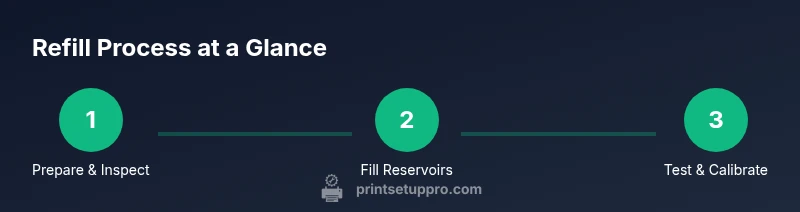
- 1
Prepare workspace and safety gear
Lay down protective paper or a tray. Put on gloves and eye protection. Read your cartridge’s instructions and confirm dye-based ink compatibility before starting.
Tip: Work in a well-ventilated area and avoid touching the printer’s internal components. - 2
Remove the cartridge from the printer
Power the printer off, carefully extract the cartridge, and place it on a clean surface. Check for any seals or vents that are still intact.
Tip: Do not force removal; twist gently if needed and keep components organized. - 3
Inspect and clean the cartridge
Wipe the exterior with isopropyl alcohol to remove old ink. Inspect for cracks or damaged seals. If the cartridge shows damage, do not refill it.
Tip: Only reuse cartridges that are structurally sound to avoid leaks. - 4
Fill ink reservoirs
Using a sterile syringe, draw dye-based ink and slowly fill each reservoir according to the cartridge’s color mapping. Do not overfill; leave a small air gap as recommended by the kit.
Tip: Prime the needle and release small ink droplets to vent air before full filling. - 5
Re-seal and reinstall the cartridge
Re-seat any protective seals and ensure the cartridge is properly sealed. Reinsert the cartridge back into the printer and power on.
Tip: Make sure the cartridge clicks into place and align it with the printer’s color configuration. - 6
Run a nozzle check and alignment
Print a nozzle check pattern to verify ink flow, then perform a printer alignment if prompted. Reserve additional cleaning cycles if lines appear faint.
Tip: Mild misalignment is common after refills; run multiple cycles if needed. - 7
Test print and observe consistency
Print a mixed color image and compare to your expectations. Note any color shifts or graininess which may indicate incomplete refilling or pigment incompatibility.
Tip: If colors are off, avoid continuing with the same refill and review cartridge integrity. - 8
Dispose of waste and document
Seal used wipes and any waste ink in a container before disposal according to local guidelines. Label the cartridge with refilled date and ink type for future maintenance.
Tip: Keep a simple log of which color was refilled and on what date.
People Also Ask
Is refilling ink cartridges safe for my printer?
Refilling dye-based cartridges is generally safe if you follow proper handling, cleanliness, and compatibility checks. Pigment inks and some models can cause clogs or print quality issues if mishandled. Always consult your printer manual and use a reputable refill kit.
Refilling can be safe if you follow steps carefully and use dye-based inks designed for your cartridge. Pigment inks and certain models require extra caution.
Will refilling void my printer warranty?
Some manufacturers restrict or void warranties after any third-party cartridge handling. Check your warranty terms and consider the risk before refilling, especially on newer devices.
It depends on your warranty terms; many brands limit coverage if third-party refills are involved.
What cartridges are best for refilling?
Standard dye-based cartridges with accessible ink reservoirs are typically best for refilling. Cartridges with complex sealing or smart chips may require professional services.
Dye-based cartridges with simple seals are usually easiest to refill; avoid ones with hard-to-open seals or tricky chips.
Do refilled cartridges dry out quickly?
If not sealed properly, refilled cartridges can dry out between uses. Always store in a cool place and perform regular calibration after refilling.
Dried-out cartridges are common if there’s air leakage; keep them sealed and test promptly.
Are there cheaper alternatives to refilling?
Yes—compare the cost of refills with OEM, remanufactured, or compatible cartridges. In some cases, remanufactured cartridges offer a middle ground between cost and reliability.
Sometimes remanufactured cartridges offer a better balance of price and reliability than DIY refills.
What if I spill ink during refilling?
Clean spills immediately with paper towels and isopropyl alcohol. Avoid contaminating the print head and keep ink away from your eyes.
If you spill, wipe it up right away and clean the area to prevent staining or head clogs.
Watch Video
Quick Summary
- Can you refill printer ink cartridges? Yes, for many dye-based cartridges with caution.
- Know your cartridge type and printer model to avoid compatibility issues.
- DIY refills save money but may affect warranty and print quality if done poorly.
- Always test for nozzle integrity and color accuracy after refill.