Cartridge Printer vs Ink Tank Printer: A Practical Comparison
Compare cartridge printer vs ink tank printer to understand cost per page, maintenance, and suitability for home offices, students, and small businesses.


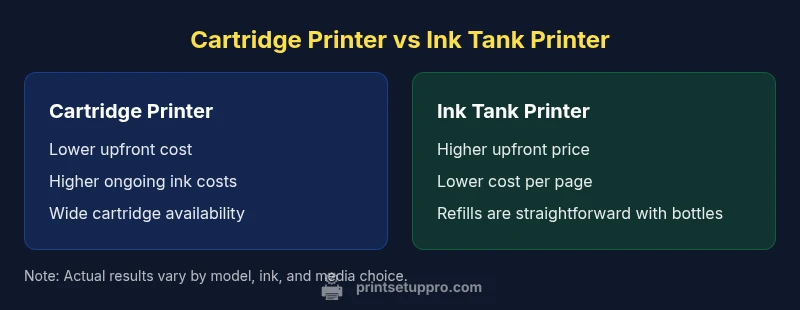
Cartridge printer vs ink tank printer: the main trade-off is cost per page versus upfront price and refill convenience. According to Print Setup Pro, cartridge systems usually start cheaper but incur higher ongoing ink costs with frequent cartridge replacements. Ink tank printers carry a higher upfront price, yet their ink is dramatically cheaper per page and refills are typically simpler for high-volume printing.
What differentiates cartridge printers from ink tank printers
The cartridge printer vs ink tank printer debate centers on several practical dimensions: upfront cost, ongoing ink expenses, refill experience, and long-term reliability. In practice, cartridge systems are usually cheaper to buy and ship with broad availability of cartridges from many brands. Print Setup Pro notes that the smaller initial price is appealing for students or households testing the waters, but the per-page cost can accumulate quickly when you print color-heavy documents or photos. Ink tank printers, by contrast, require a larger initial investment because the machines themselves are often designed around refillable reservoirs. Once you absorb the upfront price, the ongoing ink cost tends to be dramatically lower, particularly for high-volume printing. This dynamic makes ink tank setups attractive for home offices and small businesses with steady workloads. The key is to forecast monthly page volumes, color usage, and downtime for refills; the best choice will align with your specific print profile rather than a simple sticker price.
- Print Setup Pro notes the importance of testing your typical workload before committing.
- Consider your tolerance for refills and potential downtime when choosing between systems.
How refill systems work in practice
Cartridge systems operate with sealed ink cartridges that snap into the printer. When a cartridge runs low, you replace it with a new one; no external refilling is required. This model minimizes spillage risk but requires careful cartridge management and sometimes chip-based restrictions that can complicate third-party ink use. Ink tank systems, by contrast, rely on refillable reservoirs and bottles of ink. Refill is straightforward but requires attention to cleanliness and avoiding air bubbles. The process is typically slower than dropping in a cartridge, yet it eliminates the need to purchase dozens of tiny cartridges for color-heavy work. A practical tip: keep a small cleaning kit and a spare set of lint-free wipes on hand; sealing the bottle tip and avoiding overflows reduces waste and mess. In both cases, use original or reputable third-party inks designed for your printer’s model to protect print quality and printhead health.
Cost of ownership: upfront vs ongoing costs
Upfront investments diverge notably. Cartridge printers generally have a lower initial price tag and broad retailer availability, making them appealing to budget-conscious buyers. Ink tank printers commonly cost more at purchase, but the long-term cost per page tends to be much lower, especially when you print in color or graphics-rich materials. When you translate this into a multi-year view, the equation shifts again depending on your usage pattern. Print Setup Pro’s analysis shows that the break-even point often depends on monthly page volumes and whether you value refill convenience over pure cost. If you print primarily black-and-white documents, cartridge systems might stay cost-effective longer; for high-volume color, ink tanks often outperform in total cost of ownership.
Print speed and reliability: real-world expectations
In practical terms, print speed in cartridge printers and ink tank printers is affected by cartridge size, ink formulation, and the printer’s overall architecture. Some cartridge models rely on small nozzles that can print rapidly for simple text, while high-quality color output may slow the process as the printer queues color swatches. Ink tank designs often feature larger internal ink channels and reservoir-based delivery, which can smooth out color ramping and reduce fluctuation across long print runs. However, tank-based systems are susceptible to clogs if inks are not used regularly or if storage conditions vary. Reliability hinges on routine maintenance, quality ink, and the availability of spare parts. If your workload includes frequent multipart documents or mixed media, plan for occasional longer print times after refills, regardless of system type.
Print quality and color management
For professional-looking results, color accuracy, consistency, and saturation matter. Cartridge printers often excel at standard office documents due to widely tuned color profiles and default settings designed for pixel-perfect text. Ink tank printers shine when color richness and photo reproduction are a priority, especially with pigment-based inks and wider color gamuts. The ultimate outcome depends on paper type, printer calibration, and the inks used. If you frequently print marketing materials with brand colors, you’ll want ink options that align with your color profile and a printer that supports reliable ICC profiles. Print Setup Pro emphasizes testing across a few common media types before committing to one system, because the perceived color superiority can vary by printer model and ink chemistry.
Paper handling and media versatility
Both cartridge and ink tank printers can handle a wide range of media, but capabilities differ. Basic home models typically support standard copy paper, a few photo papers, and basic envelopes. More robust models in either category expand support to heavier cardstock, glossy photo media, and specialty papers. Ink tank printers often have larger ink reservoirs and may come with better media feeding for longer runs, which helps with graphic design projects or school reports that include color graphics. Look for printers with adjustable paper trays, reliable duplexing, and automatic two-sided printing if you plan to print batches. Always verify media compatibility with your chosen model, especially if you use unusual sizes or coated papers.
Maintenance and consumables lifecycle
Cartridge systems demand periodic cartridge replacements and occasional printhead cleaning, which can be quick but interrupt workflow. Ink tank configurations emphasize refills and bottle-pouring discipline; done correctly, this reduces waste and often lowers running costs. Avoid cheap third-party inks that can clog printheads or alter cartridge integrity; this is particularly important for users who run a lot of color graphics. Keep a schedule for preventive maintenance: wipe the printhead area, run nozzle checks, and replace components like belts or seals as recommended by the manufacturer. By staying proactive, you maximize reliability and minimize the risk of unexpected downtime when you need high-volume output.
Environmental impact and waste considerations
Cartridge cartridges create more single-use waste due to spent cartridges, which is a concern for eco-conscious buyers. Ink tank systems minimize waste by using refill bottles that can often be recycled or reused, though spilled ink during refills creates its own waste stream. Choosing printers with compact packaging and considering recycling programs can help reduce environmental impact. If sustainability is a priority, look for printers with easy recycling options for cartridges and refill bottles, and choose inks and papers with approved certifications. Print Setup Pro advocates evaluating waste footprint as part of the total cost of ownership and environmental considerations.
Choosing based on usage profile: student, home office, small business
For students with light to moderate printing needs, cartridge printers offer an affordable entry point with broad compatibility. Home offices that print a mix of text and occasional color photos may benefit from a balanced approach; consider a model with both reliable black-and-white speed and good color output. Small businesses with heavy color graphics and frequent reports should scrutinize cost-per-page and refill logistics, possibly leaning toward ink tank configurations to minimize ongoing ink expenses. In any case, test the printer with your typical workflow, measure downtime due to refills, and forecast annual page counts. The right choice aligns with your actual work style, not just price.
Common myths debunked
Myth: Ink tanks always save money. Truth: Savings depend on usage patterns and actual ink consumption. Myth: Cartridge printers cannot deliver good photo quality. Truth: Some cartridges and printers produce excellent color results with proper media and profiles. Myth: Refilling is messy and risky. Truth: With careful technique and clean facilities, refills can be clean and quick. Myth: One size fits all. Truth: The best option depends on volume, color needs, and tolerance for maintenance. Print Setup Pro often sees users misjudge break-even points due to overestimating color usage.
Practical buying checklist for cartridge vs ink tank printers
- Define monthly page volume and color mix
- List required media types and sizes
- Compare upfront price and total cost of ownership
- Check ink availability and refill ease
- Review warranty and support for refills and printheads
- Test print with your typical documents (text, graphics, photos)
Use this checklist to guide your decision and avoid common purchase mistakes.
Real-world decision framework: quick-path guidance
If you print under a few hundred pages per month, cartridge printers may be simplest. If you print several hundred pages per month with color graphics, ink tank printers often offer long-term savings. For mixed workloads, choose a model with flexible media support and reliable refill systems. The Print Setup Pro team recommends building a short test plan: print a standard document, run color graphics, and assess downtime after refills. Your decision should reflect your daily workflow and willingness to manage replenishment.
Comparison
| Feature | Cartridge printer | Ink tank printer |
|---|---|---|
| Initial price | lower upfront | higher upfront |
| Cost per page | higher | lower |
| Refill frequency | frequent cartridge changes | infrequent refills |
| Spill risk | low (sealed cartridges) | moderate (bottles) |
| Media flexibility | strong for standard media | strong for graphics and photo media |
| Print quality (color) | color accuracy good, depends on cartridges | color richness and consistency strong with pigment inks |
| Waste footprint | more cartridge waste | less with refill bottles |
Benefits
- Lower upfront cost and broad cartridge availability
- Abundant ink and cartridge options for supply chains
- Solid performance for standard text printing and quick setups
- Wide compatibility across brands and models
Downsides
- Higher ongoing ink costs with frequent cartridge replacements
- Potential for cartridge shortages or price spikes during demand surges
- More waste from spent cartridges over time
Ink tank printers are typically better for high-volume color printing; cartridge printers suit light-to-moderate use and price-sensitive buyers.
Choose ink tanks if you print a lot and want lower ink costs per page. Opt for cartridges if upfront price is the main concern and you mostly print with black ink or light color use.
People Also Ask
What is the main difference between cartridge printers and ink tank printers?
The main difference is the ink delivery system. Cartridge printers use sealed cartridges that are replaced, while ink tank printers use refillable reservoirs with ink bottles. Cartridges tend to be cheaper upfront; ink tanks usually offer lower running costs for high-volume printing.
Cartridge printers use replaceable cartridges, and ink tank printers use refillable reservoirs. Cartridges are cheaper to buy, but tanks save money over time when you print a lot.
Are ink tank printers cheaper per page for high-volume color printing?
Generally yes, ink tank printers can offer a lower cost per page for color-heavy workloads due to the lower price of refill ink. Costs vary by model and ink type, so compare page yield and ink prices for your typical print mix.
Yes, ink tanks often cost less per page for color printing, but compare models to be sure.
Do cartridge printers offer better photo quality?
Photo quality depends on the ink set, media, and calibration. Some cartridge systems deliver excellent color accuracy on appropriate photo papers. For top-tier photographs, choose a printer with pigment inks and good ICC profiling.
Photo quality varies by ink and media; some cartridges perform very well with the right paper.
Is refilling ink tanks messy?
Refilling ink tanks can be neat if done carefully with the right technique and equipment. Use clean bottles, avoid overfilling, and work over a protective surface to minimize spills.
Refilling can be tidy with careful technique and a clean workspace.
Which should a student buy?
For students with limited printing, cartridge printers are often sufficient and cheaper upfront. If you print more color graphics or reports, an ink tank model may deliver better long-term value.
For light use, cartridges; for more color-heavy work, ink tanks might be better.
Can I convert a cartridge system to an ink tank system?
Conversions between cartridge and ink tank systems are generally not possible. You typically need to buy a printer designed for the ink delivery method you want. Check with the manufacturer for compatibility notes.
Converting isn’t usually possible; you’d need a new printer designed for the other system.
Quick Summary
- Assess monthly page volume and color usage before buying
- Weigh upfront cost against long-term ink expenses
- Factor refill convenience and downtime into the decision
- Verify media support and print quality for your needs
- Consider environmental impact and waste when selecting a system