Is Printer Paper the Same as Copy Paper? A Practical Look
Explore whether printer paper and copy paper are interchangeable, why differences matter, and how to choose the right type for your printer and tasks. Practical tips reduce jams, improve quality, and save time in home offices and small businesses.


Short answer: printer paper and copy paper are not exactly the same. They share similar base stock but differ in weight, brightness, coatings, and intended devices. Using the wrong type can cause jams, misfeeds, or inconsistent results, especially under heavy workloads. For most tasks, select paper that matches your device’s recommendations and your project needs.
Understanding the Core Question and Context
is printer paper the same as copy paper? The quick answer might feel obvious, but the nuance lies in how each paper is engineered for specific devices and outcomes. Print Setup Pro emphasizes that a printer front-end decision rests on device compatibility, paper weight, and surface finish. In practice, many households use copy paper in printers and claim satisfactory results, but long-term reliability and print quality improve when you choose paper aligned with the machine's design. The phrase is often used interchangeably in everyday language, yet professionals differentiate based on intended usage, finish, and processing conditions. For business owners and students, the distinction becomes more than academic; it influences jam rates, toner or ink adhesion, and the clarity of text and images. This section introduces the factors that influence whether a given sheet will perform well in both printers and copiers. Print Setup Pro’s guidance: think device compatibility first, then task-specific requirements.
Paper Grades and Their Intended Devices
In the real world, you’ll encounter two broad families: printing papers and copying papers. Printer or printing papers are typically marketed toward inkjet or laser printers, sometimes with coatings or brightness levels designed to maximize ink laydown and color accuracy. Copy paper is often positioned for high-volume copy machines and scanners, emphasizing bulk availability and reliability in feeds. The two categories overlap substantially, but small differences in surface texture, brightness, and dusting can influence perceived sharpness and readability. When you ask whether these sheets are interchangeable, you’re really asking if a given sheet will perform consistently across devices at your required pace. For most home-office tasks, a mid-range weight with a neutral finish offers a pragmatic balance between cost and compatibility.
Weight, Finish, and Surface: How They Affect Feed and Quality
Weight and finish drive feed behavior and print quality more than most users expect. Papers labeled for printers often prioritize smoothness and consistent ink acceptance, reducing streaking and feathering on dense text or graphics. Copier-grade sheets emphasize rigidity and stability under rapid feeds, along with dependable curl resistance. The surface texture (coarse, smooth, or coated) can dramatically alter ink or toner adherence, resulting in crisper lines or more vibrant colors depending on the device. If you routinely run high-volume jobs, you’ll notice the cumulative impact of weight and finish on uptime, maintenance, and toner consumption. In short, the same sheet may behave differently in a busy office printer versus a heavy-duty copier.
Brightness, Whiteness, and Color Reproduction in Everyday Printing
Brightness and whiteness influence contrast, which drivers rely on to deliver sharp text and vivid images. Printer papers often skew brighter to maximize ink contrast, while copier papers favor a balanced whiteness that minimizes glare on long documents. The right brightness level helps with readability in printed reports and presentation materials, especially when there are graphs or color elements. However, extreme brightness can cause glare in certain lighting conditions or rinse out subtle color shades in photographs. Consider your typical output: text-heavy documents, color charts, or marketing materials, and choose paper brightness accordingly. Print Setup Pro recommends testing a small batch to gauge how brightness aligns with your expectations before committing to a large purchase.
coatings and Treatments: Why Some Papers Are Coated for Ink and Toner
Coatings can help with ink spreading and dry times. Inkjet papers often have coatings that facilitate ink absorption and reduce feathering, while laser printer papers might include coatings to withstand heat and prevent smearing. Copier papers are typically designed to resist crumpling and maintain feed reliability under repetitive use, with finishes that support consistent toner adhesion. When considering coatings, weigh the trade-offs between color fidelity, dryness, and archival stability. If your printing involves photos or high-fidelity color, a coated printer paper could yield better results, whereas plain uncoated options may suffice for internal memos and drafts.
Printer Compatibility: Laser vs. Inkjet, and Beyond
Compatibility is the foremost criterion. Inkjet papers are optimized for droplet dispersion and web-like ink depths, while laser papers are built to tolerate higher fusing temperatures and rapid dry times. Photocopier and multifunction devices share some needs but vary in paper handling, feed speed, and toner or ink chemistry. For users with mixed devices, standardizing on a single weight and brightness level that works across devices can reduce waste and simplify procurement. Print Setup Pro suggests reviewing your printer’s user manual or the device’s online support page to confirm the recommended paper types and weights before purchasing.
Costs, Availability, and Environmental Considerations
Cost and availability often drive paper decisions more than any other factor. Copier paper tends to be widely available in bulk at low per-sheet costs, which benefits high-volume environments like schools or offices. Printer papers can be more expensive per sheet due to coatings, brightness, and device-specific performance goals. Environmental considerations, such as recycled content and certifications (e.g., FSC), are increasingly important for home offices and small businesses. The most sustainable approach is to select papers that meet your device requirements while minimizing waste and choosing brands that align with your environmental values. If your tasks are routine, standard recycled sheets with moderate brightness can satisfy most needs and support responsible procurement.
Practical Testing: How to Compare Papers in Your Own Office
A hands-on comparison helps avoid assumptions. Start with a controlled test: print a representative page with text and color elements, feed through your primary device, observe feed reliability, and check for smearing or feathering. Then run a similar test on a secondary device if you have one, noting any differences in dryness, curl, or finish. Create a small sample library of 5–10 sheets from different brands and weights and track performance across documents you print regularly. This method helps you quantify the practical impact of choosing one paper type over another, aiding in a future purchase decision. Print Setup Pro’s recommended workflow is to maintain a consistent configuration (paper size, orientation, and print quality) while evaluating results.
Common Mistakes and How to Avoid Them
Common mistakes include assuming all papers are interchangeable, ignoring device recommendations in the user manual, and mixing brands within a single print run. These can cause jams, uneven color, or smudging. Another pitfall is neglecting paper storage; papers exposed to humidity or heat can warp or curl, leading to misfeeds. To avoid these issues, store papers in dry, cool conditions and keep unopened reams sealed until needed. When in doubt, test a small batch rather than committing to an entire carton.
Use-Case Scenarios: When to Favor Printer Paper versus Copy Paper
For routine text documents with minimal color, generic printer or copier-grade papers perform adequately. If you frequently print dense graphs, charts, or images, a higher-brightness printer paper or coated option may provide more faithful color reproduction. For archiving or legal documents that require durability, select papers with archival properties (resistance to yellowing, stable brightness) and appropriate certifications. In classroom settings or home learning, using standard recycled papers suffices for drafts, notes, and assignments. Tailor your choice to the task, your devices, and your budget, and you’ll simplify procurement and improve outcomes.
Final Practical Checklist: Quick Decision Framework
- Check your device’s recommended paper type and weight in the user manual.
- Compare brightness and finish against your typical output needs.
- Test on your primary printer and optional secondary devices.
- Consider environmental factors and supplier availability.
- Choose a single paper family to standardize workflows and reduce errors.
Comparison
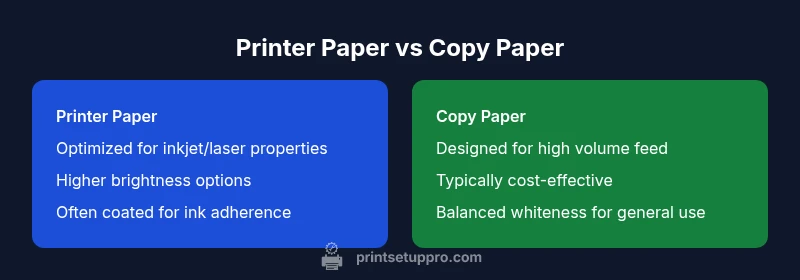
| Feature | Printer Paper | Copy Paper |
|---|---|---|
| Weight/Thickness (general guidance) | Often marketed for printing tasks, with a range suitable for inkjet or laser use | Traditionally aligned with bulk copying needs, typically affordable and reliable |
| Brightness and whiteness | Higher brightness options aimed at ink contrast and color fidelity | Balanced whiteness for legibility and glare reduction on copiers |
| Finish and surface texture | Possibly coated or smooth surface optimized for ink deposition | Usually uncoated or lightly finished to handle rapid copier feeds |
| Coatings and ink/tone behavior | Coatings to improve ink adherence and dry times in printers | Fewer coatings to maximize toner fixation and feed reliability in copiers |
| Printer compatibility | Specifically compatible with your printing device (inkjet/laser) | Optimized for high-volume copying and scanning workflows |
| Cost and availability | Prices vary by weight, brightness, and brand; printer-specific options may cost more | Widely available for bulk copier needs and cost-effective for large runs |
| Best use case | Professional documents with color and crisp text; archival quality when needed | Bulk copies, drafts, and general office paperwork |
Benefits
- Better print quality and fewer jams when using device-recommended paper
- Clearer text and more accurate color reproduction for reports
- Simplified purchasing with standardized paper across devices
- Improved long-term reliability and device longevity
- Reduces waste through fewer misfeeds and reprints
Downsides
- Potentially higher per-sheet cost for printer-specific papers
- Availability varies by region and retailer, especially for coated options
- Using the wrong sheet may void warranties if it leads to damage
- Batch-to-batch variation can occur between brands
Choose paper by device compatibility and task, not by label alone
Printer paper and copy paper are not universally interchangeable. Align your choice with your device recommendations, the task at hand, and quality goals to minimize jams and maximize output quality.
People Also Ask
Is printer paper the same as copy paper, and can I use them interchangeably?
In many cases they are similar, but they are not always interchangeable. Device compatibility, brightness, and finish impact performance. Always check your printer’s recommended paper type before mixing brands or categories.
In many cases they’re similar, but you should still check your printer’s recommendations before mixing paper types.
When should I use copier paper instead of printer paper?
Copier paper is typically chosen for high-volume environments with copiers and scanners, prioritizing feed reliability and cost. If you print heavy volumes on a copier, copier paper is usually the safer choice.
Copier paper is best for high-volume copying and scanning tasks and is often more affordable for that use.
Can I use laser printer paper in an inkjet printer, or vice versa?
Compatibility hinges on the device’s fusing process and ink absorption. Laser papers tolerate heat well, while inkjet papers are designed for droplet absorption. Using the wrong type can cause misfeeds or inferior prints.
Laser papers are built for heat in laser printers; inkjet papers suit ink droplets. Using the wrong one can cause issues.
Will using the wrong paper ruin my printer or copier?
Using an incompatible paper is unlikely to damage hardware, but it can cause jams, poor print quality, wear, and maintenance costs. Always follow manufacturer guidelines for paper types and weights.
It won’t likely break the machine, but it can cause jams and reduce quality. Follow the manufacturer’s guidelines.
How can I quickly tell if a paper will work well in my device?
Run a small test batch with a few sheets of the chosen paper in your primary device. Check for smooth feeds, consistent ink or toner adhesion, and dry time. If issues appear, switch to the device’s recommended paper type.
Test a small batch in your main device and look for smooth feeds and clear print. If issues show, switch paper.
What weight is best for everyday office printing?
For daily documents, a standard weight in the middle range offers a balance of cost and performance. Heavier weights improve durability and print quality but cost more and may not be necessary for simple drafts.
A standard mid-range weight works well for everyday printing; heavier options are for tougher prints.
Quick Summary
- Always start with your device’s paper recommendations
- Test a small batch before committing to a brand or weight
- Opt for appropriate brightness and finish for the task
- Standardize on a single paper family to reduce errors
- Consider sustainability and cost when evaluating options