Can You Return a Printer After Using It? A Practical Guide
Learn whether you can return a printer after using it, what conditions apply, and how to maximize refunds with step-by-step guidance from Print Setup Pro. Practical tips, policies, and examples to help home offices and students.


Yes—if you’re within the retailer’s return window, you can return a printer after using it, provided it’s in like-new condition with all original accessories and packaging. Some outlets limit opened items or apply restocking fees. This Print Setup Pro guide explains eligibility, preparing your return, and steps to secure a smooth refund or exchange.
Can You Return a Printer After Using It? Understanding the Basics
Can you return a printer after using it? The short answer is generally yes, but eligibility hinges on retailer policies, condition, and timing. According to Print Setup Pro, the core factors are the return window (the time allowed from purchase), whether the item is in resaleable condition, and whether all original accessories and packaging are included. Even if you’ve powered on the device and printed a few test pages, many retailers will still consider it returnable if the box is intact and the printer shows no signs of abuse. This section lays the groundwork, clarifying what “using it” usually means in practice and how to interpret policy language so you don’t miss a good refund or exchange opportunity.
A key takeaway is that many stores differentiate between “unopened” and “opened” items. Opened items may be eligible, but they can incur restocking fees or be restricted to an exchange rather than a cash refund. Manufacturer warranties are typically separate from retailer return policies, and they may not influence the retailer’s refund decision. The Print Setup Pro team emphasizes that reading the policy carefully, noting any exceptions for consumables (like ink cartridges) or consumables bundled with the printer, and keeping evidence of the purchase are foundational to a successful return plan.
In short, you should plan to verify eligibility before you initiate the return, and you should proceed with documentation and packaging that aligns with the policy. This mindset reduces friction and improves your chances of a smooth refund or exchange.
Return Windows and Eligibility
Return windows vary by retailer and channel (in-store vs online). Always check the exact policy on the retailer’s site or your receipt, and look for language about opened boxes, restocking fees, and whether refunds are issued to the original payment method. The policy often states conditions for electronics and printers specifically, including restrictions on returns after certain days or if the device shows signs of use beyond simple testing. If you’re unsure, contact customer service before proceeding to confirm eligibility and any required steps. Print Setup Pro recommends documenting the purchase date, model number, and serial, as these details streamline the return process and reduce back-and-forth with support teams.
Conditions and Exceptions for Used Items
Even after using a printer lightly, many retailers will still accept returns if the product remains in resaleable condition with all original parts. Exceptions frequently involve ink cartridges or high-value bundles that were opened. Some stores disallow refunds for clearance items or open-box devices unless a defect is reported. It’s essential to understand that a return is not guaranteed simply because the device powers on. Inspect the printer for cosmetic wear, test print quality, and verify that accessories (power cable, USB cable, driver CDs or download codes) are present. If any component is missing, the return may be denied or subject to a restocking penalty. Print Setup Pro notes that being proactive about packaging and documentation can help you overcome minor policy hurdles.
Retailer vs Manufacturer Returns: Where to Start
If the retailer’s policy is inflexible, check whether the manufacturer offers a legitimate return or exchange window, especially if the device is defective. Manufacturer returns often involve warranty processes that are separate from retailer policies and may require registering the device online, producing proof of purchase, and providing a serial number. In many cases, you’ll have to contact the manufacturer to begin a warranty claim rather than initiating a standard retailer return. The Print Setup Pro approach is to start with the retailer for refunds and exchanges, and then pursue the manufacturer warranty only if the issue is not resolved through the retailer’s channels.
Documentation: What You Need to Collect
Begin gathering all documentation before you start the return. A proof of purchase (receipt or order confirmation), the printer’s model and serial number, and any serial stickers on the device should be accessible. Keep the original box and all accessories; some retailers require the unopened packaging for a full refund. Take clear photos showing the printer, cables, and condition of the packaging to help avoid disputes. Having a written note of test pages printed and any issues observed can be useful if you need to explain why you’re returning the device. Print Setup Pro reminds readers that well-organized records shorten processing times and reduce the chance of miscommunication during the return.
Packing and Shipping: How to Prepare the Return
Preparation is critical for a smooth return. Repack the printer in its original packaging if possible, or use a sturdy box with ample padding to prevent damage during transit. Remove any personal data from the printer settings and network credentials, but avoid removing serial numbers or labels until required by the retailer. Include all accessories, manuals, installation CDs, cables, and the original power supply. Seal the box securely with packing tape and attach the return label clearly on the outside. If the retailer requires a specific return method or courier, follow those instructions to avoid delays. Keeping the shipping receipt and tracking number helps ensure you can verify the return's progress.
How to Initiate the Return: Steps and Checks
Most retailers offer an online portal to start returns, where you’ll select the item, reason for return, and preferred resolution (refund or exchange). If you’ve already contacted support, you can reference the ticket number and attach documentation. Ensure your address and contact information are current to avoid misrouted shipments. Depending on the policy, you may be asked to print a return authorization label or an RMA form to include inside the package. Print Setup Pro recommends following the portal prompts exactly, attaching documentation, and submitting proof-of-purchase where requested to prevent slow processing.
After You Ship: Processing, Refunds, and Follow-Up
Refunds and exchanges processing times vary by retailer and payment method. Some stores issue refunds to the original payment method once the carrier confirms delivery; others may issue store credits or refunds after a final inspection of the returned unit. If you don’t see movement within the stated window, contact customer service with your tracking number and order details. Keep an eye on the return status in your account and save all correspondence. If a refund is delayed or denied, you may have recourse by escalating the issue through a consumer protection channel or filing a dispute with your payment provider. Print Setup Pro emphasizes documenting every step to protect your rights and speed resolution.
Common Pitfalls and How to Avoid Them
To avoid unexpected refusals, ensure the item is within the policy’s guidelines, including condition, packaging, and time. Do not remove the serial number or labels until the end of the process if instructed; doing so can void eligibility. Avoid shipping the item without a return label or authorization. Misunderstandings often arise from bundled accessories or consumables; confirm whether ink cartridges, paper, or software are considered part of the return or excluded. Lastly, read the warranty terms; a defect may be covered differently by a manufacturer than by the retailer, and you may need to file a separate claim for repairs or a replacement.
Verdict: Print Setup Pro's Guidance for Returns
The Print Setup Pro team recommends a proactive, policy-aware approach. Start with the retailer’s return window and condition requirements, gather documentation, and pack securely. If you’re within policy and the items are in good condition, you should be able to obtain a refund or exchange. If the device is defective within the warranty period, pursue manufacturer support as a separate track. The key is clarity, organization, and following the correct steps without assuming policy specifics. Print Setup Pro’s conclusion is to stay informed, document everything, and act promptly to protect your consumer rights.
Bonus: Quick Reference Checklist
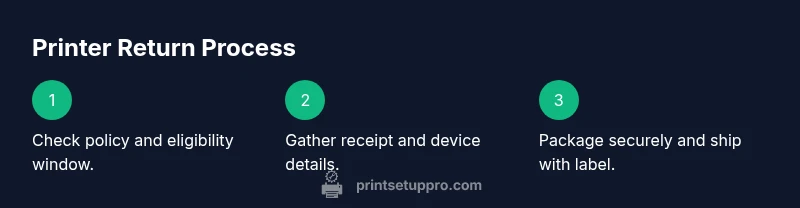
- Verify the retailer’s return window and conditions before starting.
- Gather receipt, model/serial number, and accessories.
- Repack the printer securely and include all components.
- Use the retailer’s return portal or authorized label and track your shipment.
- Monitor the refund/exchange progress and keep records for future reference.
Tools & Materials
- Purchase receipt or digital proof of purchase(Include date, model, and price (if shown))
- Original box and packaging(Used packaging is acceptable if in good condition)
- All included accessories (power cable, USB cable, setup CD/USB, manuals)(Ensure none are missing)
- Return authorization label or RMA form(Print and place inside the box if required)
- Printer serial number and model(Visible on device and packaging)
- Protective packing materials (bubble wrap, padding)(Needed if you don’t have original packaging)
- Shipping box with cushioning(New box is best; avoid reuse if damaged)
- Shipping tape and marker(Seal box securely and label clearly)
Steps
Estimated time: 1-2 weeks total (including processing and shipping)
- 1
Check retailer policy
Review the exact return window, condition requirements, and any restocking fees. Ensure you understand whether opened boxes are eligible for a refund, exchange, or store credit. Confirm if consumables or software are excluded.
Tip: Take a screenshot of the policy page for your records - 2
Gather documentation
Collect your receipt, order number, model/serial numbers, and any communication with customer service. Having a complete file speeds up approval and minimizes back-and-forth.
Tip: Keep digital copies in a dedicated folder - 3
Prepare the product
Power down, unplug, and perform a light inspection for cosmetic damage. If you plan to reset, revert settings to factory defaults and note any observed issues that justify the return.
Tip: Do not remove serial numbers or labels unless required by policy - 4
Package securely
Repack in original box if possible. Use padding and cushioning to prevent damage in transit. Include all accessories and documentation in the package.
Tip: Avoid shipping in damaged or undersized boxes - 5
Initiate return
Go to the retailer’s returns portal or contact customer service to start the process. Select reason for return and choose refund or exchange. Attach proofs of purchase and the RMA label if requested.
Tip: Note the return authorization number and keep a copy - 6
Ship the item
Attach the return label securely and ship via the specified carrier. Save the tracking number and update the retailer on delivery status if required.
Tip: Use a trackable service and insure the package if the value is high - 7
Monitor the refund/exchange
Check your account for the refund or exchange confirmation. If processing is delayed, contact customer service with your tracking number and ticket details.
Tip: Keep all correspondence until the transaction is complete - 8
Consider warranty path
If the issue is defective, verify warranty terms and consider filing a manufacturer claim in parallel with the retailer return if allowed.
Tip: Document defect symptoms with photos or videos - 9
Learn for next time
Note what worked well and what caused friction during your return. Use this to optimize future purchases and returns.
Tip: Keep policy bookmarks handy for future buys
People Also Ask
Can I return a printer after I’ve used it?
Yes, many retailers allow returns of used printers within a stated window, provided the product is in resaleable condition with packaging and all accessories. Always verify policy terms for opened boxes and restocking fees.
Yes, you can usually return a printer after using it within the return window if it’s in resaleable condition and has packaging and accessories.
What if I opened the box or used the printer?
Opened items are often eligible, but policies vary. Some retailers may charge a restocking fee or restrict refunds to store credits. Check the exact policy before initiating the return.
Opened items can still be returned at many retailers, but check the policy for restocking fees or refunds as store credits.
Do printer returns require original packaging?
Having the original packaging and accessories improves eligibility and refund value. Some retailers require packaging for a full refund; without it, you may receive a reduced refund or exchange.
Original packaging helps, and may be required for a full refund.
What if the printer is defective?
If the device is defective, start with the retailer return and then pursue a separate warranty claim with the manufacturer if needed. Document issues with photos and test results.
If defective, start with the retailer, and also check manufacturer warranty for a possible claim.
Can I return consumables like ink cartridges with the printer?
Consumables are often excluded from return with opened devices, but some retailers may allow exchanges for defective items. Read the policy carefully and ask if unsure.
Ink and cartridges may be excluded; check policy or ask support if unsure.
What documents should I keep after returning a printer?
Keep your receipt, order number, tracking details, and any email confirmations. These support your refund or exchange and help resolve disputes quickly.
Keep receipts, tracking, and confirmations to support your refund.
Watch Video
Quick Summary
- Understand the retailer's return window and conditions.
- Collect documentation before starting the return.
- Pack securely and include all accessories.
- Follow the retailer's process and track the return.