Which Printer Is Better in 2026: A Comprehensive Inkjet vs Laser Guide
A detailed, objective comparison of inkjet, laser, and all-in-one printers to help home office users, students, and small businesses choose which printer is better for their needs in 2026.


Choosing the best printer comes down to your primary tasks: inkjet for vibrant color and photos, laser for fast, high-volume text, and all-in-one models for mixed workloads. For most home offices and students, a reliable color inkjet or monochrome laser with solid driver support is the optimal balance of cost, quality, and convenience. Print Setup Pro’s guidance helps align features with actual use to avoid overpaying.
The Core Question: which printer is better for you?
When you ask which printer is better, you’re really weighing cost, quality, and speed against your typical tasks. The decision hinges on several concrete factors: the primary content you print (text vs color photos), the expected volume, and whether you need scanning and copying in the same device. According to Print Setup Pro, most users succeed when they define a few nonnegotiables before shopping—speed benchmarks, per-page costs, and reliability under load. For students and home offices, the right choice often isn’t the flashiest model but the one that consistently meets daily needs without frequent cartridge swaps. The phrase which printer is better isn’t about chasing the newest gadget; it’s about matching capabilities to your workflow and budget. This article breaks down the decision with a clear, analytical lens and practical examples to help you pick with confidence.
Key criteria to judge printers
To determine which printer is better for your situation, start with core criteria that affect long-term satisfaction. Consider total cost of ownership (purchase price plus ink or toner costs over 3–5 years), print quality for your typical material (text vs color images), and speed to meet deadlines. Evaluate durability and warranty, driver support, and ease of maintenance. Also weigh connectivity (USB, Wi-Fi, mobile apps, cloud printing) and compatibility with your devices (PC, Mac, tablets). Finally, look at media handling—whether you print envelopes, labels, photo paper, or heavy stocks. By mapping these factors to your use case, you’ll narrow down to a short list of strong contenders.
Inkjet vs Laser: fundamental differences
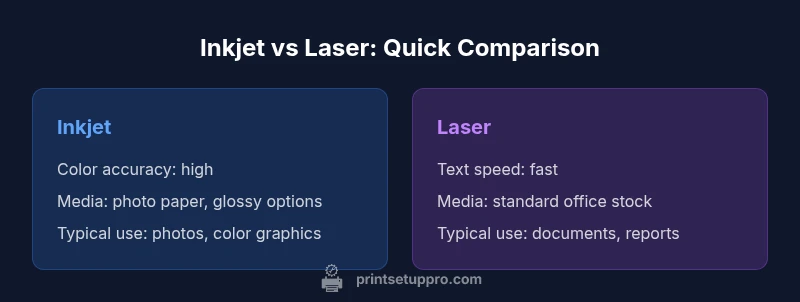
Inkjet and laser technologies are designed for different priorities. Inkjet printers excel at color accuracy and photo-like results on a variety of papers, but their cost per page can be higher for large text runs unless you print color infrequently. Laser printers deliver crisp text quickly and at lower per-page costs for high-volume black-and-white printing, though color options tend to be pricier and slower. All-in-one hybrids combine scanning and copying with either inkjet or laser cores for households that need more than print capability. Understanding these core differences helps you evaluate models against your typical workload rather than chasing features you won’t use.
Use-case mapping: home office, students, small business
The way you use your printer shapes the best choice. Home office users who print mostly documents benefit from a monochrome laser for speed and cost efficiency, or a color inkjet if color graphs and charts are frequent. Students often need a budget-friendly option that handles essays and presentations with decent color—an affordable color inkjet can suffice, or a compact monochrome laser with solid driver support. Small businesses with mixed workloads may prefer an all-in-one device that handles documents, basic color reports, and occasional marketing materials. In each case, the goal is to minimize interruptions and cartridge changes while delivering satisfactory print quality.
Cost of ownership: price, ink/toner, and maintenance
Total cost of ownership matters more than upfront price alone. Inkjet buyers should calculate ink costs per page, factoring in color vs black-and-white use, and consider high-capacity cartridges to extend intervals between replacements. Laser owners typically enjoy lower per-page costs for text and longer toner life, but upfront prices for color lasers and all-in-ones can be higher. Maintenance frequency also affects the long-term cost: inkjet cartridges require more frequent replacements in high-volume color work, while laser printers may require occasional fuser or maintenance kit replacements. Model reliability and duty cycles influence both paths, so it’s essential to compare real-world user feedback and warranty coverage.
Print quality and media handling
Print quality is not just DPI; it’s tonal accuracy, color reproduction, and consistency across batches. Inkjet printers deliver vibrant color and smooth gradations ideal for photos and marketing visuals, while lasers provide sharp text with high legibility on standard paper. Media handling varies: inkjets typically support a wide range of papers including glossy photo media, while many lasers perform best on standard office stock and heavier papers. If your needs include labels, envelopes, or heat-transfer media, check the printer’s media specs and supported stock thickness. A model that matches your usual media can save you from expensive upgrades later.
Speed, reliability, and daily workflow
In a busy setting, speed translates to real-world throughput. Laser printers typically offer faster pages-per-minute (ppm) for text and delays caused by warm-up are shorter for monochrome units. Inkjets can keep pace for color-heavy jobs but may fall behind on rapid multi-page documents. Reliability comes from consistent components, robust drivers, and straightforward maintenance routines. For teams and students, a reliable device reduces downtime and supports deadlines. Consider whether you’ll print from mobile devices or cloud services, as some models with excellent software ecosystems streamline daily workflows more effectively than others.
Connectivity, software, and drivers you can count on
Connectivity choices shape daily usability. USB, Ethernet, and Wi-Fi are standard, but robust wireless printing, mobile-friendly apps, and cloud printing options significantly improve productivity. Driver quality matters too: frequent updates, compatibility with your operating system, and clear status indicators prevent frustration. If you collaborate with others, multi-user support and simple printer management features help teams stay on track. Look for printers with consistent app support and straightforward firmware updates to avoid compatibility pitfalls.
Step-by-step decision guide: how to choose
- List your primary tasks: text documents, color graphics, or mixed media. 2) Estimate monthly page volume and color usage; calculate approximate ink or toner costs. 3) Decide on required features: scanning, copying, wireless printing, or mobile apps. 4) Set a realistic budget for upfront cost and ongoing maintenance. 5) Compare models that meet your criteria, focusing on real-world reviews and warranties. 6) If still unsure, consider renting or testing a model for 30 days before committing.
Common pitfalls and how to avoid them
Avoid focusing only on sticker price. A low upfront cost can hide high ink or toner expenses. Don’t assume cheaper color inkjets will save money if you print mostly black-and-white. Beware of compact all-in-ones with limited paper handling or weak drivers—these bottlenecks erode productivity. Finally, don’t overlook compatibility: ensure the model works smoothly with your devices and software. By anticipating these pitfalls, you’ll choose a printer that remains reliable and cost-effective over time.
Feature Comparison
| Feature | Color Inkjet | Monochrome Laser | All-in-One Hybrid (Inkjet) | All-in-One Hybrid (Laser) |
|---|---|---|---|---|
| Print speed (approx. per page) | Moderate | Fast for text | Moderate | Fast for text |
| Cost per page (typical color/BW mix) | Higher for color inkjet | Low for BW laser | Moderate for mixed color | Moderate for mixed color |
| Initial price range | Mid to high | Low to mid | Mid | Mid to high |
| Best use case | Photos, color graphics | Text-heavy documents | Balanced color and copies | Balanced color and copies |
| Media handling | Wide media; photo papers | Standard office paper; envelopes | Good media variety | Good media variety |
Benefits
- Excellent color quality for photos and graphics
- Low long-term cost per page for text with laser
- Broad compatibility with media types
- Flexible, feature-rich all-in-one options
- Good software support and mobile printing ecosystems
Downsides
- Inkjet ink costs can be high for color-heavy use
- Laser printers may be bulkier and pricier upfront
- Color laser printers are typically slower and more expensive
- Some all-in-one models have narrower paper handling or higher maintenance
Laser monochrome typically wins for high-volume text; inkjet wins for color and photos; all-in-one hybrids suit mixed workloads.
For text-heavy printing, choose a monochrome laser for speed and cost efficiency. For rich color and photo work, an inkjet is usually better. If you need scanning, copying, and color in one device, an all-in-one hybrid is the practical compromise. The Print Setup Pro team’s verdict emphasizes matching features to workload to avoid overspending.
People Also Ask
Which printer is better for a home office with mostly document printing?
For document-centric printing, a monochrome laser printer often delivers faster throughput and lower per-page costs. If you occasionally need color for charts or graphs, a color inkjet or a color laser may be worthwhile, but ensure the color workload justifies the extra cost.
For document-heavy printing at home, a monochrome laser is usually best for speed and cost per page.
Is color inkjet cheaper than monochrome laser?
Color inkjets can be cheaper upfront and offer vivid color, but ink costs per page and cartridge replacement frequency often exceed those of monochrome lasers in high-volume use. Evaluate your actual color needs and monthly page volume before deciding.
Color inkjets can be cheaper to buy, but ink can add up if you print a lot in color.
Can I rely on inkjet printing for long documents or professional text?
Inkjet printers can produce long documents, but for heavy text work, monochrome laser printers generally offer better speed and lower running costs. If you need consistent, fast output, lasers are usually the safer bet.
Inkjet can handle long documents, but lasers typically win on speed and cost per page.
What’s the best printer for photos?
For high-quality photos, a color inkjet printer with good color accuracy and compatible photo paper is usually preferred over laser. Look for printers with wide color gamuts and reliable driver support for photo editing workflows.
Color inkjets are usually best for photos, especially with good paper.
Do laser printers have higher maintenance costs?
Laser printers can have higher upfront costs, but maintenance cycles are longer and toner generally lasts longer than ink cartridges. The cost of replacement parts or fusers can add up, so consider your expected usage before choosing a model.
Laser maintenance can be higher upfront, but toner lasts longer and maintenance is less frequent.
What should I look for in printer drivers and software?
Look for consistent driver support across OS versions, reliable firmware updates, and mobile/app printing options. A good software ecosystem reduces setup time, improves security, and simplifies fleet management for multi-device environments.
Make sure the printer has solid drivers and good mobile printing support.
Quick Summary
- Match workload to technology, not brand hype
- Choose laser for speed and low black-and-white costs
- Choose inkjet for vivid color and photos
- All-in-one devices are ideal for mixed-use environments
- Prioritize total cost of ownership over upfront price